
Skip to content
  • Categories
  • Recent
  • Tags
  • Popular
  • Users
  • Groups
  • Search
  • Get Qt Extensions
  • Unsolved
Collapse
Brand Logo
  1. Home
  2. Qt Development
  3. General and Desktop
  4. Program crashes at the beginning of main() in debug mode, but runs through in Release mode
Forum Updated to NodeBB v4.3 + New Features

Program crashes at the beginning of main() in debug mode, but runs through in Release mode

Scheduled Pinned Locked Moved Unsolved General and Desktop
12 Posts 5 Posters 1.0k Views 2 Watching
  • Oldest to Newest
  • Newest to Oldest
  • Most Votes
Reply
  • Reply as topic
Log in to reply
This topic has been deleted. Only users with topic management privileges can see it.
  • M Offline
    M Offline
    MackS
    wrote on last edited by
    #1

    Qt Version: 6.5.3
    QtCreator version: Qt Creator 14.0.1
    Compiler setup: b48d133e-e7af-42e4-a9b1-408c659c8709-image.png
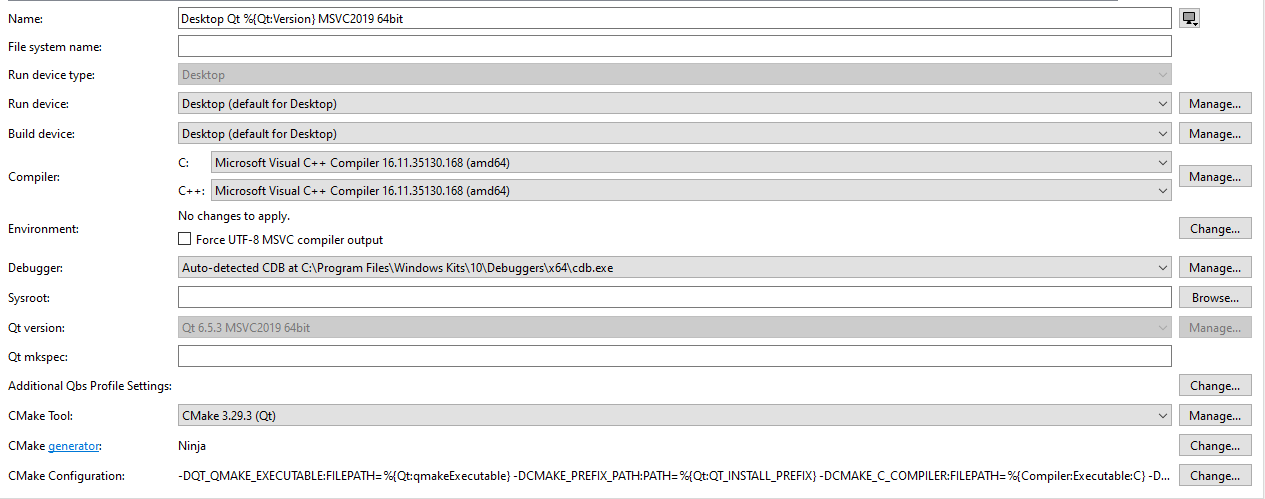
    After some testing to try and figure out what was causing it, I found that I could cause it to crash with just these lines:

    int main(int argc, char *argv[])
    {
        string test = "test";
        QString test1 = QString::fromStdString(test);
    ...
    

    Where the debugger stops on the "test1" initialization with this stack trace:
    e7c9499d-4962-451a-814d-c4d7a9f3d915-image.png

    I am completely baffled as to why it could crash this early in the program, and am at a loss as to where to look or what to try next. Any guidance as to what to investigate would be very much appreciated

    JonBJ 1 Reply Last reply
    0
    • M MackS

      Qt Version: 6.5.3
      QtCreator version: Qt Creator 14.0.1
      Compiler setup: b48d133e-e7af-42e4-a9b1-408c659c8709-image.png

      After some testing to try and figure out what was causing it, I found that I could cause it to crash with just these lines:

      int main(int argc, char *argv[])
      {
          string test = "test";
          QString test1 = QString::fromStdString(test);
      ...
      

      Where the debugger stops on the "test1" initialization with this stack trace:
      e7c9499d-4962-451a-814d-c4d7a9f3d915-image.png

      I am completely baffled as to why it could crash this early in the program, and am at a loss as to where to look or what to try next. Any guidance as to what to investigate would be very much appreciated

      JonBJ Offline
      JonBJ Offline
      JonB
      wrote on last edited by JonB
      #2

      @MackS
      Do not use any Qt classes/code until after you have instantiated whichever you want derived from QCoreApplication, which should be about the first statement in main().

      UPDATE
      Apparently not for QString, I learn to my surprise. So this is not the issue. Doubtless @Christian-Ehrlicher's reply below is the correct answer.

      R 1 Reply Last reply
      1
      • Christian EhrlicherC Offline
        Christian EhrlicherC Offline
        Christian Ehrlicher
        Lifetime Qt Champion
        wrote on last edited by
        #3

        Don't mix debug and release libraries as you do (msvcrt release lib, Qt debug libs I would guess). How did you create your project? Please show the CMakeLists.txt.

        Qt Online Installer direct download: https://download.qt.io/official_releases/online_installers/
        Visit the Qt Academy at https://academy.qt.io/catalog

        1 Reply Last reply
        5
        • M Offline
          M Offline
          MackS
          wrote on last edited by MackS
          #4

          Thank you for the quick responses! I'll try separating the libraries.

          As for CMakeLists.txt, I don't see one for my project, just for submodules within it. Are they auto-generated?

          1 Reply Last reply
          0
          • Christian EhrlicherC Offline
            Christian EhrlicherC Offline
            Christian Ehrlicher
            Lifetime Qt Champion
            wrote on last edited by
            #5

            How do you create your project / visual studio solution? Manually?

            Qt Online Installer direct download: https://download.qt.io/official_releases/online_installers/
            Visit the Qt Academy at https://academy.qt.io/catalog

            1 Reply Last reply
            0
            • M Offline
              M Offline
              MackS
              wrote on last edited by
              #6

              Using qmake <project>.pro:

              qmake steps:
              C:/Qt/6.5.3/msvc2019_64/bin/qmake.exe <project>.pro -spec win32-msvc "CONFIG+=debug" "CONFIG+=qml_debug" && C:/Qt/Tools/QtCreator/bin/jom/jom.exe qmake_all

              Make steps:
              jom.exe in C:<projectPath>\Desktop_Qt_6_5_3_MSVC2019_64bit-Debug

              jsulmJ 1 Reply Last reply
              0
              • M MackS

                Using qmake <project>.pro:

                qmake steps:
                C:/Qt/6.5.3/msvc2019_64/bin/qmake.exe <project>.pro -spec win32-msvc "CONFIG+=debug" "CONFIG+=qml_debug" && C:/Qt/Tools/QtCreator/bin/jom/jom.exe qmake_all

                Make steps:
                jom.exe in C:<projectPath>\Desktop_Qt_6_5_3_MSVC2019_64bit-Debug

                jsulmJ Offline
                jsulmJ Offline
                jsulm
                Lifetime Qt Champion
                wrote on last edited by
                #7

                @MackS So, you're using QMake, then post the pro file.

                https://forum.qt.io/topic/113070/qt-code-of-conduct

                1 Reply Last reply
                0
                • M Offline
                  M Offline
                  MackS
                  wrote on last edited by J.Hilk
                  #8
                  QT += quick
                  QT += quickcontrols2
                  QT += core
                  QT += network
                  CONFIG += c++17
                  
                  # The following define makes your compiler emit warnings if you use
                  # any feature of Qt which as been marked deprecated (the exact warnings
                  # depend on your compiler). Please consult the documentation of the
                  # deprecated API in order to know how to port your code away from it.
                  DEFINES += QT_DEPRECATED_WARNINGS
                  
                  # You can also make your code fail to compile if you use deprecated APIs.
                  # In order to do so, uncomment the following line.
                  # You can also select to disable deprecated APIs only up to a certain version of Qt.
                  #DEFINES += QT_DISABLE_DEPRECATED_BEFORE=0x060000    # disables all the APIs deprecated before Qt 6.0.0
                  
                  SOURCES += \
                      sources.cpp
                      ...
                  
                  HEADERS += \
                      headers.h
                      ...
                  
                  RESOURCES += qml.qrc \
                    prodRes.qrc \
                    imagine-assets/imagine-assets.qrc
                  
                  #Share files
                  INCLUDEPATH += $$PWD/../share $$PWD/../lib/gtest/include
                  release{ LIBS += -L$$PWD/../lib/gtest/msvc/x64/release }
                  debug{ LIBS += -L$$PWD/../lib/gtest/msvc/x64/debug }
                  LIBS += -lQt6Core -lQt6Gui -lQt6Quick -lQt6QuickControls2
                  LIBS += -L"C:\\Qt\\6.5.3\\msvc2019_64\\lib"
                  
                  *msvc*: QMAKE_CXXFLAGS += /std:c++17 /DWINDOWS=1 /DNOFILELOCKING=1
                  #*msvc*: QMAKE_LFLAGS += /DEBUG:FULL
                  
                  *wasm*: QMAKE_CXXFLAGS += -std=c++17 -Wc++17-extensions -DNOFILELOCKING=1 -DZIP_STD -DUNIX -mnontrapping-fptoint
                  *wasm*: QMAKE_LFLAGS += -s \"BINARYEN_TRAP_MODE=\'clamp\'\"
                  #*wasm*: QMAKE_LFLAGS += -s \"BINARYEN_TRAP_MODE=\'clamp\'\" -s LEGACY_VM_SUPPORT=1 -s WASM=0
                  
                  
                  #QMAKE_CXXFLAGS += -showIncludes
                  
                  #load(moc)
                  #QMAKE_MOC += -DQTMOCBUILD=1
                  
                  SOURCES += \
                    otherSources...
                  
                  HEADERS += \
                    otherHeaders...
                  
                  # Additional import path used to resolve QML modules in Qt Creator's code model
                  QML_IMPORT_PATH =
                  
                  # Additional import path used to resolve QML modules just for Qt Quick Designer
                  QML_DESIGNER_IMPORT_PATH =
                  
                  #Enable TLS/SSL
                  EXTRA_QT_PLUGINS=tls
                  CONFIG += ssl
                  
                  TARGET = trgt
                  # Default rules for deployment.
                  qnx: target.path = /tmp/$${TARGET}/bin
                  else: unix:!android: target.path = /opt/$${TARGET}/bin
                  !isEmpty(target.path): INSTALLS += target
                  
                  FORMS +=
                  
                  DESTDIR = ../run
                  
                  
                  #RC_FILE = prod.rc
                  RC_ICONS = prod.ico
                  VERSION = vers
                  QMAKE_TARGET_COMPANY = comp
                  QMAKE_TARGET_PRODUCT = prod
                  QMAKE_TARGET_DESCRIPTION = desc
                  QMAKE_TARGET_COPYRIGHT = cr
                  
                  DISTFILES += \
                      config.cfg
                  
                  # copy all the files in the config dir to the destination dir...
                  copyconfig.commands = $(COPY_DIR) $$shell_path($$PWD/config) $$shell_path($$DESTDIR)
                  first.depends = $(first) copyconfig
                  export(first.depends)
                  export(copyconfig.commands)
                  QMAKE_EXTRA_TARGETS += first copyconfig
                  

                  I took the liberty to wrap the file content in code tags, in future please use the provided button to place code fragments in the appropriated code block or manually wrap it using ```
                  @J.Hilk

                  jsulmJ 1 Reply Last reply
                  0
                  • M MackS
                    QT += quick
                    QT += quickcontrols2
                    QT += core
                    QT += network
                    CONFIG += c++17
                    
                    # The following define makes your compiler emit warnings if you use
                    # any feature of Qt which as been marked deprecated (the exact warnings
                    # depend on your compiler). Please consult the documentation of the
                    # deprecated API in order to know how to port your code away from it.
                    DEFINES += QT_DEPRECATED_WARNINGS
                    
                    # You can also make your code fail to compile if you use deprecated APIs.
                    # In order to do so, uncomment the following line.
                    # You can also select to disable deprecated APIs only up to a certain version of Qt.
                    #DEFINES += QT_DISABLE_DEPRECATED_BEFORE=0x060000    # disables all the APIs deprecated before Qt 6.0.0
                    
                    SOURCES += \
                        sources.cpp
                        ...
                    
                    HEADERS += \
                        headers.h
                        ...
                    
                    RESOURCES += qml.qrc \
                      prodRes.qrc \
                      imagine-assets/imagine-assets.qrc
                    
                    #Share files
                    INCLUDEPATH += $$PWD/../share $$PWD/../lib/gtest/include
                    release{ LIBS += -L$$PWD/../lib/gtest/msvc/x64/release }
                    debug{ LIBS += -L$$PWD/../lib/gtest/msvc/x64/debug }
                    LIBS += -lQt6Core -lQt6Gui -lQt6Quick -lQt6QuickControls2
                    LIBS += -L"C:\\Qt\\6.5.3\\msvc2019_64\\lib"
                    
                    *msvc*: QMAKE_CXXFLAGS += /std:c++17 /DWINDOWS=1 /DNOFILELOCKING=1
                    #*msvc*: QMAKE_LFLAGS += /DEBUG:FULL
                    
                    *wasm*: QMAKE_CXXFLAGS += -std=c++17 -Wc++17-extensions -DNOFILELOCKING=1 -DZIP_STD -DUNIX -mnontrapping-fptoint
                    *wasm*: QMAKE_LFLAGS += -s \"BINARYEN_TRAP_MODE=\'clamp\'\"
                    #*wasm*: QMAKE_LFLAGS += -s \"BINARYEN_TRAP_MODE=\'clamp\'\" -s LEGACY_VM_SUPPORT=1 -s WASM=0
                    
                    
                    #QMAKE_CXXFLAGS += -showIncludes
                    
                    #load(moc)
                    #QMAKE_MOC += -DQTMOCBUILD=1
                    
                    SOURCES += \
                      otherSources...
                    
                    HEADERS += \
                      otherHeaders...
                    
                    # Additional import path used to resolve QML modules in Qt Creator's code model
                    QML_IMPORT_PATH =
                    
                    # Additional import path used to resolve QML modules just for Qt Quick Designer
                    QML_DESIGNER_IMPORT_PATH =
                    
                    #Enable TLS/SSL
                    EXTRA_QT_PLUGINS=tls
                    CONFIG += ssl
                    
                    TARGET = trgt
                    # Default rules for deployment.
                    qnx: target.path = /tmp/$${TARGET}/bin
                    else: unix:!android: target.path = /opt/$${TARGET}/bin
                    !isEmpty(target.path): INSTALLS += target
                    
                    FORMS +=
                    
                    DESTDIR = ../run
                    
                    
                    #RC_FILE = prod.rc
                    RC_ICONS = prod.ico
                    VERSION = vers
                    QMAKE_TARGET_COMPANY = comp
                    QMAKE_TARGET_PRODUCT = prod
                    QMAKE_TARGET_DESCRIPTION = desc
                    QMAKE_TARGET_COPYRIGHT = cr
                    
                    DISTFILES += \
                        config.cfg
                    
                    # copy all the files in the config dir to the destination dir...
                    copyconfig.commands = $(COPY_DIR) $$shell_path($$PWD/config) $$shell_path($$DESTDIR)
                    first.depends = $(first) copyconfig
                    export(first.depends)
                    export(copyconfig.commands)
                    QMAKE_EXTRA_TARGETS += first copyconfig
                    

                    I took the liberty to wrap the file content in code tags, in future please use the provided button to place code fragments in the appropriated code block or manually wrap it using ```
                    @J.Hilk

                    jsulmJ Offline
                    jsulmJ Offline
                    jsulm
                    Lifetime Qt Champion
                    wrote on last edited by
                    #9

                    @MackS said in Program crashes at the beginning of main() in debug mode, but runs through in Release mode:

                    LIBS += -lQt6Core -lQt6Gui -lQt6Quick -lQt6QuickControls2

                    Why? This is not needed (QT += does what is needed to link Qt modules). This way you tell QMake to link release versions of these libs even in debug builds.

                    https://forum.qt.io/topic/113070/qt-code-of-conduct

                    1 Reply Last reply
                    5
                    • M Offline
                      M Offline
                      MackS
                      wrote on last edited by
                      #10

                      Removing that LIBS += line did it! Thank you all very much for your time and help!

                      1 Reply Last reply
                      0
                      • JonBJ JonB

                        @MackS
                        Do not use any Qt classes/code until after you have instantiated whichever you want derived from QCoreApplication, which should be about the first statement in main().

                        UPDATE
                        Apparently not for QString, I learn to my surprise. So this is not the issue. Doubtless @Christian-Ehrlicher's reply below is the correct answer.

                        R Offline
                        R Offline
                        RobertB
                        wrote on last edited by
                        #11

                        @JonB qbytearray can be constructed before QCoreApplication too.

                        JonBJ 1 Reply Last reply
                        0
                        • R RobertB

                          @JonB qbytearray can be constructed before QCoreApplication too.

                          JonBJ Offline
                          JonBJ Offline
                          JonB
                          wrote on last edited by
                          #12

                          @RobertB
                          Yes, now that I know that non-QObject shared objects like QString do not require an application object that will apply to QByteArray and other similar types like QList etc.

                          1 Reply Last reply
                          0

                          • Login

                          • Login or register to search.
                          • First post
                            Last post
                          0
                          • Categories
                          • Recent
                          • Tags
                          • Popular
                          • Users
                          • Groups
                          • Search
                          • Get Qt Extensions
                          • Unsolved