Skip to content
  • Categories
  • Recent
  • Tags
  • Popular
  • Users
  • Groups
  • Search
  • Get Qt Extensions
  • Unsolved
Collapse
Brand Logo
  1. Home
  2. Qt Development
  3. General and Desktop
  4. Project packaging release issues

Project packaging release issues

Scheduled Pinned Locked Moved Unsolved General and Desktop
10 Posts 4 Posters 722 Views 1 Watching
  • Oldest to Newest
  • Newest to Oldest
  • Most Votes
Reply
  • Reply as topic
Log in to reply
This topic has been deleted. Only users with topic management privileges can see it.
  • H Offline
    H Offline
    huangzilan
    wrote on last edited by
    #1

    Use the qml+ c++ mode, cmake to build the project, after the final packaging of the project is completed, double-click the exe file flash back, cmd running did not report an error! Use the windeployqt6 --release F:\Qt_project\untitled4\as\as.exe command; There are no gods who have encountered similar problems
    154be1bd-0cb9-4eca-8c84-4dd928cdfe6f-image.png

    1 Reply Last reply
    0
    • SGaistS Offline
      SGaistS Offline
      SGaist
      Lifetime Qt Champion
      wrote on last edited by
      #2

      Hi,

      Since you are using QtQuick, you should also point windeployqt6 to your qml sources so it can deploy their corresponding dependencies.

      Interested in AI ? www.idiap.ch
      Please read the Qt Code of Conduct - https://forum.qt.io/topic/113070/qt-code-of-conduct

      H 3 Replies Last reply
      1
      • SGaistS SGaist

        Hi,

        Since you are using QtQuick, you should also point windeployqt6 to your qml sources so it can deploy their corresponding dependencies.

        H Offline
        H Offline
        huangzilan
        wrote on last edited by
        #3
        This post is deleted!
        1 Reply Last reply
        0
        • SGaistS SGaist

          Hi,

          Since you are using QtQuick, you should also point windeployqt6 to your qml sources so it can deploy their corresponding dependencies.

          H Offline
          H Offline
          huangzilan
          wrote on last edited by
          #4
          This post is deleted!
          1 Reply Last reply
          0
          • SGaistS SGaist

            Hi,

            Since you are using QtQuick, you should also point windeployqt6 to your qml sources so it can deploy their corresponding dependencies.

            H Offline
            H Offline
            huangzilan
            wrote on last edited by
            #5

            @SGaist I use "windeployqt F:\Qt_project\untitled3\Analyse\Analyse.exe --qmldir D:\QT\6.8.0\llvm-mingw_64\qml" after running this command, double-click the exe file or flash back, In order to prevent the introduction of dll files, I will "D:\QT\6.8.0\llvm-mingw_64\bin" under all the files are put in, or flash back; Please help me with it

            jsulmJ 1 Reply Last reply
            0
            • H huangzilan

              @SGaist I use "windeployqt F:\Qt_project\untitled3\Analyse\Analyse.exe --qmldir D:\QT\6.8.0\llvm-mingw_64\qml" after running this command, double-click the exe file or flash back, In order to prevent the introduction of dll files, I will "D:\QT\6.8.0\llvm-mingw_64\bin" under all the files are put in, or flash back; Please help me with it

              jsulmJ Offline
              jsulmJ Offline
              jsulm
              Lifetime Qt Champion
              wrote on last edited by
              #6

              @huangzilan said in Project packaging release issues:

              --qmldir D:\QT\6.8.0\llvm-mingw_64\qml"

              You need to provide the path to the QML content of your project...

              https://forum.qt.io/topic/113070/qt-code-of-conduct

              H 1 Reply Last reply
              0
              • jsulmJ jsulm

                @huangzilan said in Project packaging release issues:

                --qmldir D:\QT\6.8.0\llvm-mingw_64\qml"

                You need to provide the path to the QML content of your project...

                H Offline
                H Offline
                huangzilan
                wrote on last edited by
                #7
                This post is deleted!
                H 1 Reply Last reply
                0
                • H huangzilan

                  This post is deleted!

                  H Offline
                  H Offline
                  huangzilan
                  wrote on last edited by
                  #8

                  @huangzilan said in Project packaging release issues:

                  @jsulm When I use "F:\Qt_project\untitled3\ Analyse\Analyse.exe" --qmldir "F:\Qt_project\untitled3\content", the cmd output is as follows:
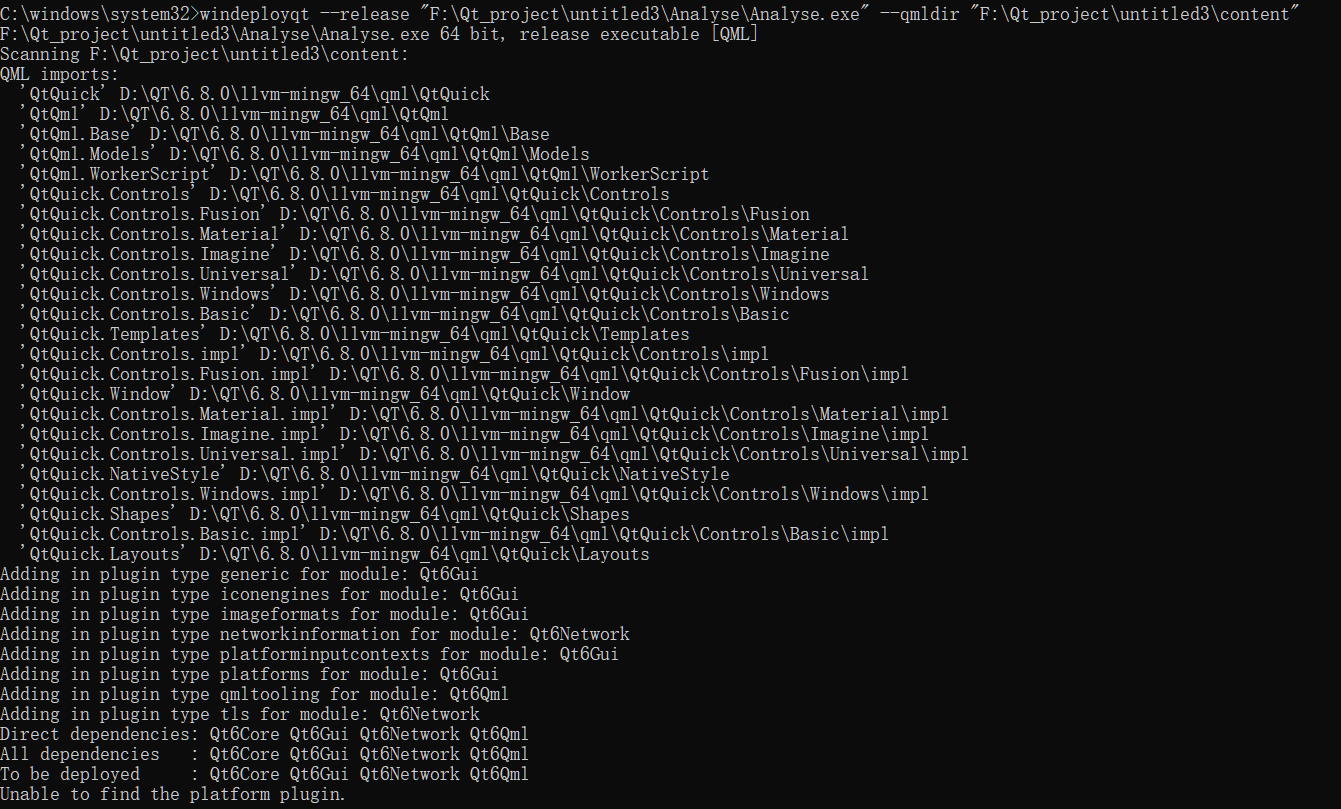
                  5ad937fc-309d-45bc-9ea2-1dbf14edd4bd-image.png
                  I have copied the "qwindows.dll" file to the folder

                  C 1 Reply Last reply
                  0
                  • H huangzilan

                    @huangzilan said in Project packaging release issues:

                    @jsulm When I use "F:\Qt_project\untitled3\ Analyse\Analyse.exe" --qmldir "F:\Qt_project\untitled3\content", the cmd output is as follows:
                    5ad937fc-309d-45bc-9ea2-1dbf14edd4bd-image.png
                    I have copied the "qwindows.dll" file to the folder

                    C Offline
                    C Offline
                    ChrisW67
                    wrote on last edited by
                    #9

                    @huangzilan What is your actual executable name? In one example it is F:\Qt_project\untitled4\as\as.exe and in another F:\Qt_project\untitled3\Analyse\Analyse.exe.

                    It clearly worked better with the first.

                    H 1 Reply Last reply
                    1
                    • C ChrisW67

                      @huangzilan What is your actual executable name? In one example it is F:\Qt_project\untitled4\as\as.exe and in another F:\Qt_project\untitled3\Analyse\Analyse.exe.

                      It clearly worked better with the first.

                      H Offline
                      H Offline
                      huangzilan
                      wrote on last edited by
                      #10

                      @ChrisW67 These are two projects, and I had the same problem when I tried to package both projects

                      1 Reply Last reply
                      0

                      • Login

                      • Login or register to search.
                      • First post
                        Last post
                      0
                      • Categories
                      • Recent
                      • Tags
                      • Popular
                      • Users
                      • Groups
                      • Search
                      • Get Qt Extensions
                      • Unsolved