
How to dymanically resize the heigh of my CustomQWidget
-
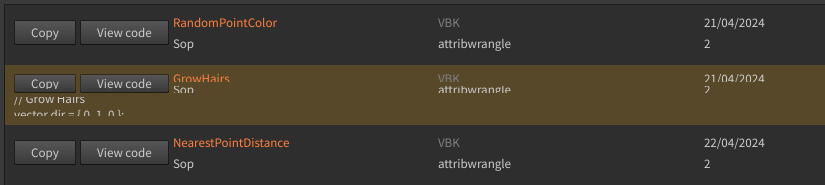
I am creating a QList with a custom QWidget as QList item. This CustomQWidget has a QButton to show or hide a QLabel at its bottom part. If I can show/hide the QLabel, my CustomQwidget doesn't resize to fit the new configuration.
class CustomQWidget (QWidget):
    """Custom Qt Widget to be transformed to an item
    for a QListWidget"""
    def __init__ (self, parent = None):
        super(CustomQWidget, self).__init__(parent)
        self.textQVBoxLayout = QVBoxLayout()
        self.txtNameQLabel = QLabel()
        self.subTextQHBoxLayoutUp = QHBoxLayout()
        self.subTextQHBoxLayoutBot = QHBoxLayout()
        self.txtAuthorQLabel = QLabel()
        self.txtDateQLabel = QLabel()
        self.txtContextQLabel = QLabel()
        self.txtTypeQLabel = QLabel()
        self.txtClassQLabel = QLabel()
        self.codeQVBoxLayout = QVBoxLayout()
        self.codeQVBoxLayout.addStretch()
        self.txtCodeQLabel = QLabel()#QLabel to show/hide
        self.txtCodeQLabel.setVisible(False)

        self.codeQVBoxLayout.addWidget(self.txtCodeQLabel)
        self.subTextQHBoxLayoutUp.addWidget(self.txtNameQLabel)
        self.subTextQHBoxLayoutUp.addWidget(self.txtAuthorQLabel)
        self.subTextQHBoxLayoutUp.addWidget(self.txtDateQLabel)
        self.subTextQHBoxLayoutBot.addWidget(self.txtContextQLabel)
        self.subTextQHBoxLayoutBot.addWidget(self.txtTypeQLabel)
        self.subTextQHBoxLayoutBot.addWidget(self.txtClassQLabel)

        self.textQVBoxLayout.addLayout(self.subTextQHBoxLayoutUp)
        self.textQVBoxLayout.addLayout(self.subTextQHBoxLayoutBot)

        self.upQHBoxLayout  = QHBoxLayout()
        self.copyButton = QPushButton('Copy')
        self.codeViewbutton = QPushButton('View code')#Trigger button to show/hide txtCodeQLabel
        self.codeViewbutton.clicked.connect(functools.partial(self.showHideCode, self.txtCodeQLabel))
        self.upQHBoxLayout.addWidget(self.copyButton)
        self.upQHBoxLayout.addWidget(self.codeViewbutton)
        self.upQHBoxLayout.addLayout(self.textQVBoxLayout, 1)

        self.globalLayout = QVBoxLayout()
        self.globalLayout.addLayout(self.upQHBoxLayout)
        self.globalLayout.addLayout(self.codeQVBoxLayout)
        self.globalLayout.addStretch()
        self.setLayout(self.globalLayout)

        # setStyleSheet
        self.txtNameQLabel.setStyleSheet('''color: rgb(255, 128, 64);''')
        self.txtAuthorQLabel.setStyleSheet('''color: rgb(128, 128, 128);''')

    def setTxtName (self, text):
        self.txtNameQLabel.setText(text)

    def setTxtAuthor (self, text):
        self.txtAuthorQLabel.setText(text)

    def setTxtDate (self, text):
        self.txtDateQLabel.setText(text)

    def setTxtContext (self, text):
        self.txtContextQLabel.setText(text)

    def setTxtType (self, text):
        self.txtTypeQLabel.setText(text)

    def setTxtClass (self, text):
        self.txtClassQLabel.setText(text)

    def setTxtCode (self, text):
        self.txtCodeQLabel.setText(text)

    def showHideCode(self, label):
        if label.isVisible():
            label.setVisible(False)
        else:
            label.setVisible(True)
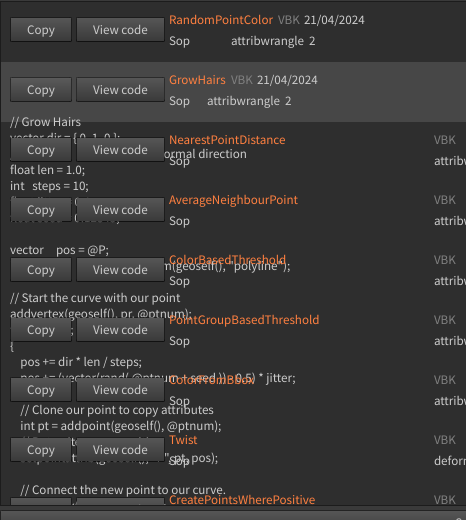
I tried to add self.adjustSize() to the showHideCode() method but if the QLabel appears entirely,it's in the background of the others QList iems which doesn't move. Plus, the others QLabels of my customwidget are moved
Thanks for your help and advice.
-
OK
I guess th problem lies within the QListWidget where I put my CustomWidget indef populateMainLayout(self,json_disk_file): """Populate QListWidget with configured CustomQWidget from json entry""" listing = QListWidget() current_data = self.openJson(json_disk_file) for entry in current_data: myQCustomQWidget = CustomQWidget() myQCustomQWidget.setTxtName(str(entry['name'])) myQCustomQWidget.setTxtDate(str(entry['date'])) myQCustomQWidget.setTxtAuthor(str(entry['author'])) myQCustomQWidget.setTxtContext(str(entry['context'])) myQCustomQWidget.setTxtType(str(entry['type'])) myQCustomQWidget.setTxtClass(str(entry['class'])) myQCustomQWidget.setTxtCode(str(entry['snip'])) q_widgetitem = QListWidgetItem(listing) q_widgetitem.setSizeHint(myQCustomQWidget.sizeHint()) listing.addItem(q_widgetitem) listing.setItemWidget(q_widgetitem, myQCustomQWidget) return listingHow I can reexecute
q_widgetitem.setSizeHint(myQCustomQWidget.sizeHint())
when one of the 'View Code' buttons is pushed ? -
class CustomQWidget (QWidget):
    """Custom Qt Widget to be transformed to an item
    for a QListWidget"""
    def __init__ (self, parent = None):
        super(CustomQWidget, self).__init__(parent)
        self.textQVBoxLayout = QVBoxLayout()
        self.txtNameQLabel = QLabel()
        self.subTextQHBoxLayoutUp = QHBoxLayout()
        self.subTextQHBoxLayoutBot = QHBoxLayout()
        self.txtAuthorQLabel = QLabel()
        self.txtDateQLabel = QLabel()
        self.txtContextQLabel = QLabel()
        self.txtTypeQLabel = QLabel()
        self.txtClassQLabel = QLabel()
        self.codeQVBoxLayout = QVBoxLayout()
        self.codeQVBoxLayout.addStretch()
        self.txtCodeQLabel = QLabel()#QLabel to show/hide
        self.txtCodeQLabel.setVisible(False)

        self.codeQVBoxLayout.addWidget(self.txtCodeQLabel)
        self.subTextQHBoxLayoutUp.addWidget(self.txtNameQLabel)
        self.subTextQHBoxLayoutUp.addWidget(self.txtAuthorQLabel)
        self.subTextQHBoxLayoutUp.addWidget(self.txtDateQLabel)
        self.subTextQHBoxLayoutBot.addWidget(self.txtContextQLabel)
        self.subTextQHBoxLayoutBot.addWidget(self.txtTypeQLabel)
        self.subTextQHBoxLayoutBot.addWidget(self.txtClassQLabel)

        self.textQVBoxLayout.addLayout(self.subTextQHBoxLayoutUp)
        self.textQVBoxLayout.addLayout(self.subTextQHBoxLayoutBot)

        self.upQHBoxLayout  = QHBoxLayout()
        self.copyButton = QPushButton('Copy')
        self.codeViewbutton = QPushButton('View code')#Trigger button to show/hide txtCodeQLabel
        self.codeViewbutton.clicked.connect(functools.partial(self.showHideCode, self.txtCodeQLabel))
        self.upQHBoxLayout.addWidget(self.copyButton)
        self.upQHBoxLayout.addWidget(self.codeViewbutton)
        self.upQHBoxLayout.addLayout(self.textQVBoxLayout, 1)

        self.globalLayout = QVBoxLayout()
        self.globalLayout.addLayout(self.upQHBoxLayout)
        self.globalLayout.addLayout(self.codeQVBoxLayout)
        self.globalLayout.addStretch()
        self.setLayout(self.globalLayout)

        # setStyleSheet
        self.txtNameQLabel.setStyleSheet('''color: rgb(255, 128, 64);''')
        self.txtAuthorQLabel.setStyleSheet('''color: rgb(128, 128, 128);''')

    def setTxtName (self, text):
        self.txtNameQLabel.setText(text)

    def setTxtAuthor (self, text):
        self.txtAuthorQLabel.setText(text)

    def setTxtDate (self, text):
        self.txtDateQLabel.setText(text)

    def setTxtContext (self, text):
        self.txtContextQLabel.setText(text)

    def setTxtType (self, text):
        self.txtTypeQLabel.setText(text)

    def setTxtClass (self, text):
        self.txtClassQLabel.setText(text)

    def setTxtCode (self, text):
        self.txtCodeQLabel.setText(text)

    def getListItem (self, item):
        self.item = item

    def showHideCode(self, label):
        if label.isVisible():
            label.setVisible(False)
            self.item.setSizeHint(self.sizeHint())
        else:
            label.setVisible(True)
            self.item.setSizeHint(self.sizeHint())


class CreateUI(QWidget):
    def __init__(self):
        super().__init__()
        root_dir ='D:/_vexGraft/'
        json_disk_file = 'D:/_vexGraft/vexgraft.json'
        main_layout = QVBoxLayout(self)

        top_layout = QHBoxLayout(self)
        bot_layout = QHBoxLayout(self)

        self.label = QLabel(root_dir)
        top_layout.addWidget(self.label)

        self.button = QPushButton('Save Selected')
        self.button.clicked.connect(functools.partial(self.save_selected,json_disk_file))
        bot_layout.addWidget(self.button)

        main_layout.addLayout(top_layout)
        self.main_widget = self.populateMainLayout(json_disk_file)#QListWigdet with items
        main_layout.addWidget(self.main_widget)
        main_layout.addLayout(bot_layout)


    def populateMainLayout(self,json_disk_file):
        """Populate QListWidget with configured
        CustomQWidget from json entry"""
        listing = QListWidget()
        current_data = self.openJson(json_disk_file)
        for entry in current_data:
            myCustomQWidget = CustomQWidget()
            myCustomQWidget.setTxtName(str(entry['name']))
            myCustomQWidget.setTxtDate(str(entry['date']))
            myCustomQWidget.setTxtAuthor(str(entry['author']))
            myCustomQWidget.setTxtContext(str(entry['context']))
            myCustomQWidget.setTxtType(str(entry['type']))
            myCustomQWidget.setTxtClass(str(entry['class']))
            myCustomQWidget.setTxtCode(str(entry['snip']))
            q_widgetitem = QListWidgetItem(listing)
            q_widgetitem.setSizeHint(myCustomQWidget.sizeHint())
            myCustomQWidget.getListItem(q_widgetitem)#get the QListWidgetItem receiveing the CustomQWidget instance
            listing.addItem(q_widgetitem)
            listing.setItemWidget(q_widgetitem, myCustomQWidget)
        return listing
With this new code I attempt to get the corresponding QListWidgetItem in the CustomWidget instance.
Now when I push the'ViewCode' button the code appear and the size QListWidgetItem is refresh.
New issue : when I click again on the button the text of the QLabel is hidden but the QListWidgetItem doesn't refresh its size correctly