Skip to content
  • Categories
  • Recent
  • Tags
  • Popular
  • Users
  • Groups
  • Search
  • Get Qt Extensions
  • Unsolved
Collapse
Brand Logo
  1. Home
  2. Qt Development
  3. General and Desktop
  4. QLineEdit won't show Chinese characters in popup menu

QLineEdit won't show Chinese characters in popup menu

Scheduled Pinned Locked Moved Solved General and Desktop
6 Posts 2 Posters 831 Views
  • Oldest to Newest
  • Newest to Oldest
  • Most Votes
Reply
  • Reply as topic
Log in to reply
This topic has been deleted. Only users with topic management privileges can see it.
  • Puppy BearP Offline
    Puppy BearP Offline
    Puppy Bear
    wrote on last edited by
    #1

    I'm trying to set a popup menu with QLineEdit, QCheckbox.
    the code is right here.
    https://github.com/ThisIsClark/Qt-MultiSelectComboBox

    The env is Qt5.9.3 and win10. encode with utf-8. Using microsoft chinese default input.

    But here comes a problem, Qt seems showing corectly Chinese characters with normal QLineEdits , while mSearchBar won't.
    bc8f159c-1acc-4b69-9a17-70ecfda93857-image.png

    There's no character limit for this QLineEdit so my guess it's not a wrong setting issue.
    How I'm I able to fix this?
    Thanks

    jsulmJ 1 Reply Last reply
    0
    • Puppy BearP Puppy Bear

      I'm trying to set a popup menu with QLineEdit, QCheckbox.
      the code is right here.
      https://github.com/ThisIsClark/Qt-MultiSelectComboBox

      The env is Qt5.9.3 and win10. encode with utf-8. Using microsoft chinese default input.

      But here comes a problem, Qt seems showing corectly Chinese characters with normal QLineEdits , while mSearchBar won't.
      bc8f159c-1acc-4b69-9a17-70ecfda93857-image.png

      There's no character limit for this QLineEdit so my guess it's not a wrong setting issue.
      How I'm I able to fix this?
      Thanks

      jsulmJ Offline
      jsulmJ Offline
      jsulm
      Lifetime Qt Champion
      wrote on last edited by
      #2

      @Puppy-Bear said in QLineEdit won't show Chinese characters in popup menu:

      while mSearchBar won't

      And what are the differences between mSearchBar and other QLineEdits?

      https://forum.qt.io/topic/113070/qt-code-of-conduct

      Puppy BearP 1 Reply Last reply
      0
      • jsulmJ jsulm

        @Puppy-Bear said in QLineEdit won't show Chinese characters in popup menu:

        while mSearchBar won't

        And what are the differences between mSearchBar and other QLineEdits?

        Puppy BearP Offline
        Puppy BearP Offline
        Puppy Bear
        wrote on last edited by
        #3

        @jsulm My guess is the others are normally set in main window& widgets, while this one is in a popup menus.

        Puppy BearP 1 Reply Last reply
        0
        • Puppy BearP Puppy Bear

          @jsulm My guess is the others are normally set in main window& widgets, while this one is in a popup menus.

          Puppy BearP Offline
          Puppy BearP Offline
          Puppy Bear
          wrote on last edited by
          #4

          @Puppy-Bear Possibly is associate with this bug report
          https://bugreports.qt.io/browse/QTBUG-45086

          1 Reply Last reply
          0
          • Puppy BearP Offline
            Puppy BearP Offline
            Puppy Bear
            wrote on last edited by
            #5

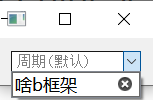
            Fix:
            I tried this code & it fixed this problem ^ ^, Thanks again for response.
            It seems that popup menus would get error with QLineEdit.
            Rewrite eventfilter would help.

            bool MultiSelectComboBox::eventFilter(QObject* aObject, QEvent* aEvent)
            {
                if (aObject == mLineEdit && aEvent->type() == QEvent::MouseButtonRelease) {
                    showPopup();
                    return false;
                }
                else if(aObject == mSearchBar)
                {
                    if(aEvent->type() == QEvent::FocusIn)
                            {
                        mSearchBar->setFocus();
                        mSearchBar->activateWindow();
                        mSearchBar->grabKeyboard();
                            }
                    else if(aEvent->type() == QEvent::FocusOut)
                            {
                            }
                }
                return QWidget::eventFilter(aObject, aEvent);
                //return false;
            }```
            
            
            ![a6c6eb54-5008-4882-b5ea-48c2073090d5-image.png](https://ddgobkiprc33d.cloudfront.net/7e82b33d-b1e2-4021-854a-254fdc7bb746.png)
            Puppy BearP 1 Reply Last reply
            0
            • Puppy BearP Puppy Bear

              Fix:
              I tried this code & it fixed this problem ^ ^, Thanks again for response.
              It seems that popup menus would get error with QLineEdit.
              Rewrite eventfilter would help.

              bool MultiSelectComboBox::eventFilter(QObject* aObject, QEvent* aEvent)
              {
                  if (aObject == mLineEdit && aEvent->type() == QEvent::MouseButtonRelease) {
                      showPopup();
                      return false;
                  }
                  else if(aObject == mSearchBar)
                  {
                      if(aEvent->type() == QEvent::FocusIn)
                              {
                          mSearchBar->setFocus();
                          mSearchBar->activateWindow();
                          mSearchBar->grabKeyboard();
                              }
                      else if(aEvent->type() == QEvent::FocusOut)
                              {
                              }
                  }
                  return QWidget::eventFilter(aObject, aEvent);
                  //return false;
              }```
              
              
              ![a6c6eb54-5008-4882-b5ea-48c2073090d5-image.png](https://ddgobkiprc33d.cloudfront.net/7e82b33d-b1e2-4021-854a-254fdc7bb746.png)
              Puppy BearP Offline
              Puppy BearP Offline
              Puppy Bear
              wrote on last edited by
              #6

              @Puppy-Bear mSearchBar->installEventFilter(this); first

              1 Reply Last reply
              0
              • Puppy BearP Puppy Bear has marked this topic as solved on

              • Login

              • Login or register to search.
              • First post
                Last post
              0
              • Categories
              • Recent
              • Tags
              • Popular
              • Users
              • Groups
              • Search
              • Get Qt Extensions
              • Unsolved