Skip to content
  • Categories
  • Recent
  • Tags
  • Popular
  • Users
  • Groups
  • Search
  • Get Qt Extensions
  • Unsolved
Collapse
Brand Logo
  1. Home
  2. Qt Development
  3. General and Desktop
  4. Building Qt 6.5.0 from source with GStreamer enabled
Forum Updated to NodeBB v4.3 + New Features

Building Qt 6.5.0 from source with GStreamer enabled

Scheduled Pinned Locked Moved Unsolved General and Desktop
7 Posts 2 Posters 747 Views 1 Watching
  • Oldest to Newest
  • Newest to Oldest
  • Most Votes
Reply
  • Reply as topic
Log in to reply
This topic has been deleted. Only users with topic management privileges can see it.
  • A Offline
    A Offline
    aleksandar14
    wrote on last edited by aleksandar14
    #1

    Hi, I am trying to build Qt 6.5.0 from source on windows 11 with enabling gstreamer.
    When I run

    ..\qt-everywhere-src-6.5.0\configure --help
    

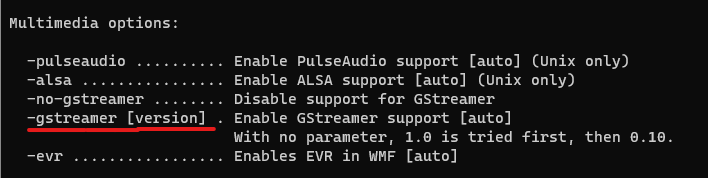
    I get this for enabling gstreamer:

    Screenshot 2023-12-25 144840.png

    And I try to configure Qt with the following command:

    ..\qt-everywhere-src-6.5.0\configure -release -platform win32-g++ -opensource -confirm-license -make libs -nomake tools -nomake examples -nomake tests -prefix C:\output\qt6.5.0 -gstreamer
    

    And I get the following error:

    -- Windows 10 SDK version:
    CMake Error at C:/Sources/qt-everywhere-src-6.5.0/qtbase/cmake/QtProcessConfigureArgs.cmake:299 (message):
      Invalid value '' supplied to command line option 'gstreamer'.
    

    Also I tried with -gstreamer 1.0 or -gstreamer 1 but got the same error.
    Any idea what I am doing wrong?

    1 Reply Last reply
    0
    • SGaistS Offline
      SGaistS Offline
      SGaist
      Lifetime Qt Champion
      wrote on last edited by
      #2

      Hi and welcome to devnet,

      Did you build and install GStreamer for Windows ?

      Interested in AI ? www.idiap.ch
      Please read the Qt Code of Conduct - https://forum.qt.io/topic/113070/qt-code-of-conduct

      A 1 Reply Last reply
      0
      • SGaistS SGaist

        Hi and welcome to devnet,

        Did you build and install GStreamer for Windows ?

        A Offline
        A Offline
        aleksandar14
        wrote on last edited by
        #3

        @SGaist Hi and thank you.
        I have installed GStreamer MinGW 64-bit runtime installer and development installer.
        Do I need to build GStreamer from the source and specify the path in the configure command?

        SGaistS 1 Reply Last reply
        0
        • A aleksandar14

          @SGaist Hi and thank you.
          I have installed GStreamer MinGW 64-bit runtime installer and development installer.
          Do I need to build GStreamer from the source and specify the path in the configure command?

          SGaistS Offline
          SGaistS Offline
          SGaist
          Lifetime Qt Champion
          wrote on last edited by
          #4

          @aleksandar14 if you have the development files, it should be good. Did you point the configure script so it can find GStreamer's development files ? Also, are you using MinGW as well to build Qt ?

          Interested in AI ? www.idiap.ch
          Please read the Qt Code of Conduct - https://forum.qt.io/topic/113070/qt-code-of-conduct

          A 1 Reply Last reply
          0
          • SGaistS SGaist

            @aleksandar14 if you have the development files, it should be good. Did you point the configure script so it can find GStreamer's development files ? Also, are you using MinGW as well to build Qt ?

            A Offline
            A Offline
            aleksandar14
            wrote on last edited by aleksandar14
            #5

            @SGaist No, I didn't specify any paths to the configure script about GStreamer's development files. Should I pass the path on the configure command or I should add the path in some file?

            Also, yes about the compiler, If I run the configure command without -gstreamer in the config summary I am getting Compiler: gcc 13.1.0.

            A 1 Reply Last reply
            0
            • A aleksandar14

              @SGaist No, I didn't specify any paths to the configure script about GStreamer's development files. Should I pass the path on the configure command or I should add the path in some file?

              Also, yes about the compiler, If I run the configure command without -gstreamer in the config summary I am getting Compiler: gcc 13.1.0.

              A Offline
              A Offline
              aleksandar14
              wrote on last edited by
              #6

              I tried passing it like this and same error occurred:

              -gstreamer C:\gstreamer\1.0\mingw_x86_64\bin
              
              1 Reply Last reply
              0
              • SGaistS Offline
                SGaistS Offline
                SGaist
                Lifetime Qt Champion
                wrote on last edited by
                #7

                Qt 6 use cmake as build system. You can't just put a path somewhere expecting it to be picked up.

                Interested in AI ? www.idiap.ch
                Please read the Qt Code of Conduct - https://forum.qt.io/topic/113070/qt-code-of-conduct

                1 Reply Last reply
                0

                • Login

                • Login or register to search.
                • First post
                  Last post
                0
                • Categories
                • Recent
                • Tags
                • Popular
                • Users
                • Groups
                • Search
                • Get Qt Extensions
                • Unsolved