
QTreeView prevent stacking indentation after certain childs.
-
So as the title suggest i want that the treeview still supports children and the indentation of those but i want it so the indentation does not get more after a certain point of children, cause this way my items get to big for the view.
Is there any way to do that?
setIndentation() does only work for all items.
-
Hi,
Shouldn't you rather considering managing your children in a different way to show them ?
Otherwise, you can implement a proxy model that "rearranges" your data in the way you see fit.
-
Hi,
Shouldn't you rather considering managing your children in a different way to show them ?
Otherwise, you can implement a proxy model that "rearranges" your data in the way you see fit.
@SGaist Thank you for the reply. What do you mean with considering a other way to manage my children?
I for sure need a Qtreeview as my list should be hierachic, but the problem is after 3 children beeing stacked below each other the readability becomes bad. Therefore i want to implement something that after there are 3 children below each other and a 4th children gets added, the 4th children should have the same intendation as the 3rd. Is there any good source where i can lookup on how to use proxy model for a treeview?
Here a picture to visualize the problem a little bit better:
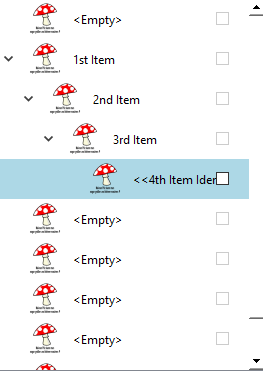
the 4th item should have the same indentation as the 3rd item. -
@SGaist Thank you for the reply. What do you mean with considering a other way to manage my children?
I for sure need a Qtreeview as my list should be hierachic, but the problem is after 3 children beeing stacked below each other the readability becomes bad. Therefore i want to implement something that after there are 3 children below each other and a 4th children gets added, the 4th children should have the same intendation as the 3rd. Is there any good source where i can lookup on how to use proxy model for a treeview?
Here a picture to visualize the problem a little bit better:
the 4th item should have the same indentation as the 3rd item.@StudentScripter
Last suggestion before you go down this route.It does not seem to me this is a good thing to try to do. Windows Explorer/a File Manager app probably has to deal with much deeper nesting/indentation than your case. But it does not chop of after a few levels and present further items without their natural indentation in the hierarchy. I have not seen such a thing. Rather consider using scrollbars or a right-hand-side splitter the user can adjust, cf. Explorer.
If you insist on what you want, istm you must either use a
QStyledItemDelegateto draw rows the way you desire or present a model with only 3 levels of depth, whether you do that by creating a new model or make a proxy behave like that. Your 4th item needs to appear as a sibling of 3rd item and a child of 1st item. -
@StudentScripter
Last suggestion before you go down this route.It does not seem to me this is a good thing to try to do. Windows Explorer/a File Manager app probably has to deal with much deeper nesting/indentation than your case. But it does not chop of after a few levels and present further items without their natural indentation in the hierarchy. I have not seen such a thing. Rather consider using scrollbars or a right-hand-side splitter the user can adjust, cf. Explorer.
If you insist on what you want, istm you must either use a
QStyledItemDelegateto draw rows the way you desire or present a model with only 3 levels of depth, whether you do that by creating a new model or make a proxy behave like that. Your 4th item needs to appear as a sibling of 3rd item and a child of 1st item.This post is deleted! -
@StudentScripter
Last suggestion before you go down this route.It does not seem to me this is a good thing to try to do. Windows Explorer/a File Manager app probably has to deal with much deeper nesting/indentation than your case. But it does not chop of after a few levels and present further items without their natural indentation in the hierarchy. I have not seen such a thing. Rather consider using scrollbars or a right-hand-side splitter the user can adjust, cf. Explorer.
If you insist on what you want, istm you must either use a
QStyledItemDelegateto draw rows the way you desire or present a model with only 3 levels of depth, whether you do that by creating a new model or make a proxy behave like that. Your 4th item needs to appear as a sibling of 3rd item and a child of 1st item.@JonB Thanks for your response. I dont know if it is the right way to do it, basically i want to build a layer system like in photoshop or affinity photo like this:
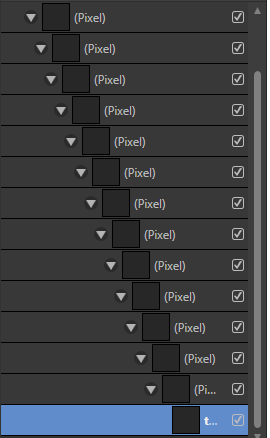
But i just can't get the desired result. Here is how mine looks:
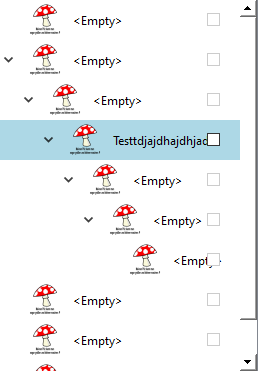
Btw. im currently using a delegate for the items which looks like this:
delegate.h:
#ifndef VIEWLAYERITEMDELEGATE_H
#define VIEWLAYERITEMDELEGATE_H

#include <QStyledItemDelegate>
#include <QModelIndex>
#include <QObject>
#include <QSize>
#include <QLineEdit>
#include <QStandardItemModel>
#include <QCheckBox>
#include <QFormLayout>
#include <QLabel>
#include <QPushButton>


// Definieren Sie das benutzerdefinierte Widget
class LineEditCheckBoxWidget : public QWidget {
    Q_OBJECT
public:
    QLineEdit *lineEdit;
    QCheckBox *checkBox;
    QLabel *iconLabel;


    LineEditCheckBoxWidget(QWidget *parent = nullptr) : QWidget(parent) {
        QHBoxLayout *layout = new QHBoxLayout(this);
        layout->setContentsMargins(10,0,20,0);
        layout->setSpacing(0);
        lineEdit = new QLineEdit(this);
        checkBox = new QCheckBox(this);
        iconLabel = new QLabel(this);


        // Laden Sie das Icon und setzen Sie es auf das QLabel
        QPixmap iconPixmap("://resource/quick.png"); // Ersetzen Sie dies durch den Pfad zu Ihrer Icon-Datei
        QPixmap scaledPixmap = iconPixmap.scaled(32, 32, Qt::KeepAspectRatio, Qt::SmoothTransformation);
        iconLabel->setPixmap(scaledPixmap);

        this->setStyleSheet("background-color: transparent");


        layout->addWidget(iconLabel);
        layout->addSpacing(10);
        layout->addWidget(lineEdit);
        layout->addStretch(1);
        layout->addWidget(checkBox);

        // Zugriff auf das QLineEdit-Widget und setzen Sie den Hintergrund transparent
        lineEdit->setStyleSheet("background-color: transparent;");
        lineEdit->setFrame(false);
        lineEdit->setPlaceholderText("<Empty>");

        checkBox->setStyleSheet("background-color: transparent");

            //QPoint globalPos = checkBox->mapToGlobal(QPoint(0, 0));
            //qDebug() << "Global position of checkbox on init: " << globalPos;


    }

    // QWidget interface
protected:
    void mousePressEvent(QMouseEvent *event) override;

signals:

};


class ViewLayerItemDelegate : public QStyledItemDelegate
{
    Q_OBJECT
public:
    explicit ViewLayerItemDelegate(QObject *parent = nullptr);


    QWidget *createEditor(QWidget *parent, const QStyleOptionViewItem &option, const QModelIndex &index) const override;
    void setEditorData(QWidget *editor, const QModelIndex &index) const override;
    void setModelData(QWidget *editor, QAbstractItemModel *model, const QModelIndex &index) const override;
    void updateEditorGeometry(QWidget *editor, const QStyleOptionViewItem &option, const QModelIndex &index) const override;

    QSize sizeHint(const QStyleOptionViewItem &option, const QModelIndex &index) const override;
    void paint(QPainter *painter, const QStyleOptionViewItem &option, const QModelIndex &index) const override;
    bool editorEvent(QEvent *event, QAbstractItemModel *model, const QStyleOptionViewItem &option, const QModelIndex &index) override;


     QModelIndex currentlyEditedIndex;


     void setCurrentlyEditedIndex(const QModelIndex &index);

    //Speichert die Position wo geklickt wurde
     QPointF ClickPosition;


 public slots:

    void onLineEditTextChanged(const QString &text);


signals:


};


#endif // VIEWLAYERITEMDELEGATE_H
delegate.cpp:
#include "ViewLayerItemDelegate.h"
#include <QStyledItemDelegate>
#include <QPainter>
#include <QApplication>
#include <QItemSelectionModel>
#include <QMouseEvent>
#include "ViewLayerList.h"

#include <QTimer>


ViewLayerItemDelegate::ViewLayerItemDelegate(QObject *parent)
    : QStyledItemDelegate{parent}
{


}


QWidget *ViewLayerItemDelegate::createEditor(QWidget *parent, const QStyleOptionViewItem &option, const QModelIndex &index) const
{
    qDebug() << "Editor created";

    LineEditCheckBoxWidget *editor = new LineEditCheckBoxWidget(parent);


   // Verbinden Sie das textChanged() Signal des LineEdits mit Ihrem Slot
    connect(editor->lineEdit, &QLineEdit::textChanged, this, &ViewLayerItemDelegate::onLineEditTextChanged);


    //Ein Timer um direkt die Editierung des LineEdit zu ermöglichen
    QTimer::singleShot(0, editor->lineEdit, SLOT(setFocus()));

    return editor;
}


void ViewLayerItemDelegate::setEditorData(QWidget *editor, const QModelIndex &index) const
{


    LineEditCheckBoxWidget *widget = static_cast<LineEditCheckBoxWidget *>(editor);

    // Setzen Sie die Werte der SpinBox und CheckBox basierend auf den Modellwerten
    QString lineEditvalue = index.model()->data(index, Qt::EditRole).toString();
    bool checkBoxValue = index.model()->data(index, Qt::CheckStateRole).toBool();

    widget->lineEdit->setText(lineEditvalue);
    widget->checkBox->setChecked(checkBoxValue);


    widget->setFocus();

    widget->lineEdit->setFocus(Qt::MouseFocusReason); // Editor aktivieren
    widget->lineEdit->setStyleSheet("");
    widget->iconLabel->setAttribute(Qt::WA_TranslucentBackground);
   //widget->setStyleSheet("background: white");


    // Setzen Sie den bearbeiteten Index
    const_cast<ViewLayerItemDelegate*>(this)->setCurrentlyEditedIndex(index);


}


void ViewLayerItemDelegate::setModelData(QWidget *editor, QAbstractItemModel *model, const QModelIndex &index) const
{


    LineEditCheckBoxWidget *widget = static_cast<LineEditCheckBoxWidget *>(editor);


    // Speichern Sie die Werte der SpinBox und CheckBox im Modell
    QString lineEditvalue = widget->lineEdit->text();
    bool checkBoxValue = widget->checkBox->isChecked();

    model->setData(index, lineEditvalue, Qt::EditRole);
    model->setData(index, checkBoxValue ? Qt::Checked : Qt::Unchecked, Qt::CheckStateRole);

    qDebug() << "Model data set";


    // Setzen Sie den bearbeiteten Index zurück
    const_cast<ViewLayerItemDelegate*>(this)->setCurrentlyEditedIndex(QModelIndex());
}


void ViewLayerItemDelegate::updateEditorGeometry(QWidget *editor, const QStyleOptionViewItem &option, const QModelIndex &index) const
{
    editor->setGeometry(option.rect);

}


QSize ViewLayerItemDelegate::sizeHint(const QStyleOptionViewItem &option, const QModelIndex &index) const
{

    QSize size = QStyledItemDelegate::sizeHint(option, index);
        size.setHeight(40); // Setzen Sie hier die gewünschte Höhe
    return size;
}


void ViewLayerItemDelegate::paint(QPainter *painter, const QStyleOptionViewItem &option, const QModelIndex &index) const
{


    QStyleOptionViewItem opt = option;
    initStyleOption(&opt, index);


    // Überprüfen Sie, ob der aktuelle Index bearbeitet wird
        if (index == currentlyEditedIndex) {

            return;
        }


    // Setzen Sie die Werte der SpinBox und CheckBox basierend auf den Modellwerten
    QString lineEditvalue = index.model()->data(index, Qt::EditRole).toString();
    bool checkBoxValue = index.model()->data(index, Qt::CheckStateRole).toBool();

    // Laden Sie das Icon und skalieren Sie es
    QPixmap iconPixmap("://resource/quick.png"); // Ersetzen Sie dies durch den Pfad zu Ihrer Icon-Datei
    QPixmap scaledPixmap = iconPixmap.scaled(32, 32, Qt::KeepAspectRatio, Qt::SmoothTransformation);

    // Berechnen Sie die Position für das Icon
    int centerY = option.rect.top() + option.rect.height() / 2;
    int iconY = centerY - scaledPixmap.height() / 2;
    QPoint iconPos = QPoint(option.rect.left() + 10, iconY);

    // Zeichnen Sie das Pixmap mit dem QPainter
    painter->drawPixmap(iconPos, scaledPixmap);


    // Berechnen Sie die Position und Größe für das LineEdit
    QRect lineEditRect = option.rect;
    lineEditRect.setLeft(iconPos.x() + scaledPixmap.width() + 10); // Adjust as needed
    lineEditRect.setRight(option.rect.right() - 10); // Adjust as needed

    // Erstellen Sie ein QStyleOptionFrame für das LineEdit
    QStyleOptionFrame lineEditOption;
    lineEditOption.lineWidth = 1; // Setzen Sie die Liniendicke auf 1
    lineEditOption.rect = lineEditRect;

    // Zeichnen Sie das LineEdit
    QApplication::style()->drawControl(QStyle::CE_ShapedFrame, &lineEditOption, painter);

  // Überprüfen Sie, ob der Text leer ist und zeichnen Sie den Platzhaltertext
    if (lineEditvalue.isEmpty()) {
        painter->drawText(lineEditOption.rect.adjusted(2, 0, 0, 0), Qt::AlignLeft | Qt::AlignVCenter, "<Empty>");
    } else {
        // Zeichnen Sie den Text des LineEdits
        painter->drawText(lineEditOption.rect.adjusted(2, 0, 0, 0), Qt::AlignLeft | Qt::AlignVCenter, lineEditvalue);
    }

    // Berechnen Sie die Position und Größe für die CheckBox
    QRect checkBoxRect = option.rect;
    checkBoxRect.setLeft(lineEditRect.right() - 22); // Adjust as needed
    checkBoxRect.setRight(option.rect.right() - 10); // Adjust as needed

    // Erstellen Sie ein QStyleOptionButton für die CheckBox
    QStyleOptionButton checkBoxOption;
    checkBoxOption.state = checkBoxValue ? QStyle::State_On : QStyle::State_Off;
    checkBoxOption.rect = checkBoxRect;

    // Zeichnen Sie die CheckBox
    QApplication::style()->drawControl(QStyle::CE_CheckBox, &checkBoxOption, painter);
}


bool ViewLayerItemDelegate::editorEvent(QEvent *event, QAbstractItemModel *model, const QStyleOptionViewItem &option, const QModelIndex &index)
{
    if(event->type() == QEvent::MouseButtonPress)
    {
        QMouseEvent *mouseEvent = static_cast<QMouseEvent*>(event);

        if (const QTreeView* view = qobject_cast<const QTreeView*>(option.widget))
        {


        const QRect itemRect = view->visualRect(index);
        ClickPosition = mouseEvent->position() - itemRect.topLeft(); // press position in item's coords


        //QRect itemRect = option.rect;
        qDebug() << "Click position: " << ClickPosition;
        qDebug() << "Item Rect: " <<itemRect;


        if(ClickPosition.x() >= itemRect.width()-35 && ClickPosition.x() <= itemRect.width()-20)
        {
        // Invert the state of the checkbox
        bool value = index.data(Qt::CheckStateRole).toBool();
        model->setData(index, !value, Qt::CheckStateRole);
        }


      }


   }


    // Standardverhalten beibehalten für andere Ereignisse
    return QStyledItemDelegate::editorEvent(event, model, option, index);
}


// Slot-Implementierung
void ViewLayerItemDelegate::onLineEditTextChanged(const QString &text)
{
    // Hier können Sie die gewünschte Aktion ausführen, wenn der Text im LineEdit bearbeitet wird
    qDebug() << "LineEdit text changed to:" << text;


}


void LineEditCheckBoxWidget::mousePressEvent(QMouseEvent *event)
{
    qDebug() << "Test clicked";
 this->lineEdit->setStyleSheet("background: transparent;");


    QWidget::mousePressEvent(event);
}


void ViewLayerItemDelegate::setCurrentlyEditedIndex(const QModelIndex &index)
{
currentlyEditedIndex = index;
}
I got the truncating working now inside my delegate but still i would like to control the indentation level on a per item basis. How to exactly do that?
-
@JonB Thanks for your response. I dont know if it is the right way to do it, basically i want to build a layer system like in photoshop or affinity photo like this:
But i just can't get the desired result. Here is how mine looks:
Btw. im currently using a delegate for the items which looks like this:
delegate.h:
#ifndef VIEWLAYERITEMDELEGATE_H
#define VIEWLAYERITEMDELEGATE_H

#include <QStyledItemDelegate>
#include <QModelIndex>
#include <QObject>
#include <QSize>
#include <QLineEdit>
#include <QStandardItemModel>
#include <QCheckBox>
#include <QFormLayout>
#include <QLabel>
#include <QPushButton>


// Definieren Sie das benutzerdefinierte Widget
class LineEditCheckBoxWidget : public QWidget {
    Q_OBJECT
public:
    QLineEdit *lineEdit;
    QCheckBox *checkBox;
    QLabel *iconLabel;


    LineEditCheckBoxWidget(QWidget *parent = nullptr) : QWidget(parent) {
        QHBoxLayout *layout = new QHBoxLayout(this);
        layout->setContentsMargins(10,0,20,0);
        layout->setSpacing(0);
        lineEdit = new QLineEdit(this);
        checkBox = new QCheckBox(this);
        iconLabel = new QLabel(this);


        // Laden Sie das Icon und setzen Sie es auf das QLabel
        QPixmap iconPixmap("://resource/quick.png"); // Ersetzen Sie dies durch den Pfad zu Ihrer Icon-Datei
        QPixmap scaledPixmap = iconPixmap.scaled(32, 32, Qt::KeepAspectRatio, Qt::SmoothTransformation);
        iconLabel->setPixmap(scaledPixmap);

        this->setStyleSheet("background-color: transparent");


        layout->addWidget(iconLabel);
        layout->addSpacing(10);
        layout->addWidget(lineEdit);
        layout->addStretch(1);
        layout->addWidget(checkBox);

        // Zugriff auf das QLineEdit-Widget und setzen Sie den Hintergrund transparent
        lineEdit->setStyleSheet("background-color: transparent;");
        lineEdit->setFrame(false);
        lineEdit->setPlaceholderText("<Empty>");

        checkBox->setStyleSheet("background-color: transparent");

            //QPoint globalPos = checkBox->mapToGlobal(QPoint(0, 0));
            //qDebug() << "Global position of checkbox on init: " << globalPos;


    }

    // QWidget interface
protected:
    void mousePressEvent(QMouseEvent *event) override;

signals:

};


class ViewLayerItemDelegate : public QStyledItemDelegate
{
    Q_OBJECT
public:
    explicit ViewLayerItemDelegate(QObject *parent = nullptr);


    QWidget *createEditor(QWidget *parent, const QStyleOptionViewItem &option, const QModelIndex &index) const override;
    void setEditorData(QWidget *editor, const QModelIndex &index) const override;
    void setModelData(QWidget *editor, QAbstractItemModel *model, const QModelIndex &index) const override;
    void updateEditorGeometry(QWidget *editor, const QStyleOptionViewItem &option, const QModelIndex &index) const override;

    QSize sizeHint(const QStyleOptionViewItem &option, const QModelIndex &index) const override;
    void paint(QPainter *painter, const QStyleOptionViewItem &option, const QModelIndex &index) const override;
    bool editorEvent(QEvent *event, QAbstractItemModel *model, const QStyleOptionViewItem &option, const QModelIndex &index) override;


     QModelIndex currentlyEditedIndex;


     void setCurrentlyEditedIndex(const QModelIndex &index);

    //Speichert die Position wo geklickt wurde
     QPointF ClickPosition;


 public slots:

    void onLineEditTextChanged(const QString &text);


signals:


};


#endif // VIEWLAYERITEMDELEGATE_H
delegate.cpp:
#include "ViewLayerItemDelegate.h"
#include <QStyledItemDelegate>
#include <QPainter>
#include <QApplication>
#include <QItemSelectionModel>
#include <QMouseEvent>
#include "ViewLayerList.h"

#include <QTimer>


ViewLayerItemDelegate::ViewLayerItemDelegate(QObject *parent)
    : QStyledItemDelegate{parent}
{


}


QWidget *ViewLayerItemDelegate::createEditor(QWidget *parent, const QStyleOptionViewItem &option, const QModelIndex &index) const
{
    qDebug() << "Editor created";

    LineEditCheckBoxWidget *editor = new LineEditCheckBoxWidget(parent);


   // Verbinden Sie das textChanged() Signal des LineEdits mit Ihrem Slot
    connect(editor->lineEdit, &QLineEdit::textChanged, this, &ViewLayerItemDelegate::onLineEditTextChanged);


    //Ein Timer um direkt die Editierung des LineEdit zu ermöglichen
    QTimer::singleShot(0, editor->lineEdit, SLOT(setFocus()));

    return editor;
}


void ViewLayerItemDelegate::setEditorData(QWidget *editor, const QModelIndex &index) const
{


    LineEditCheckBoxWidget *widget = static_cast<LineEditCheckBoxWidget *>(editor);

    // Setzen Sie die Werte der SpinBox und CheckBox basierend auf den Modellwerten
    QString lineEditvalue = index.model()->data(index, Qt::EditRole).toString();
    bool checkBoxValue = index.model()->data(index, Qt::CheckStateRole).toBool();

    widget->lineEdit->setText(lineEditvalue);
    widget->checkBox->setChecked(checkBoxValue);


    widget->setFocus();

    widget->lineEdit->setFocus(Qt::MouseFocusReason); // Editor aktivieren
    widget->lineEdit->setStyleSheet("");
    widget->iconLabel->setAttribute(Qt::WA_TranslucentBackground);
   //widget->setStyleSheet("background: white");


    // Setzen Sie den bearbeiteten Index
    const_cast<ViewLayerItemDelegate*>(this)->setCurrentlyEditedIndex(index);


}


void ViewLayerItemDelegate::setModelData(QWidget *editor, QAbstractItemModel *model, const QModelIndex &index) const
{


    LineEditCheckBoxWidget *widget = static_cast<LineEditCheckBoxWidget *>(editor);


    // Speichern Sie die Werte der SpinBox und CheckBox im Modell
    QString lineEditvalue = widget->lineEdit->text();
    bool checkBoxValue = widget->checkBox->isChecked();

    model->setData(index, lineEditvalue, Qt::EditRole);
    model->setData(index, checkBoxValue ? Qt::Checked : Qt::Unchecked, Qt::CheckStateRole);

    qDebug() << "Model data set";


    // Setzen Sie den bearbeiteten Index zurück
    const_cast<ViewLayerItemDelegate*>(this)->setCurrentlyEditedIndex(QModelIndex());
}


void ViewLayerItemDelegate::updateEditorGeometry(QWidget *editor, const QStyleOptionViewItem &option, const QModelIndex &index) const
{
    editor->setGeometry(option.rect);

}


QSize ViewLayerItemDelegate::sizeHint(const QStyleOptionViewItem &option, const QModelIndex &index) const
{

    QSize size = QStyledItemDelegate::sizeHint(option, index);
        size.setHeight(40); // Setzen Sie hier die gewünschte Höhe
    return size;
}


void ViewLayerItemDelegate::paint(QPainter *painter, const QStyleOptionViewItem &option, const QModelIndex &index) const
{


    QStyleOptionViewItem opt = option;
    initStyleOption(&opt, index);


    // Überprüfen Sie, ob der aktuelle Index bearbeitet wird
        if (index == currentlyEditedIndex) {

            return;
        }


    // Setzen Sie die Werte der SpinBox und CheckBox basierend auf den Modellwerten
    QString lineEditvalue = index.model()->data(index, Qt::EditRole).toString();
    bool checkBoxValue = index.model()->data(index, Qt::CheckStateRole).toBool();

    // Laden Sie das Icon und skalieren Sie es
    QPixmap iconPixmap("://resource/quick.png"); // Ersetzen Sie dies durch den Pfad zu Ihrer Icon-Datei
    QPixmap scaledPixmap = iconPixmap.scaled(32, 32, Qt::KeepAspectRatio, Qt::SmoothTransformation);

    // Berechnen Sie die Position für das Icon
    int centerY = option.rect.top() + option.rect.height() / 2;
    int iconY = centerY - scaledPixmap.height() / 2;
    QPoint iconPos = QPoint(option.rect.left() + 10, iconY);

    // Zeichnen Sie das Pixmap mit dem QPainter
    painter->drawPixmap(iconPos, scaledPixmap);


    // Berechnen Sie die Position und Größe für das LineEdit
    QRect lineEditRect = option.rect;
    lineEditRect.setLeft(iconPos.x() + scaledPixmap.width() + 10); // Adjust as needed
    lineEditRect.setRight(option.rect.right() - 10); // Adjust as needed

    // Erstellen Sie ein QStyleOptionFrame für das LineEdit
    QStyleOptionFrame lineEditOption;
    lineEditOption.lineWidth = 1; // Setzen Sie die Liniendicke auf 1
    lineEditOption.rect = lineEditRect;

    // Zeichnen Sie das LineEdit
    QApplication::style()->drawControl(QStyle::CE_ShapedFrame, &lineEditOption, painter);

  // Überprüfen Sie, ob der Text leer ist und zeichnen Sie den Platzhaltertext
    if (lineEditvalue.isEmpty()) {
        painter->drawText(lineEditOption.rect.adjusted(2, 0, 0, 0), Qt::AlignLeft | Qt::AlignVCenter, "<Empty>");
    } else {
        // Zeichnen Sie den Text des LineEdits
        painter->drawText(lineEditOption.rect.adjusted(2, 0, 0, 0), Qt::AlignLeft | Qt::AlignVCenter, lineEditvalue);
    }

    // Berechnen Sie die Position und Größe für die CheckBox
    QRect checkBoxRect = option.rect;
    checkBoxRect.setLeft(lineEditRect.right() - 22); // Adjust as needed
    checkBoxRect.setRight(option.rect.right() - 10); // Adjust as needed

    // Erstellen Sie ein QStyleOptionButton für die CheckBox
    QStyleOptionButton checkBoxOption;
    checkBoxOption.state = checkBoxValue ? QStyle::State_On : QStyle::State_Off;
    checkBoxOption.rect = checkBoxRect;

    // Zeichnen Sie die CheckBox
    QApplication::style()->drawControl(QStyle::CE_CheckBox, &checkBoxOption, painter);
}


bool ViewLayerItemDelegate::editorEvent(QEvent *event, QAbstractItemModel *model, const QStyleOptionViewItem &option, const QModelIndex &index)
{
    if(event->type() == QEvent::MouseButtonPress)
    {
        QMouseEvent *mouseEvent = static_cast<QMouseEvent*>(event);

        if (const QTreeView* view = qobject_cast<const QTreeView*>(option.widget))
        {


        const QRect itemRect = view->visualRect(index);
        ClickPosition = mouseEvent->position() - itemRect.topLeft(); // press position in item's coords


        //QRect itemRect = option.rect;
        qDebug() << "Click position: " << ClickPosition;
        qDebug() << "Item Rect: " <<itemRect;


        if(ClickPosition.x() >= itemRect.width()-35 && ClickPosition.x() <= itemRect.width()-20)
        {
        // Invert the state of the checkbox
        bool value = index.data(Qt::CheckStateRole).toBool();
        model->setData(index, !value, Qt::CheckStateRole);
        }


      }


   }


    // Standardverhalten beibehalten für andere Ereignisse
    return QStyledItemDelegate::editorEvent(event, model, option, index);
}


// Slot-Implementierung
void ViewLayerItemDelegate::onLineEditTextChanged(const QString &text)
{
    // Hier können Sie die gewünschte Aktion ausführen, wenn der Text im LineEdit bearbeitet wird
    qDebug() << "LineEdit text changed to:" << text;


}


void LineEditCheckBoxWidget::mousePressEvent(QMouseEvent *event)
{
    qDebug() << "Test clicked";
 this->lineEdit->setStyleSheet("background: transparent;");


    QWidget::mousePressEvent(event);
}


void ViewLayerItemDelegate::setCurrentlyEditedIndex(const QModelIndex &index)
{
currentlyEditedIndex = index;
}
I got the truncating working now inside my delegate but still i would like to control the indentation level on a per item basis. How to exactly do that?
@StudentScripter I don't know other than your own code in
ViewLayerItemDelegate::paint(). -
@StudentScripter I don't know other than your own code in
ViewLayerItemDelegate::paint().@JonB oh sorry my oversight, here is the code of my delegate:
delegate.cpp:
#include "ViewLayerItemDelegate.h"
#include <QStyledItemDelegate>
#include <QPainter>
#include <QApplication>
#include <QItemSelectionModel>
#include <QMouseEvent>
#include "ViewLayerList.h"

#include <QTimer>


ViewLayerItemDelegate::ViewLayerItemDelegate(QObject *parent)
    : QStyledItemDelegate{parent}
{


}


QWidget *ViewLayerItemDelegate::createEditor(QWidget *parent, const QStyleOptionViewItem &option, const QModelIndex &index) const
{


    qDebug() << "Editor created";


    LineEditCheckBoxWidget *editor = new LineEditCheckBoxWidget(parent);


   // Verbinden Sie das textChanged() Signal des LineEdits mit Ihrem Slot
    connect(editor->lineEdit, &QLineEdit::textChanged, this, &ViewLayerItemDelegate::onLineEditTextChanged);


    //Ein Timer um direkt die Editierung des LineEdit zu ermöglichen
    QTimer::singleShot(0, editor->lineEdit, SLOT(setFocus()));

    return editor;


}


void ViewLayerItemDelegate::setEditorData(QWidget *editor, const QModelIndex &index) const
{


    LineEditCheckBoxWidget *widget = static_cast<LineEditCheckBoxWidget *>(editor);

    // Setzen Sie die Werte der SpinBox und CheckBox basierend auf den Modellwerten
    QString lineEditvalue = index.model()->data(index, Qt::EditRole).toString();
    bool checkBoxValue = index.model()->data(index, Qt::CheckStateRole).toBool();

    widget->lineEdit->setText(lineEditvalue);
    widget->checkBox->setChecked(checkBoxValue);


    widget->setFocus();

    widget->lineEdit->setFocus(Qt::MouseFocusReason); // Editor aktivieren
    widget->lineEdit->setStyleSheet("background: white");
    widget->iconLabel->setAttribute(Qt::WA_TranslucentBackground);
   //widget->setStyleSheet("background: white");


    // Setzen Sie den bearbeiteten Index
    const_cast<ViewLayerItemDelegate*>(this)->setCurrentlyEditedIndex(index);


}


void ViewLayerItemDelegate::setModelData(QWidget *editor, QAbstractItemModel *model, const QModelIndex &index) const
{


    LineEditCheckBoxWidget *widget = static_cast<LineEditCheckBoxWidget *>(editor);


    // Speichern Sie die Werte der SpinBox und CheckBox im Modell
    QString lineEditvalue = widget->lineEdit->text();
    bool checkBoxValue = widget->checkBox->isChecked();

    model->setData(index, lineEditvalue, Qt::EditRole);
    model->setData(index, checkBoxValue ? Qt::Checked : Qt::Unchecked, Qt::CheckStateRole);

    qDebug() << "Model data set";


    // Setzen Sie den bearbeiteten Index zurück
    const_cast<ViewLayerItemDelegate*>(this)->setCurrentlyEditedIndex(QModelIndex());


}


void ViewLayerItemDelegate::updateEditorGeometry(QWidget *editor, const QStyleOptionViewItem &option, const QModelIndex &index) const
{
    editor->setGeometry(option.rect);

}


QSize ViewLayerItemDelegate::sizeHint(const QStyleOptionViewItem &option, const QModelIndex &index) const
{

    QSize size = QStyledItemDelegate::sizeHint(option, index);
        size.setHeight(40); // Setzen Sie hier die gewünschte Höhe

         // Ändern Sie die Einrückung basierend auf dem Level des Items (z.B., hier um 20 Pixel).
        int indentationLevel = index.column(); // Hier als Beispiel die Einrückung basierend auf der Spalte.
        size.rwidth() -= indentationLevel * 40; // Die Einrückung um 20 Pixel erhöhen.

    return size;
}


void ViewLayerItemDelegate::paint(QPainter *painter, const QStyleOptionViewItem &option, const QModelIndex &index) const
{


    QStyleOptionViewItem opt = option;
    initStyleOption(&opt, index);


    // Überprüfen Sie, ob der aktuelle Index bearbeitet wird
        if (index == currentlyEditedIndex) {

            return;
        }


    // Setzen Sie die Werte der SpinBox und CheckBox basierend auf den Modellwerten
    QString lineEditvalue = index.model()->data(index, Qt::EditRole).toString();
    bool checkBoxValue = index.model()->data(index, Qt::CheckStateRole).toBool();


    // Laden Sie das Icon und skalieren Sie es
    QPixmap iconPixmap("://resource/quick.png"); // Ersetzen Sie dies durch den Pfad zu Ihrer Icon-Datei
    QPixmap scaledPixmap = iconPixmap.scaled(32, 32, Qt::KeepAspectRatio, Qt::SmoothTransformation);

    // Berechnen Sie die Position für das Icon
    int centerY = option.rect.top() + option.rect.height() / 2;
    int iconY = centerY - scaledPixmap.height() / 2;
    QPoint iconPos = QPoint(option.rect.left() + 10, iconY);

    // Zeichnen Sie das Pixmap mit dem QPainter
    painter->drawPixmap(iconPos, scaledPixmap);


    // Berechnen Sie die Position und Größe für das LineEdit
    QRect lineEditRect = option.rect;
    lineEditRect.setLeft(iconPos.x() + scaledPixmap.width() + 10); // Adjust as needed
    lineEditRect.setRight(option.rect.right() - 10-35); // Adjust as needed


    // Erstellen Sie ein QStyleOptionFrame für das LineEdit
    QStyleOptionFrame lineEditOption;
    lineEditOption.lineWidth = 1; // Setzen Sie die Liniendicke auf 1
    lineEditOption.rect = lineEditRect;

    // Zeichnen Sie das LineEdit
    QApplication::style()->drawControl(QStyle::CE_ShapedFrame, &lineEditOption, painter);

  // Überprüfen Sie, ob der Text leer ist und zeichnen Sie den Platzhaltertext
 // Zeichnen Sie den Text des LineEdits, considering truncation
// Überprüfen Sie, ob der Text leer ist und zeichnen Sie den Platzhaltertext
    if (lineEditvalue.isEmpty()) {
        painter->drawText(lineEditOption.rect.adjusted(2, 0, 0, 0), Qt::AlignLeft | Qt::AlignVCenter, "<Empty>");
    } else {
        // Hier wird die maximale Breite des Texts festgelegt, bevor er abgeschnitten wird
        int maxTextWidth = lineEditRect.width();

        // Berechnen Sie die Größe des Texts
        QFontMetrics fm(painter->font());
        QString displayedText = fm.elidedText(lineEditvalue, Qt::ElideRight, maxTextWidth - 10);

        painter->drawText(lineEditOption.rect.adjusted(2, 0, 0, 0), Qt::AlignLeft | Qt::AlignVCenter, displayedText);
    }

    // Berechnen Sie die Position und Größe für die CheckBox
    QRect checkBoxRect = option.rect;
    checkBoxRect.setLeft(lineEditRect.right() +35- 22); // Adjust as needed
    checkBoxRect.setRight(option.rect.right() - 10); // Adjust as needed

    // Erstellen Sie ein QStyleOptionButton für die CheckBox
    QStyleOptionButton checkBoxOption;
    checkBoxOption.state = checkBoxValue ? QStyle::State_On : QStyle::State_Off;
    checkBoxOption.rect = checkBoxRect;


/* //CODE NUR ZUM VISUELLEN DEBUGGEN DER BEREICHE:
// Zeichnen Sie ein rotes Rechteck um das LineEdit
QPen redPen(Qt::red);
painter->setPen(redPen);
painter->drawRect(lineEditRect);


// Zeichnen Sie ein rotes Rechteck um das LineEdit
QPen bluePen(Qt::blue);
painter->setPen(bluePen);
painter->drawRect(checkBoxRect);
*/
    // Zeichnen Sie die CheckBox
    QApplication::style()->drawControl(QStyle::CE_CheckBox, &checkBoxOption, painter);
}


bool ViewLayerItemDelegate::editorEvent(QEvent *event, QAbstractItemModel *model, const QStyleOptionViewItem &option, const QModelIndex &index)
{
    if(event->type() == QEvent::MouseButtonPress)
    {
        QMouseEvent *mouseEvent = static_cast<QMouseEvent*>(event);

        if (const QTreeView* view = qobject_cast<const QTreeView*>(option.widget))
        {


        const QRect itemRect = view->visualRect(index);
        ClickPosition = mouseEvent->position() - itemRect.topLeft(); // press position in item's coords


        //QRect itemRect = option.rect;
        qDebug() << "Click position: " << ClickPosition;
        qDebug() << "Item Rect: " <<itemRect;


        if(ClickPosition.x() >= itemRect.width()-35 && ClickPosition.x() <= itemRect.width()-20)
        {
        // Invert the state of the checkbox
        bool value = index.data(Qt::CheckStateRole).toBool();
        model->setData(index, !value, Qt::CheckStateRole);
        }


      }


   }


    // Standardverhalten beibehalten für andere Ereignisse
    return QStyledItemDelegate::editorEvent(event, model, option, index);
}


// Slot-Implementierung
void ViewLayerItemDelegate::onLineEditTextChanged(const QString &text)
{
    // Hier können Sie die gewünschte Aktion ausführen, wenn der Text im LineEdit bearbeitet wird
    qDebug() << "LineEdit text changed to:" << text;


}


void LineEditCheckBoxWidget::mousePressEvent(QMouseEvent *event)
{
    qDebug() << "Test clicked";
 this->lineEdit->setStyleSheet("background: transparent;");


    QWidget::mousePressEvent(event);
}


void ViewLayerItemDelegate::setCurrentlyEditedIndex(const QModelIndex &index)
{
currentlyEditedIndex = index;
}
delegate.h:
#ifndef VIEWLAYERITEMDELEGATE_H
#define VIEWLAYERITEMDELEGATE_H

#include <QStyledItemDelegate>
#include <QModelIndex>
#include <QObject>
#include <QSize>
#include <QLineEdit>
#include <QStandardItemModel>
#include <QCheckBox>
#include <QFormLayout>
#include <QLabel>
#include <QPushButton>


// Definieren Sie das benutzerdefinierte Widget
class LineEditCheckBoxWidget : public QWidget {
    Q_OBJECT
public:
    QLineEdit *lineEdit;
    QCheckBox *checkBox;
    QLabel *iconLabel;


    LineEditCheckBoxWidget(QWidget *parent = nullptr) : QWidget(parent) {
        QHBoxLayout *layout = new QHBoxLayout(this);
        layout->setContentsMargins(10,0,20,0);
        layout->setSpacing(0);
        lineEdit = new QLineEdit(this);
        checkBox = new QCheckBox(this);
        iconLabel = new QLabel(this);


        // Laden Sie das Icon und setzen Sie es auf das QLabel
        QPixmap iconPixmap("://resource/quick.png"); // Ersetzen Sie dies durch den Pfad zu Ihrer Icon-Datei
        QPixmap scaledPixmap = iconPixmap.scaled(32, 32, Qt::KeepAspectRatio, Qt::SmoothTransformation);
        iconLabel->setPixmap(scaledPixmap);

        this->setStyleSheet("background-color: transparent");


        layout->addWidget(iconLabel);
        layout->addSpacing(10);
        layout->addWidget(lineEdit);
        layout->addSpacing(10);
        layout->addWidget(checkBox);

        // Zugriff auf das QLineEdit-Widget und setzen Sie den Hintergrund transparent
        lineEdit->setStyleSheet("background-color: transparent;");
        lineEdit->setFrame(false);
        lineEdit->setPlaceholderText("<Empty>");

        checkBox->setStyleSheet("background-color: transparent");

            //QPoint globalPos = checkBox->mapToGlobal(QPoint(0, 0));
            //qDebug() << "Global position of checkbox on init: " << globalPos;


    }

    // QWidget interface
protected:
    void mousePressEvent(QMouseEvent *event) override;

signals:

};


class ViewLayerItemDelegate : public QStyledItemDelegate
{
    Q_OBJECT
public:
    explicit ViewLayerItemDelegate(QObject *parent = nullptr);


    QWidget *createEditor(QWidget *parent, const QStyleOptionViewItem &option, const QModelIndex &index) const override;
    void setEditorData(QWidget *editor, const QModelIndex &index) const override;
    void setModelData(QWidget *editor, QAbstractItemModel *model, const QModelIndex &index) const override;
    void updateEditorGeometry(QWidget *editor, const QStyleOptionViewItem &option, const QModelIndex &index) const override;

    QSize sizeHint(const QStyleOptionViewItem &option, const QModelIndex &index) const override;
    void paint(QPainter *painter, const QStyleOptionViewItem &option, const QModelIndex &index) const override;
    bool editorEvent(QEvent *event, QAbstractItemModel *model, const QStyleOptionViewItem &option, const QModelIndex &index) override;


     QModelIndex currentlyEditedIndex;


     void setCurrentlyEditedIndex(const QModelIndex &index);

    //Speichert die Position wo geklickt wurde
     QPointF ClickPosition;


 public slots:

    void onLineEditTextChanged(const QString &text);


signals:


};


#endif // VIEWLAYERITEMDELEGATE_H

