Skip to content
  • Categories
  • Recent
  • Tags
  • Popular
  • Users
  • Groups
  • Search
  • Get Qt Extensions
  • Unsolved
Collapse
Brand Logo
  1. Home
  2. Qt Development
  3. General and Desktop
  4. Preferences menu items with QMenu on MacOS
Forum Updated to NodeBB v4.3 + New Features

Preferences menu items with QMenu on MacOS

Scheduled Pinned Locked Moved Unsolved General and Desktop
4 Posts 3 Posters 760 Views 2 Watching
  • Oldest to Newest
  • Newest to Oldest
  • Most Votes
Reply
  • Reply as topic
Log in to reply
This topic has been deleted. Only users with topic management privileges can see it.
  • C Offline
    C Offline
    codeform
    wrote on last edited by
    #1

    I am trying to implement a menu in my project that has the same kind of Preferences menu that VS Code has on MacOS.
    Basically VS Code has several menu items listed under Preferences as you can see on the screenshot.

    I have tried in many ways to achieve that but I didn't have any success. I have also used QAction::setMenuRole but that didn't help.
    Could it be that this is a limitation of Qt on MacOS?

    qt_menu_macos.png

    M 1 Reply Last reply
    0
    • C codeform

      I am trying to implement a menu in my project that has the same kind of Preferences menu that VS Code has on MacOS.
      Basically VS Code has several menu items listed under Preferences as you can see on the screenshot.

      I have tried in many ways to achieve that but I didn't have any success. I have also used QAction::setMenuRole but that didn't help.
      Could it be that this is a limitation of Qt on MacOS?

      qt_menu_macos.png

      M Offline
      M Offline
      mpergand
      wrote on last edited by mpergand
      #2

      @codeform
      My attempt also failed
      As soon as you set a submenu, it disappears !

      action=menu->addAction("Preferences");  
      action->setMenuRole(QAction::ApplicationSpecificRole);
      
      action->setMenu(new QMenu());   // the Preferences menu item vanish
      
      1 Reply Last reply
      0
      • SGaistS Offline
        SGaistS Offline
        SGaist
        Lifetime Qt Champion
        wrote on last edited by
        #3

        Hi,

        To the best of my knowledge, the Preferences menu entry shall trigger the apparition of a dedicated dialog.

        macOS is the only OS that has it standardized so users do not have to search through many other menues to find it. In order to make things simpler, Qt automatically associates an action named Preferences with that special entry.

        Interested in AI ? www.idiap.ch
        Please read the Qt Code of Conduct - https://forum.qt.io/topic/113070/qt-code-of-conduct

        M 1 Reply Last reply
        0
        • SGaistS SGaist

          Hi,

          To the best of my knowledge, the Preferences menu entry shall trigger the apparition of a dedicated dialog.

          macOS is the only OS that has it standardized so users do not have to search through many other menues to find it. In order to make things simpler, Qt automatically associates an action named Preferences with that special entry.

          M Offline
          M Offline
          mpergand
          wrote on last edited by
          #4

          @SGaist
          don't worry I tried with other names,
          doesn't work either :(

          Qt automatically associates an action named Preferences with that special entry.

          Yeah it's hardcoded in Qt and I have to say that it is a bug !
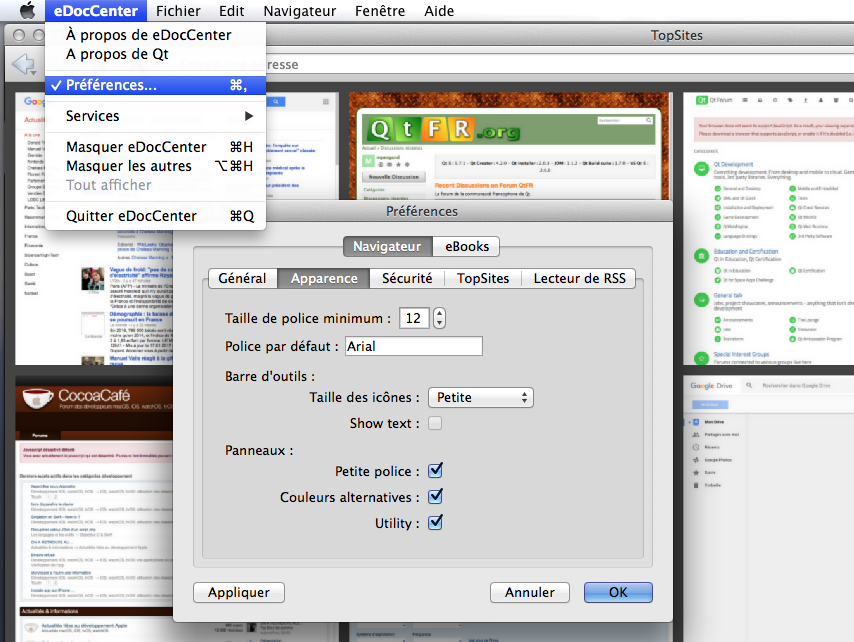
          I have a windows menu in my apps that lists all open windows included the Prefs dialog.
          Starting around Qt5.5, I noticed that the Prefs item vanish from the list and when the Prefs dialog was in front (this item should be checked in the windows list) the Preferences... item in the application menu was checked instead !!!
          pure nonsense :(
          1 Reply Last reply
          0

          • Login

          • Login or register to search.
          • First post
            Last post
          0
          • Categories
          • Recent
          • Tags
          • Popular
          • Users
          • Groups
          • Search
          • Get Qt Extensions
          • Unsolved