Skip to content
  • Categories
  • Recent
  • Tags
  • Popular
  • Users
  • Groups
  • Search
  • Get Qt Extensions
  • Unsolved
Collapse
Brand Logo
  1. Home
  2. Qt Development
  3. General and Desktop
  4. set QToolButton Icons with qss image

set QToolButton Icons with qss image

Scheduled Pinned Locked Moved Unsolved General and Desktop
10 Posts 2 Posters 1.8k Views
  • Oldest to Newest
  • Newest to Oldest
  • Most Votes
Reply
  • Reply as topic
Log in to reply
This topic has been deleted. Only users with topic management privileges can see it.
  • G Offline
    G Offline
    ggrr
    wrote on last edited by ggrr
    #1

    ee3d4f9e-79ee-402d-9243-15d692c7311c-image.png
    QToolButton{
    image:url(:/icon/delete.png);
    border:none;
    }

    it can show image normaly.
    but when i delete the "border:none" it will not show image

    QToolButton{
    image:url(:/icon/delete.png);
    }

    why?

    Christian EhrlicherC 1 Reply Last reply
    0
    • Christian EhrlicherC Offline
      Christian EhrlicherC Offline
      Christian Ehrlicher
      Lifetime Qt Champion
      wrote on last edited by
      #2

      I don't see where you use image-position anywhere in your qss.

      Qt Online Installer direct download: https://download.qt.io/official_releases/online_installers/
      Visit the Qt Academy at https://academy.qt.io/catalog

      G 1 Reply Last reply
      0
      • G Offline
        G Offline
        ggrr
        wrote on last edited by
        #3
        This post is deleted!
        1 Reply Last reply
        0
        • G ggrr

          ee3d4f9e-79ee-402d-9243-15d692c7311c-image.png
          QToolButton{
          image:url(:/icon/delete.png);
          border:none;
          }

          it can show image normaly.
          but when i delete the "border:none" it will not show image

          QToolButton{
          image:url(:/icon/delete.png);
          }

          why?

          Christian EhrlicherC Offline
          Christian EhrlicherC Offline
          Christian Ehrlicher
          Lifetime Qt Champion
          wrote on last edited by
          #4

          @ggrr said in set QToolButton Icons with qss image:

          but when i delete the "border:none" it will not show image

          More or less described in the documentation:

          "Warning: If you only set a background-color on a QToolButton, the background will not appear unless you set the border property to some value. This is because, by default, the QToolButton draws a native border which completely overlaps the background-color."

          Qt Online Installer direct download: https://download.qt.io/official_releases/online_installers/
          Visit the Qt Academy at https://academy.qt.io/catalog

          1 Reply Last reply
          0
          • G Offline
            G Offline
            ggrr
            wrote on last edited by
            #5

            But in real time background-color can work without border property

            Christian EhrlicherC 1 Reply Last reply
            0
            • G ggrr

              But in real time background-color can work without border property

              Christian EhrlicherC Offline
              Christian EhrlicherC Offline
              Christian Ehrlicher
              Lifetime Qt Champion
              wrote on last edited by
              #6

              @ggrr said in set QToolButton Icons with qss image:

              But in real time

              ?

              Qt Online Installer direct download: https://download.qt.io/official_releases/online_installers/
              Visit the Qt Academy at https://academy.qt.io/catalog

              G 1 Reply Last reply
              0
              • Christian EhrlicherC Christian Ehrlicher

                @ggrr said in set QToolButton Icons with qss image:

                But in real time

                ?

                G Offline
                G Offline
                ggrr
                wrote on last edited by
                #7

                @Christian-Ehrlicher sorry my english is not good.
                i mean, i just tried qss like below ,and it worked without "border:" property
                QToolButton{
                background-color:red;
                }

                1 Reply Last reply
                0
                • Christian EhrlicherC Offline
                  Christian EhrlicherC Offline
                  Christian Ehrlicher
                  Lifetime Qt Champion
                  wrote on last edited by
                  #8

                  Then this is maybe (base) style dependent - if the base style allows the override of the color then it works, otherwise it won't.

                  Qt Online Installer direct download: https://download.qt.io/official_releases/online_installers/
                  Visit the Qt Academy at https://academy.qt.io/catalog

                  1 Reply Last reply
                  0
                  • Christian EhrlicherC Christian Ehrlicher

                    I don't see where you use image-position anywhere in your qss.

                    G Offline
                    G Offline
                    ggrr
                    wrote on last edited by
                    #9

                    @Christian-Ehrlicher
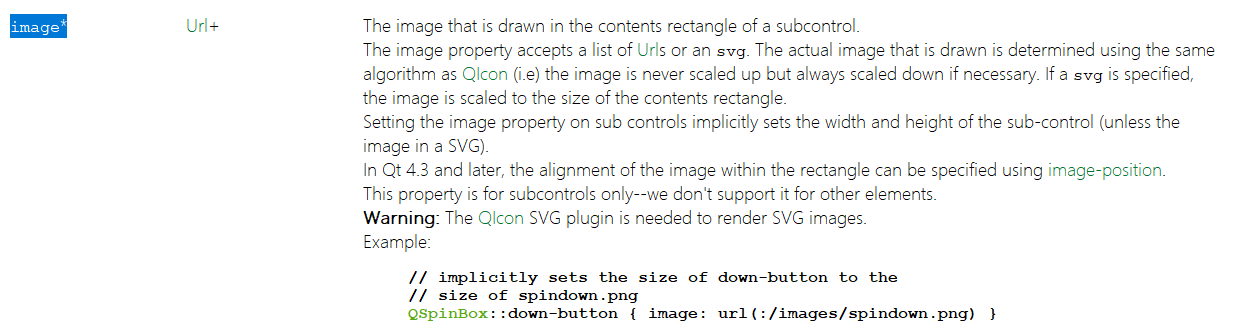
                    c4b50969-6e76-4a75-a837-85249c30f485-image.png
                    "This Property" not mean "image:" ??

                    there is a "period" behind "image-position"

                    1 Reply Last reply
                    0
                    • Christian EhrlicherC Offline
                      Christian EhrlicherC Offline
                      Christian Ehrlicher
                      Lifetime Qt Champion
                      wrote on last edited by
                      #10

                      If you think so - then use background-image

                      Qt Online Installer direct download: https://download.qt.io/official_releases/online_installers/
                      Visit the Qt Academy at https://academy.qt.io/catalog

                      1 Reply Last reply
                      0

                      • Login

                      • Login or register to search.
                      • First post
                        Last post
                      0
                      • Categories
                      • Recent
                      • Tags
                      • Popular
                      • Users
                      • Groups
                      • Search
                      • Get Qt Extensions
                      • Unsolved