Skip to content
  • Categories
  • Recent
  • Tags
  • Popular
  • Users
  • Groups
  • Search
  • Get Qt Extensions
  • Unsolved
Collapse
Brand Logo
  1. Home
  2. Qt Development
  3. General and Desktop
  4. Adjust text start position in linedit

Adjust text start position in linedit

Scheduled Pinned Locked Moved Solved General and Desktop
2 Posts 2 Posters 247 Views
  • Oldest to Newest
  • Newest to Oldest
  • Most Votes
Reply
  • Reply as topic
Log in to reply
This topic has been deleted. Only users with topic management privileges can see it.
  • I Offline
    I Offline
    IknowQT
    wrote on last edited by
    #1

    add47bec-d796-4016-b159-9c3fc2a21097-image.png

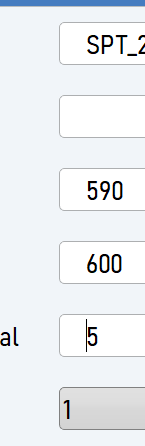
    I want to change the text start position like the picture, is there any way?
    I put the current space twice, but if I keep deleting the text, the space is also deleted.
    Is there a way to fix the text start position?

    jsulmJ 1 Reply Last reply
    0
    • I IknowQT

      add47bec-d796-4016-b159-9c3fc2a21097-image.png

      I want to change the text start position like the picture, is there any way?
      I put the current space twice, but if I keep deleting the text, the space is also deleted.
      Is there a way to fix the text start position?
      jsulmJ Offline
      jsulmJ Offline
      jsulm
      Lifetime Qt Champion
      wrote on last edited by
      #2

      @IknowQT Maybe https://doc.qt.io/qt-5/qlineedit.html#setTextMargins ?

      https://forum.qt.io/topic/113070/qt-code-of-conduct

      1 Reply Last reply
      0

      • Login

      • Login or register to search.
      • First post
        Last post
      0
      • Categories
      • Recent
      • Tags
      • Popular
      • Users
      • Groups
      • Search
      • Get Qt Extensions
      • Unsolved