Skip to content
  • Categories
  • Recent
  • Tags
  • Popular
  • Users
  • Groups
  • Search
  • Get Qt Extensions
  • Unsolved
Collapse
Brand Logo
  1. Home
  2. Qt Development
  3. Qt Creator and other tools
  4. could not start process

could not start process

Scheduled Pinned Locked Moved Solved Qt Creator and other tools
9 Posts 3 Posters 929 Views
  • Oldest to Newest
  • Newest to Oldest
  • Most Votes
Reply
  • Reply as topic
Log in to reply
This topic has been deleted. Only users with topic management privileges can see it.
  • A Offline
    A Offline
    AlperenUnal
    wrote on last edited by
    #1

    Hello everyone,

    I am new at QT programming and I am facing with a problem on Qt. Actually the program could run before, but I dont know why, my program give errors for now. Could you please help me?
    My error is down there.

    ebcb0b12-e89a-43e1-86dc-47d511cea2e3-image.png

    1 Reply Last reply
    0
    • A Offline
      A Offline
      AlperenUnal
      wrote on last edited by
      #2

      Now error is like this :(

      b1b870cb-1b79-4a1d-a01b-c74afe880828-image.png

      jsulmJ 1 Reply Last reply
      0
      • A AlperenUnal

        Now error is like this :(

        b1b870cb-1b79-4a1d-a01b-c74afe880828-image.png

        jsulmJ Offline
        jsulmJ Offline
        jsulm
        Lifetime Qt Champion
        wrote on last edited by
        #3

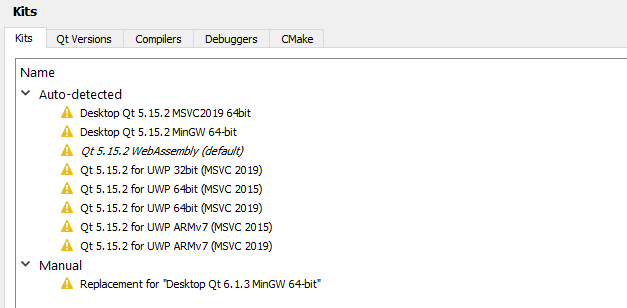
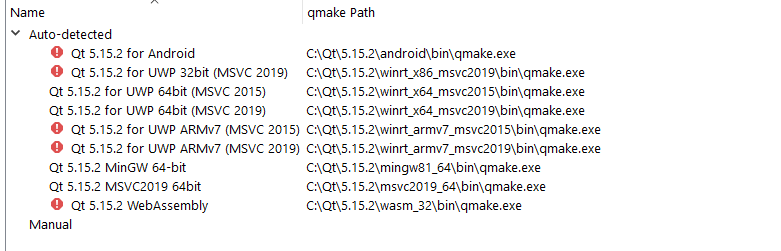
        @AlperenUnal As the error message suggests: check the Kit your using. Do you have any errors/warning there?
        Also it would be good to translate one of the error messages :-)

        https://forum.qt.io/topic/113070/qt-code-of-conduct

        A 1 Reply Last reply
        0
        • jsulmJ jsulm

          @AlperenUnal As the error message suggests: check the Kit your using. Do you have any errors/warning there?
          Also it would be good to translate one of the error messages :-)

          A Offline
          A Offline
          AlperenUnal
          wrote on last edited by
          #4

          @jsulm sorry for being late to your message :)

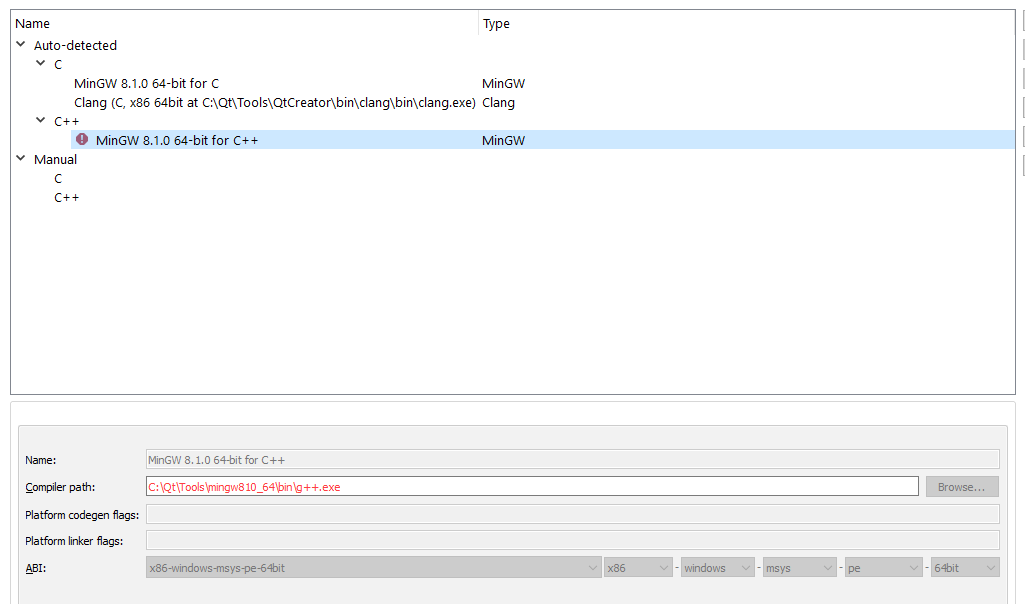
          I put some of the screenshots from the tools-> options->kits screen.
          The part that needed to be translated says that system could not find the specified file :)
          a461dcd9-f572-47f1-8e34-091220365756-image.png

          72824357-f688-4b7f-8d2e-d69a62570ee6-image.png

          1aa58f51-9145-4015-a76a-6ceec04fbe34-image.png

          KroMignonK 1 Reply Last reply
          0
          • A AlperenUnal

            @jsulm sorry for being late to your message :)

            I put some of the screenshots from the tools-> options->kits screen.
            The part that needed to be translated says that system could not find the specified file :)
            a461dcd9-f572-47f1-8e34-091220365756-image.png

            72824357-f688-4b7f-8d2e-d69a62570ee6-image.png

            1aa58f51-9145-4015-a76a-6ceec04fbe34-image.png

            KroMignonK Offline
            KroMignonK Offline
            KroMignon
            wrote on last edited by
            #5

            @AlperenUnal It looks like the MingGW compiler is not installed, do you have removed it?

            It is an old maxim of mine that when you have excluded the impossible, whatever remains, however improbable, must be the truth. (Sherlock Holmes)

            A 1 Reply Last reply
            1
            • KroMignonK KroMignon

              @AlperenUnal It looks like the MingGW compiler is not installed, do you have removed it?

              A Offline
              A Offline
              AlperenUnal
              wrote on last edited by
              #6

              @KroMignon actually I didn't change anything at my computer or in the QT Creator, but it seems that MinGW compiler has removed. How can i reinstall it if it is removed ?

              KroMignonK 1 Reply Last reply
              0
              • A AlperenUnal

                @KroMignon actually I didn't change anything at my computer or in the QT Creator, but it seems that MinGW compiler has removed. How can i reinstall it if it is removed ?

                KroMignonK Offline
                KroMignonK Offline
                KroMignon
                wrote on last edited by
                #7

                @AlperenUnal said in could not start process:

                How can i reinstall it if it is removed ?

                Use Qt Maintenance Tool and select add/remove components.

                It is an old maxim of mine that when you have excluded the impossible, whatever remains, however improbable, must be the truth. (Sherlock Holmes)

                A 1 Reply Last reply
                1
                • KroMignonK KroMignon

                  @AlperenUnal said in could not start process:

                  How can i reinstall it if it is removed ?

                  Use Qt Maintenance Tool and select add/remove components.

                  A Offline
                  A Offline
                  AlperenUnal
                  wrote on last edited by
                  #8

                  @KroMignon Okey sir, I will try it. Thanks for the help :)

                  1 Reply Last reply
                  0
                  • A Offline
                    A Offline
                    AlperenUnal
                    wrote on last edited by
                    #9

                    Hello again, after long hours for trying to fix the problem, I figured out that my antivirus program was the reason for the error :) Thanks all of you, have a nice day.

                    1 Reply Last reply
                    0

                    • Login

                    • Login or register to search.
                    • First post
                      Last post
                    0
                    • Categories
                    • Recent
                    • Tags
                    • Popular
                    • Users
                    • Groups
                    • Search
                    • Get Qt Extensions
                    • Unsolved
