insertRows and insertRow in tableview
-
Hey all,
This is a continuation of my previous post
https://forum.qt.io/topic/130364/headerdata-of-qabstracttablemodel-unable-to-return-qtcore-qvariant-list-of-strings/6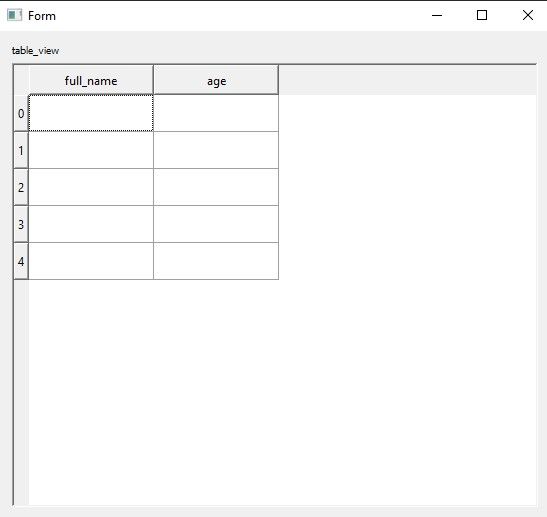
I am trying to
insertRowsthroughinsertRow-- expecting 5th row
as per the docs
but i guess i am doing something wrong, i know i am suppose to put rowCount somewhere ininsertRowsorinsertRowand if you can elaborate difference between
rowCountandinsertRowsorinsertRowcan you please guide me through
from PyQt5 import QtCore class TableModel(QtCore.QAbstractTableModel): def __init__(self, cols_strings, rows_strings, empty_strings, parent=None): super(TableModel, self).__init__(parent) self.colStringsList = cols_strings self.rowStringsList = rows_strings self.data = empty_strings def rowCount(self, index=QtCore.QModelIndex()): return len(self.data) def columnCount(self, index=QtCore.QModelIndex()): return len(self.data[0]) def data(self, index=QtCore.QModelIndex, role=QtCore.Qt.DisplayRole): if index.isValid(): if role == QtCore.Qt.DisplayRole or role == QtCore.Qt.EditRole: value = self.data[index.row()][index.column()] return str(value) def setData(self, index=QtCore.QModelIndex, value=QtCore.QVariant, role=QtCore.Qt.EditRole): if role == QtCore.Qt.EditRole: self.data[index.row()][index.column()] = value return True return False def headerData(self, section, orientation=QtCore.Qt.Orientation, role=QtCore.Qt.DisplayRole): if role == QtCore.Qt.DisplayRole: if orientation == QtCore.Qt.Horizontal: return self.colStringsList[section] if orientation == QtCore.Qt.Vertical: return self.rowStringsList[section] def flags(self, index): return QtCore.Qt.ItemIsSelectable | QtCore.Qt.ItemIsEnabled | QtCore.Qt.ItemIsEditable def insertRow(self, position, index=QtCore.QModelIndex()): self.insertRows(position, 1, index) def insertRows(self, position, rows=1, index=QtCore.QModelIndex()): self.beginInsertRows(index, position, position + rows - 1) for row in range(0, rows): self.data.insert(position, "") self.endInsertRows() return True@blossomsg said in insertRows and insertRow in tableview:
	def data(self, index=QtCore.QModelIndex, role=QtCore.Qt.DisplayRole):
		if index.isValid():
			if role == QtCore.Qt.DisplayRole or role == QtCore.Qt.EditRole:
				value = self.data[index.row()][index.column()]
				return str(value)

	def insertRows(self, position, rows=1, index=QtCore.QModelIndex()):
		self.beginInsertRows(index, position, position + rows - 1)
		for row in range(0, rows):
			self.data.insert(position, "")
		self.endInsertRows()
		return True
TableModel.insertRows() is inserting an empty string into data. TableModel.data() attempts to index into that string, which will fail.
-
Hey @jeremy_k
thanks for reply.
in the ui class i am passing list of empty strings, as i don't want it prefilled
i assumed model will be enough to explain the situation
below is the ui code
i am looking for how to get n-number of rows with insertRows, but no successfrom ui.table_view_delgate import Ui_Form from tablemodel import TableModel from PyQt5 import QtWidgets from PyQt5 import QtGui import sys import json with open('configuration_file.json') as data: config = json.load(data) table_strings = config class TableView(QtWidgets.QWidget): """ Tableview to test the delegates for multiple rows and columns """ def __init__(self): super(TableView, self).__init__() self.ui = Ui_Form() self.ui.setupUi(self) # this is coming from json, you can change to normal list as well self.table_col_names = [col for col in config.keys()] self.table_row_names = [row for row in range(10)] self.empty = [["", ""], ["", ""], ["", ""], ["", ""], ["", ""]] self.model = TableModel(self.table_col_names, self.table_row_names, self.empty) self.ui.tableView.setModel(self.model) app = QtWidgets.QApplication(sys.argv) app.setStyle('windows') window = TableView() window.show() sys.exit(app.exec_()) -
Hey @jeremy_k
thanks for reply.
in the ui class i am passing list of empty strings, as i don't want it prefilled
i assumed model will be enough to explain the situation
below is the ui code
i am looking for how to get n-number of rows with insertRows, but no successfrom ui.table_view_delgate import Ui_Form from tablemodel import TableModel from PyQt5 import QtWidgets from PyQt5 import QtGui import sys import json with open('configuration_file.json') as data: config = json.load(data) table_strings = config class TableView(QtWidgets.QWidget): """ Tableview to test the delegates for multiple rows and columns """ def __init__(self): super(TableView, self).__init__() self.ui = Ui_Form() self.ui.setupUi(self) # this is coming from json, you can change to normal list as well self.table_col_names = [col for col in config.keys()] self.table_row_names = [row for row in range(10)] self.empty = [["", ""], ["", ""], ["", ""], ["", ""], ["", ""]] self.model = TableModel(self.table_col_names, self.table_row_names, self.empty) self.ui.tableView.setModel(self.model) app = QtWidgets.QApplication(sys.argv) app.setStyle('windows') window = TableView() window.show() sys.exit(app.exec_())@blossomsg
But when you insert a new row you go:self.data.insert(position, "")That is a single string, not an array/list of strings corresponding to each column, which is what you have in your
self.empty? -
Hey @JonB ,
thanks for replying
i guess what you're saying is, this what i am suppose to do?
i tried with regular list, nested list, but no success
self.data.insert(position, ["", ""])
and
i even tried vice versa, updated
self.emptywith["", ""]and""-- no success -
Hey @JonB ,
thanks for replying
i guess what you're saying is, this what i am suppose to do?
i tried with regular list, nested list, but no success
self.data.insert(position, ["", ""])
and
i even tried vice versa, updated
self.emptywith["", ""]and""-- no success@blossomsg said in insertRows and insertRow in tableview:
self.data.insert(position, ["", ""])From what I can in
self.emptyone row is indeed["", ""], so thatinsert()looks better than"".but when i run the above code(model) with ui the 5th row does not appear
What is the question/situation/problem? The code you show doesn't actually call any
insertRow()orinsertRows()? What 5th row? -
@JonB said in insertRows and insertRow in tableview:
one row is indeed
What i am looking for,
right now there are 0 to 4 rows
and 2 columns
i want additional rows after 4th row through insertRows() is that possible?and if so how?
i don't want to mess with or keep adding again and again empty""in theself.empty -
@JonB said in insertRows and insertRow in tableview:
one row is indeed
What i am looking for,
right now there are 0 to 4 rows
and 2 columns
i want additional rows after 4th row through insertRows() is that possible?and if so how?
i don't want to mess with or keep adding again and again empty""in theself.empty@blossomsg said in insertRows and insertRow in tableview:
i want additional rows after 4th row through insertRows() is that possible?and if so how?
Of course. Just call
self.model.insertRow(5). You seem to have written your method for inserting rows but not called it.i don't want to mess with or keep adding again and again empty "" in the self.empty
I don't know what this means. The row you add will be empty because that's how you create it. Whether a row is inserted or not you can update its column values via
setData(). -
@JonB Thanks mate, you solved the mystery
so i am using the below code -- i am creatingrows=3rows of["", ""]-- as you had corrected me for""
rest everything is same
and the biggest part that i missed wasself.model.insertRow(5)Of course. Just call self.model.insertRow(5). You seem to have written your method for inserting rows but not called it.I assumed
insertRowto work asdataandsetData, i had no clue we need to call it
i had even downloaded the PyQt5 repo -- examples\itemviews\editabletreemodel\editabletreemodel.py
it was really confusingdef insertRow(self, position, index=QtCore.QModelIndex()): self.insertRows(position, 3, index) def insertRows(self, position, rows, parent=QtCore.QModelIndex()): print(position, rows, parent) self.beginInsertRows(parent, position, position + rows - 1) for rows in range(0, rows): self.data.insert(position, ["", ""]) self.endInsertRows() return True -
Thank You all
But i would like to even add one more thing, as per the docs
https://doc.qt.io/qt-5/qabstractitemmodel.html#rowCount
When implementing a table based model, rowCount() should return 0 when the parent is valid.and i am doing quite the opposite, i am creating my rows from rowCount()
https://doc.qt.io/qt-5/qabstractitemmodel.html#insertRow
https://doc.qt.io/qt-5/qabstractitemmodel.html#insertRowsso just for clarity which is the most preferred method, if there is any example page besides the mvc, please do share.
-
QAbstractItemModel::rowCount() has nothing to do with creating new rows in the model: it returns the current size and, as a const method, cannot modify the model. The documentation note, "When implementing a table based model, rowCount() should return 0 when the parent is valid," means exactly what it says. Top level items in a model have an invalid parent model index. There is no hierarchy in a table model, so there are no children of other items; all items are top level items. If anything calls your rowCount() on a table model and specifies anything other than an invalid index as the parent (it shouldn't, something is buggy) then the function should return 0 as a defensive response.
To create a new row or rows in your table model you call insertRow() or insertRows() and specify at which row you wish to insert the new row. The value rowCount() returns changes after this call.