Skip to content
  • Categories
  • Recent
  • Tags
  • Popular
  • Users
  • Groups
  • Search
  • Get Qt Extensions
  • Unsolved
Collapse
Brand Logo
  1. Home
  2. Qt Development
  3. Mobile and Embedded
  4. Cannot find jarsigner in JAVA_HOME or PATH

Cannot find jarsigner in JAVA_HOME or PATH

Scheduled Pinned Locked Moved Unsolved Mobile and Embedded
7 Posts 3 Posters 1.2k Views 2 Watching
  • Oldest to Newest
  • Newest to Oldest
  • Most Votes
Reply
  • Reply as topic
Log in to reply
This topic has been deleted. Only users with topic management privileges can see it.
  • D Offline
    D Offline
    Dmitriano
    wrote on last edited by Dmitriano
    #1

    Tried to build my app for Android with API level 30 (Android 11) and QT Creator 4.15.1, but got "Cannot find jarsigner in JAVA_HOME or PATH."

    JAVA_HOME is set as follows:

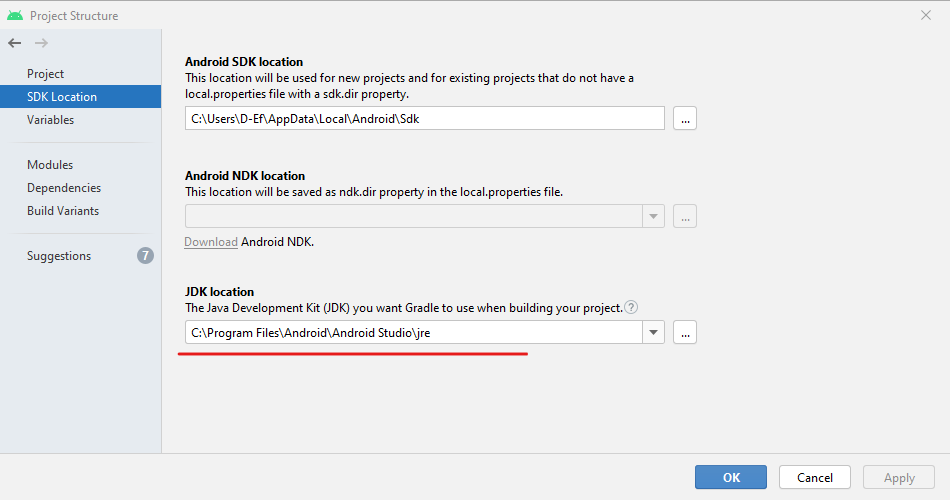
    JAVA_HOME=C:/Program Files/Android/Android Studio/jre

    but there is no jarsigner in "C:\Program Files\Android\Android Studio\jre\bin"

    I got this path from Android Studio settings:
    alt text

    should I install some other JDK version?

    see my blog post for details.

    1 Reply Last reply
    0
    • Alex RusA Offline
      Alex RusA Offline
      Alex Rus
      wrote on last edited by Alex Rus
      #2

      Same. After installation all necessary (at least what I needed on the previous machine) i can build regular apk and bundle, but not sing package :<

      1 Reply Last reply
      0
      • ekkescornerE Offline
        ekkescornerE Offline
        ekkescorner
        Qt Champions 2016
        wrote on last edited by
        #3

        from your blog I can see that your Manifest is wrong.
        This should be removed: <uses-sdk android:minSdkVersion="21" android:targetSdkVersion="30"/>
        and to be added to .pro:
        ANDROID_MIN_SDK_VERSION = "21"
        ANDROID_TARGET_SDK_VERSION = "30"

        probably because your manifest is wrong, you haven't updated your Templates ? This is really important for Qt 5.15 and QtC 5.14.1
        don't know if this is the case for your error, but yould try it

        ekke ... Qt Champion 2016 | 2024 ... mobile business apps
        5.15 --> 6.9 https://t1p.de/ekkeChecklist
        QMake --> CMake https://t1p.de/ekkeCMakeMobileApps

        Alex RusA 1 Reply Last reply
        1
        • ekkescornerE ekkescorner

          from your blog I can see that your Manifest is wrong.
          This should be removed: <uses-sdk android:minSdkVersion="21" android:targetSdkVersion="30"/>
          and to be added to .pro:
          ANDROID_MIN_SDK_VERSION = "21"
          ANDROID_TARGET_SDK_VERSION = "30"

          probably because your manifest is wrong, you haven't updated your Templates ? This is really important for Qt 5.15 and QtC 5.14.1
          don't know if this is the case for your error, but yould try it

          Alex RusA Offline
          Alex RusA Offline
          Alex Rus
          wrote on last edited by Alex Rus
          #4

          @ekkescorner said in Cannot find jarsigner in JAVA_HOME or PATH:

          from your blog I can see that your Manifest is wrong.
          This should be removed: <uses-sdk android:minSdkVersion="21" android:targetSdkVersion="30"/>
          and to be added to .pro:
          ANDROID_MIN_SDK_VERSION = "21"
          ANDROID_TARGET_SDK_VERSION = "30"

          probably because your manifest is wrong, you haven't updated your Templates ? This is really important for Qt 5.15 and QtC 5.14.1
          don't know if this is the case for your error, but yould try it

          Add as you write and remake Android Manifests (i have 2: for 32 and 64bit version) and there was no functional difference in them compared to the old ones. But there was few at gradle file. Still, same outcome: can build regular aab, signed apks, but not signed aab.

          ekkescornerE 1 Reply Last reply
          0
          • Alex RusA Alex Rus

            @ekkescorner said in Cannot find jarsigner in JAVA_HOME or PATH:

            from your blog I can see that your Manifest is wrong.
            This should be removed: <uses-sdk android:minSdkVersion="21" android:targetSdkVersion="30"/>
            and to be added to .pro:
            ANDROID_MIN_SDK_VERSION = "21"
            ANDROID_TARGET_SDK_VERSION = "30"

            probably because your manifest is wrong, you haven't updated your Templates ? This is really important for Qt 5.15 and QtC 5.14.1
            don't know if this is the case for your error, but yould try it

            Add as you write and remake Android Manifests (i have 2: for 32 and 64bit version) and there was no functional difference in them compared to the old ones. But there was few at gradle file. Still, same outcome: can build regular aab, signed apks, but not signed aab.

            ekkescornerE Offline
            ekkescornerE Offline
            ekkescorner
            Qt Champions 2016
            wrote on last edited by ekkescorner
            #5

            @Alex-Rus said in Cannot find jarsigner in JAVA_HOME or PATH:

            can build regular aab, signed apks, but not signed aab.

            don't know if this helps:

            I also can build and sign APKs (Qt 5.15 / QtC 4.15.1)
            aab from QtC build is always unsigned
            to get aab signed I added a Custom process Step
            command: jarsigner
            arguments: -verbose -sigalg SHA256withRSA -digestalg SHA-256 -keystore "path_to_mykeystore" "path_to_myApp.aab" "myKeystoreAlias" -storepass "myKeystorePassword" -keypass "myKeyPassword"
            figured this out with some help from @Jerome-Godbout

            BTW: why do you have 2 different Manifests because of 32 bit and 64 bit ?

            ekke ... Qt Champion 2016 | 2024 ... mobile business apps
            5.15 --> 6.9 https://t1p.de/ekkeChecklist
            QMake --> CMake https://t1p.de/ekkeCMakeMobileApps

            Alex RusA 1 Reply Last reply
            0
            • ekkescornerE ekkescorner

              @Alex-Rus said in Cannot find jarsigner in JAVA_HOME or PATH:

              can build regular aab, signed apks, but not signed aab.

              don't know if this helps:

              I also can build and sign APKs (Qt 5.15 / QtC 4.15.1)
              aab from QtC build is always unsigned
              to get aab signed I added a Custom process Step
              command: jarsigner
              arguments: -verbose -sigalg SHA256withRSA -digestalg SHA-256 -keystore "path_to_mykeystore" "path_to_myApp.aab" "myKeystoreAlias" -storepass "myKeystorePassword" -keypass "myKeyPassword"
              figured this out with some help from @Jerome-Godbout

              BTW: why do you have 2 different Manifests because of 32 bit and 64 bit ?

              Alex RusA Offline
              Alex RusA Offline
              Alex Rus
              wrote on last edited by
              #6

              @ekkescorner said in Cannot find jarsigner in JAVA_HOME or PATH:

              aab from QtC build is always unsigned

              It's strange, before updating to 5.15 version I could easily sign and upload bundles to the Play Market

              to get aab signed I added a Custom process Step
              command: jarsigner
              arguments: -verbose -sigalg SHA256withRSA -digestalg SHA-256 -keystore "path_to_mykeystore" "path_to_myApp.aab" "myKeystoreAlias" -storepass "myKeystorePassword" -keypass "myKeyPassword"
              figured this out with some help from @Jerome-Godbout

              Thx for info, but the "Invalid command" is writing to me and "Could not start process "jarsigner"" in Compile Output
              63814ba5-94a7-4577-b97e-8015678a61a1-image.png ![alt text]

              BTW: why do you have 2 different Manifests because of 32 bit and 64 bit ?

              As far as I remember (I did this a year ago), this is to assign a unique ID to different versions (the Play Market requires it)

              ekkescornerE 1 Reply Last reply
              0
              • Alex RusA Alex Rus

                @ekkescorner said in Cannot find jarsigner in JAVA_HOME or PATH:

                aab from QtC build is always unsigned

                It's strange, before updating to 5.15 version I could easily sign and upload bundles to the Play Market

                to get aab signed I added a Custom process Step
                command: jarsigner
                arguments: -verbose -sigalg SHA256withRSA -digestalg SHA-256 -keystore "path_to_mykeystore" "path_to_myApp.aab" "myKeystoreAlias" -storepass "myKeystorePassword" -keypass "myKeyPassword"
                figured this out with some help from @Jerome-Godbout

                Thx for info, but the "Invalid command" is writing to me and "Could not start process "jarsigner"" in Compile Output
                63814ba5-94a7-4577-b97e-8015678a61a1-image.png ![alt text]

                BTW: why do you have 2 different Manifests because of 32 bit and 64 bit ?

                As far as I remember (I did this a year ago), this is to assign a unique ID to different versions (the Play Market requires it)

                ekkescornerE Offline
                ekkescornerE Offline
                ekkescorner
                Qt Champions 2016
                wrote on last edited by
                #7

                @Alex-Rus don't know why you cannot start jarsigner - I'm working on macOS Catalina with JDK 8, no Android Studio installed and QtCreator 4.15.1 by magic installed all what's needed. no problems with Android or iOS

                you don't need 2 Android Manifests to upload 32-bit and 64-bit APKs to PlayStore, but you must make sure that VersionCode is different.
                here's how you can do this with 1 Manifest - let QtC fill in the VersionName and VersionCode:

                android:versionName="-- %%INSERT_VERSION_NAME%% --" android:versionCode="-- %%INSERT_VERSION_CODE%% --"
                

                inside your .pro you can calculate the VersionCode:

                    # deploying 32-bit and 64-bit APKs you need different VersionCode
                    # here's my way to solve this - per ex. Version 1.2.3
                    # aabcddeef aa: 21 (MY_MIN_API), b: 0 (32 Bit) or 1 (64 Bit)  c: 0 (unused)
                    # dd: 01 (Major Release), ee: 02 (Minor Release), f:  3 (Patch Release)
                    # VersionName 1.2.3
                    # VersionCode 32 Bit: 210001023
                    # VersionCode 64 Bit: 211001023
                    defineReplace(droidVersionCode) {
                        segments = $$split(1, ".")
                        for (segment, segments): vCode = "$$first(vCode)$$format_number($$segment, width=2 zeropad)"
                        equals(ANDROID_ABIS, arm64-v8a): \
                            prefix = 1
                        else: equals(ANDROID_ABIS, armeabi-v7a): \
                            prefix = 0
                        else: prefix = 2
                        # add more cases as needed
                        return($$first(prefix)0$$first(vCode))
                    }
                    MY_VERSION = 1.2
                    MY_PATCH_VERSION = 3
                    MY_MIN_API = 21
                    ANDROID_VERSION_NAME = $$MY_VERSION"."$$MY_PATCH_VERSION
                    ANDROID_VERSION_CODE = $$MY_MIN_API$$droidVersionCode($$MY_VERSION)$$MY_PATCH_VERSION


                there are different ways to number VersionCode for different archs, take a look at:
                https://www.qt.io/blog/2019/06/28/comply-upcoming-requirements-google-play
                hint: you must use ANDROID_ABIS instead of ANDROID_TARGET_ARCH
                https://androidbycode.wordpress.com/2015/06/30/android-ndk-version-code-scheme-for-publishing-apks-per-architecture/
                https://medium.com/dipien/versioning-android-apps-d6ec171cfd82

                also you have to remove MinSDK and TargetSDK from Manifest, because it's now part of gradle.properties, where QtC will put it in from this in .pro:

                ANDROID_MIN_SDK_VERSION = "21"
                ANDROID_TARGET_SDK_VERSION = "29"
                

                will blog about all of this soon - just "moving" more then 30 projects from 5.13.2 to 5.15...

                ekke ... Qt Champion 2016 | 2024 ... mobile business apps
                5.15 --> 6.9 https://t1p.de/ekkeChecklist
                QMake --> CMake https://t1p.de/ekkeCMakeMobileApps

                1 Reply Last reply
                0

                • Login

                • Login or register to search.
                • First post
                  Last post
                0
                • Categories
                • Recent
                • Tags
                • Popular
                • Users
                • Groups
                • Search
                • Get Qt Extensions
                • Unsolved