
Skip to content
  • Categories
  • Recent
  • Tags
  • Popular
  • Users
  • Groups
  • Search
  • Get Qt Extensions
  • Unsolved
Collapse
Brand Logo
  1. Home
  2. Qt Development
  3. Qt Creator and other tools
  4. Tooll tip copy?
Qt 6.11 is out! See what's new in the release blog

Tooll tip copy?

Scheduled Pinned Locked Moved Unsolved Qt Creator and other tools
6 Posts 5 Posters 817 Views 2 Watching
  • Oldest to Newest
  • Newest to Oldest
  • Most Votes
Reply
  • Reply as topic
Log in to reply
This topic has been deleted. Only users with topic management privileges can see it.
  • A Offline
    A Offline
    Anonymous_Banned275
    wrote on last edited by
    #1

    Howering mouse on item gives "tool tip".

    Is there a way to save / copy such tool tip text?

    1 Reply Last reply
    0
    • VRoninV Offline
      VRoninV Offline
      VRonin
      wrote on last edited by VRonin
      #2

      What classes are we talking about? What's an "item" in this context?

      "La mort n'est rien, mais vivre vaincu et sans gloire, c'est mourir tous les jours"
      ~Napoleon Bonaparte

      On a crusade to banish setIndexWidget() from the holy land of Qt

      A 1 Reply Last reply
      0
      • VRoninV VRonin

        What classes are we talking about? What's an "item" in this context?

        A Offline
        A Offline
        Anonymous_Banned275
        wrote on last edited by
        #3

        @VRonin If I have an #include <WHATEVER.h> - putting the mouse on the text will give me WHATEVER.h path as "tool tip"
        Can I save this tool tip ?

        JonBJ 1 Reply Last reply
        0
        • A Anonymous_Banned275

          @VRonin If I have an #include <WHATEVER.h> - putting the mouse on the text will give me WHATEVER.h path as "tool tip"
          Can I save this tool tip ?

          JonBJ Online
          JonBJ Online
          JonB
          wrote on last edited by
          #4

          @AnneRanch
          No, you cannot save the tooltips displayed by a program like Qt Creator.

          However, I can't run it now, but is there a double-click or a right-click or right-click context menu or a key press which will bring the file referenced by the #include <...> line into the editor for you?

          J.HilkJ 1 Reply Last reply
          1
          • JonBJ JonB

            @AnneRanch
            No, you cannot save the tooltips displayed by a program like Qt Creator.

            However, I can't run it now, but is there a double-click or a right-click or right-click context menu or a key press which will bring the file referenced by the #include <...> line into the editor for you?

            J.HilkJ Offline
            J.HilkJ Offline
            J.Hilk
            Moderators
            wrote on last edited by J.Hilk
            #5

            @JonB curser in the word and F2 or ctrl+leftclick iirc 😉
            or shift\alt modifier, im using an apple keyboard, so who knows


            Be aware of the Qt Code of Conduct, when posting : https://forum.qt.io/topic/113070/qt-code-of-conduct


            Q: What's that?
            A: It's blue light.
            Q: What does it do?
            A: It turns blue.

            1 Reply Last reply
            2
            • mrjjM Offline
              mrjjM Offline
              mrjj
              Lifetime Qt Champion
              wrote on last edited by
              #6

              Hi
              Press F2 or Ctrl+left click (windows)
              to go into the file.
              Then on top of it, in the drop down you can do
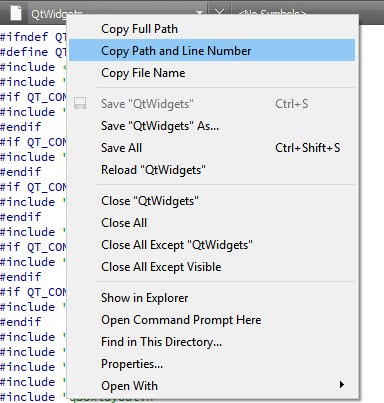
              alt text

              and use Copy Path

              1 Reply Last reply
              2

              • Login

              • Login or register to search.
              • First post
                Last post
              0
              • Categories
              • Recent
              • Tags
              • Popular
              • Users
              • Groups
              • Search
              • Get Qt Extensions
              • Unsolved