New Project options for QT 6.0 Open Source
-
Hi
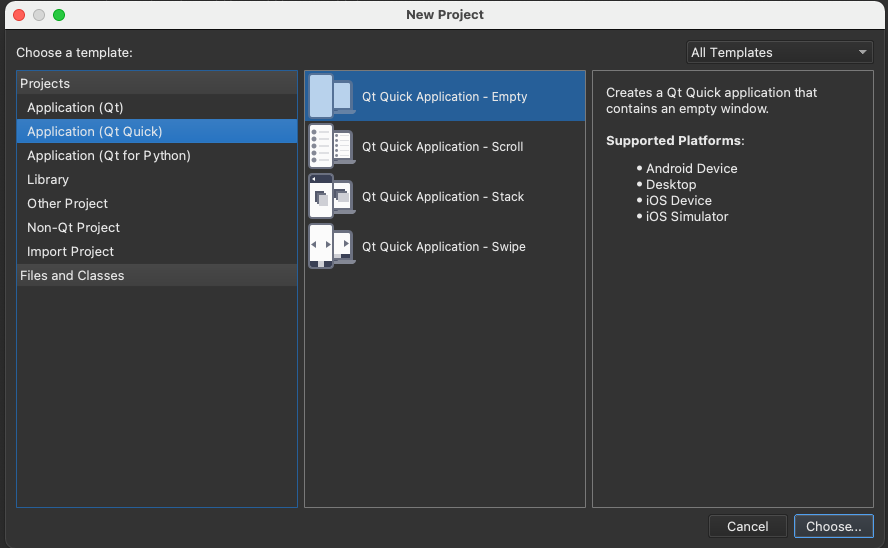
Just completed a new install of 6.0.1 and looking to create a QML application. When doing a New Project I am not seeing the following options:
- File > New File or Project > Application > Qt Quick Application - Empty
only seeing the following:
-
File > New File or Project > Application > Qt Widgets Application, and
-
File > New File or Project > Application > Qt Console Application
Is this because it is the Open Source version of am I missing something in the configuration
Documentation indicates I should see the following:

-
@J-Hilk I was a bit to fast in uninstalling. I did find installing the standard deployment using 5.15.2 worked in that it showed the templates. Following this with adding the 6.0.0 distribution enabled me to continue using the templates.
Thanks for your help
-
Hi
Just completed a new install of 6.0.1 and looking to create a QML application. When doing a New Project I am not seeing the following options:
- File > New File or Project > Application > Qt Quick Application - Empty
only seeing the following:
-
File > New File or Project > Application > Qt Widgets Application, and
-
File > New File or Project > Application > Qt Console Application
Is this because it is the Open Source version of am I missing something in the configuration
Documentation indicates I should see the following:
-
@J-Hilk I installed the creator as part of the clean install:
QT Creator: 4.14.0
Platform is: Mac OS 11.1 -
Thanks, I will delete and try downloading the free trial and see if I get a different result.
I am hoping it is not a licensed version thing as while I am learning I can not afford the monthly fee.
Cheers
@Garf hold on, no need to throw the baby out with the bathwater!
you can simply choose one of your options and simply change a few things in the pro file and the main.cpp
no need to deinstall everything
First of I would suggest, try one of the qml examples to see if the qtquick module is installed at all :D
-
I can assure you that the Qt Quick wizards in the commercial and non-commercial wizards are the same.
Have you actually checked out the 'Application (Qt Quick)' section under projects?
Can you paste a screenshot of your dialog?
-
@J-Hilk I was a bit to fast in uninstalling. I did find installing the standard deployment using 5.15.2 worked in that it showed the templates. Following this with adding the 6.0.0 distribution enabled me to continue using the templates.
Thanks for your help