
Change the interface inside the same MainWindow
-
I need to change the interface of my application inside the main window every time that I push one of three pushbuttons (I have 3 different interfaces). I foud something on the web about the DockWidgets but they seem not to be the right choise for my pourpose because I think that they are usefull when you have to place side by side, in your main windows, two or more "windows" and not only one. Maybe I'm wrong, I'm moving my first steps in Qt framework.
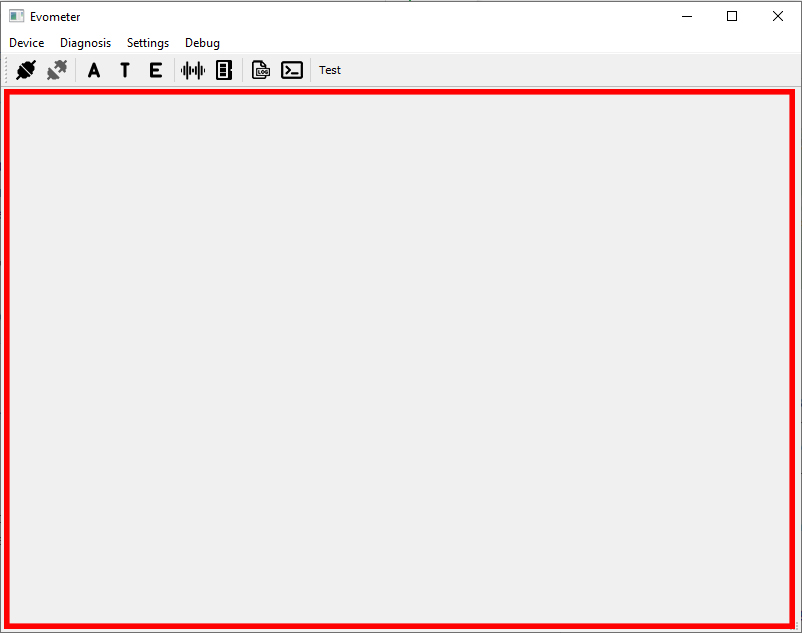
What's the best method to implement the switch between interfaces in main window? In the following picture an example of what I'm looking for: if I press the button 'A' it must open the 'Innterface A' in the red area, if I press the button 'T' it must close the 'Interface A' and open the 'Innterface T' in the same red area and if I press the button 'E' it must close the 'Interface T' and open the 'Innterface E'...and so on.
Any suggestions?
-
I need to change the interface of my application inside the main window every time that I push one of three pushbuttons (I have 3 different interfaces). I foud something on the web about the DockWidgets but they seem not to be the right choise for my pourpose because I think that they are usefull when you have to place side by side, in your main windows, two or more "windows" and not only one. Maybe I'm wrong, I'm moving my first steps in Qt framework.
What's the best method to implement the switch between interfaces in main window? In the following picture an example of what I'm looking for: if I press the button 'A' it must open the 'Innterface A' in the red area, if I press the button 'T' it must close the 'Interface A' and open the 'Innterface T' in the same red area and if I press the button 'E' it must close the 'Interface T' and open the 'Innterface E'...and so on.
Any suggestions?
@Andrew23 Take a look at https://doc.qt.io/qt-5/qstackedwidget.html
-
I need to change the interface of my application inside the main window every time that I push one of three pushbuttons (I have 3 different interfaces). I foud something on the web about the DockWidgets but they seem not to be the right choise for my pourpose because I think that they are usefull when you have to place side by side, in your main windows, two or more "windows" and not only one. Maybe I'm wrong, I'm moving my first steps in Qt framework.
What's the best method to implement the switch between interfaces in main window? In the following picture an example of what I'm looking for: if I press the button 'A' it must open the 'Innterface A' in the red area, if I press the button 'T' it must close the 'Interface A' and open the 'Innterface T' in the same red area and if I press the button 'E' it must close the 'Interface T' and open the 'Innterface E'...and so on.
Any suggestions?
-
@Andrew23 Take a look at https://doc.qt.io/qt-5/qstackedwidget.html

