Skip to content
  • Categories
  • Recent
  • Tags
  • Popular
  • Users
  • Groups
  • Search
  • Get Qt Extensions
  • Unsolved
Collapse
Brand Logo
  1. Home
  2. Qt Development
  3. General and Desktop
  4. Vertical Layout: something wrong
Qt 6.11 is out! See what's new in the release blog

Vertical Layout: something wrong

Scheduled Pinned Locked Moved Solved General and Desktop
4 Posts 3 Posters 723 Views 3 Watching
  • Oldest to Newest
  • Newest to Oldest
  • Most Votes
Reply
  • Reply as topic
Log in to reply
This topic has been deleted. Only users with topic management privileges can see it.
  • sitesvS Offline
    sitesvS Offline
    sitesv
    wrote on last edited by
    #1

    Hello!
    I have one simple Q:
    Default Widget project

    #include "mainwindow.h"
    
    #include <QApplication>
    #include <QVBoxLayout>
    #include <QTableWidget>
    
    void init_form(QWidget *parent);
    QVBoxLayout *vbox;
    
    int main(int argc, char *argv[])
    {
        QApplication a(argc, argv);
        MainWindow w;
    
        init_form(&w);
    
        w.show();
        return a.exec();
    }
    
    void init_form(QWidget *parent){
        vbox = new QVBoxLayout(parent);
        for(int i = 0; i < 2; i++){
            QTableWidget *t = new QTableWidget(parent);
            t->setRowCount(10);
            t->setColumnCount(10);
            vbox->addWidget(t);
        }
        parent->setLayout(vbox);
    }
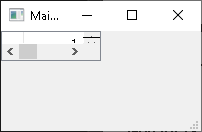
    

    355fc614-76aa-4cd0-bc40-13be3d00590f-image.png

    What is wrong?
    Thank you!

    1 Reply Last reply
    0
    • SGaistS Offline
      SGaistS Offline
      SGaist
      Lifetime Qt Champion
      wrote on last edited by
      #2

      Hi,

      What does MainWindow contain ?

      As for the what is wrong question: why do you store a static pointer to your layout ?
      One thing that is wrong is passaient a parent to your layout constructor and call setLayout afterward. If you give a parent to a layout, then it will be automatically applied.

      Interested in AI ? www.idiap.ch
      Please read the Qt Code of Conduct - https://forum.qt.io/topic/113070/qt-code-of-conduct

      sitesvS 1 Reply Last reply
      0
      • SGaistS SGaist

        Hi,

        What does MainWindow contain ?

        As for the what is wrong question: why do you store a static pointer to your layout ?
        One thing that is wrong is passaient a parent to your layout constructor and call setLayout afterward. If you give a parent to a layout, then it will be automatically applied.

        sitesvS Offline
        sitesvS Offline
        sitesv
        wrote on last edited by
        #3

        @SGaist said in Vertical Layout: something wrong:

        What does MainWindow contain ?

        Default empty form.

        @SGaist said in Vertical Layout: something wrong:

        As for the what is wrong question: why do you store a static pointer to your layout ?

        Ok. What pointer I should use as a parent?

        1 Reply Last reply
        0
        • mrjjM Offline
          mrjjM Offline
          mrjj
          Lifetime Qt Champion
          wrote on last edited by
          #4

          hi
          MainWindow is special in that it normally has a centralWidget so
          what i think you want is

          #include "mainwindow.h"
          
          #include <QApplication>
          #include <QVBoxLayout>
          #include <QTableWidget>
          
          void init_form(QWidget *parent);
          QVBoxLayout *vbox; // this is really not needed. could just be in function
          
          int main(int argc, char *argv[])
          {
              QApplication a(argc, argv);
              MainWindow w;
          
              init_form(w.centralWidget()); // give the centralWidget
          
              w.show();
              return a.exec();
          }
          
          void init_form(QWidget *parent){
              vbox = new QVBoxLayout(); // no parent yet
              for(int i = 0; i < 2; i++){
                  QTableWidget *t = new QTableWidget(parent);
                  t->setRowCount(10);
                  t->setColumnCount(10);
                  vbox->addWidget(t);
              }
              parent->setLayout(vbox);
          }
          

          alt text

          1 Reply Last reply
          2

          • Login

          • Login or register to search.
          • First post
            Last post
          0
          • Categories
          • Recent
          • Tags
          • Popular
          • Users
          • Groups
          • Search
          • Get Qt Extensions
          • Unsolved