
Skip to content
  • Categories
  • Recent
  • Tags
  • Popular
  • Users
  • Groups
  • Search
  • Get Qt Extensions
  • Unsolved
Collapse
Brand Logo
  1. Home
  2. Qt Development
  3. General and Desktop
  4. QTreeWidgetItem. Colored text.
Qt 6.11 is out! See what's new in the release blog

QTreeWidgetItem. Colored text.

Scheduled Pinned Locked Moved Solved General and Desktop
8 Posts 4 Posters 2.8k Views 2 Watching
  • Oldest to Newest
  • Newest to Oldest
  • Most Votes
Reply
  • Reply as topic
Log in to reply
This topic has been deleted. Only users with topic management privileges can see it.
  • D Offline
    D Offline
    DMI3Y
    wrote on last edited by
    #1

    Hi. Is there any way to use color/font tags (or another solution) for QTreeWidgetItem? Need to fill it with colored text in one column.
    (Sorry for my english)

    1 Reply Last reply
    0
    • mrjjM Offline
      mrjjM Offline
      mrjj
      Lifetime Qt Champion
      wrote on last edited by
      #6

      Hi

      AS @SGaist says you need to do your own drawing of that.

      Like here
      https://stackoverflow.com/questions/55923137/custom-qstyleditemdelegate-to-draw-text-with-multiple-colors

      Funny enough it seems to be exactly the same use case :)

      1 Reply Last reply
      1
      • mrjjM Offline
        mrjjM Offline
        mrjj
        Lifetime Qt Champion
        wrote on last edited by mrjj
        #2

        Hi and welcome to the forums.
        Your English is fine.

        One way is to use the
        QBrush b (Qt::red);
        item->setForeground( 0 , b );
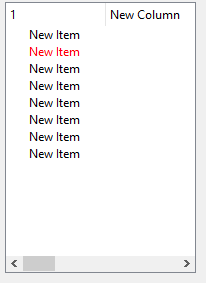
        alt text

        D 1 Reply Last reply
        2
        • mrjjM mrjj

          Hi and welcome to the forums.
          Your English is fine.

          One way is to use the
          QBrush b (Qt::red);
          item->setForeground( 0 , b );

          alt text

          D Offline
          D Offline
          DMI3Y
          wrote on last edited by
          #3

          @mrjj thx.. I knew about that, but need something different. My trouble - paint "new" and "item" with different colors. For example "new" - red, "item" - blue.

          JonBJ 1 Reply Last reply
          0
          • D DMI3Y

            @mrjj thx.. I knew about that, but need something different. My trouble - paint "new" and "item" with different colors. For example "new" - red, "item" - blue.

            JonBJ Online
            JonBJ Online
            JonB
            wrote on last edited by
            #4

            @DMI3Y
            You are supposed to change the color as @mrjj has shown you. The fact that you wish to vary the color depending on the text in the item is for you to implement.

            1 Reply Last reply
            2
            • SGaistS Offline
              SGaistS Offline
              SGaist
              Lifetime Qt Champion
              wrote on last edited by
              #5

              Hi,

              You will need a QStyledItemDelegate and do the text painting yourself.

              Interested in AI ? www.idiap.ch
              Please read the Qt Code of Conduct - https://forum.qt.io/topic/113070/qt-code-of-conduct

              1 Reply Last reply
              2
              • mrjjM Offline
                mrjjM Offline
                mrjj
                Lifetime Qt Champion
                wrote on last edited by
                #6

                Hi

                AS @SGaist says you need to do your own drawing of that.

                Like here
                https://stackoverflow.com/questions/55923137/custom-qstyleditemdelegate-to-draw-text-with-multiple-colors

                Funny enough it seems to be exactly the same use case :)

                1 Reply Last reply
                1
                • D Offline
                  D Offline
                  DMI3Y
                  wrote on last edited by
                  #7

                  Thx you all.
                  There was hope for some built-in functionality something like setHTML... But... Ok...
                  Think this thread can be marked as resolved.

                  mrjjM 1 Reply Last reply
                  0
                  • D DMI3Y

                    Thx you all.
                    There was hope for some built-in functionality something like setHTML... But... Ok...
                    Think this thread can be marked as resolved.

                    mrjjM Offline
                    mrjjM Offline
                    mrjj
                    Lifetime Qt Champion
                    wrote on last edited by
                    #8

                    @DMI3Y

                    Well you could add a QLabel to the cell and use its rich text capabilities but
                    it suffers from being non-editable and poor performance if many items.

                    You will be much happier with the Delegate.

                    1 Reply Last reply
                    0

                    • Login

                    • Login or register to search.
                    • First post
                      Last post
                    0
                    • Categories
                    • Recent
                    • Tags
                    • Popular
                    • Users
                    • Groups
                    • Search
                    • Get Qt Extensions
                    • Unsolved