Skip to content
  • Categories
  • Recent
  • Tags
  • Popular
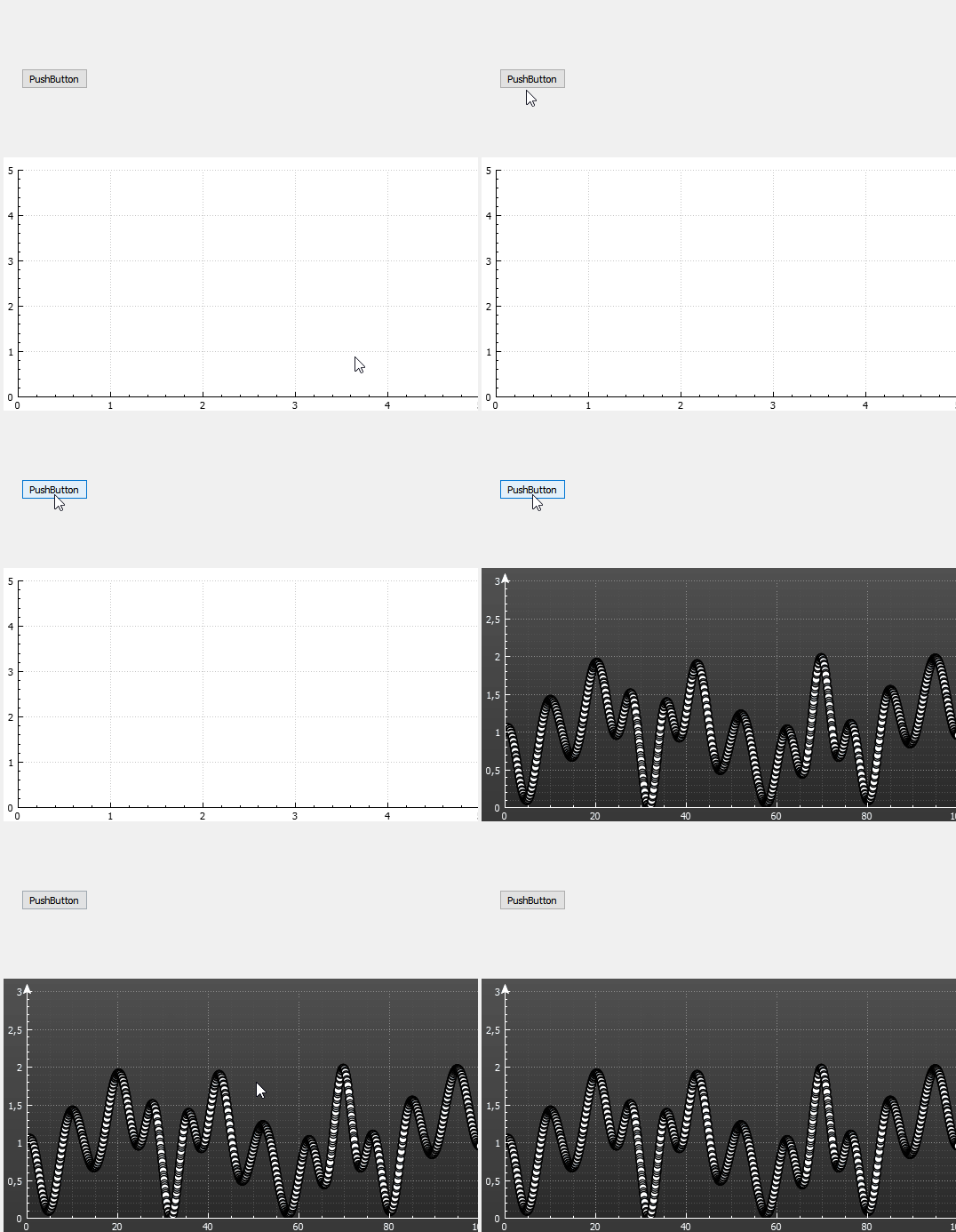
  • Users
  • Groups
  • Search
  • Get Qt Extensions
  • Unsolved
Collapse
Brand Logo
  1. Home
  2. Qt Development
  3. General and Desktop
  4. Function not calling other than Main function

Function not calling other than Main function

Scheduled Pinned Locked Moved Unsolved General and Desktop
9 Posts 4 Posters 485 Views 1 Watching
  • Oldest to Newest
  • Newest to Oldest
  • Most Votes
Reply
  • Reply as topic
Log in to reply
This topic has been deleted. Only users with topic management privileges can see it.
  • MijazM Offline
    MijazM Offline
    Mijaz
    wrote on last edited by
    #1

    When I can mainPlot(); into main function
    as follows it works correctly for one time display.

    #include "mainwindow.h"
    #include "ui_mainwindow.h"
    
    MainWindow::MainWindow(QWidget *parent) :
        QMainWindow(parent),
        ui(new Ui::MainWindow)
    {
        ui->setupUi(this);
       makePlot();
    }


    When I call makePlot(); to under another function it don't display plot.

    #include "mainwindow.h"
    #include "ui_mainwindow.h"
    
    MainWindow::MainWindow(QWidget *parent) :
        QMainWindow(parent),
        ui(new Ui::MainWindow)
    {
        ui->setupUi(this);
       // makePlot();
    }
    
    MainWindow::~MainWindow()
    {
        delete ui;
    }
     void MainWindow::makePlot()
     {
    
         // prepare data:
         QVector<double> x1(200), y1(200);
         for (int i=0; i<x1.size(); ++i)
         {
           x1[i] = i/(double)(x1.size()-1)*15;
           y1[i] = qCos(x1[i]*0.8+qSin(x1[i]*0.16+1.0))*qSin(x1[i]*0.25)+1;
         }
    
         // create and configure plottables:
         QCPGraph *graph1 = ui->customPlot->addGraph();
         graph1->setData(x1, y1);
         graph1->setScatterStyle(QCPScatterStyle(QCPScatterStyle::ssCircle, QPen(Qt::black, 1.5), QBrush(Qt::white), 9));
            graph1->setPen(QPen(QColor(220, 220, 0), 2));
    
         // set some pens, brushes and backgrounds:
         ui->customPlot->xAxis->setBasePen(QPen(Qt::white, 1));
         ui->customPlot->yAxis->setBasePen(QPen(Qt::white, 1));
         ui->customPlot->xAxis->setTickPen(QPen(Qt::white, 1));
         ui->customPlot->yAxis->setTickPen(QPen(Qt::white, 1));
         ui->customPlot->xAxis->setSubTickPen(QPen(Qt::white, 1));
         ui->customPlot->yAxis->setSubTickPen(QPen(Qt::white, 1));
         ui->customPlot->xAxis->setTickLabelColor(Qt::white);
         ui->customPlot->yAxis->setTickLabelColor(Qt::white);
         ui->customPlot->xAxis->grid()->setPen(QPen(QColor(140, 140, 140), 1, Qt::DotLine));
         ui->customPlot->yAxis->grid()->setPen(QPen(QColor(140, 140, 140), 1, Qt::DotLine));
         ui->customPlot->xAxis->grid()->setSubGridPen(QPen(QColor(80, 80, 80), 1, Qt::DotLine));
         ui->customPlot->yAxis->grid()->setSubGridPen(QPen(QColor(80, 80, 80), 1, Qt::DotLine));
         ui->customPlot->xAxis->grid()->setSubGridVisible(true);
         ui->customPlot->yAxis->grid()->setSubGridVisible(true);
         ui->customPlot->xAxis->grid()->setZeroLinePen(Qt::NoPen);
         ui->customPlot->yAxis->grid()->setZeroLinePen(Qt::NoPen);
         ui->customPlot->xAxis->setUpperEnding(QCPLineEnding::esSpikeArrow);
         ui->customPlot->yAxis->setUpperEnding(QCPLineEnding::esSpikeArrow);
         QLinearGradient plotGradient;
         plotGradient.setStart(0, 0);
         plotGradient.setFinalStop(0, 350);
         plotGradient.setColorAt(0, QColor(80, 80, 80));
         plotGradient.setColorAt(1, QColor(50, 50, 50));
         ui->customPlot->setBackground(plotGradient);
         QLinearGradient axisRectGradient;
         axisRectGradient.setStart(0, 0);
         axisRectGradient.setFinalStop(0, 350);
         axisRectGradient.setColorAt(0, QColor(80, 80, 80));
         axisRectGradient.setColorAt(1, QColor(30, 30, 30));
        ui->customPlot->axisRect()->setBackground(axisRectGradient);
    
         ui->customPlot->rescaleAxes();
         ui->customPlot->yAxis->setRange(0, 2); }
    
    void MainWindow::on_start_clicked()
    {
      makePlot();
    }
    
    
    jsulmJ 1 Reply Last reply
    0
    • MijazM Mijaz

      When I can mainPlot(); into main function
      as follows it works correctly for one time display.

      #include "mainwindow.h"
      #include "ui_mainwindow.h"
      
      MainWindow::MainWindow(QWidget *parent) :
          QMainWindow(parent),
          ui(new Ui::MainWindow)
      {
          ui->setupUi(this);
         makePlot();
      }


      When I call makePlot(); to under another function it don't display plot.

      #include "mainwindow.h"
      #include "ui_mainwindow.h"
      
      MainWindow::MainWindow(QWidget *parent) :
          QMainWindow(parent),
          ui(new Ui::MainWindow)
      {
          ui->setupUi(this);
         // makePlot();
      }
      
      MainWindow::~MainWindow()
      {
          delete ui;
      }
       void MainWindow::makePlot()
       {
      
           // prepare data:
           QVector<double> x1(200), y1(200);
           for (int i=0; i<x1.size(); ++i)
           {
             x1[i] = i/(double)(x1.size()-1)*15;
             y1[i] = qCos(x1[i]*0.8+qSin(x1[i]*0.16+1.0))*qSin(x1[i]*0.25)+1;
           }
      
           // create and configure plottables:
           QCPGraph *graph1 = ui->customPlot->addGraph();
           graph1->setData(x1, y1);
           graph1->setScatterStyle(QCPScatterStyle(QCPScatterStyle::ssCircle, QPen(Qt::black, 1.5), QBrush(Qt::white), 9));
              graph1->setPen(QPen(QColor(220, 220, 0), 2));
      
           // set some pens, brushes and backgrounds:
           ui->customPlot->xAxis->setBasePen(QPen(Qt::white, 1));
           ui->customPlot->yAxis->setBasePen(QPen(Qt::white, 1));
           ui->customPlot->xAxis->setTickPen(QPen(Qt::white, 1));
           ui->customPlot->yAxis->setTickPen(QPen(Qt::white, 1));
           ui->customPlot->xAxis->setSubTickPen(QPen(Qt::white, 1));
           ui->customPlot->yAxis->setSubTickPen(QPen(Qt::white, 1));
           ui->customPlot->xAxis->setTickLabelColor(Qt::white);
           ui->customPlot->yAxis->setTickLabelColor(Qt::white);
           ui->customPlot->xAxis->grid()->setPen(QPen(QColor(140, 140, 140), 1, Qt::DotLine));
           ui->customPlot->yAxis->grid()->setPen(QPen(QColor(140, 140, 140), 1, Qt::DotLine));
           ui->customPlot->xAxis->grid()->setSubGridPen(QPen(QColor(80, 80, 80), 1, Qt::DotLine));
           ui->customPlot->yAxis->grid()->setSubGridPen(QPen(QColor(80, 80, 80), 1, Qt::DotLine));
           ui->customPlot->xAxis->grid()->setSubGridVisible(true);
           ui->customPlot->yAxis->grid()->setSubGridVisible(true);
           ui->customPlot->xAxis->grid()->setZeroLinePen(Qt::NoPen);
           ui->customPlot->yAxis->grid()->setZeroLinePen(Qt::NoPen);
           ui->customPlot->xAxis->setUpperEnding(QCPLineEnding::esSpikeArrow);
           ui->customPlot->yAxis->setUpperEnding(QCPLineEnding::esSpikeArrow);
           QLinearGradient plotGradient;
           plotGradient.setStart(0, 0);
           plotGradient.setFinalStop(0, 350);
           plotGradient.setColorAt(0, QColor(80, 80, 80));
           plotGradient.setColorAt(1, QColor(50, 50, 50));
           ui->customPlot->setBackground(plotGradient);
           QLinearGradient axisRectGradient;
           axisRectGradient.setStart(0, 0);
           axisRectGradient.setFinalStop(0, 350);
           axisRectGradient.setColorAt(0, QColor(80, 80, 80));
           axisRectGradient.setColorAt(1, QColor(30, 30, 30));
          ui->customPlot->axisRect()->setBackground(axisRectGradient);
      
           ui->customPlot->rescaleAxes();
           ui->customPlot->yAxis->setRange(0, 2); }
      
      void MainWindow::on_start_clicked()
      {
        makePlot();
      }
      
      
      jsulmJ Offline
      jsulmJ Offline
      jsulm
      Lifetime Qt Champion
      wrote on last edited by
      #2

      @Mijaz said in Function not calling other than Main function:

      When I call makePlot(); to under another function it don't display plot

      What does this mean? Can you please explain better?
      Which part is not working? on_start_clicked()?

      "When I can mainPlot(); into main function" - what does this mean? What is mainPlot()?

      https://forum.qt.io/topic/113070/qt-code-of-conduct

      MijazM 1 Reply Last reply
      2
      • mrjjM Offline
        mrjjM Offline
        mrjj
        Lifetime Qt Champion
        wrote on last edited by
        #3

        Hi
        It should not matter if you call if from constructor or
        buttons clicked.
        Did you check your slot is actually called?
        (on_start_clicked)¨

        MijazM 1 Reply Last reply
        1
        • jsulmJ jsulm

          @Mijaz said in Function not calling other than Main function:

          When I call makePlot(); to under another function it don't display plot

          What does this mean? Can you please explain better?
          Which part is not working? on_start_clicked()?

          "When I can mainPlot(); into main function" - what does this mean? What is mainPlot()?

          MijazM Offline
          MijazM Offline
          Mijaz
          wrote on last edited by
          #4

          @jsulm
          When I call " makePlot();" to main function it works correctly.
          But when I call it through on_start_clicked() function it does not work.

          1 Reply Last reply
          0
          • mrjjM mrjj

            Hi
            It should not matter if you call if from constructor or
            buttons clicked.
            Did you check your slot is actually called?
            (on_start_clicked)¨

            MijazM Offline
            MijazM Offline
            Mijaz
            wrote on last edited by
            #5

            @mrjj
            It works when I call it to main function.
            as follows:

            #include "mainwindow.h"
            #include "ui_mainwindow.h"
            
            MainWindow::MainWindow(QWidget *parent) :
                QMainWindow(parent),
                ui(new Ui::MainWindow)
            {
                ui->setupUi(this);
                makePlot();
            }
            
            MainWindow::~MainWindow()
            {
                delete ui;
            }
            
             void MainWindow::makePlot()
             {
                 // prepare data:
                 QVector<double> x1(2000), y1(2000);
                 for (int i=0; i<x1.size(); ++i)
                 {
                   x1[i] = i/(double)(x1.size()-1)*100;
                   y1[i] = qCos(x1[i]*0.5+qSin(x1[i]*0.16+1.0))*qSin(x1[i]*0.25)+1;
                 }
                 // create and configure plottables:
                 QCPGraph *graph1 = ui->customPlot->addGraph();
                 graph1->setData(x1, y1);
                 graph1->setScatterStyle(QCPScatterStyle(QCPScatterStyle::ssCircle, QPen(Qt::black, 1.5), QBrush(Qt::white), 9));
                    graph1->setPen(QPen(QColor(220, 220, 0), 2));
                 // set some pens, brushes and backgrounds:
                 ui->customPlot->xAxis->setBasePen(QPen(Qt::white, 1));
                 ui->customPlot->yAxis->setBasePen(QPen(Qt::white, 1));
                 ui->customPlot->xAxis->setTickPen(QPen(Qt::white, 1));
                 ui->customPlot->yAxis->setTickPen(QPen(Qt::white, 1));
                 ui->customPlot->xAxis->setSubTickPen(QPen(Qt::white, 1));
                 ui->customPlot->yAxis->setSubTickPen(QPen(Qt::white, 1));
                 ui->customPlot->xAxis->setTickLabelColor(Qt::white);
                 ui->customPlot->yAxis->setTickLabelColor(Qt::white);
                 ui->customPlot->xAxis->grid()->setPen(QPen(QColor(140, 140, 140), 1, Qt::DotLine));
                 ui->customPlot->yAxis->grid()->setPen(QPen(QColor(140, 140, 140), 1, Qt::DotLine));
                 ui->customPlot->xAxis->grid()->setSubGridPen(QPen(QColor(80, 80, 80), 1, Qt::DotLine));
                 ui->customPlot->yAxis->grid()->setSubGridPen(QPen(QColor(80, 80, 80), 1, Qt::DotLine));
                 ui->customPlot->xAxis->grid()->setSubGridVisible(true);
                 ui->customPlot->yAxis->grid()->setSubGridVisible(true);
                 ui->customPlot->xAxis->grid()->setZeroLinePen(Qt::NoPen);
                 ui->customPlot->yAxis->grid()->setZeroLinePen(Qt::NoPen);
                 ui->customPlot->xAxis->setUpperEnding(QCPLineEnding::esSpikeArrow);
                 ui->customPlot->yAxis->setUpperEnding(QCPLineEnding::esSpikeArrow);
                 QLinearGradient plotGradient;
                 plotGradient.setStart(0, 0);
                 plotGradient.setFinalStop(0, 350);
                 plotGradient.setColorAt(0, QColor(80, 80, 80));
                 plotGradient.setColorAt(1, QColor(50, 50, 50));
                 ui->customPlot->setBackground(plotGradient);
                 QLinearGradient axisRectGradient;
                 axisRectGradient.setStart(0, 0);
                 axisRectGradient.setFinalStop(0, 350);
                 axisRectGradient.setColorAt(0, QColor(80, 80, 80));
                 axisRectGradient.setColorAt(1, QColor(30, 30, 30));
                ui->customPlot->axisRect()->setBackground(axisRectGradient);
            
                 ui->customPlot->rescaleAxes();
                 ui->customPlot->yAxis->setRange(0, 3); }
            
             void MainWindow::on_start_clicked()
            {
            //ui->lineEdit->setText("Started ploting");
            //makePlot();
             }
            

            Screenshot from 2020-04-09 12-49-09.png

            It is not woking when I call though start button.
            as follows:

            #include "mainwindow.h"
            #include "ui_mainwindow.h"
            
            MainWindow::MainWindow(QWidget *parent) :
                QMainWindow(parent),
                ui(new Ui::MainWindow)
            {
                ui->setupUi(this);
               // makePlot();
            }
            
            MainWindow::~MainWindow()
            {
                delete ui;
            }
            
             void MainWindow::makePlot()
             {
                 // prepare data:
                 QVector<double> x1(2000), y1(2000);
                 for (int i=0; i<x1.size(); ++i)
                 {
                   x1[i] = i/(double)(x1.size()-1)*100;
                   y1[i] = qCos(x1[i]*0.5+qSin(x1[i]*0.16+1.0))*qSin(x1[i]*0.25)+1;
                 }
                 // create and configure plottables:
                 QCPGraph *graph1 = ui->customPlot->addGraph();
                 graph1->setData(x1, y1);
                 graph1->setScatterStyle(QCPScatterStyle(QCPScatterStyle::ssCircle, QPen(Qt::black, 1.5), QBrush(Qt::white), 9));
                    graph1->setPen(QPen(QColor(220, 220, 0), 2));
                 // set some pens, brushes and backgrounds:
                 ui->customPlot->xAxis->setBasePen(QPen(Qt::white, 1));
                 ui->customPlot->yAxis->setBasePen(QPen(Qt::white, 1));
                 ui->customPlot->xAxis->setTickPen(QPen(Qt::white, 1));
                 ui->customPlot->yAxis->setTickPen(QPen(Qt::white, 1));
                 ui->customPlot->xAxis->setSubTickPen(QPen(Qt::white, 1));
                 ui->customPlot->yAxis->setSubTickPen(QPen(Qt::white, 1));
                 ui->customPlot->xAxis->setTickLabelColor(Qt::white);
                 ui->customPlot->yAxis->setTickLabelColor(Qt::white);
                 ui->customPlot->xAxis->grid()->setPen(QPen(QColor(140, 140, 140), 1, Qt::DotLine));
                 ui->customPlot->yAxis->grid()->setPen(QPen(QColor(140, 140, 140), 1, Qt::DotLine));
                 ui->customPlot->xAxis->grid()->setSubGridPen(QPen(QColor(80, 80, 80), 1, Qt::DotLine));
                 ui->customPlot->yAxis->grid()->setSubGridPen(QPen(QColor(80, 80, 80), 1, Qt::DotLine));
                 ui->customPlot->xAxis->grid()->setSubGridVisible(true);
                 ui->customPlot->yAxis->grid()->setSubGridVisible(true);
                 ui->customPlot->xAxis->grid()->setZeroLinePen(Qt::NoPen);
                 ui->customPlot->yAxis->grid()->setZeroLinePen(Qt::NoPen);
                 ui->customPlot->xAxis->setUpperEnding(QCPLineEnding::esSpikeArrow);
                 ui->customPlot->yAxis->setUpperEnding(QCPLineEnding::esSpikeArrow);
                 QLinearGradient plotGradient;
                 plotGradient.setStart(0, 0);
                 plotGradient.setFinalStop(0, 350);
                 plotGradient.setColorAt(0, QColor(80, 80, 80));
                 plotGradient.setColorAt(1, QColor(50, 50, 50));
                 ui->customPlot->setBackground(plotGradient);
                 QLinearGradient axisRectGradient;
                 axisRectGradient.setStart(0, 0);
                 axisRectGradient.setFinalStop(0, 350);
                 axisRectGradient.setColorAt(0, QColor(80, 80, 80));
                 axisRectGradient.setColorAt(1, QColor(30, 30, 30));
                ui->customPlot->axisRect()->setBackground(axisRectGradient);
            
                 ui->customPlot->rescaleAxes();
                 ui->customPlot->yAxis->setRange(0, 3); }
            
             void MainWindow::on_start_clicked()
            {
            ui->lineEdit->setText("Started ploting");
            makePlot();
             }
            

            Screenshot from 2020-04-09 12-50-04.png

            1 Reply Last reply
            0
            • mrjjM Offline
              mrjjM Offline
              mrjj
              Lifetime Qt Champion
              wrote on last edited by
              #6

              Hi
              Yes, that is indeed strange.
              I tried it here and got the same result.
              Not sure what is going on as it should work the same so i suspect
              QCustomPlot likes some of it to be setup before shown
              as that the only real difference running in the constructor and then in a button's click.
              i will have a look tonight when better time :)

              MijazM 1 Reply Last reply
              0
              • T Offline
                T Offline
                Taytoo
                wrote on last edited by Taytoo
                #7

                The only difference is UI Refresh, MainWindow constructor is called BEFORE UI is displayed so customplot redraws everything when MainWindow is first displayed. On the other hand, when you call makePlot() in the button slot, then customplot is not being refreshed.

                Looking at the documentation, looks like you have to call replot() method at the end - to draw changes.

                1 Reply Last reply
                1
                • mrjjM mrjj

                  Hi
                  Yes, that is indeed strange.
                  I tried it here and got the same result.
                  Not sure what is going on as it should work the same so i suspect
                  QCustomPlot likes some of it to be setup before shown
                  as that the only real difference running in the constructor and then in a button's click.
                  i will have a look tonight when better time :)

                  MijazM Offline
                  MijazM Offline
                  Mijaz
                  wrote on last edited by
                  #8

                  @mrjj
                  yes it seems simple but not works.
                  I am trying myself. Please share with me if you resoulve this issue.

                  1 Reply Last reply
                  0
                  • mrjjM Offline
                    mrjjM Offline
                    mrjj
                    Lifetime Qt Champion
                    wrote on last edited by
                    #9

                    Hi
                    Your code works for me with

                    void MainWindow::on_pushButton_released()
                    {
                         makePlot();
                         ui->customPlot->replot();
                    }
                    

                    as @Taytoo mentions.
                    alt text

                    1 Reply Last reply
                    1

                    • Login

                    • Login or register to search.
                    • First post
                      Last post
                    0
                    • Categories
                    • Recent
                    • Tags
                    • Popular
                    • Users
                    • Groups
                    • Search
                    • Get Qt Extensions
                    • Unsolved