
Skip to content
  • Categories
  • Recent
  • Tags
  • Popular
  • Users
  • Groups
  • Search
  • Get Qt Extensions
  • Unsolved
Collapse
Brand Logo
  1. Home
  2. Qt Development
  3. General and Desktop
  4. Serial port Communication with pc through serial Adapter
Forum Updated to NodeBB v4.3 + New Features

Serial port Communication with pc through serial Adapter

Scheduled Pinned Locked Moved General and Desktop
45 Posts 6 Posters 6.8k Views 2 Watching
  • Oldest to Newest
  • Newest to Oldest
  • Most Votes
Reply
  • Reply as topic
Log in to reply
This topic has been deleted. Only users with topic management privileges can see it.
  • sankarapandiyanS sankarapandiyan

    @jsulm @J-Hilk I Have tried like this

    void MainWindow::on_send_clicked()
    {
         line   = ui->sender->toPlainText();
        QString txt1 = ui->receive->toPlainText();
        /*QString*/ txt3 = ui->aknowmnt->toPlainText();
    
         if(m_lines.isEmpty()){
        QFile inputFile(QString("/home/adx-soft1/Shankar/serial/myfile1.txt"));
        inputFile.open(QIODevice::ReadOnly);
        if (!inputFile.isOpen())
            return;
    
        QTextStream stream(&inputFile);
        while (!stream.atEnd()){
                line = stream.readLine();
                m_lines.append(line+QString("\r\n"));
        }
    
         }
         checkAndSendData();
         serialReceived(); // Here I have call a function but it also make no sense i think.
    }
    
    J.HilkJ Offline
    J.HilkJ Offline
    J.Hilk
    Moderators
    wrote on last edited by
    #18

    @sankarapandiyan
    you're right, it makes no sense there.

    serialReceived should be a slot (and it has to be markt as such inside your header file) that is called when the serial port emits the readyRead signal.

    Ideale, you should never call this slot manually, from within your own source code.

    change your connect to the new syntax
    from

    connect(serial,SIGNAL(readyRead()),this, SLOT (serialReceived()));

    to

    connect(serial, &QSerialPort::readyRead,this, &MainWindow::serialReceived);

    It should/could solve a couple of issues


    Be aware of the Qt Code of Conduct, when posting : https://forum.qt.io/topic/113070/qt-code-of-conduct


    Q: What's that?
    A: It's blue light.
    Q: What does it do?
    A: It turns blue.

    sankarapandiyanS 1 Reply Last reply
    2
    • jsulmJ jsulm

      @sankarapandiyan This does not answer my question.
      Did you connect serialReceived() to readyRead()? Can you please answer this question?

      sankarapandiyanS Offline
      sankarapandiyanS Offline
      sankarapandiyan
      wrote on last edited by
      #19

      @jsulm said in Serial port Communication with pc through serial Adapter:

      This does not answer my question.
      Did you connect serialReceived() to readyRead()? Can you please answer this question?
      Yes Connected..

      void MainWindow::on_pushButton_clicked()
      {
          serial = new QSerialPort (this) ;
          serial->setPortName(ui->comboBox->currentText());
          serial->setBaudRate (QSerialPort::Baud115200);
          serial->setDataBits(QSerialPort::Data8);
          serial->setParity (QSerialPort::NoParity);
          serial->setStopBits (QSerialPort::OneStop);
          serial->setFlowControl(QSerialPort::NoFlowControl);
          serial->open(QIODevice::ReadWrite);
          connect(serial,SIGNAL(readyRead()),this, SLOT (serialReceived())); //**HERE_I_CONNECTED_THE_SERIALRECEIVED_SLOT**
          ui->progressBar->setValue(100);
      //    ui->receive->clear();
      }
      
      jsulmJ KroMignonK 2 Replies Last reply
      0
      • sankarapandiyanS sankarapandiyan

        @jsulm said in Serial port Communication with pc through serial Adapter:

        This does not answer my question.
        Did you connect serialReceived() to readyRead()? Can you please answer this question?
        Yes Connected..

        void MainWindow::on_pushButton_clicked()
        {
            serial = new QSerialPort (this) ;
            serial->setPortName(ui->comboBox->currentText());
            serial->setBaudRate (QSerialPort::Baud115200);
            serial->setDataBits(QSerialPort::Data8);
            serial->setParity (QSerialPort::NoParity);
            serial->setStopBits (QSerialPort::OneStop);
            serial->setFlowControl(QSerialPort::NoFlowControl);
            serial->open(QIODevice::ReadWrite);
            connect(serial,SIGNAL(readyRead()),this, SLOT (serialReceived())); //**HERE_I_CONNECTED_THE_SERIALRECEIVED_SLOT**
            ui->progressBar->setValue(100);
        //    ui->receive->clear();
        }
        
        jsulmJ Offline
        jsulmJ Offline
        jsulm
        Lifetime Qt Champion
        wrote on last edited by
        #20

        @sankarapandiyan OK, I didn't noticed, sorry.
        Check @J-Hilk response and make sure your slot is called (put a qDebug() there).

        https://forum.qt.io/topic/113070/qt-code-of-conduct

        1 Reply Last reply
        1
        • J.HilkJ J.Hilk

          @sankarapandiyan
          you're right, it makes no sense there.

          serialReceived should be a slot (and it has to be markt as such inside your header file) that is called when the serial port emits the readyRead signal.

          Ideale, you should never call this slot manually, from within your own source code.

          change your connect to the new syntax
          from

          connect(serial,SIGNAL(readyRead()),this, SLOT (serialReceived()));

          to

          connect(serial, &QSerialPort::readyRead,this, &MainWindow::serialReceived);

          It should/could solve a couple of issues

          sankarapandiyanS Offline
          sankarapandiyanS Offline
          sankarapandiyan
          wrote on last edited by
          #21

          @J-Hilk said in Serial port Communication with pc through serial Adapter:

          connect(serial, &QSerialPort::readyRead,this, &MainWindow::serialReceived);

          Thanks a lot . I have changed the code
          from

          connect(serial,SIGNAL(readyRead()),this, SLOT (serialReceived()));

          to

          connect(serial, &QSerialPort::readyRead,this, &MainWindow::serialReceived);
          but same output is came

          1 Reply Last reply
          0
          • sankarapandiyanS sankarapandiyan

            @jsulm said in Serial port Communication with pc through serial Adapter:

            This does not answer my question.
            Did you connect serialReceived() to readyRead()? Can you please answer this question?
            Yes Connected..

            void MainWindow::on_pushButton_clicked()
            {
                serial = new QSerialPort (this) ;
                serial->setPortName(ui->comboBox->currentText());
                serial->setBaudRate (QSerialPort::Baud115200);
                serial->setDataBits(QSerialPort::Data8);
                serial->setParity (QSerialPort::NoParity);
                serial->setStopBits (QSerialPort::OneStop);
                serial->setFlowControl(QSerialPort::NoFlowControl);
                serial->open(QIODevice::ReadWrite);
                connect(serial,SIGNAL(readyRead()),this, SLOT (serialReceived())); //**HERE_I_CONNECTED_THE_SERIALRECEIVED_SLOT**
                ui->progressBar->setValue(100);
            //    ui->receive->clear();
            }
            
            KroMignonK Offline
            KroMignonK Offline
            KroMignon
            wrote on last edited by KroMignon
            #22

            @sankarapandiyan said in Serial port Communication with pc through serial Adapter:

            connect(serial,SIGNAL(readyRead()),this, SLOT (serialReceived())); //HERE_I_CONNECTED_THE_SERIALRECEIVED_SLOT

            You should prefer using new connect style, so connect validity will be checked at compilation:

            connect(serial, &QSerialPort::readyRead,this, &MainWindow::serialReceived);
            

            And then in the slot:

            void MainWindow::serialReceived()
            {
                QByteArray rawData;
                while(!serial->atEnd())
                {
                    rawData.append(serial->readAll());
                }
                if(!rawData.isEmpty())
                {
                    QString glen = QString(rawDaa);
                   /*QString*/ line = ui->receive->toPlainText();
                   ui->receive->setText(ui->receive->toPlainText()+line+"\n");
                   ui->receive->setText(line + "\r\n" + glen + "\r\n");
                   line = txt3;
                }
                checkAndSendData();
            }
            

            Or if you are sure always receiving a '\r' or '\n' from your device, you can do it like this:

            void MainWindow::serialReceived()
            {
                while(serial->canReadLine())
                {
                    QString glen = QString(serial->readLine());
                   /*QString*/ line = ui->receive->toPlainText();
                   ui->receive->setText(ui->receive->toPlainText()+line+"\n");
                   ui->receive->setText(line + "\r\n" + glen + "\r\n");
                   line = txt3;
                }
                checkAndSendData();
            }
            

            look at documentation ==> https://doc.qt.io/qt-5/qserialport.html#canReadLine

            It is an old maxim of mine that when you have excluded the impossible, whatever remains, however improbable, must be the truth. (Sherlock Holmes)

            sankarapandiyanS 1 Reply Last reply
            1
            • J.HilkJ Offline
              J.HilkJ Offline
              J.Hilk
              Moderators
              wrote on last edited by
              #23

              As I don't have a serial dive at hand that returns data I can't debug it for you.

              Start the debugger (F5) set a breakpoint in serialReceived and step over/in via F10/F11 and see what happens

              That said, I vaguely remember that one should not call write from the slot that is connected to readyRead ( my be wrong here )

              So you could try:

              void MainWindow::serialReceived()
              {
                  ....
                  QMetaObject::invokeMethod(this, &MainWindow::checkAndSendData, Qt::QueuedConnection);
              }
              

              to push the write to the next event loop cycle


              Be aware of the Qt Code of Conduct, when posting : https://forum.qt.io/topic/113070/qt-code-of-conduct


              Q: What's that?
              A: It's blue light.
              Q: What does it do?
              A: It turns blue.

              sankarapandiyanS 1 Reply Last reply
              1
              • KroMignonK KroMignon

                @sankarapandiyan said in Serial port Communication with pc through serial Adapter:

                connect(serial,SIGNAL(readyRead()),this, SLOT (serialReceived())); //HERE_I_CONNECTED_THE_SERIALRECEIVED_SLOT

                You should prefer using new connect style, so connect validity will be checked at compilation:

                connect(serial, &QSerialPort::readyRead,this, &MainWindow::serialReceived);
                

                And then in the slot:

                void MainWindow::serialReceived()
                {
                    QByteArray rawData;
                    while(!serial->atEnd())
                    {
                        rawData.append(serial->readAll());
                    }
                    if(!rawData.isEmpty())
                    {
                        QString glen = QString(rawDaa);
                       /*QString*/ line = ui->receive->toPlainText();
                       ui->receive->setText(ui->receive->toPlainText()+line+"\n");
                       ui->receive->setText(line + "\r\n" + glen + "\r\n");
                       line = txt3;
                    }
                    checkAndSendData();
                }
                

                Or if you are sure always receiving a '\r' or '\n' from your device, you can do it like this:

                void MainWindow::serialReceived()
                {
                    while(serial->canReadLine())
                    {
                        QString glen = QString(serial->readLine());
                       /*QString*/ line = ui->receive->toPlainText();
                       ui->receive->setText(ui->receive->toPlainText()+line+"\n");
                       ui->receive->setText(line + "\r\n" + glen + "\r\n");
                       line = txt3;
                    }
                    checkAndSendData();
                }
                

                look at documentation ==> https://doc.qt.io/qt-5/qserialport.html#canReadLine

                sankarapandiyanS Offline
                sankarapandiyanS Offline
                sankarapandiyan
                wrote on last edited by sankarapandiyan
                #24

                @KroMignon said in Serial port Communication with pc through serial Adapter:

                You should prefer using new connect style, so connect validity will be checked at compilation:
                connect(serial, &QSerialPort::readyRead,this, &MainWindow::serialReceived);

                I want to change this
                from -
                -->connect(serial,SIGNAL(readyRead()),this, SLOT (serialReceived()))
                to
                -->connect(serial, &QSerialPort::readyRead,this, &MainWindow::serialReceived);

                Like this you are saying ?

                I tried by your words , and i have edited my code , this is my code i have attached below

                void MainWindow::on_pushButton_clicked()
                {
                    serial = new QSerialPort (this) ;
                    serial->setPortName(ui->comboBox->currentText());
                    serial->setBaudRate (QSerialPort::Baud115200);
                    serial->setDataBits(QSerialPort::Data8);
                    serial->setParity (QSerialPort::NoParity);
                    serial->setStopBits (QSerialPort::OneStop);
                    serial->setFlowControl(QSerialPort::NoFlowControl);
                    serial->open(QIODevice::ReadWrite);
                   // connect(serial,SIGNAL(readyRead()),this, SLOT (serialReceived()));
                    connect(serial, &QSerialPort::readyRead,this, &MainWindow::serialReceived);
                
                   ui->progressBar->setValue(100);
                //    ui->receive->clear();
                }
                
                void MainWindow::checkAndSendData()
                {
                    if(!m_lines.isEmpty()){
                        QByteArray inBytes;
                        QByteArray baToSend = m_lines.takeFirst().toUtf8();
                        serial->write(baToSend);
                        ui->aknowmnt->setText("Sent Message -->" "\n"+ QString(baToSend) + "\n");
                    } else {
                        ui->aknowmnt->setText("Receiving ");
                    }
                }
                
                void MainWindow::on_send_clicked()
                {
                     line   = ui->sender->toPlainText();
                    QString txt1 = ui->receive->toPlainText();
                    /*QString*/ txt3 = ui->aknowmnt->toPlainText();
                
                     if(m_lines.isEmpty()){
                    QFile inputFile(QString("/home/adx-soft1/Shankar/serial/myfile1.txt"));
                    inputFile.open(QIODevice::ReadOnly);
                    if (!inputFile.isOpen())
                        return;
                
                    QTextStream stream(&inputFile);
                    while (!stream.atEnd()){
                            line = stream.readLine();
                            m_lines.append(line+QString("\r\n"));
                    }
                
                     }
                     checkAndSendData();
                
                }
                void MainWindow::serialReceived()
                {
                    QByteArray rawData;
                    while(!serial->atEnd())
                    {
                        rawData.append(serial->readAll());
                    }
                    if(!rawData.isEmpty())
                    {
                        QString glen = QString(rawData);
                       /*QString*/ line = ui->receive->toPlainText();
                       ui->receive->setText(ui->receive->toPlainText()+line+"\n");
                       ui->receive->setText(line + "\r\n" + glen + "\r\n");
                       line = txt3;
                    }
                    checkAndSendData();
                }
                

                and my output is sended like this ,
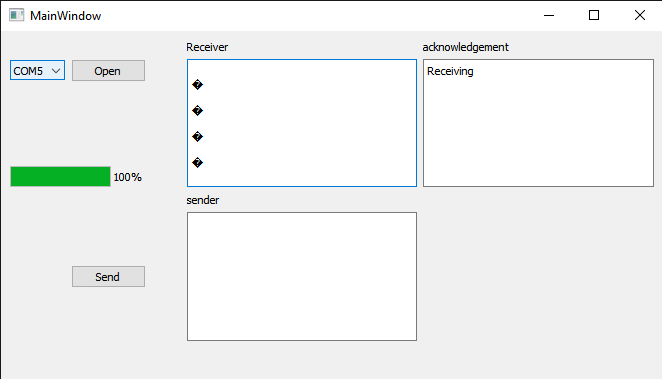
                alternate text

                I Dont know what is the Exact problem is

                1 Reply Last reply
                0
                • sankarapandiyanS sankarapandiyan

                  @jsulm @J-Hilk I Have tried like this

                  void MainWindow::on_send_clicked()
                  {
                       line   = ui->sender->toPlainText();
                      QString txt1 = ui->receive->toPlainText();
                      /*QString*/ txt3 = ui->aknowmnt->toPlainText();
                  
                       if(m_lines.isEmpty()){
                      QFile inputFile(QString("/home/adx-soft1/Shankar/serial/myfile1.txt"));
                      inputFile.open(QIODevice::ReadOnly);
                      if (!inputFile.isOpen())
                          return;
                  
                      QTextStream stream(&inputFile);
                      while (!stream.atEnd()){
                              line = stream.readLine();
                              m_lines.append(line+QString("\r\n"));
                      }
                  
                       }
                       checkAndSendData();
                       serialReceived(); // Here I have call a function but it also make no sense i think.
                  }
                  
                  small_birdS Offline
                  small_birdS Offline
                  small_bird
                  wrote on last edited by
                  #25

                  @sankarapandiyan
                  You need to set a timer to delay some time after each serial write.

                  sankarapandiyanS 1 Reply Last reply
                  1
                  • small_birdS small_bird

                    @sankarapandiyan
                    You need to set a timer to delay some time after each serial write.

                    sankarapandiyanS Offline
                    sankarapandiyanS Offline
                    sankarapandiyan
                    wrote on last edited by
                    #26

                    @small_bird ok fine , But is it possible to send the all data with in just a one click with ack ..! that is my exact problem

                    small_birdS 1 Reply Last reply
                    0
                    • J.HilkJ J.Hilk

                      As I don't have a serial dive at hand that returns data I can't debug it for you.

                      Start the debugger (F5) set a breakpoint in serialReceived and step over/in via F10/F11 and see what happens

                      That said, I vaguely remember that one should not call write from the slot that is connected to readyRead ( my be wrong here )

                      So you could try:

                      void MainWindow::serialReceived()
                      {
                          ....
                          QMetaObject::invokeMethod(this, &MainWindow::checkAndSendData, Qt::QueuedConnection);
                      }
                      

                      to push the write to the next event loop cycle

                      sankarapandiyanS Offline
                      sankarapandiyanS Offline
                      sankarapandiyan
                      wrote on last edited by
                      #27

                      @J-Hilk You are saying like this ?

                      void MainWindow::serialReceived()
                      
                      {
                          QMetaObject::invokeMethod(this, &MainWindow::checkAndSendData, Qt::QueuedConnection);
                          
                          QString glen = serial->readAll();
                          if (glen.length()>0){
                          /*QString*/ line = ui->receive->toPlainText();
                          ui->receive->setText(ui->receive->toPlainText()+line+"\n");
                          ui->receive->setText(line + "\r\n" + glen + "\r\n");
                          line = txt3;
                          }
                         checkAndSendData();
                      }
                      
                      
                      J.HilkJ 1 Reply Last reply
                      0
                      • sankarapandiyanS sankarapandiyan

                        @J-Hilk You are saying like this ?

                        void MainWindow::serialReceived()
                        
                        {
                            QMetaObject::invokeMethod(this, &MainWindow::checkAndSendData, Qt::QueuedConnection);
                            
                            QString glen = serial->readAll();
                            if (glen.length()>0){
                            /*QString*/ line = ui->receive->toPlainText();
                            ui->receive->setText(ui->receive->toPlainText()+line+"\n");
                            ui->receive->setText(line + "\r\n" + glen + "\r\n");
                            line = txt3;
                            }
                           checkAndSendData();
                        }
                        
                        
                        J.HilkJ Offline
                        J.HilkJ Offline
                        J.Hilk
                        Moderators
                        wrote on last edited by
                        #28

                        @sankarapandiyan

                        void MainWindow::serialReceived()
                        {
                            ....
                            QMetaObject::invokeMethod(this, &MainWindow::checkAndSendData, Qt::QueuedConnection);
                        }
                        
                        void MainWindow::serialReceived()
                        
                        {
                            QString glen = serial->readAll();
                            if (glen.length()>0){
                            /*QString*/ line = ui->receive->toPlainText();
                            ui->receive->setText(ui->receive->toPlainText()+line+"\n");
                            ui->receive->setText(line + "\r\n" + glen + "\r\n");
                            line = txt3;
                            }
                           QMetaObject::invokeMethod(this, &MainWindow::checkAndSendData, Qt::QueuedConnection);
                        }
                        

                        Be aware of the Qt Code of Conduct, when posting : https://forum.qt.io/topic/113070/qt-code-of-conduct


                        Q: What's that?
                        A: It's blue light.
                        Q: What does it do?
                        A: It turns blue.

                        sankarapandiyanS 1 Reply Last reply
                        1
                        • sankarapandiyanS sankarapandiyan

                          @small_bird ok fine , But is it possible to send the all data with in just a one click with ack ..! that is my exact problem

                          small_birdS Offline
                          small_birdS Offline
                          small_bird
                          wrote on last edited by
                          #29

                          @sankarapandiyan
                          of course you can, define a queue and then put every line into the queue. every time ,get one from the queue and then put it into the serial port.

                          1 Reply Last reply
                          1
                          • J.HilkJ J.Hilk

                            @sankarapandiyan

                            void MainWindow::serialReceived()
                            {
                                ....
                                QMetaObject::invokeMethod(this, &MainWindow::checkAndSendData, Qt::QueuedConnection);
                            }
                            
                            void MainWindow::serialReceived()
                            
                            {
                                QString glen = serial->readAll();
                                if (glen.length()>0){
                                /*QString*/ line = ui->receive->toPlainText();
                                ui->receive->setText(ui->receive->toPlainText()+line+"\n");
                                ui->receive->setText(line + "\r\n" + glen + "\r\n");
                                line = txt3;
                                }
                               QMetaObject::invokeMethod(this, &MainWindow::checkAndSendData, Qt::QueuedConnection);
                            }
                            
                            sankarapandiyanS Offline
                            sankarapandiyanS Offline
                            sankarapandiyan
                            wrote on last edited by sankarapandiyan
                            #30

                            @J-Hilk said in Serial port Communication with pc through serial Adapter:

                            void MainWindow::serialReceived()

                            {
                            QString glen = serial->readAll();
                            if (glen.length()>0){
                            /QString/ line = ui->receive->toPlainText();
                            ui->receive->setText(ui->receive->toPlainText()+line+"\n");
                            ui->receive->setText(line + "\r\n" + glen + "\r\n");
                            line = txt3;
                            }
                            QMetaObject::invokeMethod(this, &MainWindow::checkAndSendData, Qt::QueuedConnection);
                            }

                            I Have tried this my output is same like this
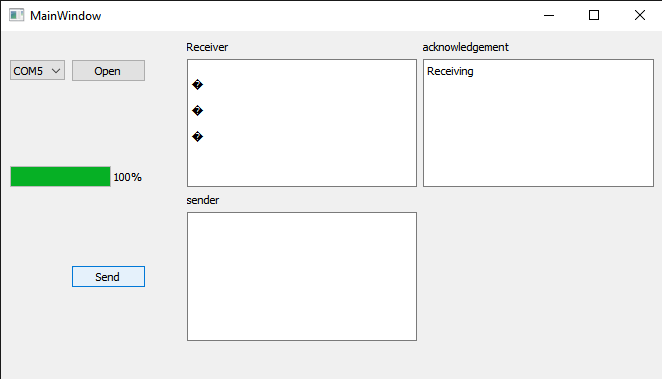
                            alternate text
                            this is my code is there is any problem in my code

                            #include "mainwindow.h"
                            #include "ui_mainwindow.h"
                            #include <QList>
                            #include <QComboBox>
                            #include <QString>
                            #include <QTextEdit>
                            #include <QTime>
                            #include <QDebug>
                            #include <QtSerialPort/QSerialPortInfo>
                            #include <QtSerialPort>
                            #include <QFile>
                            #include <QList>
                            
                              QString line ;
                              QString txt3;
                            QSerialPort *serial;
                            QStringList m_lines;
                            //QByteArray rawData;
                            
                            
                            MainWindow::MainWindow(QWidget *parent)
                                : QMainWindow(parent)
                                , ui(new Ui::MainWindow)
                            {
                            
                                ui->setupUi(this);
                            
                                QString filename1="/home/adx-soft1/Shankar/serial/myfile1.txt";
                                  QFile file(filename1);
                                  if(!file.exists()){
                                      qDebug() << "NO FILE "<<filename1;
                                  }else{
                                      qDebug() << filename1<<" ...";
                                  }
                                  QString line1;
                                  ui->sender->clear();
                                  if (file.open(QIODevice::ReadOnly | QIODevice::Text)){ ui->sender->setText(file.readAll()); }
                            
                                QList<QSerialPortInfo> list;
                                list = QSerialPortInfo::availablePorts();
                            
                                for (int i= 0; i < list.length(); i++)
                                {
                                    ui->comboBox->addItem(list[i].portName());
                            
                                }
                            }
                            
                            MainWindow::~MainWindow()
                            {
                                delete ui;
                                serial->close();
                            }
                            
                            
                            void MainWindow::on_pushButton_clicked()
                            {
                                serial = new QSerialPort (this) ;
                                serial->setPortName(ui->comboBox->currentText());
                                serial->setBaudRate (QSerialPort::Baud115200);
                                serial->setDataBits(QSerialPort::Data8);
                                serial->setParity (QSerialPort::NoParity);
                                serial->setStopBits (QSerialPort::OneStop);
                                serial->setFlowControl(QSerialPort::NoFlowControl);
                                serial->open(QIODevice::ReadWrite);
                                connect(serial,SIGNAL(readyRead()),this, SLOT (serialReceived()));
                            //    connect(serial, &QSerialPort::readyRead,this, &MainWindow::serialReceived);
                            
                               ui->progressBar->setValue(100);
                            //    ui->receive->clear();
                            }
                            
                            void MainWindow::checkAndSendData()
                            {
                                if(!m_lines.isEmpty()){
                                    QByteArray inBytes;
                                    QByteArray baToSend = m_lines.takeFirst().toUtf8();
                                    serial->write(baToSend);
                                    ui->aknowmnt->setText("Sent Message -->" "\n"+ QString(baToSend) + "\n");
                                } else {
                                    ui->aknowmnt->setText("Receiving ");
                                }
                            }
                            
                            void MainWindow::on_send_clicked()
                            {
                                 line   = ui->sender->toPlainText();
                                QString txt1 = ui->receive->toPlainText();
                                /*QString*/ txt3 = ui->aknowmnt->toPlainText();
                            
                                 if(m_lines.isEmpty()){
                                QFile inputFile(QString("/home/adx-soft1/Shankar/serial/myfile1.txt"));
                                inputFile.open(QIODevice::ReadOnly);
                                if (!inputFile.isOpen())
                                    return;
                            
                                QTextStream stream(&inputFile);
                                while (!stream.atEnd()){
                                        line = stream.readLine();
                                        m_lines.append(line+QString("\r\n"));
                                }
                            
                                 }
                                 checkAndSendData();
                            
                            }
                            void MainWindow::serialReceived()
                            
                            {
                            
                                QString glen = serial->readAll();
                                if (glen.length()>0){
                                /*QString*/ line = ui->receive->toPlainText();
                                ui->receive->setText(ui->receive->toPlainText()+line+"\n");
                                ui->receive->setText(line + "\r\n" + glen + "\r\n");
                                line = txt3;
                                }
                               checkAndSendData();
                               QMetaObject::invokeMethod(this, &MainWindow::checkAndSendData, Qt::QueuedConnection);
                            
                            }
                            

                            But I have not get the correct output @J-Hilk

                            small_birdS 1 Reply Last reply
                            0
                            • sankarapandiyanS sankarapandiyan

                              @J-Hilk said in Serial port Communication with pc through serial Adapter:

                              void MainWindow::serialReceived()

                              {
                              QString glen = serial->readAll();
                              if (glen.length()>0){
                              /QString/ line = ui->receive->toPlainText();
                              ui->receive->setText(ui->receive->toPlainText()+line+"\n");
                              ui->receive->setText(line + "\r\n" + glen + "\r\n");
                              line = txt3;
                              }
                              QMetaObject::invokeMethod(this, &MainWindow::checkAndSendData, Qt::QueuedConnection);
                              }

                              I Have tried this my output is same like this

                              alternate text
                              this is my code is there is any problem in my code

                              #include "mainwindow.h"
                              #include "ui_mainwindow.h"
                              #include <QList>
                              #include <QComboBox>
                              #include <QString>
                              #include <QTextEdit>
                              #include <QTime>
                              #include <QDebug>
                              #include <QtSerialPort/QSerialPortInfo>
                              #include <QtSerialPort>
                              #include <QFile>
                              #include <QList>
                              
                                QString line ;
                                QString txt3;
                              QSerialPort *serial;
                              QStringList m_lines;
                              //QByteArray rawData;
                              
                              
                              MainWindow::MainWindow(QWidget *parent)
                                  : QMainWindow(parent)
                                  , ui(new Ui::MainWindow)
                              {
                              
                                  ui->setupUi(this);
                              
                                  QString filename1="/home/adx-soft1/Shankar/serial/myfile1.txt";
                                    QFile file(filename1);
                                    if(!file.exists()){
                                        qDebug() << "NO FILE "<<filename1;
                                    }else{
                                        qDebug() << filename1<<" ...";
                                    }
                                    QString line1;
                                    ui->sender->clear();
                                    if (file.open(QIODevice::ReadOnly | QIODevice::Text)){ ui->sender->setText(file.readAll()); }
                              
                                  QList<QSerialPortInfo> list;
                                  list = QSerialPortInfo::availablePorts();
                              
                                  for (int i= 0; i < list.length(); i++)
                                  {
                                      ui->comboBox->addItem(list[i].portName());
                              
                                  }
                              }
                              
                              MainWindow::~MainWindow()
                              {
                                  delete ui;
                                  serial->close();
                              }
                              
                              
                              void MainWindow::on_pushButton_clicked()
                              {
                                  serial = new QSerialPort (this) ;
                                  serial->setPortName(ui->comboBox->currentText());
                                  serial->setBaudRate (QSerialPort::Baud115200);
                                  serial->setDataBits(QSerialPort::Data8);
                                  serial->setParity (QSerialPort::NoParity);
                                  serial->setStopBits (QSerialPort::OneStop);
                                  serial->setFlowControl(QSerialPort::NoFlowControl);
                                  serial->open(QIODevice::ReadWrite);
                                  connect(serial,SIGNAL(readyRead()),this, SLOT (serialReceived()));
                              //    connect(serial, &QSerialPort::readyRead,this, &MainWindow::serialReceived);
                              
                                 ui->progressBar->setValue(100);
                              //    ui->receive->clear();
                              }
                              
                              void MainWindow::checkAndSendData()
                              {
                                  if(!m_lines.isEmpty()){
                                      QByteArray inBytes;
                                      QByteArray baToSend = m_lines.takeFirst().toUtf8();
                                      serial->write(baToSend);
                                      ui->aknowmnt->setText("Sent Message -->" "\n"+ QString(baToSend) + "\n");
                                  } else {
                                      ui->aknowmnt->setText("Receiving ");
                                  }
                              }
                              
                              void MainWindow::on_send_clicked()
                              {
                                   line   = ui->sender->toPlainText();
                                  QString txt1 = ui->receive->toPlainText();
                                  /*QString*/ txt3 = ui->aknowmnt->toPlainText();
                              
                                   if(m_lines.isEmpty()){
                                  QFile inputFile(QString("/home/adx-soft1/Shankar/serial/myfile1.txt"));
                                  inputFile.open(QIODevice::ReadOnly);
                                  if (!inputFile.isOpen())
                                      return;
                              
                                  QTextStream stream(&inputFile);
                                  while (!stream.atEnd()){
                                          line = stream.readLine();
                                          m_lines.append(line+QString("\r\n"));
                                  }
                              
                                   }
                                   checkAndSendData();
                              
                              }
                              void MainWindow::serialReceived()
                              
                              {
                              
                                  QString glen = serial->readAll();
                                  if (glen.length()>0){
                                  /*QString*/ line = ui->receive->toPlainText();
                                  ui->receive->setText(ui->receive->toPlainText()+line+"\n");
                                  ui->receive->setText(line + "\r\n" + glen + "\r\n");
                                  line = txt3;
                                  }
                                 checkAndSendData();
                                 QMetaObject::invokeMethod(this, &MainWindow::checkAndSendData, Qt::QueuedConnection);
                              
                              }
                              

                              But I have not get the correct output @J-Hilk

                              small_birdS Offline
                              small_birdS Offline
                              small_bird
                              wrote on last edited by
                              #31

                              @sankarapandiyan check your encode function

                              sankarapandiyanS 1 Reply Last reply
                              1
                              • small_birdS small_bird

                                @sankarapandiyan check your encode function

                                sankarapandiyanS Offline
                                sankarapandiyanS Offline
                                sankarapandiyan
                                wrote on last edited by
                                #32

                                @small_bird Encode function means What you mean ? i didnt get you

                                1 Reply Last reply
                                0
                                • J.HilkJ Offline
                                  J.HilkJ Offline
                                  J.Hilk
                                  Moderators
                                  wrote on last edited by J.Hilk
                                  #33

                                  @sankarapandiyan
                                  ok, lets simplify your code, I assume receive and aknowmntare QTextEdits or QTextBrowser, since they have a toPlainTextfunction

                                  void MainWindow::checkAndSendData()
                                  {
                                      if(!m_lines.isEmpty()){
                                          QByteArray baToSend = m_lines.takeFirst().toUtf8();
                                          serial->write(baToSend);
                                          ui->aknowmnt->append("Sent Message --> "+ QString(baToSend));
                                      } else {
                                          ui->aknowmnt->append("All are send ");
                                      }
                                  }
                                  
                                  void MainWindow::serialReceived()
                                  
                                  {
                                      QString glen = serial->readAll();
                                      if (glen.length()>0){
                                           ui->receive->append( "Received -->" + QString(glen));
                                      }
                                     QMetaObject::invokeMethod(this, &MainWindow::checkAndSendData, Qt::QueuedConnection);
                                  
                                  }
                                  

                                  Be aware of the Qt Code of Conduct, when posting : https://forum.qt.io/topic/113070/qt-code-of-conduct


                                  Q: What's that?
                                  A: It's blue light.
                                  Q: What does it do?
                                  A: It turns blue.

                                  sankarapandiyanS 2 Replies Last reply
                                  1
                                  • J.HilkJ J.Hilk

                                    @sankarapandiyan
                                    ok, lets simplify your code, I assume receive and aknowmntare QTextEdits or QTextBrowser, since they have a toPlainTextfunction

                                    void MainWindow::checkAndSendData()
                                    {
                                        if(!m_lines.isEmpty()){
                                            QByteArray baToSend = m_lines.takeFirst().toUtf8();
                                            serial->write(baToSend);
                                            ui->aknowmnt->append("Sent Message --> "+ QString(baToSend));
                                        } else {
                                            ui->aknowmnt->append("All are send ");
                                        }
                                    }
                                    
                                    void MainWindow::serialReceived()
                                    
                                    {
                                        QString glen = serial->readAll();
                                        if (glen.length()>0){
                                             ui->receive->append( "Received -->" + QString(glen));
                                        }
                                       QMetaObject::invokeMethod(this, &MainWindow::checkAndSendData, Qt::QueuedConnection);
                                    
                                    }
                                    
                                    sankarapandiyanS Offline
                                    sankarapandiyanS Offline
                                    sankarapandiyan
                                    wrote on last edited by sankarapandiyan
                                    #34

                                    @J-Hilk

                                    Yes i have tried this method , the correct data is not shown in the receiver side ..

                                    alternate text

                                    void MainWindow::on_pushButton_clicked()
                                    {
                                        serial = new QSerialPort (this) ;
                                        serial->setPortName(ui->comboBox->currentText());
                                        serial->setBaudRate (QSerialPort::Baud115200);
                                        serial->setDataBits(QSerialPort::Data8);
                                        serial->setParity (QSerialPort::NoParity);
                                        serial->setStopBits (QSerialPort::OneStop);
                                        serial->setFlowControl(QSerialPort::NoFlowControl);
                                        serial->open(QIODevice::ReadWrite);
                                    //    connect(serial,SIGNAL(readyRead()),this, SLOT (serialReceived()));
                                        connect(serial, &QSerialPort::readyRead,this, &MainWindow::serialReceived);
                                    
                                       ui->progressBar->setValue(100);
                                    //    ui->receive->clear();
                                    }
                                    
                                    void MainWindow::checkAndSendData()
                                    {
                                        if(!m_lines.isEmpty()){
                                            QByteArray baToSend = m_lines.takeFirst().toUtf8();
                                            serial->write(baToSend);
                                            ui->aknowmnt->append("Sent Message --> "+ QString(baToSend));
                                        } else {
                                            ui->aknowmnt->append("All are send ");
                                        }
                                    }
                                    
                                    void MainWindow::on_send_clicked()
                                    {
                                         line   = ui->sender->toPlainText();
                                        QString txt1 = ui->receive->toPlainText();
                                        /*QString*/ txt3 = ui->aknowmnt->toPlainText();
                                    
                                         if(m_lines.isEmpty()){
                                        QFile inputFile(QString("/home/adx-soft1/Shankar/serial/myfile1.txt"));
                                        inputFile.open(QIODevice::ReadOnly);
                                        if (!inputFile.isOpen())
                                            return;
                                    
                                        QTextStream stream(&inputFile);
                                        while (!stream.atEnd()){
                                                line = stream.readLine();
                                                m_lines.append(line+QString("\r\n"));
                                        }
                                    
                                         }
                                         checkAndSendData();
                                    
                                    }
                                    
                                    void MainWindow::serialReceived()
                                    
                                    {
                                        QString glen = serial->readAll();
                                        if (glen.length()>0){
                                             ui->receive->append( "Received -->" + QString(glen));
                                        }
                                       QMetaObject::invokeMethod(this, &MainWindow::checkAndSendData, Qt::QueuedConnection);
                                    }
                                    
                                    J.HilkJ 1 Reply Last reply
                                    0
                                    • J.HilkJ J.Hilk

                                      @sankarapandiyan
                                      ok, lets simplify your code, I assume receive and aknowmntare QTextEdits or QTextBrowser, since they have a toPlainTextfunction

                                      void MainWindow::checkAndSendData()
                                      {
                                          if(!m_lines.isEmpty()){
                                              QByteArray baToSend = m_lines.takeFirst().toUtf8();
                                              serial->write(baToSend);
                                              ui->aknowmnt->append("Sent Message --> "+ QString(baToSend));
                                          } else {
                                              ui->aknowmnt->append("All are send ");
                                          }
                                      }
                                      
                                      void MainWindow::serialReceived()
                                      
                                      {
                                          QString glen = serial->readAll();
                                          if (glen.length()>0){
                                               ui->receive->append( "Received -->" + QString(glen));
                                          }
                                         QMetaObject::invokeMethod(this, &MainWindow::checkAndSendData, Qt::QueuedConnection);
                                      
                                      }
                                      
                                      sankarapandiyanS Offline
                                      sankarapandiyanS Offline
                                      sankarapandiyan
                                      wrote on last edited by
                                      #35

                                      @J-Hilk said in Serial port Communication with pc through serial Adapter:

                                      ok, lets simplify your code, I assume receive and aknowmntare QTextEdits or QTextBrowser, since they have a toPlainTextfunction

                                      Yes Its a QTextEdits

                                      1 Reply Last reply
                                      0
                                      • sankarapandiyanS sankarapandiyan

                                        @J-Hilk

                                        Yes i have tried this method , the correct data is not shown in the receiver side ..

                                        alternate text

                                        void MainWindow::on_pushButton_clicked()
                                        {
                                            serial = new QSerialPort (this) ;
                                            serial->setPortName(ui->comboBox->currentText());
                                            serial->setBaudRate (QSerialPort::Baud115200);
                                            serial->setDataBits(QSerialPort::Data8);
                                            serial->setParity (QSerialPort::NoParity);
                                            serial->setStopBits (QSerialPort::OneStop);
                                            serial->setFlowControl(QSerialPort::NoFlowControl);
                                            serial->open(QIODevice::ReadWrite);
                                        //    connect(serial,SIGNAL(readyRead()),this, SLOT (serialReceived()));
                                            connect(serial, &QSerialPort::readyRead,this, &MainWindow::serialReceived);
                                        
                                           ui->progressBar->setValue(100);
                                        //    ui->receive->clear();
                                        }
                                        
                                        void MainWindow::checkAndSendData()
                                        {
                                            if(!m_lines.isEmpty()){
                                                QByteArray baToSend = m_lines.takeFirst().toUtf8();
                                                serial->write(baToSend);
                                                ui->aknowmnt->append("Sent Message --> "+ QString(baToSend));
                                            } else {
                                                ui->aknowmnt->append("All are send ");
                                            }
                                        }
                                        
                                        void MainWindow::on_send_clicked()
                                        {
                                             line   = ui->sender->toPlainText();
                                            QString txt1 = ui->receive->toPlainText();
                                            /*QString*/ txt3 = ui->aknowmnt->toPlainText();
                                        
                                             if(m_lines.isEmpty()){
                                            QFile inputFile(QString("/home/adx-soft1/Shankar/serial/myfile1.txt"));
                                            inputFile.open(QIODevice::ReadOnly);
                                            if (!inputFile.isOpen())
                                                return;
                                        
                                            QTextStream stream(&inputFile);
                                            while (!stream.atEnd()){
                                                    line = stream.readLine();
                                                    m_lines.append(line+QString("\r\n"));
                                            }
                                        
                                             }
                                             checkAndSendData();
                                        
                                        }
                                        
                                        void MainWindow::serialReceived()
                                        
                                        {
                                            QString glen = serial->readAll();
                                            if (glen.length()>0){
                                                 ui->receive->append( "Received -->" + QString(glen));
                                            }
                                           QMetaObject::invokeMethod(this, &MainWindow::checkAndSendData, Qt::QueuedConnection);
                                        }
                                        
                                        J.HilkJ Offline
                                        J.HilkJ Offline
                                        J.Hilk
                                        Moderators
                                        wrote on last edited by J.Hilk
                                        #36

                                        @sankarapandiyan
                                        you're obviously receiving non ascii bytes

                                        void MainWindow::serialReceived()
                                        
                                        {
                                            QByteArray glen = serial->readAll();
                                            if (glen.length()>0){
                                                 ui->receive->append( QString("Received --> %1").arg(QString(glen.toHex(' ')));
                                            }
                                           QMetaObject::invokeMethod(this, &MainWindow::checkAndSendData, Qt::QueuedConnection);
                                        
                                        }
                                        

                                        Be aware of the Qt Code of Conduct, when posting : https://forum.qt.io/topic/113070/qt-code-of-conduct


                                        Q: What's that?
                                        A: It's blue light.
                                        Q: What does it do?
                                        A: It turns blue.

                                        sankarapandiyanS 1 Reply Last reply
                                        1
                                        • J.HilkJ J.Hilk

                                          @sankarapandiyan
                                          you're obviously receiving non ascii bytes

                                          void MainWindow::serialReceived()
                                          
                                          {
                                              QByteArray glen = serial->readAll();
                                              if (glen.length()>0){
                                                   ui->receive->append( QString("Received --> %1").arg(QString(glen.toHex(' ')));
                                              }
                                             QMetaObject::invokeMethod(this, &MainWindow::checkAndSendData, Qt::QueuedConnection);
                                          
                                          }
                                          
                                          sankarapandiyanS Offline
                                          sankarapandiyanS Offline
                                          sankarapandiyan
                                          wrote on last edited by sankarapandiyan
                                          #37

                                          @J-Hilk said in Serial port Communication with pc through serial Adapter:

                                          void MainWindow::serialReceived()

                                          {
                                          QByteArray glen = serial->readAll();
                                          if (glen.length()>0){
                                          ui->receive->append( QString("Received --> %1").arg(QString(glen.toHex(' ')));
                                          }
                                          QMetaObject::invokeMethod(this, &MainWindow::checkAndSendData, Qt::QueuedConnection);

                                          }

                                          this out put is what i receive from another pc
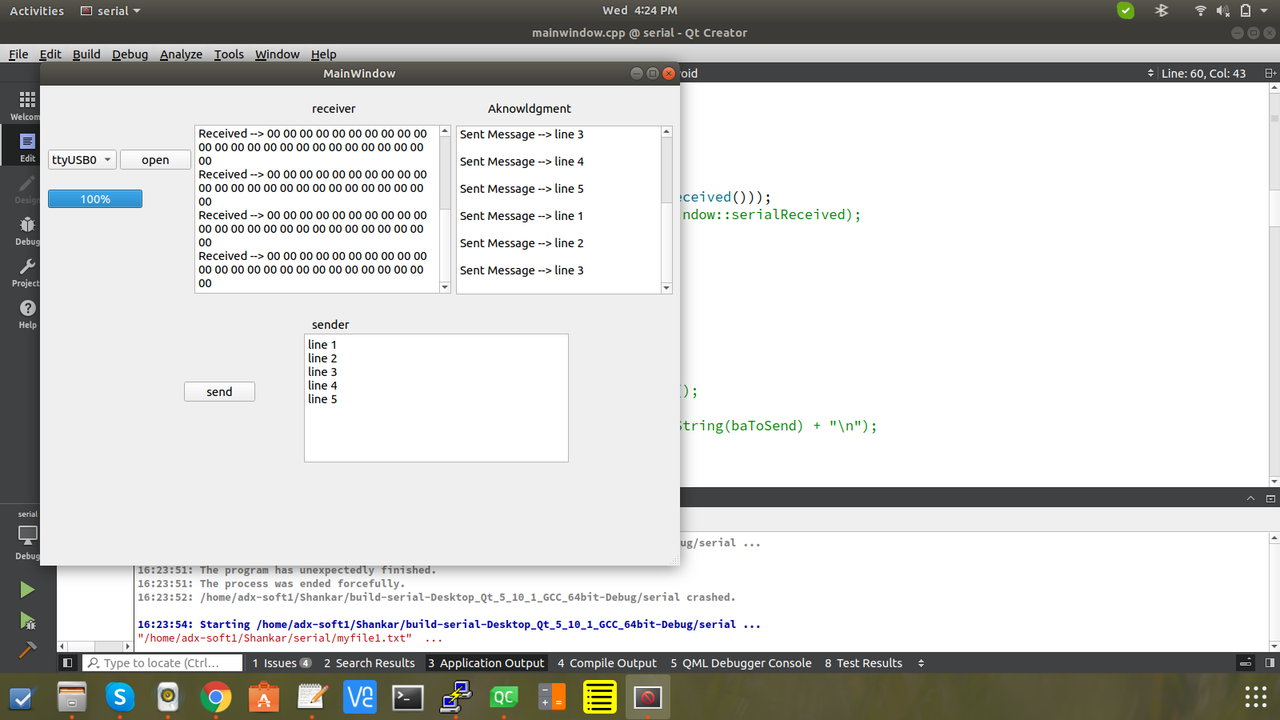
                                          alternate text
                                          And the next below image is shown as a data send as some thing different
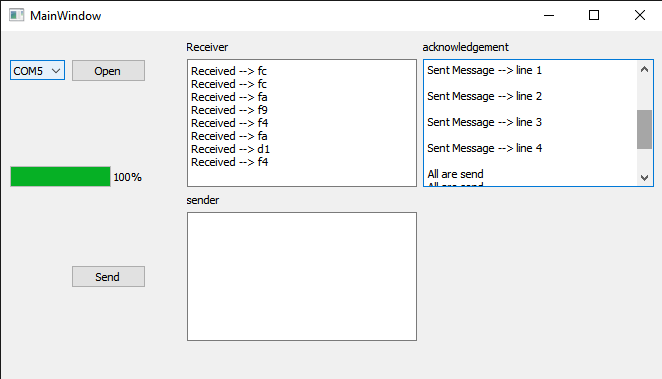
                                          alternate text

                                          Even Now also i did not get the exact output sir what should i do i am stuck here .. @J-Hilk

                                          KroMignonK 1 Reply Last reply
                                          0

                                          • Login

                                          • Login or register to search.
                                          • First post
                                            Last post
                                          0
                                          • Categories
                                          • Recent
                                          • Tags
                                          • Popular
                                          • Users
                                          • Groups
                                          • Search
                                          • Get Qt Extensions
                                          • Unsolved