
Skip to content
  • Categories
  • Recent
  • Tags
  • Popular
  • Users
  • Groups
  • Search
  • Get Qt Extensions
  • Unsolved
Collapse
Brand Logo
  1. Home
  2. Qt Development
  3. General and Desktop
  4. How to generate the barcode 128 in Qpixmap ?
Forum Updated to NodeBB v4.3 + New Features

How to generate the barcode 128 in Qpixmap ?

Scheduled Pinned Locked Moved Solved General and Desktop
23 Posts 4 Posters 5.5k Views 3 Watching
  • Oldest to Newest
  • Newest to Oldest
  • Most Votes
Reply
  • Reply as topic
Log in to reply
This topic has been deleted. Only users with topic management privileges can see it.
  • M Offline
    M Offline
    Mihaill
    wrote on last edited by
    #21

    I understand that the number of sticks is changing. But the pixel size of the image changes by 1.25 times or 1. And the picture is cropped and the barcode is not correct.
    2.png

    2.png
    Here 2 pictures of the same size, but one the size of the shaded zone higher in 1,25. Why so?

    mrjjM 1 Reply Last reply
    0
    • M Mihaill

      I understand that the number of sticks is changing. But the pixel size of the image changes by 1.25 times or 1. And the picture is cropped and the barcode is not correct.
      2.png

      2.png
      Here 2 pictures of the same size, but one the size of the shaded zone higher in 1,25. Why so?

      mrjjM Offline
      mrjjM Offline
      mrjj
      Lifetime Qt Champion
      wrote on last edited by mrjj
      #22

      @Mihaill
      Hi
      the programmer made it so, it seems.

      void Code128Item::paint(QPainter *painter, const QStyleOptionGraphicsItem *, QWidget *)
      {
          float lineWidth = m_Width / m_CodeLength;
      
      
          /*
           * This code tries to fit the barcode right inside the width. If the code
           * is too long this means that the bar width goes below one pixel. Which in
           * turn means we get no barcode. On printers this is not a problem too fast
           * as they have 600 DPI usually. Screens with 96 DPI run out faster.
           *
           */
      
      if ( !m_HighDPI )
          {
              lineWidth = qRound(lineWidth);
              if ( lineWidth < 1 )
              {
                  lineWidth = 1;
              }
          }


      so it tries to fit in area and might alter the lineWidth. and hence the barcode has a different size.

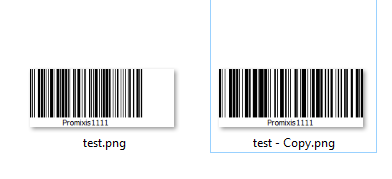
      try
      m_Barcode->setHighDPI(true);
      alt text

      1 Reply Last reply
      1
      • M Offline
        M Offline
        Mihaill
        wrote on last edited by
        #23

        Thanks, now works fine

        1 Reply Last reply
        0

        • Login

        • Login or register to search.
        • First post
          Last post
        0
        • Categories
        • Recent
        • Tags
        • Popular
        • Users
        • Groups
        • Search
        • Get Qt Extensions
        • Unsolved