Skip to content
  • Categories
  • Recent
  • Tags
  • Popular
  • Users
  • Groups
  • Search
  • Get Qt Extensions
  • Unsolved
Collapse
Brand Logo
  1. Home
  2. Qt Development
  3. Qt Creator and other tools
  4. Qt Creator suddenly doesn't detect my MSVC kits (Visual Studio Community 2017)
Forum Updated to NodeBB v4.3 + New Features

Qt Creator suddenly doesn't detect my MSVC kits (Visual Studio Community 2017)

Scheduled Pinned Locked Moved Unsolved Qt Creator and other tools
17 Posts 5 Posters 6.8k Views 4 Watching
  • Oldest to Newest
  • Newest to Oldest
  • Most Votes
Reply
  • Reply as topic
Log in to reply
This topic has been deleted. Only users with topic management privileges can see it.
  • enjoysmathE Offline
    enjoysmathE Offline
    enjoysmath
    wrote on last edited by
    #1

    I want to get started learning Qt Quick, after having done Widgets for 5 years.

    I tried re-installing VS community 2017, and restarting my machine, and the build kits are still not detected.

    I have heard of vswhere.exe, but then again I'm not sure what particular location within VS directories should be put onto my Path variable manually.

    Can anyone help?

    All its detecting is MinGW from a Code::Blocks install, which I don't even use...

    Does this depend on what version of Qt I have selected? I changed from 5.12 to 5.9 and it did work, but then stopped working.

    It is detecting the compilers as far as I can tell (go to Compilers tab), yet the Kits are showing the yellow exclamation triangle.

    [Rant] Why is setting up a dev environment always a pain in the neck?

    1 Reply Last reply
    0
    • SGaistS Offline
      SGaistS Offline
      SGaist
      Lifetime Qt Champion
      wrote on last edited by
      #2

      Hi,

      Might be a silly question but did you select the C++ components when installing Visual Studio ? They are not selected by default.

      Interested in AI ? www.idiap.ch
      Please read the Qt Code of Conduct - https://forum.qt.io/topic/113070/qt-code-of-conduct

      enjoysmathE 1 Reply Last reply
      1
      • SGaistS SGaist

        Hi,

        Might be a silly question but did you select the C++ components when installing Visual Studio ? They are not selected by default.

        enjoysmathE Offline
        enjoysmathE Offline
        enjoysmath
        wrote on last edited by
        #3

        @sgaist Yes, always. I didn't select UWP or whatever that was, since I don't use it and that's not usually required to use MSVC tools. I didn't select anything else other than all the C++ stuff. The Visual Studio is installed and works, compiles C++, etc.

        However, nothing I don't think is being added to the Path like it used to automatically.

        aha_1980A 1 Reply Last reply
        0
        • enjoysmathE Offline
          enjoysmathE Offline
          enjoysmath
          wrote on last edited by
          #4
          This post is deleted!
          1 Reply Last reply
          1
          • enjoysmathE enjoysmath

            @sgaist Yes, always. I didn't select UWP or whatever that was, since I don't use it and that's not usually required to use MSVC tools. I didn't select anything else other than all the C++ stuff. The Visual Studio is installed and works, compiles C++, etc.

            However, nothing I don't think is being added to the Path like it used to automatically.

            aha_1980A Offline
            aha_1980A Offline
            aha_1980
            Lifetime Qt Champion
            wrote on last edited by aha_1980
            #5

            Hi @enjoysmath,

            It is detecting the compilers as far as I can tell (go to Compilers tab), yet the Kits are showing the yellow exclamation triangle.

            Can you show the screens so we can have a look too?

            [Rant] Why is setting up a dev environment always a pain in the neck?

            I don't know. The simplest dev env I ever had was QBasic in MS-DOS. Completely installed with help and debugger. After that Turbo Pascal and Delphi, still installed and run.

            Nowadays I prefer Linux, probably because I know how to handle things there. Developing on Windows is a pure desaster if you need to combine different tools and libraries.

            But he - if it was easy, then everyone could do it ;)

            Qt has to stay free or it will die.

            1 Reply Last reply
            1
            • enjoysmathE Offline
              enjoysmathE Offline
              enjoysmath
              wrote on last edited by
              #6

              It's still broken. When I said I selected all the kits before, I must have also selected MinGW. That works. I guess I will use it for now.

              1 Reply Last reply
              0
              • enjoysmathE Offline
                enjoysmathE Offline
                enjoysmath
                wrote on last edited by
                #7

                When creating the project, they seem to be listed:

                0_1564269262104_91bf5a97-0dc9-4715-8d35-c0778f2d3cba-image.png

                Kits tab:

                0_1564269329111_9ca9a7d0-65b4-4759-87fe-e43725bd4bfb-image.png

                Compilers tab:

                0_1564269338831_74e6bdc5-4e76-4102-8739-3fb8fcd52730-image.png

                aha_1980A 1 Reply Last reply
                0
                • enjoysmathE enjoysmath

                  When creating the project, they seem to be listed:

                  0_1564269262104_91bf5a97-0dc9-4715-8d35-c0778f2d3cba-image.png

                  Kits tab:

                  0_1564269329111_9ca9a7d0-65b4-4759-87fe-e43725bd4bfb-image.png

                  Compilers tab:

                  0_1564269338831_74e6bdc5-4e76-4102-8739-3fb8fcd52730-image.png

                  aha_1980A Offline
                  aha_1980A Offline
                  aha_1980
                  Lifetime Qt Champion
                  wrote on last edited by
                  #8

                  @enjoysmath

                  Ok, compilers looks good - only thing is - the Tooltip says MSVC2019. Is that correct? is MSVC2019 binary compatible with 2017?

                  We now also need to see the details in Kits after you clicked on one Kit.

                  By the way: there's no need to install so much. You have 10 Qt version which you most likely will never use all.

                  Qt has to stay free or it will die.

                  enjoysmathE 1 Reply Last reply
                  1
                  • aha_1980A aha_1980

                    @enjoysmath

                    Ok, compilers looks good - only thing is - the Tooltip says MSVC2019. Is that correct? is MSVC2019 binary compatible with 2017?

                    We now also need to see the details in Kits after you clicked on one Kit.

                    By the way: there's no need to install so much. You have 10 Qt version which you most likely will never use all.

                    enjoysmathE Offline
                    enjoysmathE Offline
                    enjoysmath
                    wrote on last edited by enjoysmath
                    #9

                    @aha_1980

                    I'm not sure what you mean by 10 Qt versions.

                    0_1564296228639_3a64fb32-8c5d-43c7-bb39-786ff8704aef-image.png

                    aha_1980A JKSHJ 2 Replies Last reply
                    0
                    • enjoysmathE enjoysmath

                      @aha_1980

                      I'm not sure what you mean by 10 Qt versions.

                      0_1564296228639_3a64fb32-8c5d-43c7-bb39-786ff8704aef-image.png

                      aha_1980A Offline
                      aha_1980A Offline
                      aha_1980
                      Lifetime Qt Champion
                      wrote on last edited by aha_1980
                      #10

                      @enjoysmath said in Qt Creator suddenly doesn't detect my MSVC kits (Visual Studio Community 2017):

                      @aha_1980
                      I'm not sure what you mean by 10 Qt versions.

                      Well, all these Desktop Qt 5.12.0 MSVC2015, 2017, UWP, 32 and 64 bit versions.

                      Do you need them?

                      As you can see in your last screenshot, your default Kit "Desktop Qt 5.12.0 MSVC2015 64bit (default)" has no compiler assigned. So it simply cannot work.

                      Therefore, please answer yourself the questions:

                      • Which Compiler version do you want to use?
                      • Do you want to use 32 or 64 bit? If unsure, use 32 bit.

                      Then only install the Qt for exactly this compiler, and nothing else. Afterwards, check the Kits again, there should be no more warnings.

                      Regards

                      PS: I have a hard time looking at your screenshots on my phone. Please crop them to the needed essentials. I don't need to see your complete desktop. Thanks :)

                      Qt has to stay free or it will die.

                      1 Reply Last reply
                      4
                      • enjoysmathE enjoysmath

                        @aha_1980

                        I'm not sure what you mean by 10 Qt versions.

                        0_1564296228639_3a64fb32-8c5d-43c7-bb39-786ff8704aef-image.png

                        JKSHJ Offline
                        JKSHJ Offline
                        JKSH
                        Moderators
                        wrote on last edited by
                        #11

                        @enjoysmath said in Qt Creator suddenly doesn't detect my MSVC kits (Visual Studio Community 2017):

                        I'm not sure what you mean by 10 Qt versions.

                        You installed 10 different copies of Qt 5.12.0:

                        1. Qt 5.12.0 for MSVC 2015, 64-bit
                        2. Qt 5.12.0 for MSVC 2017, 32-bit
                        3. Qt 5.12.0 for MSVC 2017, 64-bit
                        4. Qt 5.12.0 for MinGW, 64-bit
                        5. Qt 5.12.0 for UWP on MSVC 2015, 32-bit
                        6. Qt 5.12.0 for UWP on MSVC 2017, 32-bit
                        7. Qt 5.12.0 for UWP on MSVC 2015, 64-bit
                        8. Qt 5.12.0 for UWP on MSVC 2017, 64-bit
                        9. Qt 5.12.0 for UWP on MSVC 2015, ARMv7
                        10. Qt 5.12.0 for UWP on MSVC 2017, ARMv7

                        I suggest you uninstall the 9 copies that you don't want.

                        Qt Doc Search for browsers: forum.qt.io/topic/35616/web-browser-extension-for-improved-doc-searches

                        1 Reply Last reply
                        3
                        • enjoysmathE Offline
                          enjoysmathE Offline
                          enjoysmath
                          wrote on last edited by
                          #12

                          How do you uninstall a Qt version? I was never prompted as to what versions I want to install either.

                          mrjjM 1 Reply Last reply
                          0
                          • enjoysmathE enjoysmath

                            How do you uninstall a Qt version? I was never prompted as to what versions I want to install either.

                            mrjjM Offline
                            mrjjM Offline
                            mrjj
                            Lifetime Qt Champion
                            wrote on last edited by mrjj
                            #13

                            @enjoysmath
                            Hi
                            Use the maintenance tool n the Qt folder
                            and simply deselect the unwanted version(s).
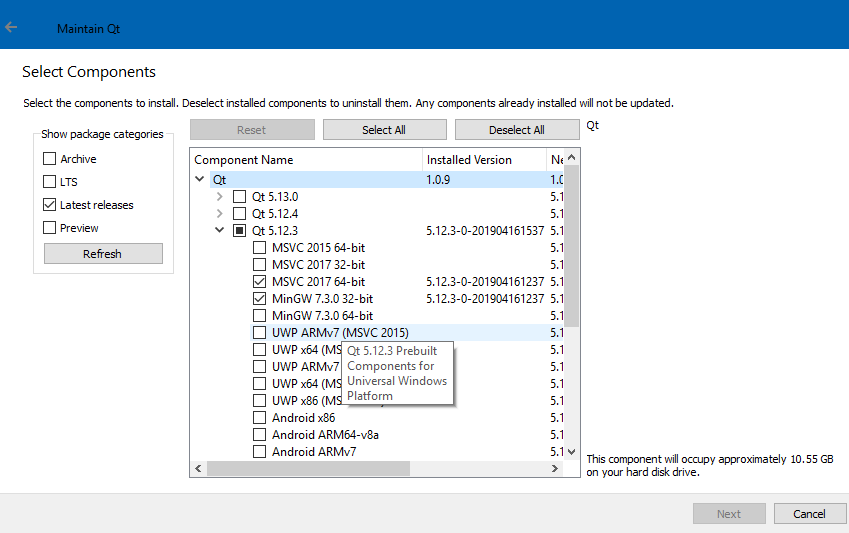
                            alt text

                            enjoysmathE 2 Replies Last reply
                            4
                            • mrjjM mrjj

                              @enjoysmath
                              Hi
                              Use the maintenance tool n the Qt folder
                              and simply deselect the unwanted version(s).

                              alt text

                              enjoysmathE Offline
                              enjoysmathE Offline
                              enjoysmath
                              wrote on last edited by
                              #14
                              This post is deleted!
                              1 Reply Last reply
                              0
                              • mrjjM mrjj

                                @enjoysmath
                                Hi
                                Use the maintenance tool n the Qt folder
                                and simply deselect the unwanted version(s).

                                alt text

                                enjoysmathE Offline
                                enjoysmathE Offline
                                enjoysmath
                                wrote on last edited by enjoysmath
                                #15

                                @mrjj Which version of Qt should I use? >_>

                                I want to do Qt Quick apps tied with C++ code, with 2D graphics scene stuff (using Qt Quick framework), and potentially 3D graphics, if I can ever get that to work.

                                I have up to date Win 10, 64 bit machine. I also want to make Android / iOS versions using the same code.

                                Thanks for advising.

                                aha_1980A JKSHJ 2 Replies Last reply
                                0
                                • enjoysmathE enjoysmath

                                  @mrjj Which version of Qt should I use? >_>

                                  I want to do Qt Quick apps tied with C++ code, with 2D graphics scene stuff (using Qt Quick framework), and potentially 3D graphics, if I can ever get that to work.

                                  I have up to date Win 10, 64 bit machine. I also want to make Android / iOS versions using the same code.

                                  Thanks for advising.

                                  aha_1980A Offline
                                  aha_1980A Offline
                                  aha_1980
                                  Lifetime Qt Champion
                                  wrote on last edited by
                                  #16

                                  @enjoysmath which compiler do you want to use?

                                  Qt has to stay free or it will die.

                                  1 Reply Last reply
                                  1
                                  • enjoysmathE enjoysmath

                                    @mrjj Which version of Qt should I use? >_>

                                    I want to do Qt Quick apps tied with C++ code, with 2D graphics scene stuff (using Qt Quick framework), and potentially 3D graphics, if I can ever get that to work.

                                    I have up to date Win 10, 64 bit machine. I also want to make Android / iOS versions using the same code.

                                    Thanks for advising.

                                    JKSHJ Offline
                                    JKSHJ Offline
                                    JKSH
                                    Moderators
                                    wrote on last edited by
                                    #17

                                    @enjoysmath said in Qt Creator suddenly doesn't detect my MSVC kits (Visual Studio Community 2017):

                                    I want to do Qt Quick apps tied with C++ code, with 2D graphics scene stuff (using Qt Quick framework), and potentially 3D graphics, if I can ever get that to work.

                                    I have up to date Win 10, 64 bit machine. I also want to make Android / iOS versions using the same code.

                                    It doesn't matter whether or not you use MinGW or MSVC. Pick one that works for you and uninstall the rest.

                                    It sounds like you don't want UWP, so uninstall all the "UWP" versions. (UWP stands for Universal Windows Platform, a.k.a. "Metro")

                                    For Android, you must install one of the versions marked "Android".

                                    For iOS, you need a macOS machine. You cannot build iOS apps on Windows.

                                    Qt Doc Search for browsers: forum.qt.io/topic/35616/web-browser-extension-for-improved-doc-searches

                                    1 Reply Last reply
                                    5

                                    • Login

                                    • Login or register to search.
                                    • First post
                                      Last post
                                    0
                                    • Categories
                                    • Recent
                                    • Tags
                                    • Popular
                                    • Users
                                    • Groups
                                    • Search
                                    • Get Qt Extensions
                                    • Unsolved