
Skip to content
  • Categories
  • Recent
  • Tags
  • Popular
  • Users
  • Groups
  • Search
  • Get Qt Extensions
  • Unsolved
Collapse
Brand Logo
  1. Home
  2. Qt Development
  3. General and Desktop
  4. custom push button

custom push button

Scheduled Pinned Locked Moved Solved General and Desktop
10 Posts 2 Posters 925 Views
  • Oldest to Newest
  • Newest to Oldest
  • Most Votes
Reply
  • Reply as topic
Log in to reply
This topic has been deleted. Only users with topic management privileges can see it.
  • R Offline
    R Offline
    Raii
    wrote on last edited by
    #1

    Hi everyone I have 2 png files (active.png and notactive.png) and I want the other image change the when I click
    stylesheet :

    #button {
    background-color: transparent;
    border-image: url(:active.png);
    background: none;
    border: none;
    background-repeat: none;
    }
    #button:pressed // What should i write
    {
    border-image: url(:noactive.png);
    }


    KillerSmathK 1 Reply Last reply
    0
    • R Offline
      R Offline
      Raii
      wrote on last edited by
      #10

      i have not changed my button to checkable and mark the post to solved

      1 Reply Last reply
      0
      • R Raii

        Hi everyone I have 2 png files (active.png and notactive.png) and I want the other image change the when I click
        stylesheet :

        #button {
        background-color: transparent;
        border-image: url(:active.png);
        background: none;
        border: none;
        background-repeat: none;
        }
        #button:pressed // What should i write
        {
        border-image: url(:noactive.png);
        }


        KillerSmathK Offline
        KillerSmathK Offline
        KillerSmath
        wrote on last edited by
        #2

        @Raii
        Okay, and what is the issue ?

        @Computer Science Student - Brazil
        Web Developer and Researcher
        “Sometimes it’s the people no one imagines anything of who do the things that no one can imagine.” - Alan Turing

        1 Reply Last reply
        2
        • R Offline
          R Offline
          Raii
          wrote on last edited by
          #3

          (pressed)->picture changes instant I want to stay permanently when I click

          KillerSmathK 1 Reply Last reply
          0
          • R Raii

            (pressed)->picture changes instant I want to stay permanently when I click

            KillerSmathK Offline
            KillerSmathK Offline
            KillerSmath
            wrote on last edited by KillerSmath
            #4

            @Raii
            Why not use #button:checked and setup your button as checkable ?

            @Computer Science Student - Brazil
            Web Developer and Researcher
            “Sometimes it’s the people no one imagines anything of who do the things that no one can imagine.” - Alan Turing

            1 Reply Last reply
            2
            • R Offline
              R Offline
              Raii
              wrote on last edited by
              #5

              (checked) -> I tried but the picture does not change at the first picture still stands
              0_1556989316532_Ekran Alıntısı.PNG

              1 Reply Last reply
              0
              • R Offline
                R Offline
                Raii
                wrote on last edited by
                #6

                i'm doing something like toggle button

                1 Reply Last reply
                0
                • R Offline
                  R Offline
                  Raii
                  wrote on last edited by
                  #7
                  This post is deleted!
                  KillerSmathK 1 Reply Last reply
                  0
                  • R Raii

                    This post is deleted!

                    KillerSmathK Offline
                    KillerSmathK Offline
                    KillerSmath
                    wrote on last edited by
                    #8

                    @Raii
                    Everything is working with this style:

                    #button {
                    background-color: transparent;
                    border-image: url(:blue.png);
                    background: none;
                    border: none;
                    background-repeat: none;
                    }
                    #button:checked
                    {
                    border-image: url(:gray.png);
                    }
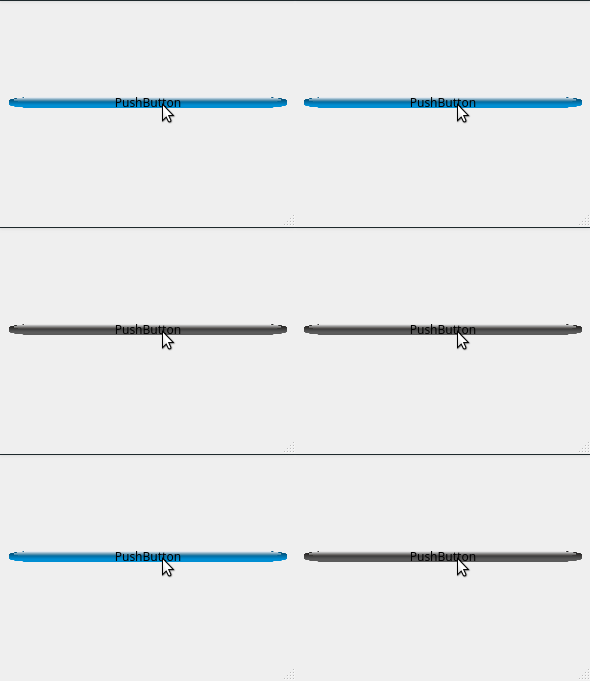
                    

                    alt text

                    @Computer Science Student - Brazil
                    Web Developer and Researcher
                    “Sometimes it’s the people no one imagines anything of who do the things that no one can imagine.” - Alan Turing

                    1 Reply Last reply
                    2
                    • R Offline
                      R Offline
                      Raii
                      wrote on last edited by
                      #9
                      This post is deleted!
                      1 Reply Last reply
                      0
                      • R Offline
                        R Offline
                        Raii
                        wrote on last edited by
                        #10

                        i have not changed my button to checkable and mark the post to solved

                        1 Reply Last reply
                        0

                        • Login

                        • Login or register to search.
                        • First post
                          Last post
                        0
                        • Categories
                        • Recent
                        • Tags
                        • Popular
                        • Users
                        • Groups
                        • Search
                        • Get Qt Extensions
                        • Unsolved