
Skip to content
  • Categories
  • Recent
  • Tags
  • Popular
  • Users
  • Groups
  • Search
  • Get Qt Extensions
  • Unsolved
Collapse
Brand Logo
  1. Home
  2. Qt Development
  3. General and Desktop
  4. custom push button
Qt 6.11 is out! See what's new in the release blog

custom push button

Scheduled Pinned Locked Moved Solved General and Desktop
10 Posts 2 Posters 942 Views
  • Oldest to Newest
  • Newest to Oldest
  • Most Votes
Reply
  • Reply as topic
Log in to reply
This topic has been deleted. Only users with topic management privileges can see it.
  • R Offline
    R Offline
    Raii
    wrote on last edited by
    #1

    Hi everyone I have 2 png files (active.png and notactive.png) and I want the other image change the when I click
    stylesheet :

    #button {
    background-color: transparent;
    border-image: url(:active.png);
    background: none;
    border: none;
    background-repeat: none;
    }
    #button:pressed // What should i write
    {
    border-image: url(:noactive.png);
    }


    KillerSmathK 1 Reply Last reply
    0
    • R Offline
      R Offline
      Raii
      wrote on last edited by
      #10

      i have not changed my button to checkable and mark the post to solved

      1 Reply Last reply
      0
      • R Raii

        Hi everyone I have 2 png files (active.png and notactive.png) and I want the other image change the when I click
        stylesheet :

        #button {
        background-color: transparent;
        border-image: url(:active.png);
        background: none;
        border: none;
        background-repeat: none;
        }
        #button:pressed // What should i write
        {
        border-image: url(:noactive.png);
        }


        KillerSmathK Offline
        KillerSmathK Offline
        KillerSmath
        wrote on last edited by
        #2

        @Raii
        Okay, and what is the issue ?

        @Computer Science Student - Brazil
        Web Developer and Researcher
        “Sometimes it’s the people no one imagines anything of who do the things that no one can imagine.” - Alan Turing

        1 Reply Last reply
        2
        • R Offline
          R Offline
          Raii
          wrote on last edited by
          #3

          (pressed)->picture changes instant I want to stay permanently when I click

          KillerSmathK 1 Reply Last reply
          0
          • R Raii

            (pressed)->picture changes instant I want to stay permanently when I click

            KillerSmathK Offline
            KillerSmathK Offline
            KillerSmath
            wrote on last edited by KillerSmath
            #4

            @Raii
            Why not use #button:checked and setup your button as checkable ?

            @Computer Science Student - Brazil
            Web Developer and Researcher
            “Sometimes it’s the people no one imagines anything of who do the things that no one can imagine.” - Alan Turing

            1 Reply Last reply
            2
            • R Offline
              R Offline
              Raii
              wrote on last edited by
              #5

              (checked) -> I tried but the picture does not change at the first picture still stands
              0_1556989316532_Ekran Alıntısı.PNG

              1 Reply Last reply
              0
              • R Offline
                R Offline
                Raii
                wrote on last edited by
                #6

                i'm doing something like toggle button

                1 Reply Last reply
                0
                • R Offline
                  R Offline
                  Raii
                  wrote on last edited by
                  #7
                  This post is deleted!
                  KillerSmathK 1 Reply Last reply
                  0
                  • R Raii

                    This post is deleted!

                    KillerSmathK Offline
                    KillerSmathK Offline
                    KillerSmath
                    wrote on last edited by
                    #8

                    @Raii
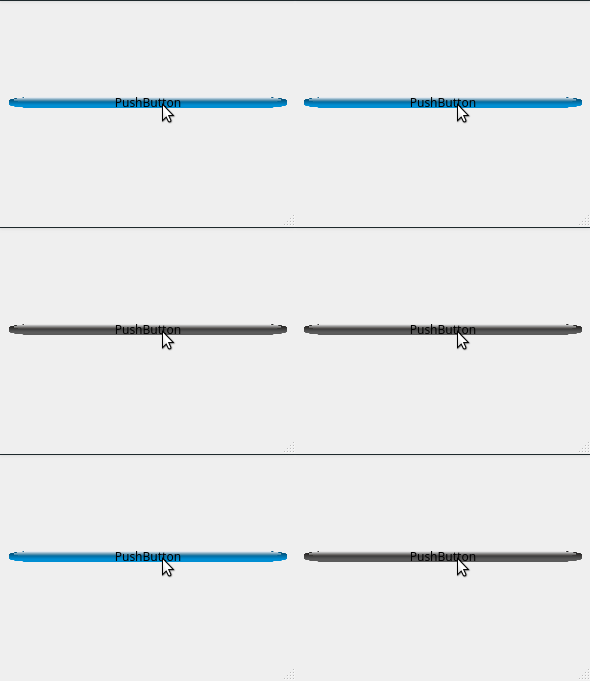
                    Everything is working with this style:

                    #button {
                    background-color: transparent;
                    border-image: url(:blue.png);
                    background: none;
                    border: none;
                    background-repeat: none;
                    }
                    #button:checked
                    {
                    border-image: url(:gray.png);
                    }
                    

                    alt text

                    @Computer Science Student - Brazil
                    Web Developer and Researcher
                    “Sometimes it’s the people no one imagines anything of who do the things that no one can imagine.” - Alan Turing

                    1 Reply Last reply
                    2
                    • R Offline
                      R Offline
                      Raii
                      wrote on last edited by
                      #9
                      This post is deleted!
                      1 Reply Last reply
                      0
                      • R Offline
                        R Offline
                        Raii
                        wrote on last edited by
                        #10

                        i have not changed my button to checkable and mark the post to solved

                        1 Reply Last reply
                        0

                        • Login

                        • Login or register to search.
                        • First post
                          Last post
                        0
                        • Categories
                        • Recent
                        • Tags
                        • Popular
                        • Users
                        • Groups
                        • Search
                        • Get Qt Extensions
                        • Unsolved