
Skip to content
  • Categories
  • Recent
  • Tags
  • Popular
  • Users
  • Groups
  • Search
  • Get Qt Extensions
  • Unsolved
Collapse
Brand Logo
  1. Home
  2. Qt Development
  3. General and Desktop
  4. Animate QTableWidget
Qt 6.11 is out! See what's new in the release blog

Animate QTableWidget

Scheduled Pinned Locked Moved Solved General and Desktop
12 Posts 3 Posters 2.8k Views 1 Watching
  • Oldest to Newest
  • Newest to Oldest
  • Most Votes
Reply
  • Reply as topic
Log in to reply
This topic has been deleted. Only users with topic management privileges can see it.
  • I Offline
    I Offline
    imaqt 0
    wrote on last edited by
    #1

    How can I animate the deletion/insertion of a row in a QTableWidget?

    1 Reply Last reply
    0
    • mrjjM Offline
      mrjjM Offline
      mrjj
      Lifetime Qt Champion
      wrote on last edited by
      #2

      Hi
      In what way animate?
      The items are tightly controlled by the QTableWidget so we cant move them
      around or anything like that.

      1 Reply Last reply
      0
      • I Offline
        I Offline
        imaqt 0
        wrote on last edited by imaqt 0
        #3

        Well I have created rowInsert() and rowDelete() functions and i would like the deleted/inserted rows to be animated when they appear/disappear. I would like animation like for example one on their height property (from 0->100 when it appears, from
        100->0 when it disappears).
        Edit: https://www.youtube.com/watch?v=bOl5MIti7n0 I found this video as an example of how I want it to appear.

        1 Reply Last reply
        0
        • mrjjM Offline
          mrjjM Offline
          mrjj
          Lifetime Qt Champion
          wrote on last edited by mrjj
          #4

          Hi
          You can do like this

          class RowAnimator : public QObject
          {
              Q_OBJECT
          private:
              QRect mRect;
              QPropertyAnimation *animation;
              QTableWidget *table = nullptr;
          public:
              Q_PROPERTY(QRect ItemRect READ ItemRectRead WRITE ItemRectWrite)
          
              QRect ItemRectRead() const
              {
                  return mRect;
              }
          
              void ItemRectWrite(const QRect &rect)
              {
                  mRect = rect;
              }
          
              RowAnimator(QObject *parent, QTableWidget *tableTarget) : QObject (parent), table(tableTarget)
              {
                  animation = new QPropertyAnimation(this, "ItemRect");
                  //animation->setEasingCurve(QEasingCurve::InBack);
              }
          
              virtual ~RowAnimator() {}
          
          public slots:
              void AnimateRow(int row, int start, int end)
              {
                  animation->setDuration(500);
                  animation->setStartValue(QRect(0, 0, 0, start));
                  animation->setEndValue(QRect(0, 0, 0, end));
                  animation->start();
                  connect(animation, &QPropertyAnimation::valueChanged, [ = ](const QVariant & value) {
                      QRect rect = value.toRect();
                      table->setRowHeight(row, rect.height());
                  });
              }
          
          };
          

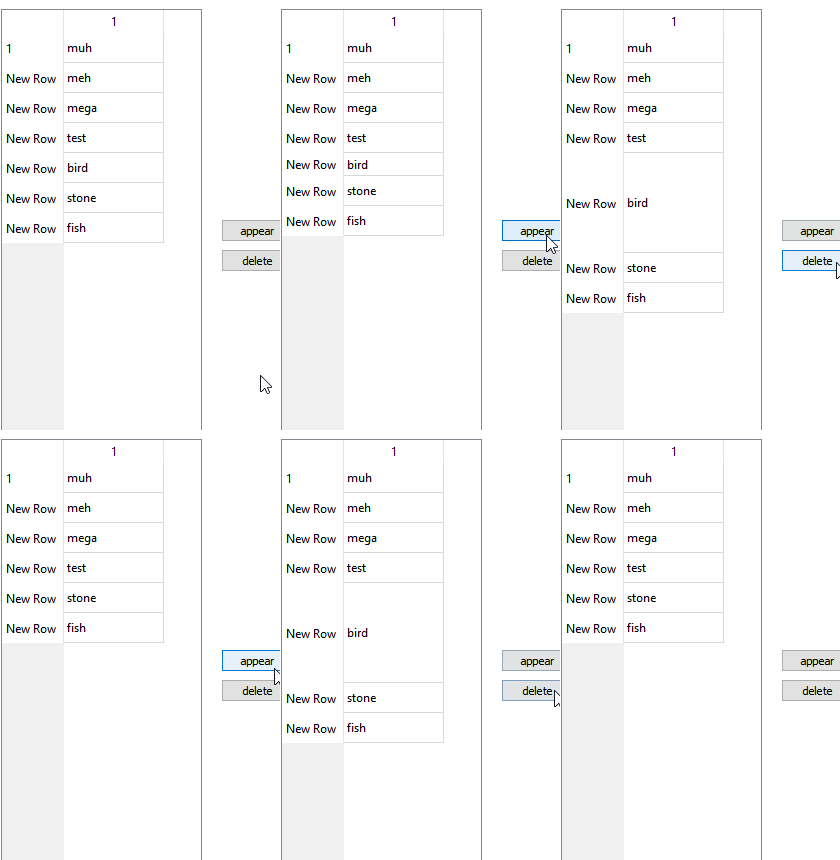
          and call Ra->AnimateRow(4,start height ,end height );
          alt text

          you might want to add a signal for animation finished so you know when its ok to
          actually, remove the row.
          Also if you tweak it a bit and use an easing curve it should look pretty ok.

          1 Reply Last reply
          2
          • I Offline
            I Offline
            imaqt 0
            wrote on last edited by imaqt 0
            #5

            Can you please help me with what coordinates you put in startHeight and endHeight, because no matter what coordinate i put in the resize stops halfway. The animation itself runs until the value of rectangle goes endHeight, but no resizing happens. I think it happens because table.setRowHeight fails for some reason but I don't understand why.

            mrjjM 1 Reply Last reply
            0
            • I imaqt 0

              Can you please help me with what coordinates you put in startHeight and endHeight, because no matter what coordinate i put in the resize stops halfway. The animation itself runs until the value of rectangle goes endHeight, but no resizing happens. I think it happens because table.setRowHeight fails for some reason but I don't understand why.

              mrjjM Offline
              mrjjM Offline
              mrjj
              Lifetime Qt Champion
              wrote on last edited by
              #6

              @imaqt-0
              Hi
              I tested with both small and large values and seems to work.

                connect(ui->pbGo, &QPushButton::released, this, [Ra](){
                  Ra->AnimateRow(4,500,0);
                  });
              
                  connect(ui->pbCome, &QPushButton::released, this, [Ra](){
                  Ra->AnimateRow(4,0,500);
                  });


              what values did you use ?

              1 Reply Last reply
              1
              • I Offline
                I Offline
                imaqt 0
                wrote on last edited by imaqt 0
                #7

                Hi
                I used

                int begin = table.rowHeight(table.currentRow());
                int end = 0;
                int row = table.currentRow();
                

                as values for animation begin and end.
                I have this piece of code

                connect(anim, &QPropertyAnimation::valueChanged, [&table, row]
                (const QVariant & value) {
                   	QRect rect = value.toRect();
                   	qDebug() << rect<<"\t";
                   	table.setRowHeight(row, rect.height());
                   	qDebug() << table.rowHeight(table.currentRow())<<endl;
                   	}
                

                which produces this debug info:

                QRect(0,0 0x29)
                29
                
                QRect(0,0 0x28)
                28
                
                QRect(0,0 0x27)
                27
                
                QRect(0,0 0x26)
                26
                
                QRect(0,0 0x25)
                25
                
                QRect(0,0 0x24)
                24
                
                QRect(0,0 0x23)
                23
                
                QRect(0,0 0x22)
                23
                
                QRect(0,0 0x21)
                23
                

                This is what makes me think that it might be a problem with QTableWidget::setRowHeight.

                1 Reply Last reply
                1
                • mrjjM Offline
                  mrjjM Offline
                  mrjj
                  Lifetime Qt Champion
                  wrote on last edited by
                  #8

                  Hi
                  Hmm so it only runs to 23 as minimum row height.
                  Odd.
                  What if you directly set it to say 10?

                  1 Reply Last reply
                  1
                  • I Offline
                    I Offline
                    imaqt 0
                    wrote on last edited by
                    #9

                    I have tried setting it directly even to 0 and it works. Maybe there's a limit to number of resizes?

                    mrjjM 1 Reply Last reply
                    1
                    • I imaqt 0

                      I have tried setting it directly even to 0 and it works. Maybe there's a limit to number of resizes?

                      mrjjM Offline
                      mrjjM Offline
                      mrjj
                      Lifetime Qt Champion
                      wrote on last edited by mrjj
                      #10

                      @imaqt-0
                      Hmm
                      It seems to have a minimum size.
                      if i do

                        ui->tableWidget->setRowHeight(4,1);
                        qDebug() << ui->tableWidget->rowHeight(4);
                      

                      it says 23.

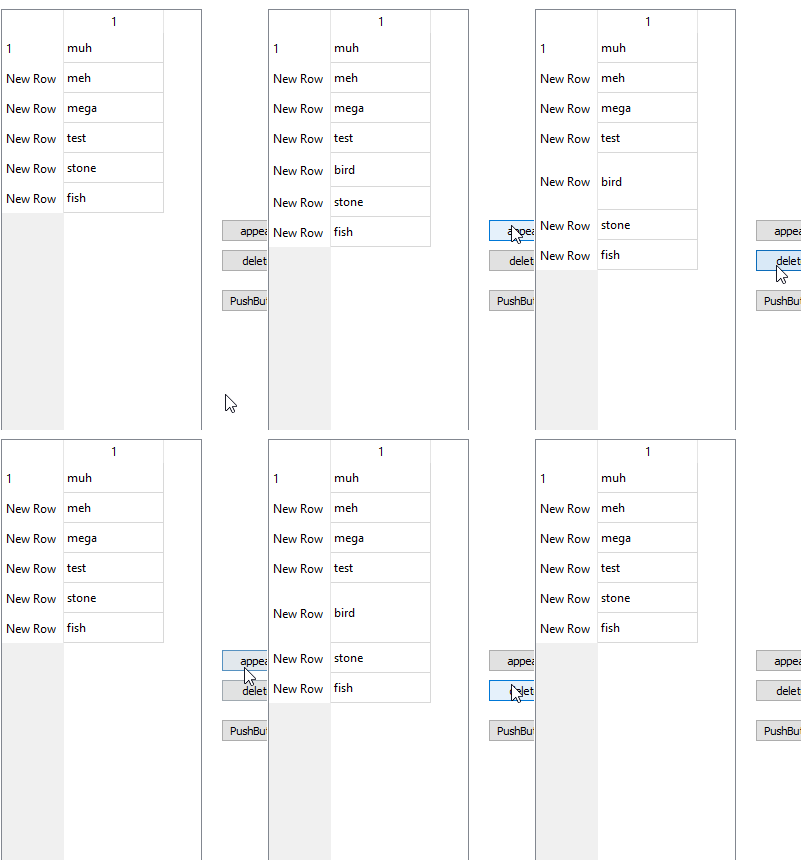
                      ah, its linked to
                      ui->tableWidget->verticalHeader()->setMinimumSectionSize(1);
                      alt text

                      1 Reply Last reply
                      1
                      • I Offline
                        I Offline
                        imaqt 0
                        wrote on last edited by
                        #11

                        @mrjj said in Animate QTableWidget:

                        ui->tableWidget->verticalHeader()->setMinimumSectionSize(1);

                        Yes this was it thank you very much, its smooth now!

                        1 Reply Last reply
                        1
                        • N Offline
                          N Offline
                          Nielsen25
                          wrote on last edited by Nielsen25
                          #12

                          Yes,agreed....Lots of confusions in cordinates of startHeight and endHeight. It just stucks in mysystem after going halfway.Saw couple of codes but all in vain www.mybkexperience.com

                          1 Reply Last reply
                          0

                          • Login

                          • Login or register to search.
                          • First post
                            Last post
                          0
                          • Categories
                          • Recent
                          • Tags
                          • Popular
                          • Users
                          • Groups
                          • Search
                          • Get Qt Extensions
                          • Unsolved