Skip to content
  • Categories
  • Recent
  • Tags
  • Popular
  • Users
  • Groups
  • Search
  • Get Qt Extensions
  • Unsolved
Collapse
Brand Logo
  1. Home
  2. Qt Development
  3. General and Desktop
  4. Custom table model with checkbox

Custom table model with checkbox

Scheduled Pinned Locked Moved Unsolved General and Desktop
5 Posts 3 Posters 812 Views 2 Watching
  • Oldest to Newest
  • Newest to Oldest
  • Most Votes
Reply
  • Reply as topic
Log in to reply
This topic has been deleted. Only users with topic management privileges can see it.
  • _ Offline
    _ Offline
    __vnv__
    wrote on last edited by __vnv__
    #1

    Hello everyone,

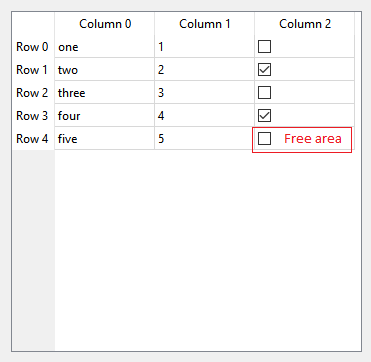
    I have created my custom table model based on QAbstractTableModel and it contains checkbox which works as it is supposed to and only issue is empty text field next to it.

    Is there any way to remove that space , and could please someone explain that.
    I would like to have just a checkbox centered in the column.

    Big thank you in advance!

    0_1551219248213_table.png

    1 Reply Last reply
    0
    • SGaistS Offline
      SGaistS Offline
      SGaist
      Lifetime Qt Champion
      wrote on last edited by
      #2

      Hi,

      You can add handling of the Qt::SizeHintRole role to your model and give something more suitable.

      Interested in AI ? www.idiap.ch
      Please read the Qt Code of Conduct - https://forum.qt.io/topic/113070/qt-code-of-conduct

      1 Reply Last reply
      3
      • _ Offline
        _ Offline
        __vnv__
        wrote on last edited by __vnv__
        #3

        @SGaist said in Custom table model with checkbox:

        Qt::SizeHintRole

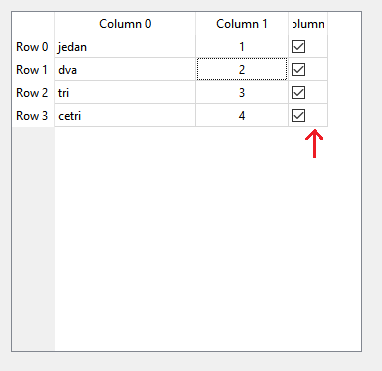
        Thank you for helping. So It seems that it is solving the thing partially, still that Free area stays, for some reason checkbox includes text space which has no use at all. Any way to remove that text space?
        0_1551275746889_table.png

        1 Reply Last reply
        0
        • VRoninV Offline
          VRoninV Offline
          VRonin
          wrote on last edited by
          #4

          Is it read-only or is the checkbox clickable by the user?

          "La mort n'est rien, mais vivre vaincu et sans gloire, c'est mourir tous les jours"
          ~Napoleon Bonaparte

          On a crusade to banish setIndexWidget() from the holy land of Qt

          1 Reply Last reply
          0
          • _ Offline
            _ Offline
            __vnv__
            wrote on last edited by
            #5

            Yes, it is user clickable. User can change state of sensor with this (in the future).

            1 Reply Last reply
            0

            • Login

            • Login or register to search.
            • First post
              Last post
            0
            • Categories
            • Recent
            • Tags
            • Popular
            • Users
            • Groups
            • Search
            • Get Qt Extensions
            • Unsolved