
QDialog minimize and maximize buttons on Wayland
-
I have a class that inherits from QDialog and the constructor looks like this:
InfoPopup::InfoPopup(QMainWindow *parent, Info *info) : QDialog(parent), m_info(info)
{
   setWindowFlags(windowFlags() & ~Qt::WindowMinMaxButtonsHint);
   setWindowFlags(windowFlags() & ~Qt::WindowContextHelpButtonHint);
   setAttribute(Qt::WA_DeleteOnClose);
   setWindowTitle(info->name());

   ...

   show();
   raise();
}
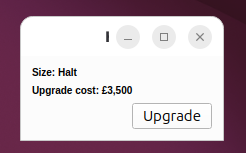
As expected, on both Windows and Liniux/X11 I get a dialog with a title bar and a close button but no minimise or maximise buttons. However on Linux/Wayland I get both minimise and maximise buttons too.
I have read elsewhere that it's necessary to set the Qt::CustomizeWindowHint flag in order to customise the window so I tried that but it made no difference. I also saw an example (from a question based on an earlier version of Qt) where a QWidget was being used directly as a Window so I tried inheriting from QWidget as follows:InfoPopup::InfoPopup(QMainWindow *parent, Info *info) : QWidget(parent), m_info(info) { setWindowFlags(Qt::Window | Qt::CustomizeWindowHint | Qt::WindowTitleHint | Qt::WindowCloseButtonHint); setAttribute(Qt::WA_DeleteOnClose); setWindowTitle(info->name()); ... show(); raise(); }Again, it works as expected on Windows but I still get minimise and maximise buttons on Wayland. In fact on Wayland I also get a title bar and a close button even if I don't specify Qt::WindowTitleHint and Qt::WindowCloseButtonHint respectively whereas on Windows I need to specify them.
I appreciate that just because it works fine on Windows and X11 doesn't necessarily mean that it was correct but I've tried various other combinations of flags on Wayland and nothing I've found gets rid of the minimise and maximise buttons. Does Wayland just ignore setWindowFlags? Is there anything I can do to get rid of the minimise and maximise buttons on Wayland?In case it has any bearing I'm using Ubuntu 26.04 with Qt 6.12.0 and GCC x86 (64-bit).
-
Hi IgKh. Thanks for the response.
As far as I'm aware I'm using whatever standard compositor is installed with Ubuntu 26.04. I did a brief search to try to figure out if there's a way to determine what compositor is in use but couldn't find anything definitive. You said a screenshot should make it clear - assuming you meant a screenshot of my application, here's the window in question. What looks like a capital I in the title bar is all that can be seen of my window title obscured by the unwanted buttons.
I also tried grepping for "comp" in the output from wayland-info and I got the following results:interface: 'wl_compositor' version: 6, name: 1 interface: 'wl_subcompositor' version: 1, name: 8but I'm not really sure if that's a definitive list because it seems that many of the Wayland compositors have names which don't contain the word "Compositor" anyway so I'm not really sure what I'm looking for. I haven't knowingly installed any compositors but something else that I've installed may have done of course.
Sorry if I'm missing something obvious or have misunderstood your response - I've been writing software with Qt on Linux for almost 20 years but I'm really struggling to get my head around Wayland and every time I think I'm starting to get my head around it I read something that makes me question everything I thought I understood :-(
@SiFox said in QDialog minimize and maximize buttons on Wayland:
As far as I'm aware I'm using whatever standard compositor is installed with Ubuntu 26.04. I did a brief search to try to figure out if there's a way to determine what compositor is in use but couldn't find anything definitive.
Yes, so that would be GNOME with its' standard compositor "Mutter". The environment variable
XDG_SESSION_DESKTOPcan confirm that.The main thing to understand about Wayland, that it is just a protocol, and a very bare-bones one at that. Each compositor has to (mostly) independently implement everything from scratch. There are multiple extension protocols, but again each compositor implements a different set of them. This is unlike in the X11 days, in which X was both a protocol but also a common server implementation that handled all the basic stuff in a uniform way and only delegated window handling to a WM. So you can't really target "Wayland" - you need to target GNOME on Wayland, KDE on Wayland, COSMIC, etc... (Qt does a mostly satisfactory job on hiding that).
According to your screenshot, you are using the Adwaita client-side window decorations plugin shipped with Qt. Mutter - on purpose - does not support the extensions that allow the compositor to draw decorations for client applications, and never sees your hints. GNOME requires applications to draw their own decorations.
From a quick look, Qt's Adwaita-style window decorations don't have any code to check if the window is maximize-able or not. I don't know if it was purposefully left out or is just an oversight. Perhaps you can file a ticket in the Qt issue tracker to ask.
You can try switching to the "bardient" decorations plugin by setting the environment variable
QT_WAYLAND_DECORATIONto the valuebradient. -
Hi @SiFox, welcome to the forum.
Wayland is not a single "thing", it depends heavily on which compositor you are running under, as especially if the window decorations are drawn by the compositor or by Qt itself (SSDs vs CSDs). A screenshot should make it clear, if you can't tell by yourself.
-
Hi IgKh. Thanks for the response.
As far as I'm aware I'm using whatever standard compositor is installed with Ubuntu 26.04. I did a brief search to try to figure out if there's a way to determine what compositor is in use but couldn't find anything definitive. You said a screenshot should make it clear - assuming you meant a screenshot of my application, here's the window in question. What looks like a capital I in the title bar is all that can be seen of my window title obscured by the unwanted buttons.
I also tried grepping for "comp" in the output from wayland-info and I got the following results:interface: 'wl_compositor' version: 6, name: 1 interface: 'wl_subcompositor' version: 1, name: 8but I'm not really sure if that's a definitive list because it seems that many of the Wayland compositors have names which don't contain the word "Compositor" anyway so I'm not really sure what I'm looking for. I haven't knowingly installed any compositors but something else that I've installed may have done of course.
Sorry if I'm missing something obvious or have misunderstood your response - I've been writing software with Qt on Linux for almost 20 years but I'm really struggling to get my head around Wayland and every time I think I'm starting to get my head around it I read something that makes me question everything I thought I understood :-(
-
Hi IgKh. Thanks for the response.
As far as I'm aware I'm using whatever standard compositor is installed with Ubuntu 26.04. I did a brief search to try to figure out if there's a way to determine what compositor is in use but couldn't find anything definitive. You said a screenshot should make it clear - assuming you meant a screenshot of my application, here's the window in question. What looks like a capital I in the title bar is all that can be seen of my window title obscured by the unwanted buttons.
I also tried grepping for "comp" in the output from wayland-info and I got the following results:interface: 'wl_compositor' version: 6, name: 1 interface: 'wl_subcompositor' version: 1, name: 8but I'm not really sure if that's a definitive list because it seems that many of the Wayland compositors have names which don't contain the word "Compositor" anyway so I'm not really sure what I'm looking for. I haven't knowingly installed any compositors but something else that I've installed may have done of course.
Sorry if I'm missing something obvious or have misunderstood your response - I've been writing software with Qt on Linux for almost 20 years but I'm really struggling to get my head around Wayland and every time I think I'm starting to get my head around it I read something that makes me question everything I thought I understood :-(
@SiFox said in QDialog minimize and maximize buttons on Wayland:
As far as I'm aware I'm using whatever standard compositor is installed with Ubuntu 26.04. I did a brief search to try to figure out if there's a way to determine what compositor is in use but couldn't find anything definitive.
Yes, so that would be GNOME with its' standard compositor "Mutter". The environment variable
XDG_SESSION_DESKTOPcan confirm that.The main thing to understand about Wayland, that it is just a protocol, and a very bare-bones one at that. Each compositor has to (mostly) independently implement everything from scratch. There are multiple extension protocols, but again each compositor implements a different set of them. This is unlike in the X11 days, in which X was both a protocol but also a common server implementation that handled all the basic stuff in a uniform way and only delegated window handling to a WM. So you can't really target "Wayland" - you need to target GNOME on Wayland, KDE on Wayland, COSMIC, etc... (Qt does a mostly satisfactory job on hiding that).
According to your screenshot, you are using the Adwaita client-side window decorations plugin shipped with Qt. Mutter - on purpose - does not support the extensions that allow the compositor to draw decorations for client applications, and never sees your hints. GNOME requires applications to draw their own decorations.
From a quick look, Qt's Adwaita-style window decorations don't have any code to check if the window is maximize-able or not. I don't know if it was purposefully left out or is just an oversight. Perhaps you can file a ticket in the Qt issue tracker to ask.
You can try switching to the "bardient" decorations plugin by setting the environment variable
QT_WAYLAND_DECORATIONto the valuebradient. -
Hi IgKh.
Your proposed solution of setting QT_WAYLAND_DECORATION to bradient solves my problem and gives me control over the presence or absence of the maximise and minimise buttons. I would prefer it if Adwaita respected those choices because then my window decorations would be consistent with other Gnome desktop applications so I'll raise a ticket as you suggest and see what happens.
Thank you so much for your help! -
S SiFox has marked this topic as solved
-
Hi IgKh.
Your proposed solution of setting QT_WAYLAND_DECORATION to bradient solves my problem and gives me control over the presence or absence of the maximise and minimise buttons. I would prefer it if Adwaita respected those choices because then my window decorations would be consistent with other Gnome desktop applications so I'll raise a ticket as you suggest and see what happens.
Thank you so much for your help!
