SoundEffect: "QSocketNotifier: Invalid socket ... disabling..." floods the log and the app freezes (Qt 6.12, Linux)
-
Hi all,
I'm running into a problem with QML
SoundEffectand wondering if anyone has seen this before.What I'm doing
My game has two
SoundEffectinstances (one per player). Whenever something happens in the game
(at most about every 800 ms per player), I play a different short WAV file like this:SoundEffect { id: effect } function playSound(url) { effect.stop() effect.source = url // a different file from the previous one effect.play() // not waiting for status == SoundEffect.Ready }The WAV files are short (0.5 to 1.4 s, 16 bit PCM, 44.1 kHz).
The problem
After a few seconds to a minute, this suddenly appears:
QSocketNotifier: Socket notifiers cannot be enabled or disabled from another thread
QSocketNotifier: Invalid socket 15 and type 'Read', disabling...
QSocketNotifier: Invalid socket 15 and type 'Read', disabling...
... (repeated endlessly, hundreds of MB of log)
From then on, timers no longer fire and the app is basically frozen, so I have to kill it.
(The first line doesn't always show up.)A few observations:
- It only happened with two instances. With one instance, I couldn't reproduce it.
- It didn't happen when the sounds were always cut off quickly by the next
stop()(e.g. every 200 ms). - Using one
SoundEffectper file with a fixedsource(only callingplay()) made it worse. MediaPlayer+AudioOutputworks fine, but I'd like to stick withSoundEffectbecause its low-latency playback is a better fit for a game.
Environment
- Ubuntu 24.04, PipeWire 1.0.5, X11
- Qt 6.12.0 (gcc_64, installed via Qt Creator, unmodified), FFmpeg backend
Questions
- Is this a known issue?
- Is my usage (changing
sourceright afterstop(), callingplay()beforeReady) okay?
If not, what's the recommended way to play different short sounds in quick succession?
I have a small project that reproduces it and can share it if that helps.
Thanks!
-
Hi and welcome to devnet,
Sharing that small project would be nice as it will allow other people to try to reproduce your issue.
-
Thanks!
It's a single QML file with two
SoundEffectinstances that dostop()→ changesource→play()on a timer,
the same way as in my game. No C++ or build step is needed.Setup
soundeffect_repro/
  Main.qml
  sounds/tone_1.wav
  sounds/tone_2.wav
Sorry, the WAV files (
tone_1.wavandtone_2.wav) can't be uploaded, so you'll need to prepare two short WAV files yourself.
Two different short WAV files are needed. Mine are 16 bit PCM, stereo, 44.1 kHz sine waves of 0.5 s and 0.6 s.Run
<Qt>/6.12.0/gcc_64/bin/qml Main.qml 2> err.txt
grep -m3 -n QSocketNotifier err.txt
I ran it 5 times, and it reproduced every time, after about 3 to 30 s.
13:QSocketNotifier: Socket notifiers cannot be enabled or disabled from another thread
14:QSocketNotifier: Invalid socket 60 and type 'Read', disabling...
15:QSocketNotifier: Invalid socket 60 and type 'Read', disabling...
When it reproduces:
err.txtfills up withQSocketNotifier: Invalid socket ...lines.- The square in the window stops rotating, the play count stops increasing, and no more sound is played
(see the screenshot below).
Note: once the issue starts,
err.txtkeeps growing by tens of MB per second.
Please stop the app (Ctrl+C) soon after it reproduces, or the file will get huge.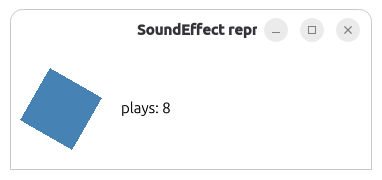
Main.qml
pragma ComponentBehavior: Bound
import QtQuick
import QtMultimedia

Window {
    id: root

    readonly property int playInterval: 800    // ms between plays of each SoundEffect
    readonly property list<url> soundUrls: [
        Qt.resolvedUrl("sounds/tone_1.wav"),
        Qt.resolvedUrl("sounds/tone_2.wav")
    ]
    property int playCount: 0

    width: 360
    height: 120
    visible: true
    title: "SoundEffect repro"

    // Two SoundEffect instances, the second one starting half an interval later
    Repeater {
        model: 2

        delegate: Item {
            id: player

            required property int index
            property int nextSound: index   // index into soundUrls

            function playNext() {
                effect.stop()
                effect.source = root.soundUrls[player.nextSound]   // a different file from the previous play
                effect.play()                                      // without waiting for SoundEffect.Ready
                player.nextSound = (player.nextSound + 1) % root.soundUrls.length
                root.playCount++
                console.log("play " + root.playCount + " instance " + player.index + " "
                            + effect.source.toString().split("/").pop())
            }

            SoundEffect {
                id: effect

                onStatusChanged: {
                    if (status === SoundEffect.Error)
                        console.log("instance " + player.index + ": Error " + source)
                }
            }

            Timer {
                interval: player.index * root.playInterval / 2
                running: true
                onTriggered: {
                    player.playNext()
                    repeatTimer.start()
                }
            }

            Timer {
                id: repeatTimer
                interval: root.playInterval
                repeat: true
                onTriggered: player.playNext()
            }
        }
    }

    // Progress line every 10 s; it stops once the issue starts
    Timer {
        interval: 10000
        running: true
        repeat: true
        onTriggered: console.log("progress: plays=" + root.playCount)
    }

    // Shows whether the GUI thread is still alive
    Rectangle {
        x: 20
        y: 30
        width: 60
        height: 60
        color: "steelblue"
        RotationAnimation on rotation {
            from: 0
            to: 360
            duration: 2000
            loops: Animation.Infinite
        }
    }

    Text {
        x: 110
        y: 50
        text: "plays: " + root.playCount
    }
}
Thanks again!
-
I had bookmarked this page so I could test it "just for fun" (and to be helpful), mostly because it seemed like something I could easily test. I don't currently have any projects that need to play
wavfiles with QMLSoundEffect, so the outcome is not of immediate impact to me but (again) this seemed easy to paste into a QML file and launch.So (after a week's delay 😅) that is what I have done.
My OS is
Ubuntu 22.04.5 LTS jammyI generated the
wavfiles as follows:sox -n -r 48000 -b 16 tone_1.wav synth 0.6 sin 440 sox -n -r 48000 -b 16 tone_2.wav synth 0.5 sin 240When I launched the code using
Qt_desktop/6.8.3/gcc_64/bin/qmlscene, things seem to work pretty well. I cannot reproduce the reported issue.I then tried with both:
Qt_desktop/6.12.0/gcc_64/bin/qmlsceneand alsoQt_desktop/6.12.0/gcc_64/bin/qml
In both of these
6.12.0attempts, I hear no sound whatsoever! 🫤So I still cannot reproduce the reported issue, but I definitely see different outcomes between 6.8.3 and 6.12.0, which the behavior in 6.12.0 seeming to be worse. (But maybe there is some other dependency I am missing to use multimedia in 6.12.0 on Ubuntu 22.04? .... but there wasn't any warning or error printed that would hint in that direction...)
When I use 6.8.3 I see:
qt.multimedia.ffmpeg: Using Qt multimedia with FFmpeg version 7.1 LGPL version 2.1 or laterAnd with 6.12.0 I see:
qt.multimedia.ffmpeg: Using Qt multimedia with FFmpeg version 9.0.1 LGPL version 2.1 or later -
Thank you for taking the time to test this.
My environment is Ubuntu 24.04.5 LTS, and I can confirm that the issue does not occur with Qt 6.8.3 either. (The application ran for more than five minutes without freezing.)
In my environment, sound also works with Qt 6.12.0, but the application eventually freezes and produces a large number of error messages.
The FFmpeg versions used by Qt Multimedia are the same in my environment as well:
- Qt 6.8.3
- Using Qt multimedia with FFmpeg version 7.1 LGPL version 2.1 or later
- Qt 6.12.0
- Using Qt multimedia with FFmpeg version 9.0.1 LGPL version 2.1 or later
It's interesting that different issues seem to occur depending on the Ubuntu version.
- Qt 6.8.3