Skip to content
  • Categories
  • Recent
  • Tags
  • Popular
  • Users
  • Groups
  • Search
  • Get Qt
  • Unsolved
Collapse
Brand Logo
  1. Home
  2. Qt Development
  3. General and Desktop
  4. Same code different GUI?
Qt 6.12 LTS is out! See what's new in the release blog

Same code different GUI?

Scheduled Pinned Locked Moved Unsolved General and Desktop
21 Posts 4 Posters 2.5k Views 3 Watching
  • Oldest to Newest
  • Newest to Oldest
  • Most Votes
Reply
  • Reply as topic
Log in to reply
This topic has been deleted. Only users with topic management privileges can see it.
  • SGaistS Offline
    SGaistS Offline
    SGaist
    Lifetime Qt Champion
    wrote last edited by
    #6

    Board or full computer should not make a difference in that case. You likely have two different versions of KDE and Plasma running which may be using a different style hence the suggestion to check which one is being loaded.

    Interested in AI ? www.idiap.ch
    Please read the Qt Code of Conduct - https://forum.qt.io/topic/113070/qt-code-of-conduct

    1 Reply Last reply
    0
    • MucipM Offline
      MucipM Offline
      Mucip
      wrote last edited by Mucip
      #7

      OK. I see many changes on both loading things. And very difficult to see reason for me?!

      But I can not add both txt files here?!

      But I see in first lines:
      Debian12 uses;
      QVncIntegrationPlugin
      QXcbIntegrationPlugin
      QVkKhrDisplayIntegrationPlugin

      Debian13 uses;
      QXcbIntegrationPlugin
      QLinuxFbIntegrationPlugin
      QOffscreenIntegrationPlugin

      1 Reply Last reply
      0
      • MucipM Offline
        MucipM Offline
        Mucip
        wrote last edited by
        #8

        Or should I transfer to basic desktop something like xfce?

        1 Reply Last reply
        0
        • MucipM Offline
          MucipM Offline
          Mucip
          wrote last edited by
          #9

          I started QT_QPA_PLATFORM=eglfs mode I mean without Desktop but nothing changed?!

          1 Reply Last reply
          0
          • MucipM Offline
            MucipM Offline
            Mucip
            wrote last edited by
            #10

            Any suggestion about my problem?

            1 Reply Last reply
            0
            • SGaistS Offline
              SGaistS Offline
              SGaist
              Lifetime Qt Champion
              wrote last edited by
              #11

              Can you describe your setup with more precision ?
              Which exact version of Qt are you using on each system ?
              Which exact version of KDE are you using on each ?
              Which style does get loaded and used ?
              How are you starting your application ?

              Interested in AI ? www.idiap.ch
              Please read the Qt Code of Conduct - https://forum.qt.io/topic/113070/qt-code-of-conduct

              MucipM 1 Reply Last reply
              0
              • SGaistS SGaist

                Can you describe your setup with more precision ?
                Which exact version of Qt are you using on each system ?
                Which exact version of KDE are you using on each ?
                Which style does get loaded and used ?
                How are you starting your application ?

                MucipM Offline
                MucipM Offline
                Mucip
                wrote last edited by
                #12

                Dear @SGaist ,
                I wrote program in QtCreator 6.11.2 in Debian 13.
                I copy code to Debain12. Because RockPi use Debian 12. And I use qmak6 to compile in Debian12.
                I run compiled program from CLI in Debian12.

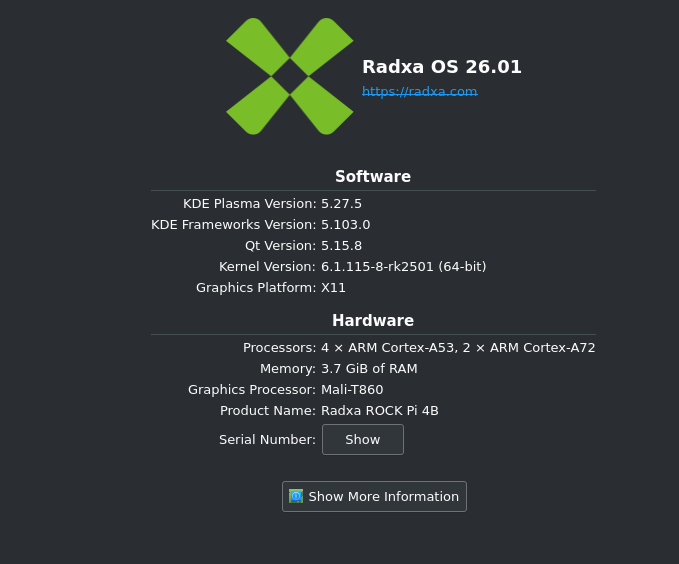
                Debian 12KDE:
                Debian12KDEVersion.png

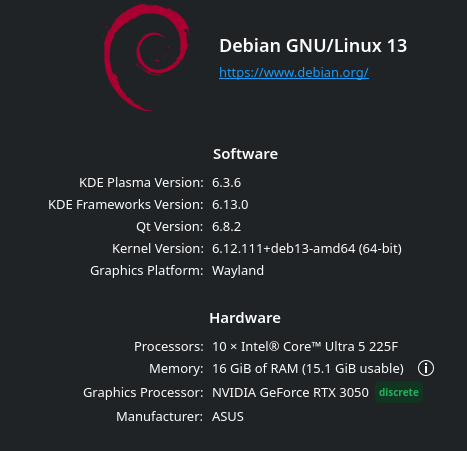
                Debian 13 KDE:
                Debian13KDEVersion.png

                I use Breeze Dark on both system.

                Regards,
                Mucip:)

                1 Reply Last reply
                0
                • SGaistS Offline
                  SGaistS Offline
                  SGaist
                  Lifetime Qt Champion
                  wrote last edited by
                  #13

                  So I would take that you are using 6.4.2 on Debian 12 ? That means a gap of four minor versions between the two.
                  That does not fully explain the difference but there might have been fixes between the two versions.
                  Are you using QML for you UI ?
                  Also, which style gets loaded ?

                  Interested in AI ? www.idiap.ch
                  Please read the Qt Code of Conduct - https://forum.qt.io/topic/113070/qt-code-of-conduct

                  1 Reply Last reply
                  0
                  • MucipM Offline
                    MucipM Offline
                    Mucip
                    wrote last edited by
                    #14

                    I use UI not QML.
                    I did not understan your last question. Style? In Qt or in Plasma?

                    Regards,
                    Mucip:)

                    SGaistS 1 Reply Last reply
                    0
                    • S Offline
                      S Offline
                      SimonSchroeder
                      wrote last edited by
                      #15

                      According to your screenshots on Debian 12 you are using KDE 5, Qt 5, and X11 and on Debian 13 you are using KDE 6, Qt 6, and Wayland.

                      Besides the totally different versions of KDE and Qt, also the switch from X11 to Wayland can have a huge impact.

                      MucipM 1 Reply Last reply
                      4
                      • S SimonSchroeder

                        According to your screenshots on Debian 12 you are using KDE 5, Qt 5, and X11 and on Debian 13 you are using KDE 6, Qt 6, and Wayland.

                        Besides the totally different versions of KDE and Qt, also the switch from X11 to Wayland can have a huge impact.

                        MucipM Offline
                        MucipM Offline
                        Mucip
                        wrote last edited by
                        #16

                        @SimonSchroeder
                        But in any case I recompile the codes with qmake6 in Debian12. It should be same I think.
                        Or Should I install Qtcreator in Debian 12? But I don't think that it changes something. Because I recompile it?
                        It must be something other reason?

                        Regards,
                        Mucip:)

                        1 Reply Last reply
                        0
                        • MucipM Offline
                          MucipM Offline
                          Mucip
                          wrote last edited by Mucip
                          #17

                          Well, I just installed Qt5 Framework on Rock Pi Debian12.
                          $ sudo apt install qtbase5-dev qtcreator

                          I use qmake (not qmake6!) incase of compile program. But nothing changed.
                          Than I tried to open pro file in QtFramework but could not open even?!
                          Project error: cannot run compile 'clang++'.output
                          Maybe you forgot to setup the environment?

                          Error while parsing file.... xx.pro

                          And I don't know why I see about window:
                          Qt Creator 9.0.2
                          Based on Qt 6.4.2 (GCC 12.2.0, arm64)

                          Situation is getting strange step by step... :)

                          1 Reply Last reply
                          0
                          • MucipM Mucip

                            I use UI not QML.
                            I did not understan your last question. Style? In Qt or in Plasma?

                            Regards,
                            Mucip:)

                            SGaistS Offline
                            SGaistS Offline
                            SGaist
                            Lifetime Qt Champion
                            wrote last edited by
                            #18

                            @Mucip said in Same code different GUI?:

                            I use UI not QML.
                            I did not understan your last question. Style? In Qt or in Plasma?

                            Regards,
                            Mucip:)

                            Style as in QStyle. If memory serves well KDE has its own.

                            Interested in AI ? www.idiap.ch
                            Please read the Qt Code of Conduct - https://forum.qt.io/topic/113070/qt-code-of-conduct

                            MucipM 1 Reply Last reply
                            0
                            • SGaistS SGaist

                              @Mucip said in Same code different GUI?:

                              I use UI not QML.
                              I did not understan your last question. Style? In Qt or in Plasma?

                              Regards,
                              Mucip:)

                              Style as in QStyle. If memory serves well KDE has its own.

                              MucipM Offline
                              MucipM Offline
                              Mucip
                              wrote last edited by
                              #19

                              @SGaist ,
                              I don't know about style? Please could you guide me how to control it?

                              Regards,
                              Mucip:)

                              1 Reply Last reply
                              0
                              • Christian EhrlicherC Offline
                                Christian EhrlicherC Offline
                                Christian Ehrlicher
                                Lifetime Qt Champion
                                wrote last edited by
                                #20

                                You can pass the style you want to use by command line ( https://doc.qt.io/qt-6/qapplication.html#QApplication-1 ) or by code ( https://doc.qt.io/qt-6/qapplication.html#setStyle )

                                Qt Online Installer direct download: https://download.qt.io/official_releases/online_installers/
                                Visit the Qt Academy at https://academy.qt.io/catalog

                                MucipM 1 Reply Last reply
                                0
                                • Christian EhrlicherC Christian Ehrlicher

                                  You can pass the style you want to use by command line ( https://doc.qt.io/qt-6/qapplication.html#QApplication-1 ) or by code ( https://doc.qt.io/qt-6/qapplication.html#setStyle )

                                  MucipM Offline
                                  MucipM Offline
                                  Mucip
                                  wrote last edited by
                                  #21

                                  @Christian-Ehrlicher ,
                                  I added below line in main.cpp but nothing changed in Debian 12.

                                  QApplication::setStyle(QStyleFactory::create("Fusion"));
                                  MainWindow w;
                                  

                                  Regards,
                                  Mucip:)

                                  1 Reply Last reply
                                  0

                                  • Login

                                  • Login or register to search.
                                  • First post
                                    Last post
                                  0
                                  • Categories
                                  • Recent
                                  • Tags
                                  • Popular
                                  • Users
                                  • Groups
                                  • Search
                                  • Get Qt
                                  • Unsolved