
QFontDialog on macOS 27 isn't modal anymore
-
The documentation for
QFontDialogin Qt Widgets 6.12 says that it operates the dialog modally.In macOS 27, the (OS-native) font dialog lost its OK and Cancel buttons, so it's sort of non-modal now. Our code (compiled in Qt 6.10.3) continues to block on the
QFontDialog::getFontcall as it did in macOS 26 and earlier when the dialog was fully modal, so the user must close the font dialog to continue, and theokvalue on return is alwaysfalse.I understand that there is a
currentFontChangedsignal we could use, and there's also theDontUseNativeDialogoption to use the Qt (non-OS-native) font dialog instead, but it looks to me likeQFontDialogis now behind the times with respect to macOS, so the Qt API or at least its documentation needs an update.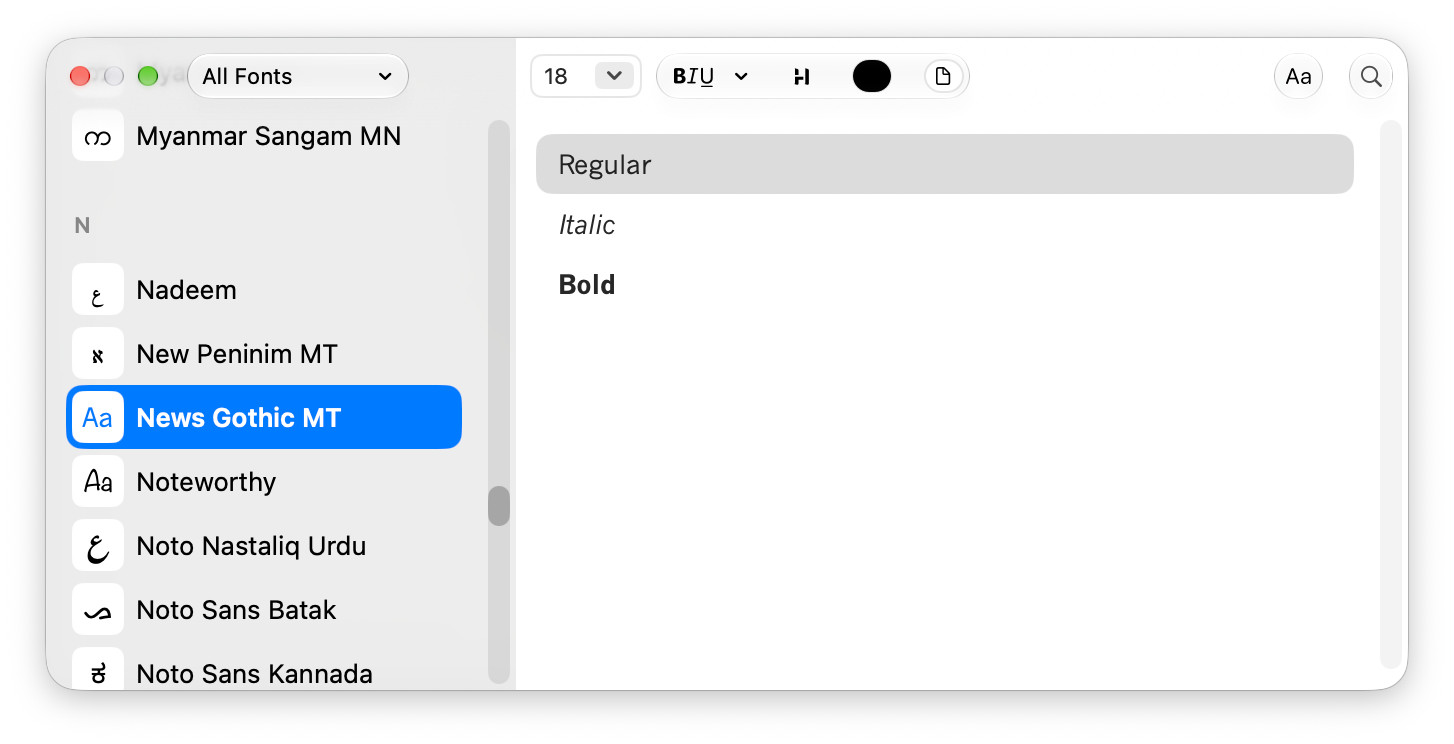
-
Hi,
Can you provide a minimal compilable example that shows this behaviour change ?
-
@barbicels Qt's implementation makes some assumptions about the internal structure of
NSFontPanel(AppKit's native font selector) to inject the action buttons into it. They are not a built-in option. This likely broke with macOS changes. I don't see an open ticket in the bug tracker about it - I encourage you to create one, with the minimal reproducer. -
Minimal compilable example, based on Qt Creator's "Qt Widgets Application":
#include "mainwindow.h"
#include <QtWidgets/QFontDialog>

MainWindow::MainWindow(QWidget *parent)
    : QMainWindow(parent)
{
    bool ok = false;
    QFont font = QFontDialog::getFont(&ok, this);
    qDebug() << "ok =" << ok << "font =" << font;
}

MainWindow::~MainWindow() = default;
Result under macOS 27, regardless of what font is selected in the Apple font dialog, after closing the dialog using the red button:
ok = false font = QFont(.AppleSystemUIFont,13,-1,5,400,0,0,0,0,0,0,0,0,0,0,1)In macOS 26, this same code would have set
oktotrueandfontto whatever was selected, after the user clicked the OK button that is no longer visible in macOS 27 (as the other commenter described). -
Indeed. I filed https://qt-project.atlassian.net/browse/QTBUG-151608 on the matter.
-
 J JonB referenced this topic
-
I am using this as a replacement for QFontDialog::getFont(), for now:
QFont getFontFromDialog( bool* ok, const QFont& font, QWidget* parent )
{
    Q_ASSERT( ok );
    QFontDialog::FontDialogOptions options;
#ifdef Q_OS_MACOS
    if ( QOperatingSystemVersion::current() >= QOperatingSystemVersion( QOperatingSystemVersion::MacOS, 27 ) )
    {
        // native font dialog does not work with Qt for macOS 27
        options |= QFontDialog::DontUseNativeDialog;
    }
#endif
    QFont f = QFontDialog::getFont( ok, font, parent, QString(), options );
    return f;
}
But I hope we get a fix so that we can use the new macOS 27 native font menu.
-
Classic macOS breaking platform consistency again. We ran into the exact same issue after updating our build machines — calling the static QFontDialog::getFont basically turns into a dead end because the native panel now behaves more like an inspector rather than a traditional modal dialog. Setting the QFontDialog::DontUseNativeDialog flag is pretty much the only sane workaround right now if you rely on blocking modal flow with OK/Cancel, even though the Qt-rendered dialog looks noticeably out of place on newer macOS versions.

