
Set stylesheet to parent frame only
-
Hi everybody,
I'm trying to set a background color to a frame. That frame has a sub frame with a label in it. These two should have the default stylesheet/color. But I can't for the life of me figure it out. Here are some observations:
-
Trying to set the stylesheet to only objects of a certain object name via # doesn't work if such object doesn't exist (as expected).
-
But: trying to set the stylesheet to only objects of a certain object name via # doesn't prevent subwidgets from inheriting the stylesheet. Even if they have an object name of their own.
-
This is true even if the class isn't really the same. I tried making a subclass for the main frame ("AFrame"), that inherits from QFrame, but left the subframe as QFrame proper. The QFrame and QLabel still took on the AFrame's stylesheet.
-
This isn't true in the other direction, though. The QFrame subwidget accepts the parent's AFrame stylesheet, but a stylesheet set directly with AFrame doesn't work (as expected).
-
I can't find a way to delete the stylesheet of the subwidgets. I can set a different color, but I can't put them back to the default color.
AFrame *vMainFrame = new AFrame(this);
vMainFrame->setObjectName("AFrame");
QHBoxLayout *vLayoutMainFrame = new QHBoxLayout(vMainFrame);
ui->verticalLayout_2->addWidget(vMainFrame);

QFrame *vSubFrame = new QFrame(this);
vSubFrame->setObjectName("SOMEOTHERFRAME");
vLayoutMainFrame->addWidget(vSubFrame);

QHBoxLayout *vLayoutSubFrame = new QHBoxLayout(vSubFrame);
QLabel* vLabel = new QLabel("womimwolmiplomw",this);
vLabel->setObjectName("somelabel");
vLayoutSubFrame->addWidget(vLabel);


//main no color, sub frame no color, label is green
//vMainFrame->setStyleSheet(QString("QFrame#somelabel {background-color: green}"));

//main no color, sub frame + label green
vMainFrame->setStyleSheet(QString("QFrame#SOMEOTHERFRAME {background-color: green}"));

//no color
//vMainFrame->setStyleSheet(QString("AFrame#SOMEOTHERFRAME {background-color: green}"));

//main is blue, sub frame + label green
//vMainFrame->setStyleSheet(QString("QFrame#AFrame {background-color: blue} QFrame#SOMEOTHERFRAME {background-color: green}"));

//main is blue, sub frame + label blue
//vMainFrame->setStyleSheet(QString("AFrame#AFrame {background-color: blue} QFrame#SOMEOTHERFRAME {}"));
//vMainFrame->setStyleSheet(QString("QFrame#AFrame {background-color: blue} QFrame#SOMEOTHERFRAME {background-color: }"));
//vMainFrame->setStyleSheet(QString("QFrame#AFrame {background-color: blue} QFrame#SOMEOTHERFRAME {}"));

//no color
//vMainFrame->setStyleSheet(QString("AFrame#AFrameNONEXISTING {background-color: blue} QFrame#SOMEOTHERFRAME {}"));
//vMainFrame->setStyleSheet(QString("QFrame#AFrameNONEXISTING {background-color: blue} QFrame {}"));

//no color for main, sub frame + label green
//vMainFrame->setStyleSheet(QString("QFrame#AFrameNONEXISTING {background-color: blue} QFrame#SOMEOTHERFRAME {background-color: green}"));
Best wishes, Angela -
-
Hi,
If you want to change the background of only two widget, going the palette way would be easier:
QPalette *palette = vMainFrame->palette();
palette.setColor(QPalette.Window, QColor("green"));
vMainFrame->setPalette(palette);
And the same for your other widget.
-
Hi,
If you want to change the background of only two widget, going the palette way would be easier:
QPalette *palette = vMainFrame->palette();
palette.setColor(QPalette.Window, QColor("green"));
vMainFrame->setPalette(palette);
And the same for your other widget.
@SGaist Thanks for the hint. I eventually got it working with:
    QPalette palette = vMainFrame->palette();
    palette.setColor(QPalette::Window, QColor("blue"));
    vMainFrame->setAutoFillBackground( true );
    vMainFrame->setPalette(palette);

    QPalette p;
    QColor c = p.color(QPalette::Window);
    p.setColor(QPalette::Window, c);
    vSubFrame->setAutoFillBackground( true );
    vSubFrame->setPalette(p);
It should be said that I found the second part on the old Qt forum and another user was apparently horrified by it, but it's the only way of resetting the palette I found that actually worked.
-
Hi everybody,
I'm trying to set a background color to a frame. That frame has a sub frame with a label in it. These two should have the default stylesheet/color. But I can't for the life of me figure it out. Here are some observations:
-
Trying to set the stylesheet to only objects of a certain object name via # doesn't work if such object doesn't exist (as expected).
-
But: trying to set the stylesheet to only objects of a certain object name via # doesn't prevent subwidgets from inheriting the stylesheet. Even if they have an object name of their own.
-
This is true even if the class isn't really the same. I tried making a subclass for the main frame ("AFrame"), that inherits from QFrame, but left the subframe as QFrame proper. The QFrame and QLabel still took on the AFrame's stylesheet.
-
This isn't true in the other direction, though. The QFrame subwidget accepts the parent's AFrame stylesheet, but a stylesheet set directly with AFrame doesn't work (as expected).
-
I can't find a way to delete the stylesheet of the subwidgets. I can set a different color, but I can't put them back to the default color.
AFrame *vMainFrame = new AFrame(this);
vMainFrame->setObjectName("AFrame");
QHBoxLayout *vLayoutMainFrame = new QHBoxLayout(vMainFrame);
ui->verticalLayout_2->addWidget(vMainFrame);

QFrame *vSubFrame = new QFrame(this);
vSubFrame->setObjectName("SOMEOTHERFRAME");
vLayoutMainFrame->addWidget(vSubFrame);

QHBoxLayout *vLayoutSubFrame = new QHBoxLayout(vSubFrame);
QLabel* vLabel = new QLabel("womimwolmiplomw",this);
vLabel->setObjectName("somelabel");
vLayoutSubFrame->addWidget(vLabel);


//main no color, sub frame no color, label is green
//vMainFrame->setStyleSheet(QString("QFrame#somelabel {background-color: green}"));

//main no color, sub frame + label green
vMainFrame->setStyleSheet(QString("QFrame#SOMEOTHERFRAME {background-color: green}"));

//no color
//vMainFrame->setStyleSheet(QString("AFrame#SOMEOTHERFRAME {background-color: green}"));

//main is blue, sub frame + label green
//vMainFrame->setStyleSheet(QString("QFrame#AFrame {background-color: blue} QFrame#SOMEOTHERFRAME {background-color: green}"));

//main is blue, sub frame + label blue
//vMainFrame->setStyleSheet(QString("AFrame#AFrame {background-color: blue} QFrame#SOMEOTHERFRAME {}"));
//vMainFrame->setStyleSheet(QString("QFrame#AFrame {background-color: blue} QFrame#SOMEOTHERFRAME {background-color: }"));
//vMainFrame->setStyleSheet(QString("QFrame#AFrame {background-color: blue} QFrame#SOMEOTHERFRAME {}"));

//no color
//vMainFrame->setStyleSheet(QString("AFrame#AFrameNONEXISTING {background-color: blue} QFrame#SOMEOTHERFRAME {}"));
//vMainFrame->setStyleSheet(QString("QFrame#AFrameNONEXISTING {background-color: blue} QFrame {}"));

//no color for main, sub frame + label green
//vMainFrame->setStyleSheet(QString("QFrame#AFrameNONEXISTING {background-color: blue} QFrame#SOMEOTHERFRAME {background-color: green}"));
Best wishes, Angela@angela2016 said in Set stylesheet to parent frame only:
I'm trying to set a background color to a frame. That frame has a sub frame with a label in it. These two should have the default stylesheet/color
Sorry I'm a bit late to the party. You want the top level frame to have a background color but its child frame plus its content like button/label not to inherit that, right? Then
background-color: palette(base)orbackground-color: palette(window)on the child widget to cancel what is inherited from the parent widget seems to do what you want? And the latter is presumably the equivalent of what you have written in your code:#include <QFrame> #include <QPushButton> #include <QApplication> int main(int argc, char *argv[]) { QApplication a(argc, argv); QFrame f1; f1.setGeometry(50, 50, 200, 200); f1.setStyleSheet("background-color: red;"); QFrame f2(&f1); f2.setGeometry(25, 25, 100, 100); f2.setStyleSheet("background-color: palette(window)"); // or palette(base) QPushButton pb(&f2); pb.setText("Hello"); pb.setGeometry(20, 20, 50, 50); f1.show(); return a.exec(); }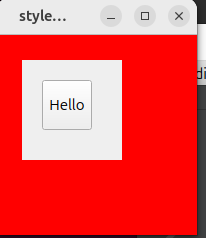
Does this give you what you ask for?
-
-
@angela2016 said in Set stylesheet to parent frame only:
I'm trying to set a background color to a frame. That frame has a sub frame with a label in it. These two should have the default stylesheet/color
Sorry I'm a bit late to the party. You want the top level frame to have a background color but its child frame plus its content like button/label not to inherit that, right? Then
background-color: palette(base)orbackground-color: palette(window)on the child widget to cancel what is inherited from the parent widget seems to do what you want? And the latter is presumably the equivalent of what you have written in your code:#include <QFrame> #include <QPushButton> #include <QApplication> int main(int argc, char *argv[]) { QApplication a(argc, argv); QFrame f1; f1.setGeometry(50, 50, 200, 200); f1.setStyleSheet("background-color: red;"); QFrame f2(&f1); f2.setGeometry(25, 25, 100, 100); f2.setStyleSheet("background-color: palette(window)"); // or palette(base) QPushButton pb(&f2); pb.setText("Hello"); pb.setGeometry(20, 20, 50, 50); f1.show(); return a.exec(); }Does this give you what you ask for?
-
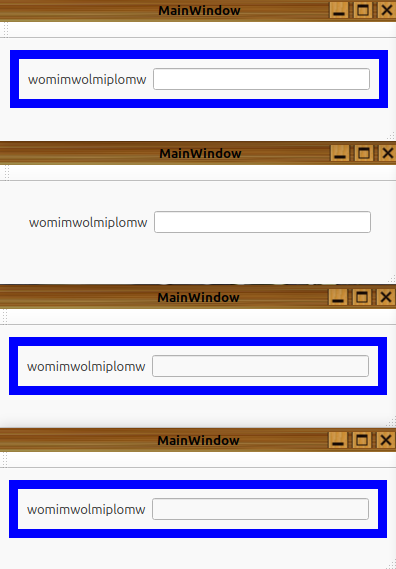
@JonB Thanks, that's almost it. Line edits and check boxes aren't white enough, though, compared to the palette solution. It's all "label grey".
@angela2016
Oh, so after thepalette(window)you are not back where you started, something has still changed? And same forpalette(base)? -
Not sure if you can see it well but here's a screenshot.
The top example is my QPalette code. Second is the default without any setting of the background. The third and fourth window are with your code: palette(window) and palette(base) produce the same result. The label is as expected, but the line edit has the same color as the label, not as the default line edit.
-
Another observation: if I set the palette(window) background directly on the line edit, it becomes white, but the frame and label are blue (as expected). But if I set the palette(window) to both the subframe and the line edit, the line edit is still grey. It's all a bit odd.
-
Hi,
If you want to change the background of only two widget, going the palette way would be easier:
QPalette *palette = vMainFrame->palette();
palette.setColor(QPalette.Window, QColor("green"));
vMainFrame->setPalette(palette);
And the same for your other widget.
@SGaist said in Set stylesheet to parent frame only:
If you want to change the background of only two widget, going the palette way would be easier
Changing the palette works unreliably on some OSes. I believe it only works properly with the Fusion style. But, if you want to go with a native look on Windows (and maybe macOS as well) you need to use stylesheets (which also have their problems). For portable code I can only advise againt using the palette.

