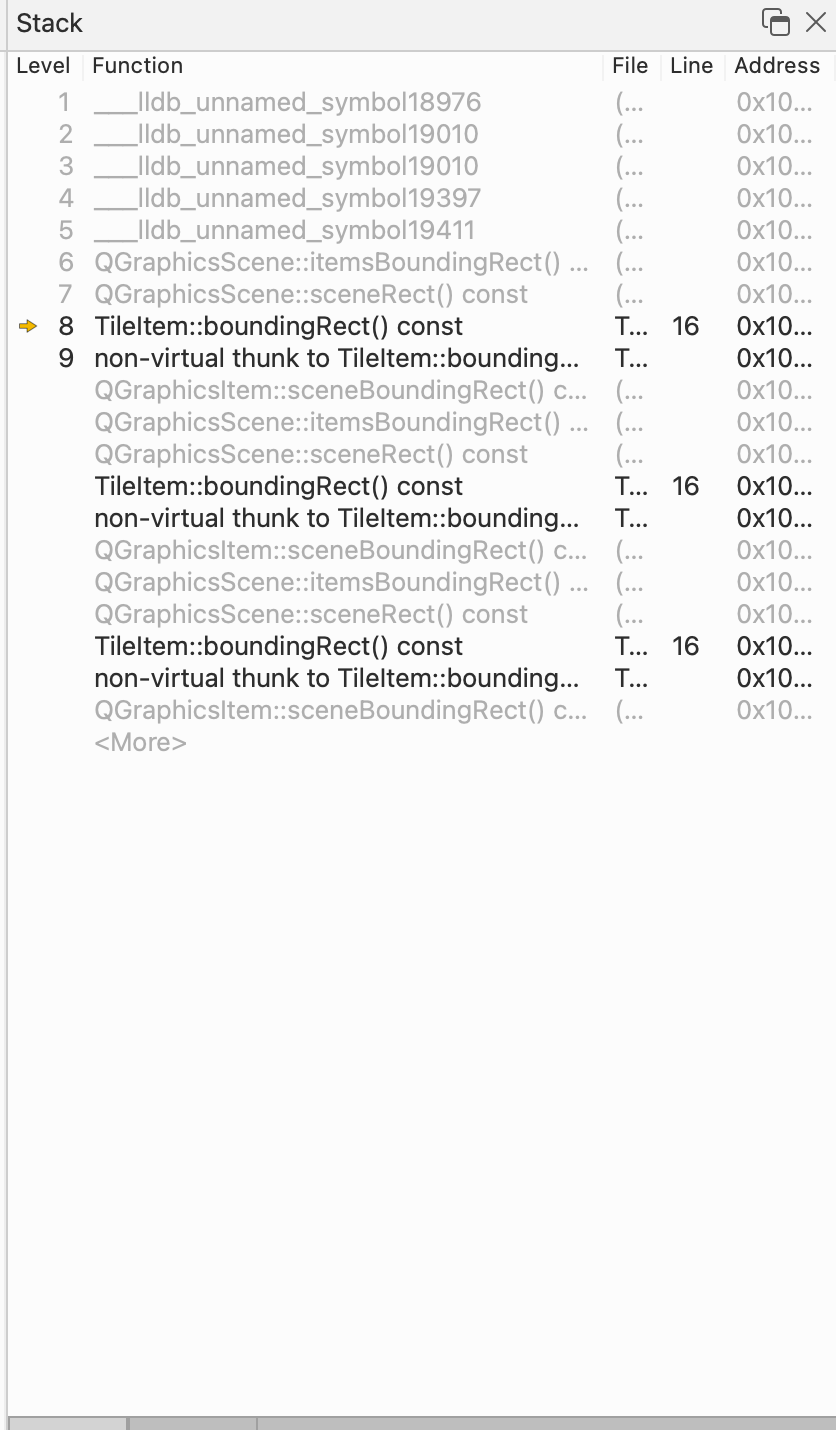
Why does calling sceneRect() cause process crash?
-
I am experimenting with Qt graphics view, and to understand how things work i have this simple code
#include "MainWindow.h"
#include <QGraphicsPixmapItem>
#include <QGraphicsView>
#include <QtWidgets>
#include "TileItem.h"
MainWindow::MainWindow(QWidget* parent)
    : QMainWindow(parent) {
    QWidget* centralWidget = new QWidget(this);
    QHBoxLayout* centralLayout = new QHBoxLayout();
    centralWidget->setLayout(centralLayout);
    loadDefaultTiles();
    centralLayout->addWidget(m_gameView);
    m_gameView->setBackgroundBrush(Qt::red);
    centralLayout->addStretch(10);
    setCentralWidget(centralWidget);
}

void MainWindow::loadDefaultTiles() {
    m_gameScene = new QGraphicsScene();
    m_gameView = new QGraphicsView();
    m_gameView->setFrameStyle(QFrame::NoFrame);

    m_gameView->setScene(m_gameScene);

    for (int i = 0; i < 10; i++) {
        for (int j = 0; j < 10; j++) {
            TileItem* tile = new TileItem();
            m_gameScene->addItem(tile);
            tile->setPos(i * 50, j * 50);
        }
    }

    m_gameView->setMinimumWidth(m_gameScene->width());
    m_gameView->setMinimumHeight(m_gameScene->height());

    qDebug() << m_gameScene->items().count();
}
and
#include "TileItem.h"
#include <QtGui/qpainter.h>
#include <QtWidgets/qgraphicsscene.h>

TileItem::TileItem() {}


QRectF TileItem::boundingRect() const {
    if (scene()) {
        qDebug() << scene()->sceneRect();
    }
    return {0, 0, 50, 50};
}
void TileItem::paint(QPainter* painter, const QStyleOptionGraphicsItem* option, QWidget* widget) {
    painter->drawPixmap(boundingRect(), m_texture, m_texture.rect());
}
But when I run it, the program crashes instantly. Whats weird to me is that the same exact code but changing qDebug() << scene()->sceneRect(); to qDebug() << scene()->parent(); works fine.
Whats happening? sceneRect() always returns something, its not returning void if no scene rect is set.
-
I am experimenting with Qt graphics view, and to understand how things work i have this simple code
#include "MainWindow.h"
#include <QGraphicsPixmapItem>
#include <QGraphicsView>
#include <QtWidgets>
#include "TileItem.h"
MainWindow::MainWindow(QWidget* parent)
    : QMainWindow(parent) {
    QWidget* centralWidget = new QWidget(this);
    QHBoxLayout* centralLayout = new QHBoxLayout();
    centralWidget->setLayout(centralLayout);
    loadDefaultTiles();
    centralLayout->addWidget(m_gameView);
    m_gameView->setBackgroundBrush(Qt::red);
    centralLayout->addStretch(10);
    setCentralWidget(centralWidget);
}

void MainWindow::loadDefaultTiles() {
    m_gameScene = new QGraphicsScene();
    m_gameView = new QGraphicsView();
    m_gameView->setFrameStyle(QFrame::NoFrame);

    m_gameView->setScene(m_gameScene);

    for (int i = 0; i < 10; i++) {
        for (int j = 0; j < 10; j++) {
            TileItem* tile = new TileItem();
            m_gameScene->addItem(tile);
            tile->setPos(i * 50, j * 50);
        }
    }

    m_gameView->setMinimumWidth(m_gameScene->width());
    m_gameView->setMinimumHeight(m_gameScene->height());

    qDebug() << m_gameScene->items().count();
}
and
#include "TileItem.h"
#include <QtGui/qpainter.h>
#include <QtWidgets/qgraphicsscene.h>

TileItem::TileItem() {}


QRectF TileItem::boundingRect() const {
    if (scene()) {
        qDebug() << scene()->sceneRect();
    }
    return {0, 0, 50, 50};
}
void TileItem::paint(QPainter* painter, const QStyleOptionGraphicsItem* option, QWidget* widget) {
    painter->drawPixmap(boundingRect(), m_texture, m_texture.rect());
}
But when I run it, the program crashes instantly. Whats weird to me is that the same exact code but changing qDebug() << scene()->sceneRect(); to qDebug() << scene()->parent(); works fine.
Whats happening? sceneRect() always returns something, its not returning void if no scene rect is set.
@Mbkerdellou said in Why does calling sceneRect() cause process crash?:
loadDefaultTiles();
centralLayout->addWidget(m_gameView);
Does it make a difference if you swap the order of these 2 lines?
If you move the
qDebug() << scene()->sceneRect();to, say, thepaint()does it crash there? -
Hi,
What is the backtrace of your crash ?
-
@JonB No swapping the order does not fix it. And moving it to paint does not cause it to crash,
-
@Mbkerdellou
Assuming that backtrace continues on & on with same calls, you seem to be stuck in a loop where thesceneRect()calculation needs to ask for the item'sboundingRect(), and then you try to access thesceneRect()from there. Infinite recursion I assume. You'll need to call it from somewhere else. or maybe it becomes safer when the size has settled down. -
@Mbkerdellou
Assuming that backtrace continues on & on with same calls, you seem to be stuck in a loop where thesceneRect()calculation needs to ask for the item'sboundingRect(), and then you try to access thesceneRect()from there. Infinite recursion I assume. You'll need to call it from somewhere else. or maybe it becomes safer when the size has settled down.@JonB Thank you, makes sense