Skip to content
  • Categories
  • Recent
  • Tags
  • Popular
  • Users
  • Groups
  • Search
  • Get Qt Extensions
  • Unsolved
Collapse
Brand Logo
  1. Home
  2. Qt Development
  3. General and Desktop
  4. Make QFileDialog parent not clickable on Gnome
Qt 6.11 is out! See what's new in the release blog

Make QFileDialog parent not clickable on Gnome

Scheduled Pinned Locked Moved Unsolved General and Desktop
11 Posts 6 Posters 4.2k Views 2 Watching
  • Oldest to Newest
  • Newest to Oldest
  • Most Votes
Reply
  • Reply as topic
Log in to reply
This topic has been deleted. Only users with topic management privileges can see it.
  • SGaistS Offline
    SGaistS Offline
    SGaist
    Lifetime Qt Champion
    wrote on last edited by
    #2

    Hi,

    Which version of Gnome is it ?
    Which version of Qt are you using ?

    Interested in AI ? www.idiap.ch
    Please read the Qt Code of Conduct - https://forum.qt.io/topic/113070/qt-code-of-conduct

    K 1 Reply Last reply
    0
    • K keesaev

      Hello everyone!
      I am using QFileDialog with DontUseNativeDialog = false on Gnome and I'm trying to get this type of behavior:
      83fdddb8-4957-4947-ab5e-cc4eaa2ad1f3-image.png
      Here parent form is not clickable when dialog window is open. I get this result using QDialog:

      Widget::Widget(QWidget* parent) : QWidget(parent), ui(new Ui::Widget) {
        ui->setupUi(this);
      
        connect(ui->pushButton, &QPushButton::clicked, [=]() {
          QDialog* dl = new QDialog(this, Qt::WindowStaysOnTopHint);
          dl->exec();
        });
      }


      But if I try to do same with QFileDialog, I can't make file dialog stay on top:
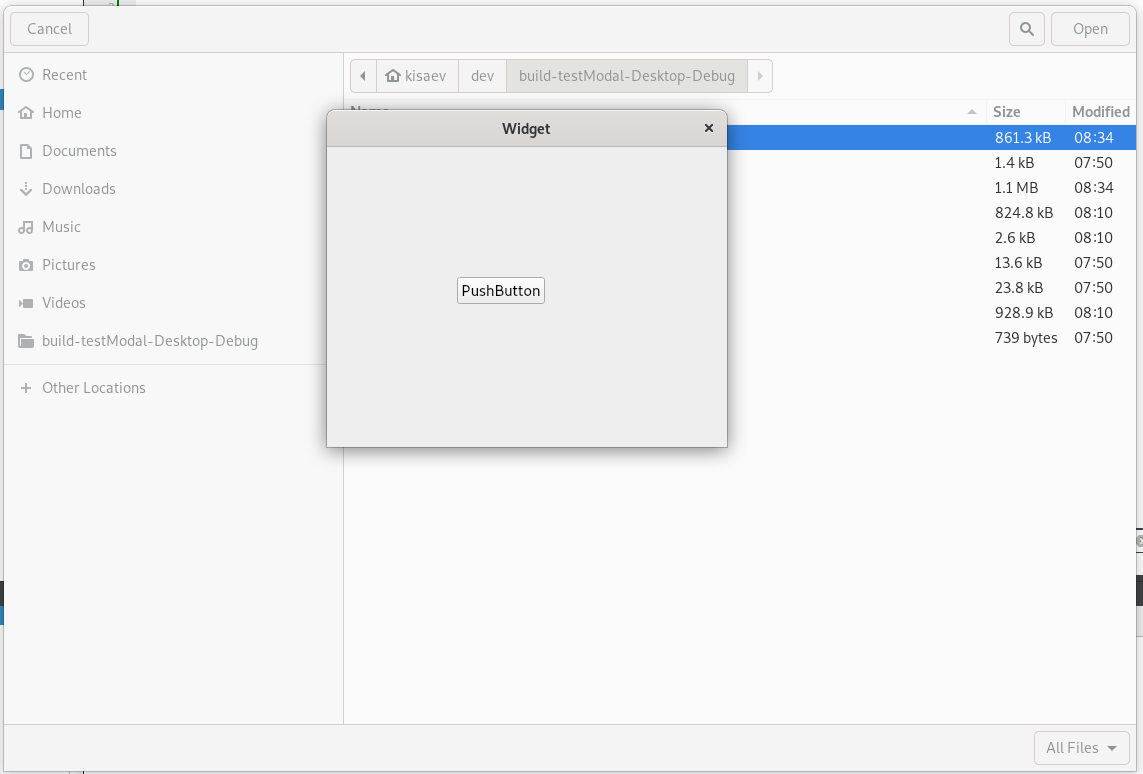
      356ca57b-ea76-464b-97bf-bc61bb05ccec-image.png
      Here I'm using this code which works with KDE and xfce, but not with Gnome:

      Widget::Widget(QWidget* parent) : QWidget(parent), ui(new Ui::Widget) {
        ui->setupUi(this);
      
        connect(ui->pushButton, &QPushButton::clicked, [=]() {
          QFileDialog* dl = new QFileDialog(this, Qt::WindowStaysOnTopHint);
          dl->setOption(QFileDialog::DontUseNativeDialog, false);
          dl->setModal(true);
          dl->exec();
        });
      }
      

      I also tried to use QFileDialog::DontUseNativeDialog = false, in this case parent window does become not clickable, but I need to use native dialog. How do I handle this on Gnome?

      eyllanescE Offline
      eyllanescE Offline
      eyllanesc
      wrote on last edited by
      #3
      This post is deleted!
      1 Reply Last reply
      0
      • SGaistS SGaist

        Hi,

        Which version of Gnome is it ?
        Which version of Qt are you using ?

        K Offline
        K Offline
        keesaev
        wrote on last edited by
        #4

        @SGaist Hi!
        I am using Gnome 3.30.2 with Qt 5.11.3

        1 Reply Last reply
        0
        • SGaistS Offline
          SGaistS Offline
          SGaist
          Lifetime Qt Champion
          wrote on last edited by
          #5

          I would try with a more recent version of Qt.
          By the way, is it the Qt version coming from your distribution ?

          Interested in AI ? www.idiap.ch
          Please read the Qt Code of Conduct - https://forum.qt.io/topic/113070/qt-code-of-conduct

          K 1 Reply Last reply
          0
          • SGaistS SGaist

            I would try with a more recent version of Qt.
            By the way, is it the Qt version coming from your distribution ?

            K Offline
            K Offline
            keesaev
            wrote on last edited by
            #6

            @SGaist
            Unfortunately I'm using Debian 10, here 5.11.3 is the latest version of Qt

            5d4d8fce-ba11-43ac-9df4-9da3105f0d40-image.png

            jsulmJ 1 Reply Last reply
            0
            • K keesaev

              @SGaist
              Unfortunately I'm using Debian 10, here 5.11.3 is the latest version of Qt

              5d4d8fce-ba11-43ac-9df4-9da3105f0d40-image.png

              jsulmJ Offline
              jsulmJ Offline
              jsulm
              Lifetime Qt Champion
              wrote on last edited by
              #7

              @keesaev said in Make QFileDialog parent not clickable on Gnome:

              here 5.11.3 is the latest version of Qt

              You can use Qt Online Installer to install a recent Qt version.

              https://forum.qt.io/topic/113070/qt-code-of-conduct

              K 1 Reply Last reply
              0
              • jsulmJ jsulm

                @keesaev said in Make QFileDialog parent not clickable on Gnome:

                here 5.11.3 is the latest version of Qt

                You can use Qt Online Installer to install a recent Qt version.

                K Offline
                K Offline
                keesaev
                wrote on last edited by
                #8

                @jsulm
                I know, but we're developing for this version of Debian :(

                1 Reply Last reply
                0
                • S Offline
                  S Offline
                  stretchthebits
                  wrote on last edited by
                  #9

                  @keesaev said in Make QFileDialog parent not clickable on Gnome:

                  dl->setModal(true);

                  I don't even call
                  dl->setModal(true);
                  in my program and for me, it creates a modal file open dialog box.
                  I use KDE.

                  Either you have a limitation with GNOME or you have to setup something in your OS.
                  Are other programs able to make modal file dialog boxes?
                  You can try one of my programs and see. Search for TextFind2 on sourceforge.
                  When you open the program, at the top right, click on the Open button.

                  K 1 Reply Last reply
                  0
                  • S stretchthebits

                    @keesaev said in Make QFileDialog parent not clickable on Gnome:

                    dl->setModal(true);

                    I don't even call
                    dl->setModal(true);
                    in my program and for me, it creates a modal file open dialog box.
                    I use KDE.

                    Either you have a limitation with GNOME or you have to setup something in your OS.
                    Are other programs able to make modal file dialog boxes?
                    You can try one of my programs and see. Search for TextFind2 on sourceforge.
                    When you open the program, at the top right, click on the Open button.

                    K Offline
                    K Offline
                    keesaev
                    wrote on last edited by keesaev
                    #10

                    @stretchthebits
                    Yeah, I know, on KDE and xfce you just need to initiate dialog with a parent widget to make it modal. As for other programs - I tried Telegram, which uses Qt as well, and it doesn't have this problem. Tried looking into their code, but couldn't find anything specific, I guess the answer here is to use later versions of Qt

                    1 Reply Last reply
                    0
                    • A Offline
                      A Offline
                      albfan
                      wrote on last edited by
                      #11

                      Just checked with 2026 configuration (gtk4/wayland) and simple example fails on qt5 and works on qt6

                      1 Reply Last reply
                      0

                      • Login

                      • Login or register to search.
                      • First post
                        Last post
                      0
                      • Categories
                      • Recent
                      • Tags
                      • Popular
                      • Users
                      • Groups
                      • Search
                      • Get Qt Extensions
                      • Unsolved