Skip to content
  • Categories
  • Recent
  • Tags
  • Popular
  • Users
  • Groups
  • Search
  • Get Qt Extensions
  • Unsolved
Collapse
Brand Logo
  1. Home
  2. Qt Development
  3. Qt Creator and other tools
  4. Project does not configure correctly when created on Linux Fedora.
Qt 6.11 is out! See what's new in the release blog

Project does not configure correctly when created on Linux Fedora.

Scheduled Pinned Locked Moved Qt Creator and other tools
5 Posts 3 Posters 1.1k Views
  • Oldest to Newest
  • Newest to Oldest
  • Most Votes
Reply
  • Reply as topic
Log in to reply
This topic has been deleted. Only users with topic management privileges can see it.
  • S Offline
    S Offline
    SnapseSnapper
    wrote on last edited by aha_1980
    #1

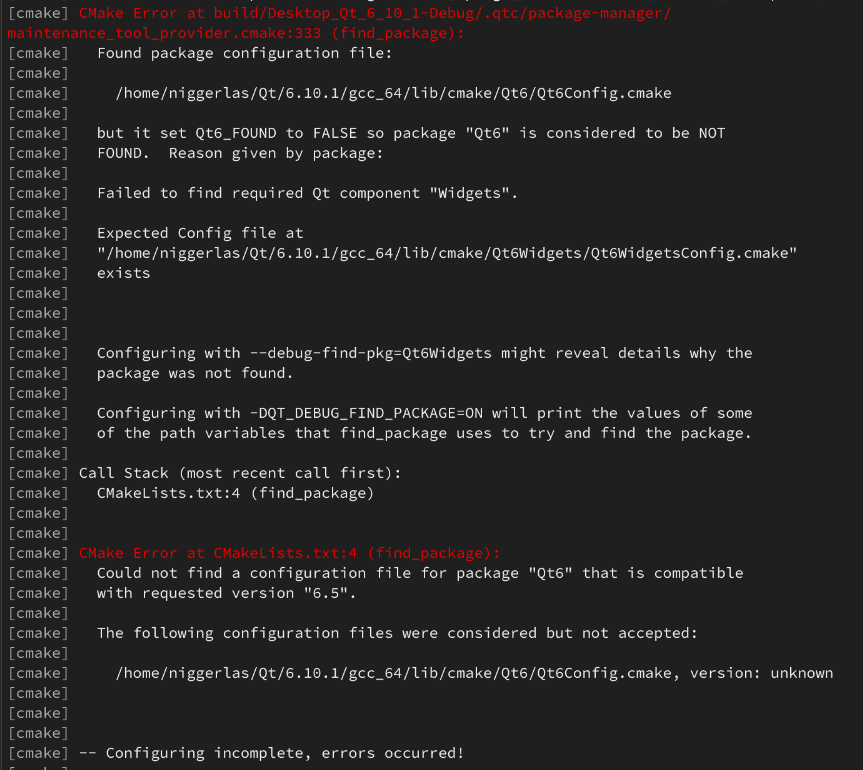
    I get a configuration error when I start a new project.
    Ï installed QT using the maintenance t tool, do I need more dependencies?

    Im not sure if this is helping.
    0e3088d3-242d-4c5d-b4f9-6e7a81af437b-image.png

    jsulmJ cristian-adamC 2 Replies Last reply
    0
    • S SnapseSnapper marked this topic as a regular topic on
    • S SnapseSnapper

      I get a configuration error when I start a new project.
      Ï installed QT using the maintenance t tool, do I need more dependencies?

      Im not sure if this is helping.
      0e3088d3-242d-4c5d-b4f9-6e7a81af437b-image.png

      jsulmJ Offline
      jsulmJ Offline
      jsulm
      Lifetime Qt Champion
      wrote on last edited by
      #2

      @SnapseSnapper Why is it requesting Qt 6.5? What is in your CMakeLists.txt and how do you call cmake?

      https://forum.qt.io/topic/113070/qt-code-of-conduct

      S 1 Reply Last reply
      0
      • S SnapseSnapper

        I get a configuration error when I start a new project.
        Ï installed QT using the maintenance t tool, do I need more dependencies?

        Im not sure if this is helping.
        0e3088d3-242d-4c5d-b4f9-6e7a81af437b-image.png

        cristian-adamC Offline
        cristian-adamC Offline
        cristian-adam
        wrote on last edited by
        #3

        @SnapseSnapper on Linux the Qt SDK doesn't install the necessary dependencies to create GUI applications.

        https://wiki.qt.io/Building_Qt_Creator_from_Git_on_Fedora_38 has some dependencies installed. But the page builds Qt Creator using Qt from Fedora, and not from the Qt SDK.

        $ sudo dnf install mesa-libGL-devel libxkbcommon-devel
        

        Maybe it's enough.

        S 1 Reply Last reply
        2
        • cristian-adamC cristian-adam

          @SnapseSnapper on Linux the Qt SDK doesn't install the necessary dependencies to create GUI applications.

          https://wiki.qt.io/Building_Qt_Creator_from_Git_on_Fedora_38 has some dependencies installed. But the page builds Qt Creator using Qt from Fedora, and not from the Qt SDK.

          $ sudo dnf install mesa-libGL-devel libxkbcommon-devel
          

          Maybe it's enough.

          S Offline
          S Offline
          SnapseSnapper
          wrote on last edited by
          #4

          @cristian-adam This seems to have fixed it! Thanks a lot!

          1 Reply Last reply
          1
          • jsulmJ jsulm

            @SnapseSnapper Why is it requesting Qt 6.5? What is in your CMakeLists.txt and how do you call cmake?

            S Offline
            S Offline
            SnapseSnapper
            wrote on last edited by
            #5

            @jsulm I wondered about that myself. But it does not seem to be the issue. I fixed it by installing the dependencies from @cristian-adam comment :)

            1 Reply Last reply
            0

            • Login

            • Login or register to search.
            • First post
              Last post
            0
            • Categories
            • Recent
            • Tags
            • Popular
            • Users
            • Groups
            • Search
            • Get Qt Extensions
            • Unsolved