Skip to content
  • Categories
  • Recent
  • Tags
  • Popular
  • Users
  • Groups
  • Search
  • Get Qt Extensions
  • Unsolved
Collapse
Brand Logo
  1. Home
  2. Qt Development
  3. General and Desktop
  4. How to make a round corner for the qwebengineview?
Qt 6.11 is out! See what's new in the release blog

How to make a round corner for the qwebengineview?

Scheduled Pinned Locked Moved Unsolved General and Desktop
14 Posts 5 Posters 981 Views 1 Watching
  • Oldest to Newest
  • Newest to Oldest
  • Most Votes
Reply
  • Reply as topic
Log in to reply
This topic has been deleted. Only users with topic management privileges can see it.
  • B Offline
    B Offline
    Bonnie
    wrote on last edited by Bonnie
    #2

    Just put the qwebengineview in a round corner qwidget/qframe.

    1 Reply Last reply
    1
    • nicker playerN Offline
      nicker playerN Offline
      nicker player
      wrote on last edited by
      #3

      I've just tried what u mentioned.but failed.the qwebengineview is still the rectangle.

      B 1 Reply Last reply
      0
      • nicker playerN nicker player

        I've just tried what u mentioned.but failed.the qwebengineview is still the rectangle.

        B Offline
        B Offline
        Bonnie
        wrote on last edited by Bonnie
        #4

        @nicker-player I don't think you tried what I mentioned, because there is nothing to "fail".

        1 Reply Last reply
        0
        • nicker playerN Offline
          nicker playerN Offline
          nicker player
          wrote on last edited by
          #5

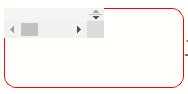
          image.png

           QWidget * t_widget = new QWidget();
              t_widget->setFixedSize(180,80);
              t_widget->setStyleSheet("QWidget{border:1px solid red;border-radius:12px;}");
              QWebEngineView * t_view = new QWebEngineView(t_widget);
              t_view->setSizePolicy(QSizePolicy::Expanding,QSizePolicy::Expanding);
              t_view->load(QUrl("https://forum.qt.io/"));
          

          like this ?the border of the qwebengine dosnt fit the corner outside.

          B 1 Reply Last reply
          0
          • nicker playerN nicker player

            image.png

             QWidget * t_widget = new QWidget();
                t_widget->setFixedSize(180,80);
                t_widget->setStyleSheet("QWidget{border:1px solid red;border-radius:12px;}");
                QWebEngineView * t_view = new QWebEngineView(t_widget);
                t_view->setSizePolicy(QSizePolicy::Expanding,QSizePolicy::Expanding);
                t_view->load(QUrl("https://forum.qt.io/"));
            

            like this ?the border of the qwebengine dosnt fit the corner outside.

            B Offline
            B Offline
            Bonnie
            wrote on last edited by Bonnie
            #6

            @nicker-player So this is what you call "into the widget"? Why don't you use layout? How would you expect qwebengineview to fit in the widget? And maybe adjust the margins to make sure the borders are shown (might not necessary), or use qframe. I think you are not a beginner since I often see you post here.

            nicker playerN Pl45m4P 2 Replies Last reply
            0
            • B Bonnie

              @nicker-player So this is what you call "into the widget"? Why don't you use layout? How would you expect qwebengineview to fit in the widget? And maybe adjust the margins to make sure the borders are shown (might not necessary), or use qframe. I think you are not a beginner since I often see you post here.

              nicker playerN Offline
              nicker playerN Offline
              nicker player
              wrote on last edited by
              #7

              @Bonnie
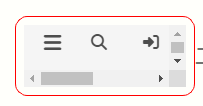
              In fact.Ive tried to use the layout to fit the widget.but it dosent work too.

              QWidget * t_widget = new QWidget();
                  t_widget->setFixedSize(180,80);
                  t_widget->setStyleSheet("QWidget{border:1px solid red;border-radius:12px;background:transparent;}");
                  QHBoxLayout * t_layouttmp = new QHBoxLayout(t_widget);
                  //t_layouttmp->setContentsMargins(0,0,0,0); //evne though  i added the code here .the qwebengineview is still the rectangle.
                  QWebEngineView * t_view = new QWebEngineView();
                  t_view->setSizePolicy(QSizePolicy::Expanding,QSizePolicy::Expanding);
                  t_view->load(QUrl("https://forum.qt.io/"));
                  t_layouttmp->addWidget(t_view);
                  t_widget->setLayout(t_layouttmp);
              

              a76ed2ba-472b-4777-b9d6-8ca42bedd6f6-image.png

              B jsulmJ 2 Replies Last reply
              0
              • nicker playerN nicker player

                @Bonnie
                In fact.Ive tried to use the layout to fit the widget.but it dosent work too.

                QWidget * t_widget = new QWidget();
                    t_widget->setFixedSize(180,80);
                    t_widget->setStyleSheet("QWidget{border:1px solid red;border-radius:12px;background:transparent;}");
                    QHBoxLayout * t_layouttmp = new QHBoxLayout(t_widget);
                    //t_layouttmp->setContentsMargins(0,0,0,0); //evne though  i added the code here .the qwebengineview is still the rectangle.
                    QWebEngineView * t_view = new QWebEngineView();
                    t_view->setSizePolicy(QSizePolicy::Expanding,QSizePolicy::Expanding);
                    t_view->load(QUrl("https://forum.qt.io/"));
                    t_layouttmp->addWidget(t_view);
                    t_widget->setLayout(t_layouttmp);
                

                a76ed2ba-472b-4777-b9d6-8ca42bedd6f6-image.png

                B Offline
                B Offline
                Bonnie
                wrote on last edited by Bonnie
                #8
                This post is deleted!
                1 Reply Last reply
                1
                • nicker playerN nicker player

                  @Bonnie
                  In fact.Ive tried to use the layout to fit the widget.but it dosent work too.

                  QWidget * t_widget = new QWidget();
                      t_widget->setFixedSize(180,80);
                      t_widget->setStyleSheet("QWidget{border:1px solid red;border-radius:12px;background:transparent;}");
                      QHBoxLayout * t_layouttmp = new QHBoxLayout(t_widget);
                      //t_layouttmp->setContentsMargins(0,0,0,0); //evne though  i added the code here .the qwebengineview is still the rectangle.
                      QWebEngineView * t_view = new QWebEngineView();
                      t_view->setSizePolicy(QSizePolicy::Expanding,QSizePolicy::Expanding);
                      t_view->load(QUrl("https://forum.qt.io/"));
                      t_layouttmp->addWidget(t_view);
                      t_widget->setLayout(t_layouttmp);
                  

                  a76ed2ba-472b-4777-b9d6-8ca42bedd6f6-image.png

                  jsulmJ Offline
                  jsulmJ Offline
                  jsulm
                  Lifetime Qt Champion
                  wrote on last edited by
                  #9

                  @nicker-player Try to set margins in the layout to 0

                  https://forum.qt.io/topic/113070/qt-code-of-conduct

                  1 Reply Last reply
                  1
                  • nicker playerN Offline
                    nicker playerN Offline
                    nicker player
                    wrote on last edited by
                    #10

                    if i used the code

                    t_layouttmp->setContentsMargins(0,0,0,0); 
                    

                    the qwebengineview would block the border of the widget.then the whole widget view became the rectangle too.which looks like below.the qwebengineview is on the widget,but not in the widget.
                    0fa28a27-5fe7-4af5-85de-9905df82cabf-image.png
                    I just want to make the qwebengineview to be a round corner without changing the background of the html body.

                    B 1 Reply Last reply
                    0
                    • B Offline
                      B Offline
                      Bonnie
                      wrote on last edited by Bonnie
                      #11

                      Hey sorry for my attitude, just got some anxiety from no where. I'll reply later :)
                      But the margins would still be needed there.

                      1 Reply Last reply
                      0
                      • B Bonnie

                        @nicker-player So this is what you call "into the widget"? Why don't you use layout? How would you expect qwebengineview to fit in the widget? And maybe adjust the margins to make sure the borders are shown (might not necessary), or use qframe. I think you are not a beginner since I often see you post here.

                        Pl45m4P Offline
                        Pl45m4P Offline
                        Pl45m4
                        wrote on last edited by Pl45m4
                        #12

                        @Bonnie said in How to make a round corner for the qwebengineview?:

                        I think you are not a beginner since I often see you post here.

                        Your faith in people on the internet is flattering :))
                        Just because someone posts frequently it doesn't necessarily mean he/she is good :)

                        @nicker-player said in How to make a round corner for the qwebengineview?:

                        I just want to make the qwebengineview to be a round corner without changing the background of the html body.

                        That does not work like this.
                        The rendered webengine content is (and will be) still rectangular. So if you "cut" the corners of the containing/parent widget, you get exactly what you have above.

                        Unfortunately I don't have a solution how to make the webengineview page itself a rounded rect (if this is what you are really after)
                        And I don't know if it is possible at all...


                        If debugging is the process of removing software bugs, then programming must be the process of putting them in.

                        ~E. W. Dijkstra

                        1 Reply Last reply
                        0
                        • nicker playerN nicker player

                          if i used the code

                          t_layouttmp->setContentsMargins(0,0,0,0); 
                          

                          the qwebengineview would block the border of the widget.then the whole widget view became the rectangle too.which looks like below.the qwebengineview is on the widget,but not in the widget.
                          0fa28a27-5fe7-4af5-85de-9905df82cabf-image.png
                          I just want to make the qwebengineview to be a round corner without changing the background of the html body.

                          B Offline
                          B Offline
                          Bonnie
                          wrote on last edited by Bonnie
                          #13

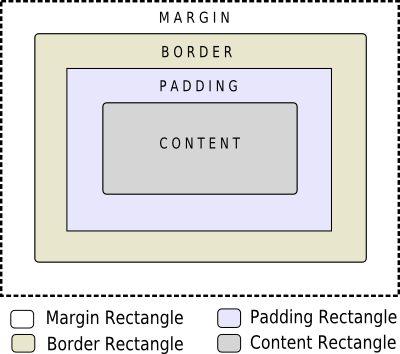
                          @nicker-player So here you need to know that the border of stylesheet follows the box model:
                          4e2d386a-ad60-4759-a286-b6aaede2ee49-stylesheet-boxmodel.png

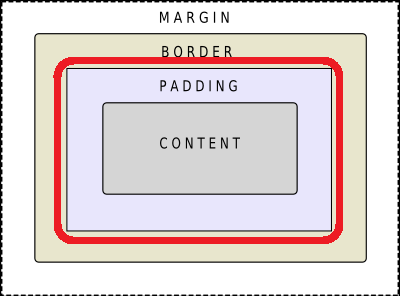
                          When you have round corner borders, there will always need some space between the content area and the drawn borders, this is just how stylesheet works.
                          50e100ca-7836-4815-8f83-9f5c57acb2b2-图片.png

                          Suppose we do not use qwebengineview here, but a class supports stylesheet, for example QLabel, with stylesheet {border:1px solid red;border-radius:12px;}, it will also show just like in your post.

                          b94207b2-f97f-4cdb-a7d7-d9f11d8a2725-图片.png
                          In order to show the 12px-radius corner, we must leave some padding for 3-4px: {border:1px solid red;border-radius:12px; padding: 3px;} then it will show like this:

                          1f7f2a10-e5a2-4eb9-a161-b371cd580dde-图片.png

                          So since qwebengineview doesn't apply stylesheet, by using a parent qwidget and layout, we just make it behave like normal stylesheet (the contents margins of the layout act as the padding).

                          If your content area (qwebengineview) has single color background, you can make the round corner borders look seamless to the content by setting same background color in the stylesheet.
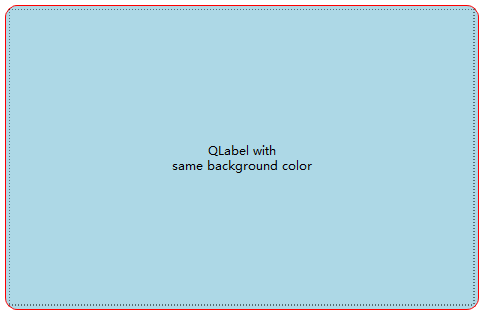
                          acd84a29-f3a1-4e80-95d5-85d13478fcde-图片.png
                          But if it is not that simple to set by stylesheet, then stylesheet is not the proper approach for you.

                          @Pl45m4 said in How to make a round corner for the qwebengineview?:

                          Just because someone posts frequently it doesn't necessarily mean he/she is good :)

                          I wasn't expecting good, these are just basics...

                          JonBJ 1 Reply Last reply
                          1
                          • B Bonnie

                            @nicker-player So here you need to know that the border of stylesheet follows the box model:
                            4e2d386a-ad60-4759-a286-b6aaede2ee49-stylesheet-boxmodel.png

                            When you have round corner borders, there will always need some space between the content area and the drawn borders, this is just how stylesheet works.
                            50e100ca-7836-4815-8f83-9f5c57acb2b2-图片.png

                            Suppose we do not use qwebengineview here, but a class supports stylesheet, for example QLabel, with stylesheet {border:1px solid red;border-radius:12px;}, it will also show just like in your post.
                            b94207b2-f97f-4cdb-a7d7-d9f11d8a2725-图片.png
                            In order to show the 12px-radius corner, we must leave some padding for 3-4px: {border:1px solid red;border-radius:12px; padding: 3px;} then it will show like this:
                            1f7f2a10-e5a2-4eb9-a161-b371cd580dde-图片.png

                            So since qwebengineview doesn't apply stylesheet, by using a parent qwidget and layout, we just make it behave like normal stylesheet (the contents margins of the layout act as the padding).

                            If your content area (qwebengineview) has single color background, you can make the round corner borders look seamless to the content by setting same background color in the stylesheet.
                            acd84a29-f3a1-4e80-95d5-85d13478fcde-图片.png
                            But if it is not that simple to set by stylesheet, then stylesheet is not the proper approach for you.

                            @Pl45m4 said in How to make a round corner for the qwebengineview?:

                            Just because someone posts frequently it doesn't necessarily mean he/she is good :)

                            I wasn't expecting good, these are just basics...

                            JonBJ Offline
                            JonBJ Offline
                            JonB
                            wrote on last edited by JonB
                            #14

                            @Bonnie said in How to make a round corner for the qwebengineview?:

                            Just because someone posts frequently it doesn't necessarily mean he/she is good :)

                            I wasn't expecting good, these are just basics...

                            You are (always) good! :)

                            1 Reply Last reply
                            0

                            • Login

                            • Login or register to search.
                            • First post
                              Last post
                            0
                            • Categories
                            • Recent
                            • Tags
                            • Popular
                            • Users
                            • Groups
                            • Search
                            • Get Qt Extensions
                            • Unsolved