
Qt 6.11 is out! See what's new in the release
blog
QML problem on Android
-
Hi,
I have an application with a QML GUI which works on linux (Kubuntu 25.10) very well (Qt 6.9.3). But on an Android system, some texts behind checkboxes aren't displayed.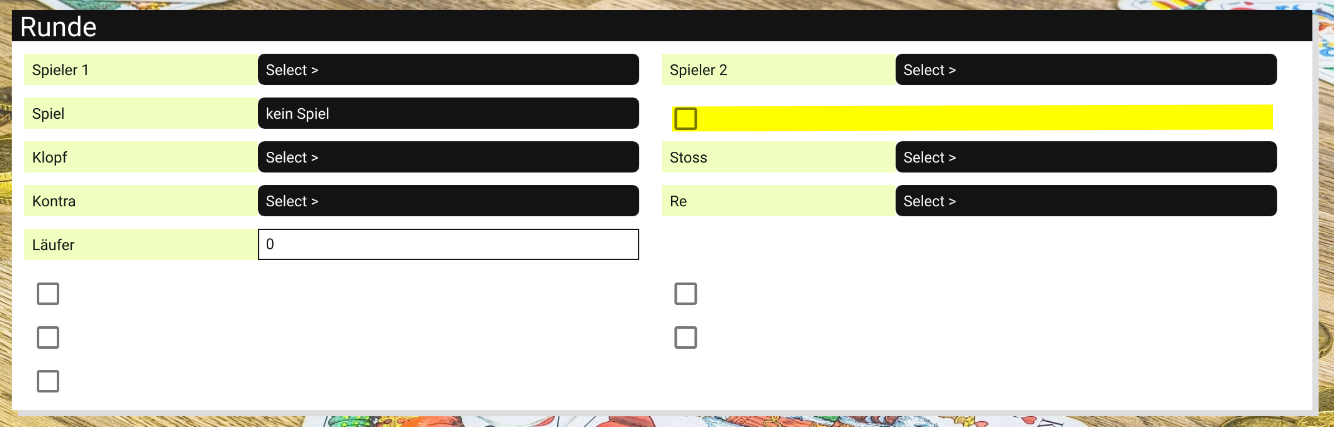
The code of my checkbox element:
import QtQuick
import QtQuick.Controls
import SK 1.0
import assets 1.0

Item {
    property BoolDecorator boolDecorator
    property int widthValue
    property bool setWidthValue

    height: Style.heightDataControls
    width: (setWidthValue) ? (widthValue+Style.widthDataControls) : (parent.width/2) - 10

    Component.onCompleted: {
        console.log("Text="+boolDecorator.uiLabel+", Size="+Style.pixelSizeDataControls+", width="+Style.widthDataControls+", height="+Style.heightDataControls)
    }

    CheckBox {
        id: checkBox
        anchors {
            fill: parent
            margins: 2 // Style.heightDataControls / 4
        }
        width: Style.widthDataControls
        height: Style.heightDataControls
        checkState: boolDecorator.uiValue ? Qt.Checked : Qt.Unchecked
        text: boolDecorator.uiLabel
        font.pixelSize: Style.pixelSizeDataControls
    }

    Binding {
        target: boolDecorator
        property: "uiValue"
        value: (checkBox.checkState == Qt.Checked) ? true : false
    }
}
Behind the yellow marker a description of the checkbox should be printed. On linux there will be a text, but on Android only a white area will appear.
I get the following debug messages:
D/default : onSpielRundeNeuExecuted
D/qml     : Text=Stock Auszahlen, Size=12, width=187, height=25
D/qml     : Text=Stock Aufdoppeln, Size=12, width=187, height=25
D/qml     : Text=Stock, Size=12, width=187, height=25
D/qml     : Text=Schneider, Size=12, width=187, height=25
D/qml     : Text=Schwarz, Size=12, width=187, height=25
D/qml     : Text=Solo Verloren, Size=12, width=187, height=25
I don't know where the problem is. Can you help me, to solve it.
Thank you so much.
BR
Martin
