Skip to content
  • Categories
  • Recent
  • Tags
  • Popular
  • Users
  • Groups
  • Search
  • Get Qt Extensions
  • Unsolved
Collapse
Brand Logo
  1. Home
  2. Qt Development
  3. General and Desktop
  4. Suitable kit Issue
Forum Updated to NodeBB v4.3 + New Features

Suitable kit Issue

Scheduled Pinned Locked Moved Solved General and Desktop
5 Posts 2 Posters 273 Views
  • Oldest to Newest
  • Newest to Oldest
  • Most Votes
Reply
  • Reply as topic
Log in to reply
This topic has been deleted. Only users with topic management privileges can see it.
  • N Offline
    N Offline
    NapDynamite
    wrote last edited by
    #1

    Hi there.

    I have installed QT-6.10 with MSVC 2022 (visual studio 2022) as a part of toolchain guideline for the development of QGroundControl application (https://docs.qgroundcontrol.com/master/en/qgc-dev-guide/getting_started/)

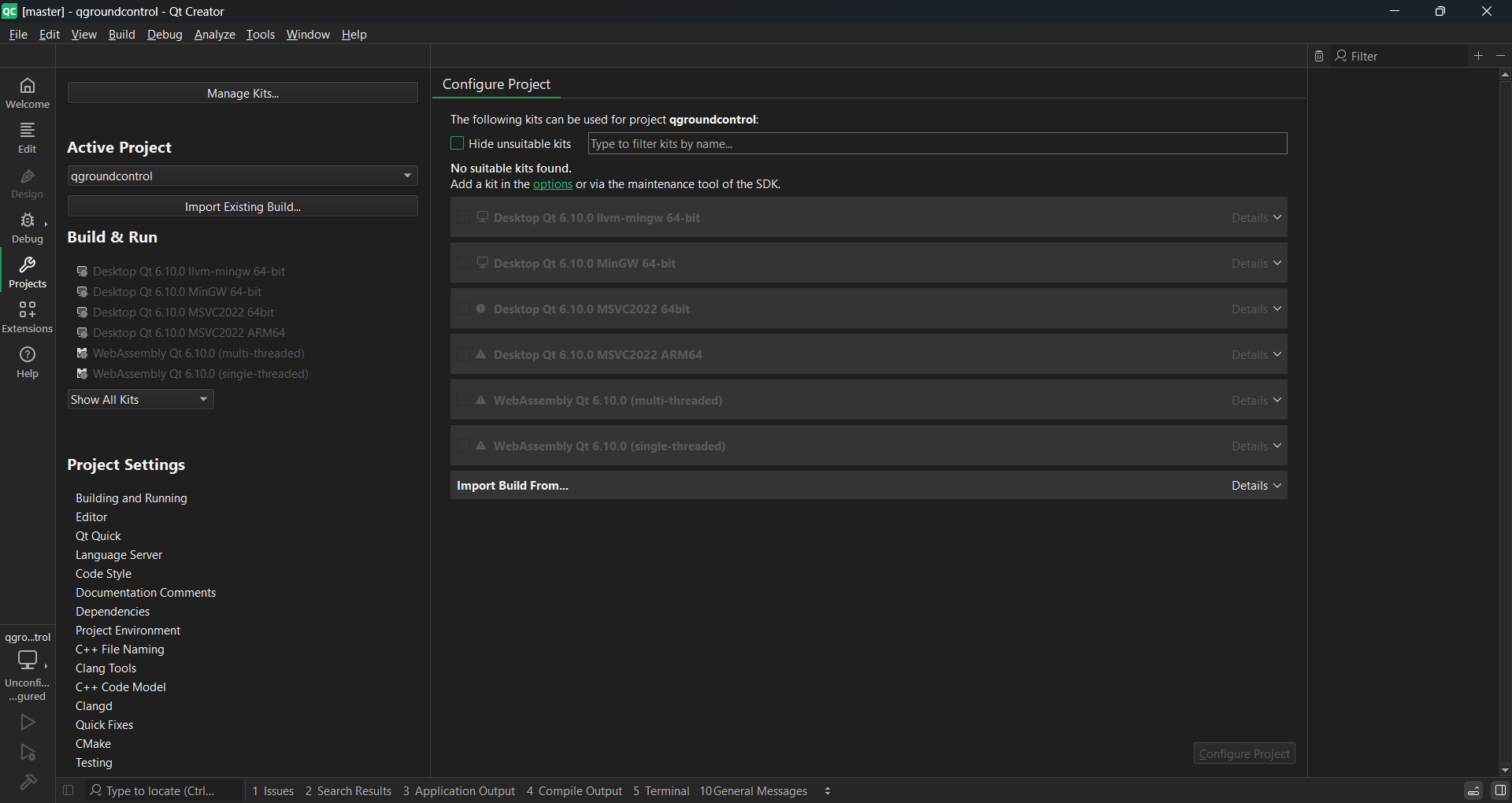
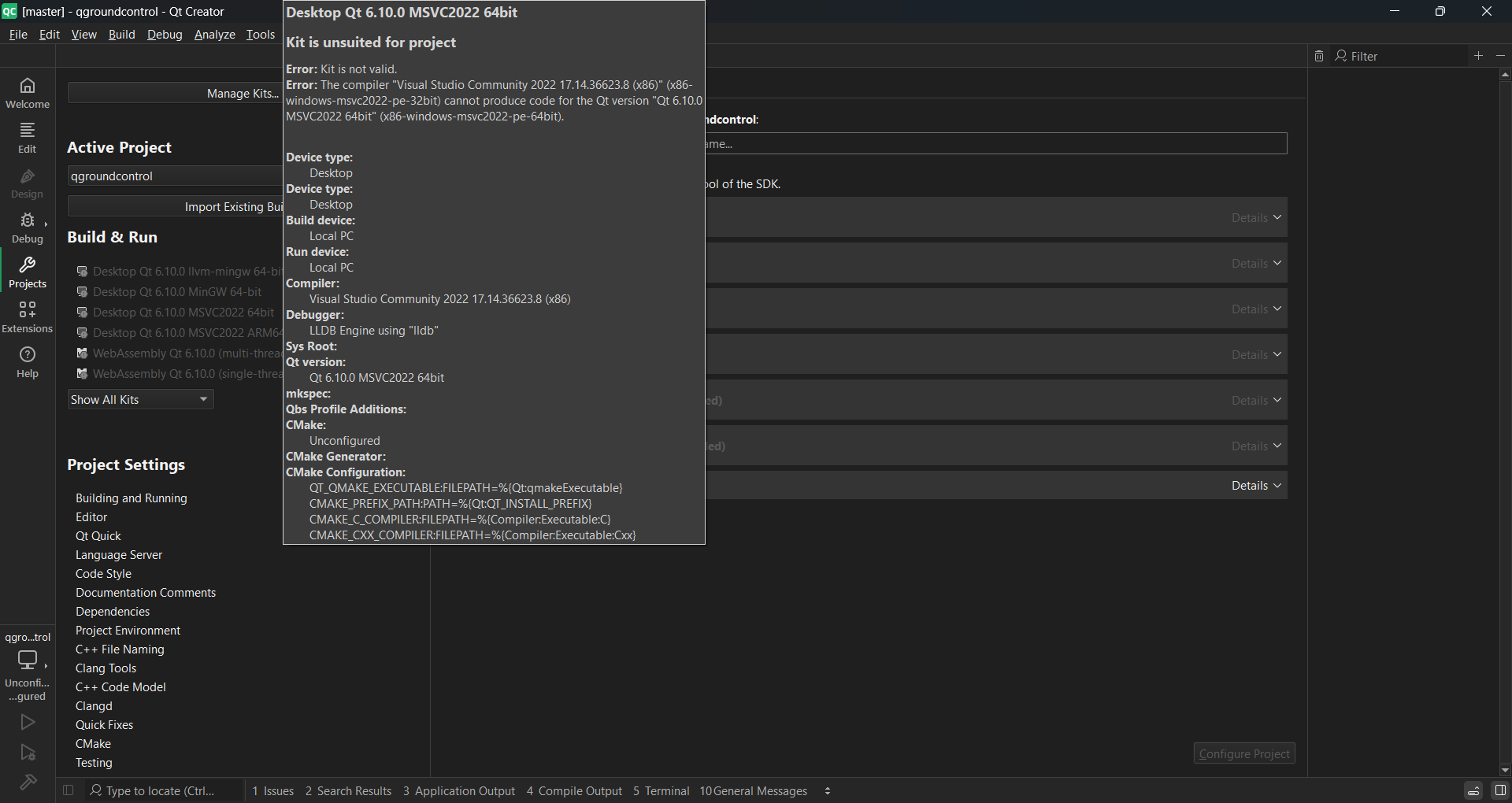
    Now that I want to configure project in the welcome screen just to test, I cannot find any suitable kits. The supported platforms according to the link (https://doc.qt.io/qt-6/supported-platforms.html) for QT-6.10 is MSVC 2022 which I have already installed.

    I have installed QT using online installer. Using custom installation and selecting QT-6.10 and MSVC 2022 64 bit under the drop down.
    73bce065-1d69-4821-81b1-1fe0d417bf0d-image.png

    4dbd77b7-36e4-4ede-9f7a-25079ff332ae-image.png

    Attaching screenshot.
    Platform is Win11.

    cristian-adamC 1 Reply Last reply
    0
    • N NapDynamite

      I have installed x86/64 version of MSVC. But I don't know why it is greyed out here.

      cristian-adamC Offline
      cristian-adamC Offline
      cristian-adam
      wrote last edited by
      #4

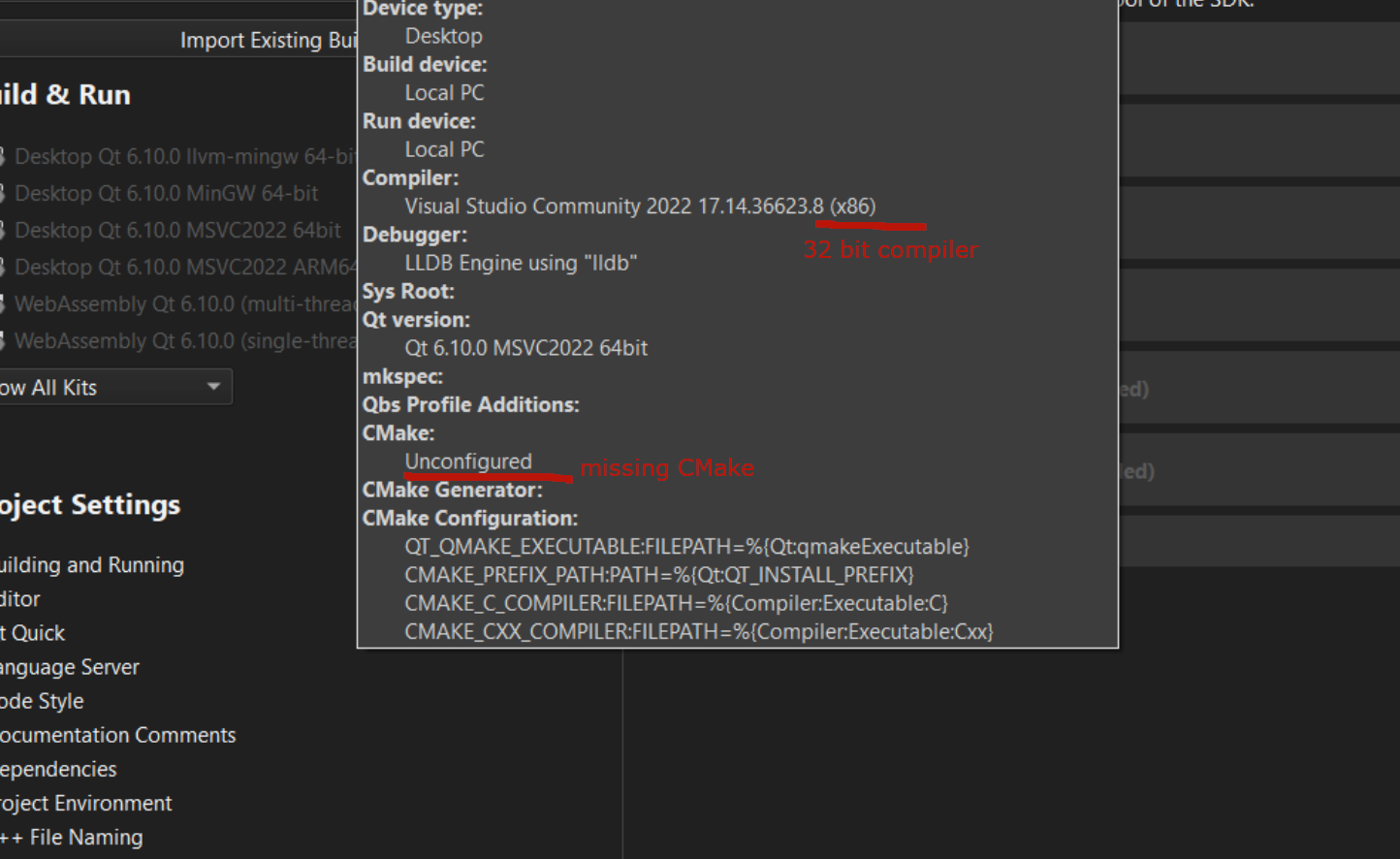
      @NapDynamite bad-msvc-kit.png

      Take care of these things. You need to go to the Kits sections and modify the compiler and CMake sections.

      Afterwards you'll have a working kit.

      1 Reply Last reply
      1
      • N NapDynamite

        Hi there.

        I have installed QT-6.10 with MSVC 2022 (visual studio 2022) as a part of toolchain guideline for the development of QGroundControl application (https://docs.qgroundcontrol.com/master/en/qgc-dev-guide/getting_started/)

        Now that I want to configure project in the welcome screen just to test, I cannot find any suitable kits. The supported platforms according to the link (https://doc.qt.io/qt-6/supported-platforms.html) for QT-6.10 is MSVC 2022 which I have already installed.

        I have installed QT using online installer. Using custom installation and selecting QT-6.10 and MSVC 2022 64 bit under the drop down.

        73bce065-1d69-4821-81b1-1fe0d417bf0d-image.png

        4dbd77b7-36e4-4ede-9f7a-25079ff332ae-image.png

        Attaching screenshot.
        Platform is Win11.

        cristian-adamC Offline
        cristian-adamC Offline
        cristian-adam
        wrote last edited by
        #2

        @NapDynamite Make sure you have the x86_64 version of the MSVC Compiler installed.

        Also, make sure you have CMake installed.

        1 Reply Last reply
        0
        • N Offline
          N Offline
          NapDynamite
          wrote last edited by
          #3

          I have installed x86/64 version of MSVC. But I don't know why it is greyed out here.

          cristian-adamC 1 Reply Last reply
          0
          • N NapDynamite

            I have installed x86/64 version of MSVC. But I don't know why it is greyed out here.

            cristian-adamC Offline
            cristian-adamC Offline
            cristian-adam
            wrote last edited by
            #4

            @NapDynamite bad-msvc-kit.png

            Take care of these things. You need to go to the Kits sections and modify the compiler and CMake sections.

            Afterwards you'll have a working kit.

            1 Reply Last reply
            1
            • N NapDynamite has marked this topic as solved
            • N Offline
              N Offline
              NapDynamite
              wrote last edited by
              #5

              Thanks @cristian-adam

              1 Reply Last reply
              0

              • Login

              • Login or register to search.
              • First post
                Last post
              0
              • Categories
              • Recent
              • Tags
              • Popular
              • Users
              • Groups
              • Search
              • Get Qt Extensions
              • Unsolved