Skip to content
  • Categories
  • Recent
  • Tags
  • Popular
  • Users
  • Groups
  • Search
  • Get Qt Extensions
  • Unsolved
Collapse
Brand Logo
  1. Home
  2. Qt Development
  3. Qt Creator and other tools
  4. unable to show pixmap using qrc file

unable to show pixmap using qrc file

Scheduled Pinned Locked Moved Solved Qt Creator and other tools
7 Posts 3 Posters 541 Views 1 Watching
  • Oldest to Newest
  • Newest to Oldest
  • Most Votes
Reply
  • Reply as topic
Log in to reply
This topic has been deleted. Only users with topic management privileges can see it.
  • Y Offline
    Y Offline
    yav12
    wrote on last edited by yav12
    #1

    I have added an image to a qrc file, and want to show it instead of using the absolute path, but it doesnt seem to want to work no matter what I try. Using the absolute path works fine but trying to reference the qrc doesnt work at all.
    the project file structure is like this:

    └── zzz-optimizer/
        ├── window.h
        ├── window.ui
        ├── main.cpp
        ├── assets.qrc
        ├── window.cpp
        ├── CMakeLists.txt
        └── assets/
            └── discs/
                └── DawnsBloom.png


    The qrc looks like this:

    <RCC>
        <qresource prefix="/discs">
            <file alias="DawnsBloom.png">assets/discs/DawnsBloom.png</file>
        </qresource>
    </RCC>


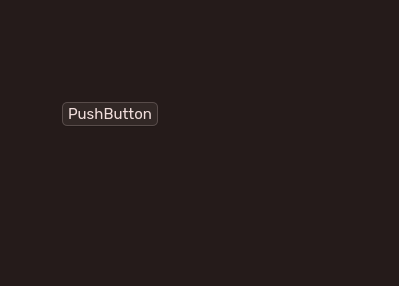
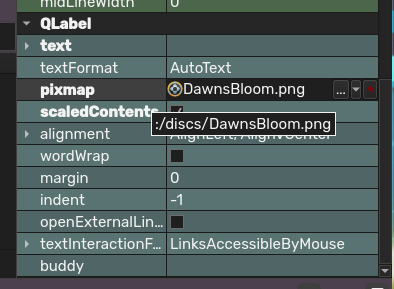
    In qt designer, it shows up just fine, but the actual application shows nothing (designer vs build):
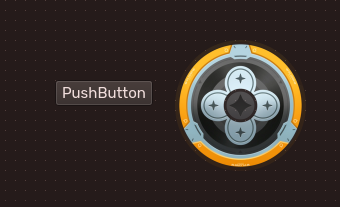
    404abb97-4075-4877-b2cb-a12a4142d5a8-image.png fc33ecfe-c2d0-4c81-8389-38d57d8afcbc-image.png

    how can i make this work?

    1 Reply Last reply
    0
    • SGaistS Offline
      SGaistS Offline
      SGaist
      Lifetime Qt Champion
      wrote on last edited by
      #6

      Hi,

      You either need to add set(CMAKE_AUTORCC ON) or use qt_add_resources.

      See here

      Interested in AI ? www.idiap.ch
      Please read the Qt Code of Conduct - https://forum.qt.io/topic/113070/qt-code-of-conduct

      1 Reply Last reply
      1
      • Christian EhrlicherC Offline
        Christian EhrlicherC Offline
        Christian Ehrlicher
        Lifetime Qt Champion
        wrote on last edited by
        #2

        Do you add the qrc to your executable? Also which path do you use for the image? It's :/discs/DawnsBloom.png

        Qt Online Installer direct download: https://download.qt.io/official_releases/online_installers/
        Visit the Qt Academy at https://academy.qt.io/catalog

        1 Reply Last reply
        1
        • Y Offline
          Y Offline
          yav12
          wrote on last edited by
          #3

          i did, the qrc is referenced in the cmakelists.txt, and it is using that path:
          image.png

          Christian EhrlicherC 1 Reply Last reply
          0
          • Y yav12

            i did, the qrc is referenced in the cmakelists.txt, and it is using that path:
            image.png

            Christian EhrlicherC Offline
            Christian EhrlicherC Offline
            Christian Ehrlicher
            Lifetime Qt Champion
            wrote on last edited by
            #4

            @yav12 said in unable to show pixmap using qrc file:

            he qrc is referenced in the cmakelists.txt

            Please show the CMakeLists.txt
            Also look what's really inside your qrc during runtime with

            QDirIterator it(":", QDirIterator::Subdirectories);
            while (it.hasNext())
                qDebug() << it.next();
            

            Qt Online Installer direct download: https://download.qt.io/official_releases/online_installers/
            Visit the Qt Academy at https://academy.qt.io/catalog

            1 Reply Last reply
            0
            • Y Offline
              Y Offline
              yav12
              wrote on last edited by yav12
              #5

              my cmakelists.txt looks like this:

              cmake_minimum_required(VERSION 3.19)
              project(zzz-optimizer LANGUAGES CXX)
              
              find_package(Qt6 6.5 REQUIRED COMPONENTS Core Widgets)
              
              qt_standard_project_setup()
              
              qt_add_executable(zzz-optimizer
                 WIN32 MACOSX_BUNDLE
                 main.cpp
                 window.cpp
                 window.h
                 window.ui
                 assets.qrc
              )
              
              target_link_libraries(zzz-optimizer
                 PRIVATE
                     Qt::Core
                     Qt::Widgets
              )
              
              include(GNUInstallDirs)
              
              install(TARGETS zzz-optimizer
                 BUNDLE  DESTINATION .
                 RUNTIME DESTINATION ${CMAKE_INSTALL_BINDIR}
                 LIBRARY DESTINATION ${CMAKE_INSTALL_LIBDIR}
              )
              
              qt_generate_deploy_app_script(
                 TARGET zzz-optimizer
                 OUTPUT_SCRIPT deploy_script
                 NO_UNSUPPORTED_PLATFORM_ERROR
              )
              install(SCRIPT ${deploy_script})


              Also look what's really inside your qrc

              i placed this code in, and a LOT of files showed up (it took a couple minutes to finish printing everything) but not my file in the qrc

              1 Reply Last reply
              0
              • SGaistS Offline
                SGaistS Offline
                SGaist
                Lifetime Qt Champion
                wrote on last edited by
                #6

                Hi,

                You either need to add set(CMAKE_AUTORCC ON) or use qt_add_resources.

                See here

                Interested in AI ? www.idiap.ch
                Please read the Qt Code of Conduct - https://forum.qt.io/topic/113070/qt-code-of-conduct

                1 Reply Last reply
                1
                • Y Offline
                  Y Offline
                  yav12
                  wrote on last edited by
                  #7

                  ohhhh i see. I added it to the CMakeLists.txt and now it works as expected.
                  Thank you :D

                  1 Reply Last reply
                  0
                  • Y yav12 has marked this topic as solved on

                  • Login

                  • Login or register to search.
                  • First post
                    Last post
                  0
                  • Categories
                  • Recent
                  • Tags
                  • Popular
                  • Users
                  • Groups
                  • Search
                  • Get Qt Extensions
                  • Unsolved