
How to activate keyboard shortcut in QMenu
-
Tested now with all for ShortcutContext and setting the shortcut to a simple Letter, tried H and F, nothing. What I really find strange is even with the menu open, nothing happens:
mCloseTab->setText(tr("Close"));
mCloseTab->setShortcut(QKeySequence(Qt::Key_F));
mCloseTab->setShortcutContext(Qt::ApplicationShortcut);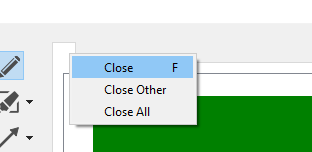
-
Interesting, I've created a QToolButton in the ContextMenu, just created it and gave it the same QAction as the defaultAction and now it's triggered when the ContextMenu is open:
mCloseTab->setText(tr("Close"));
mCloseTab->setShortcut(QKeySequence(Qt::Key_F));
mCloseTab->setShortcutContext(Qt::ApplicationShortcut);

auto button = new QToolButton(this);
button->setDefaultAction(mCloseTab);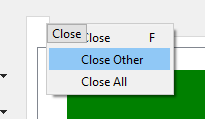
Still not working when the menu is closed.
-
Giving the QToolButton the QTabWidget as parent seems to be working even with the menu not shown. Just giving the QAction the QTabWidget as parent doesn't work without the QToolButton.
mCloseTab->setText(tr("Close"));
mCloseTab->setShortcut(QKeySequence(Qt::Key_F));
mCloseTab->setShortcutContext(Qt::ApplicationShortcut);

auto button = new QToolButton(parent);
button->setDefaultAction(mCloseTab);
button->setFixedSize(0,0);
It's a workaround, but one of the ugly kind. Any idea how to fix this? Is this a bug?
-
Giving the QToolButton the QTabWidget as parent seems to be working even with the menu not shown. Just giving the QAction the QTabWidget as parent doesn't work without the QToolButton.
mCloseTab->setText(tr("Close"));
mCloseTab->setShortcut(QKeySequence(Qt::Key_F));
mCloseTab->setShortcutContext(Qt::ApplicationShortcut);

auto button = new QToolButton(parent);
button->setDefaultAction(mCloseTab);
button->setFixedSize(0,0);
It's a workaround, but one of the ugly kind. Any idea how to fix this? Is this a bug?
Looks like there is something wrong with shortcuts and contextMenus in general (I dont know if bug or if we dont use it correctly).
Your hierarchy is somewhat like this:- Top level window / MainWindow
- TabWidget
- TabWidgets TabBar
- ContextMenu
- Action with shortcut
- TabWidget
And here is the problem... You can't say if the action actually receives the key event / shortcut, due to multiple parents and children.
At least on Window
Ctrl + F4is used (Shortcut List). - Top level window / MainWindow
-
Hi,
IIRC, you should add the action to your main widget using the addAction method.
If you have centralized actions that can be found in several places, you should also centralize their creation and propagate them as needed. Or provide an accessor like QDockWidget's toggleViewAction.
Interested in AI ? www.idiap.ch
Please read the Qt Code of Conduct - https://forum.qt.io/topic/113070/qt-code-of-conduct -
Hi,
IIRC, you should add the action to your main widget using the addAction method.
If you have centralized actions that can be found in several places, you should also centralize their creation and propagate them as needed. Or provide an accessor like QDockWidget's toggleViewAction.
-
Because it would not make sense to have that restriction because you can build these menus and actions in several different ways and that Qt cannot know that you are actually on purpose adding a shortcut to an action that will only be available in a popup menu.
-
Hi,
IIRC, you should add the action to your main widget using the addAction method.
If you have centralized actions that can be found in several places, you should also centralize their creation and propagate them as needed. Or provide an accessor like QDockWidget's toggleViewAction.
@SGaist said in How to activate keyboard shortcut in QMenu:
IIRC, you should add the action to your main widget using the addAction method.
The addAction method on the parent seems to be working indeed, need to think about if I should distribute them differently:
mCloseTab->setText(tr("Close")); mCloseTab->setShortcut(QKeySequence(Qt::Key_F)); mCloseTab->setShortcutContext(Qt::ApplicationShortcut); parent->addAction(mCloseTab);@Pl45m4 it is indeed a close action though it looks like I should be using Ctrl+W which is more cross platform.
-
How can I change the color of QMenu shortcuts and make them align from the right side?
Stylesheets don’t seem to affect the shortcut text


