Skip to content
  • Categories
  • Recent
  • Tags
  • Popular
  • Users
  • Groups
  • Search
  • Get Qt Extensions
  • Unsolved
Collapse
Brand Logo
  1. Home
  2. Qt Development
  3. Qt Creator and other tools
  4. Qt Creator Running project
Qt 6.11 is out! See what's new in the release blog

Qt Creator Running project

Scheduled Pinned Locked Moved Solved Qt Creator and other tools
15 Posts 5 Posters 2.7k Views 2 Watching
  • Oldest to Newest
  • Newest to Oldest
  • Most Votes
Reply
  • Reply as topic
Log in to reply
This topic has been deleted. Only users with topic management privileges can see it.
  • Q Offline
    Q Offline
    Qreator35
    wrote on last edited by
    #3

    I have the Qt folder in my users folder how can I verify I used the Qt installer to install everything. I do have Xcode installed

    Screen Shot 2025-05-16 at 5.04.25 AM
    Screen Shot 2025-05-16 at 5.04.25 AM.png

    Pl45m4P J.HilkJ 2 Replies Last reply
    0
    • Q Qreator35

      I have the Qt folder in my users folder how can I verify I used the Qt installer to install everything. I do have Xcode installed

      Screen Shot 2025-05-16 at 5.04.25 AM
      Screen Shot 2025-05-16 at 5.04.25 AM.png

      Pl45m4P Offline
      Pl45m4P Offline
      Pl45m4
      wrote on last edited by
      #4

      @Qreator35

      Where did you install your Qt version to? and what version did you install?


      If debugging is the process of removing software bugs, then programming must be the process of putting them in.

      ~E. W. Dijkstra

      1 Reply Last reply
      0
      • Q Qreator35

        I have the Qt folder in my users folder how can I verify I used the Qt installer to install everything. I do have Xcode installed

        Screen Shot 2025-05-16 at 5.04.25 AM
        Screen Shot 2025-05-16 at 5.04.25 AM.png

        J.HilkJ Offline
        J.HilkJ Offline
        J.Hilk
        Moderators
        wrote on last edited by
        #5

        @Qreator35 you're missing a Qt version, that install folder should have a folder containing only numbers, representing the installed Qt Version, if installed via the installer/maintenaince tool:

        7d0fca44-a73a-43df-ac3f-21d9b37705ee-image.png


        Be aware of the Qt Code of Conduct, when posting : https://forum.qt.io/topic/113070/qt-code-of-conduct


        Q: What's that?
        A: It's blue light.
        Q: What does it do?
        A: It turns blue.

        1 Reply Last reply
        3
        • Christian EhrlicherC Christian Ehrlicher moved this topic from General and Desktop on
        • Q Offline
          Q Offline
          Qreator35
          wrote on last edited by
          #6

          I ended up installing qt 5.10.1 this fixed the issue. However im not sure why the qt installer didn't automatically install a Qt Version. Is there a step during the installation process that I may have missed. It seems as if by default the QT installer installs QT 6.

          Pl45m4P 1 Reply Last reply
          0
          • Q Qreator35 has marked this topic as solved on
          • Q Qreator35

            I ended up installing qt 5.10.1 this fixed the issue. However im not sure why the qt installer didn't automatically install a Qt Version. Is there a step during the installation process that I may have missed. It seems as if by default the QT installer installs QT 6.

            Pl45m4P Offline
            Pl45m4P Offline
            Pl45m4
            wrote on last edited by
            #7

            @Qreator35

            Qt 5.10.1?!
            Why even that?!
            Even the latest Qt 5 release 5.15 is EOL and 10.1 is way older and has more unfixed bugs.

            The software from the linked GitHub repo is 7+ years old. It was built using 5.10.1 but it doesn't mean you also need the same version almost a decade later.


            If debugging is the process of removing software bugs, then programming must be the process of putting them in.

            ~E. W. Dijkstra

            Q 2 Replies Last reply
            1
            • Pl45m4P Pl45m4

              @Qreator35

              Qt 5.10.1?!
              Why even that?!
              Even the latest Qt 5 release 5.15 is EOL and 10.1 is way older and has more unfixed bugs.

              The software from the linked GitHub repo is 7+ years old. It was built using 5.10.1 but it doesn't mean you also need the same version almost a decade later.

              Q Offline
              Q Offline
              Qreator35
              wrote on last edited by
              #8

              @Pl45m4 you’re right I should update to at least 5.15. But again I don’t understand why the installer didn’t automatically install qt6. This made me use a separate installer to install QT5.

              jsulmJ 1 Reply Last reply
              0
              • Q Qreator35

                @Pl45m4 you’re right I should update to at least 5.15. But again I don’t understand why the installer didn’t automatically install qt6. This made me use a separate installer to install QT5.

                jsulmJ Offline
                jsulmJ Offline
                jsulm
                Lifetime Qt Champion
                wrote on last edited by
                #9

                @Qreator35 Did you use Qt Online Installer?

                https://forum.qt.io/topic/113070/qt-code-of-conduct

                Q 1 Reply Last reply
                0
                • jsulmJ jsulm

                  @Qreator35 Did you use Qt Online Installer?

                  Q Offline
                  Q Offline
                  Qreator35
                  wrote on last edited by
                  #10

                  @jsulm yes I did

                  jsulmJ 1 Reply Last reply
                  0
                  • Q Qreator35

                    @jsulm yes I did

                    jsulmJ Offline
                    jsulmJ Offline
                    jsulm
                    Lifetime Qt Champion
                    wrote on last edited by
                    #11

                    @Qreator35 This is strange. The online installer by default suggests Qt6, to install Qt5 you have to enable the Archive option.

                    https://forum.qt.io/topic/113070/qt-code-of-conduct

                    1 Reply Last reply
                    0
                    • SGaistS Offline
                      SGaistS Offline
                      SGaist
                      Lifetime Qt Champion
                      wrote on last edited by
                      #12

                      Also, which version of the installer are you using ?

                      Interested in AI ? www.idiap.ch
                      Please read the Qt Code of Conduct - https://forum.qt.io/topic/113070/qt-code-of-conduct

                      1 Reply Last reply
                      0
                      • Q Offline
                        Q Offline
                        Qreator35
                        wrote on last edited by Qreator35
                        #13

                        At the time of installation it was 4.8.1 for MacOS

                        1 Reply Last reply
                        0
                        • Pl45m4P Pl45m4

                          @Qreator35

                          Qt 5.10.1?!
                          Why even that?!
                          Even the latest Qt 5 release 5.15 is EOL and 10.1 is way older and has more unfixed bugs.

                          The software from the linked GitHub repo is 7+ years old. It was built using 5.10.1 but it doesn't mean you also need the same version almost a decade later.

                          Q Offline
                          Q Offline
                          Qreator35
                          wrote on last edited by
                          #14

                          @Pl45m4

                          Ive tried installing QT5.15.2 and QT 5.10.1. I don't have any issue opening my project with 5.10.1 however with 5.15.2 I get an error stating :-1: error: Project ERROR: failed to parse default search paths from compiler output.

                          1 Reply Last reply
                          0
                          • Q Offline
                            Q Offline
                            Qreator35
                            wrote on last edited by
                            #15

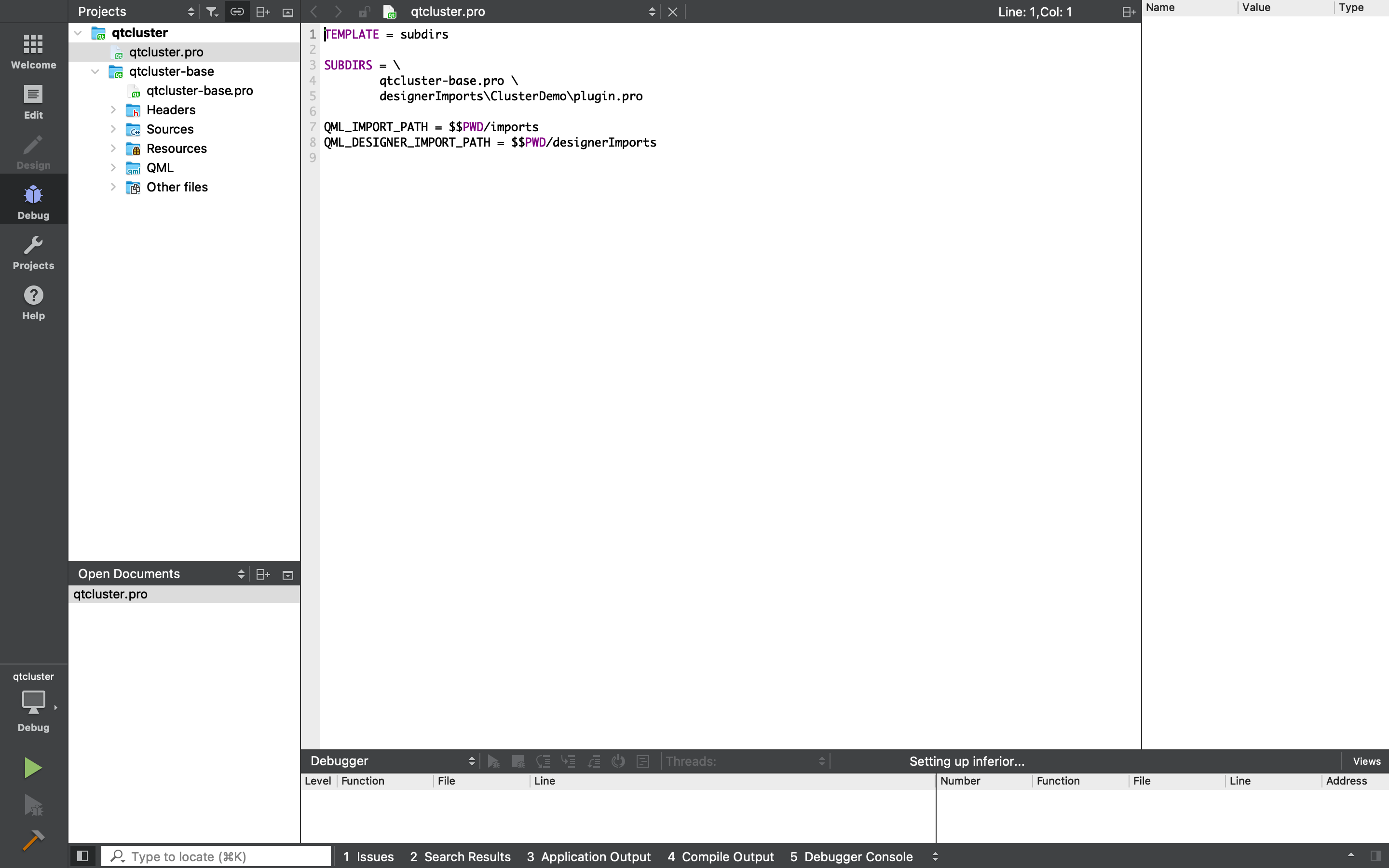
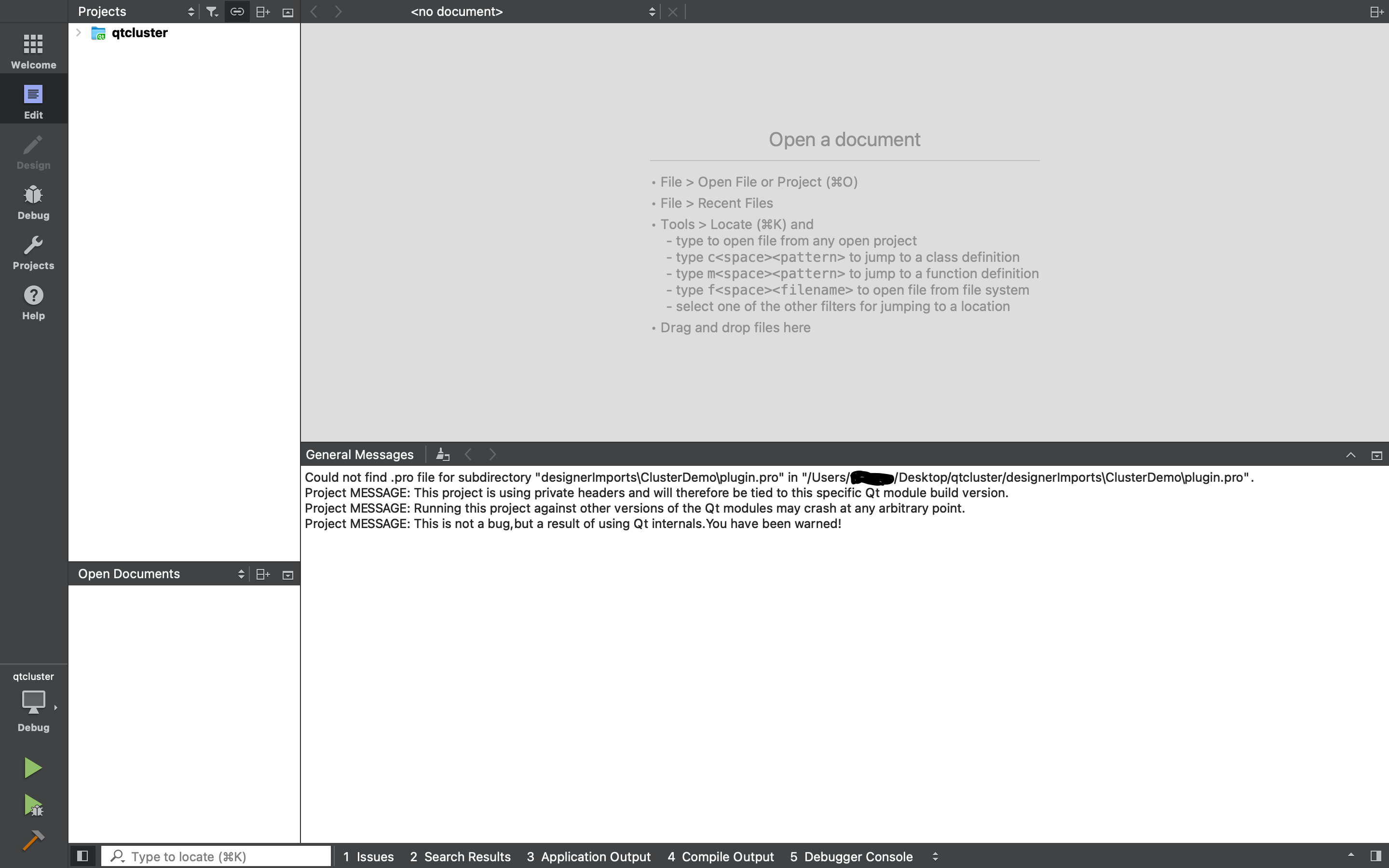
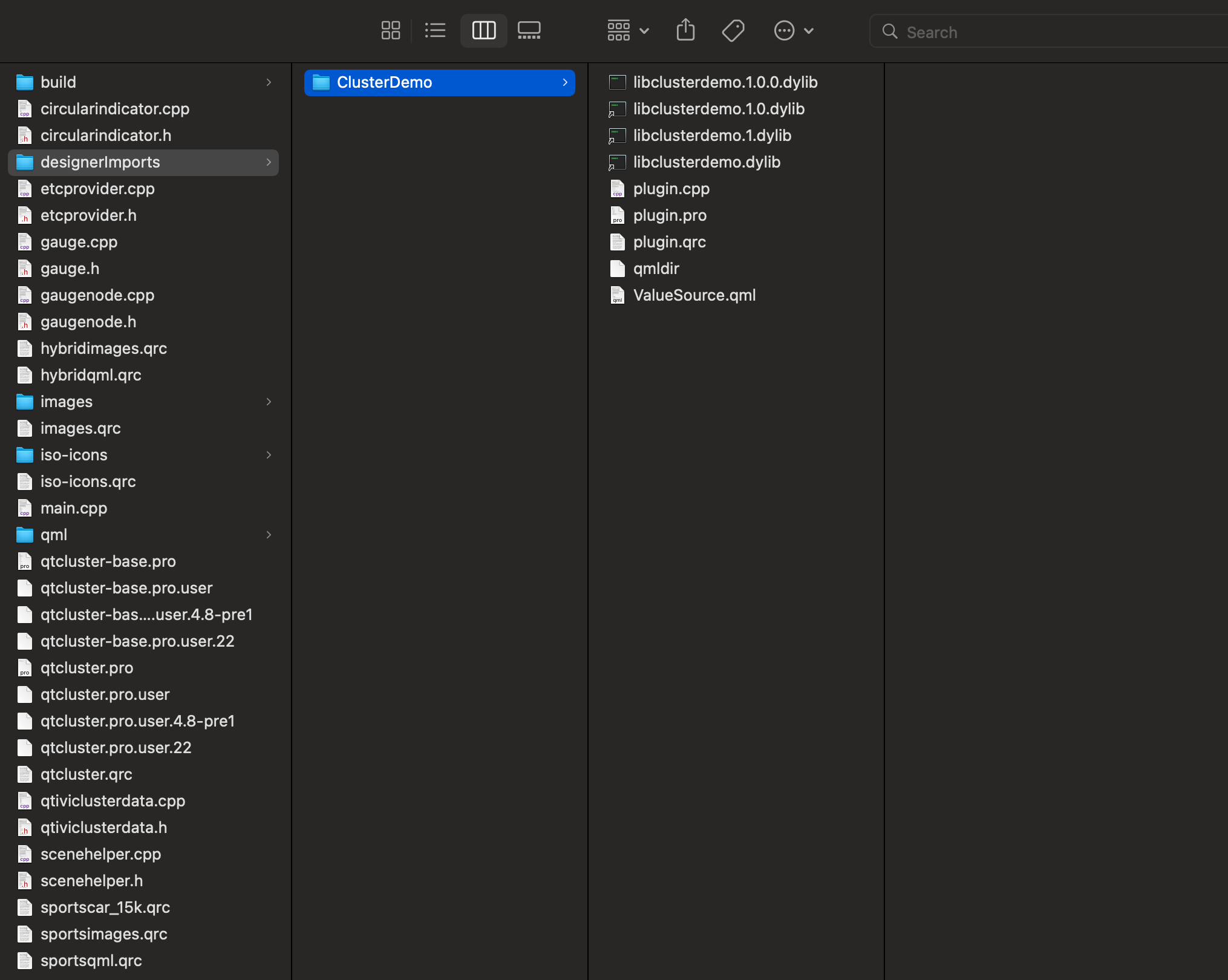
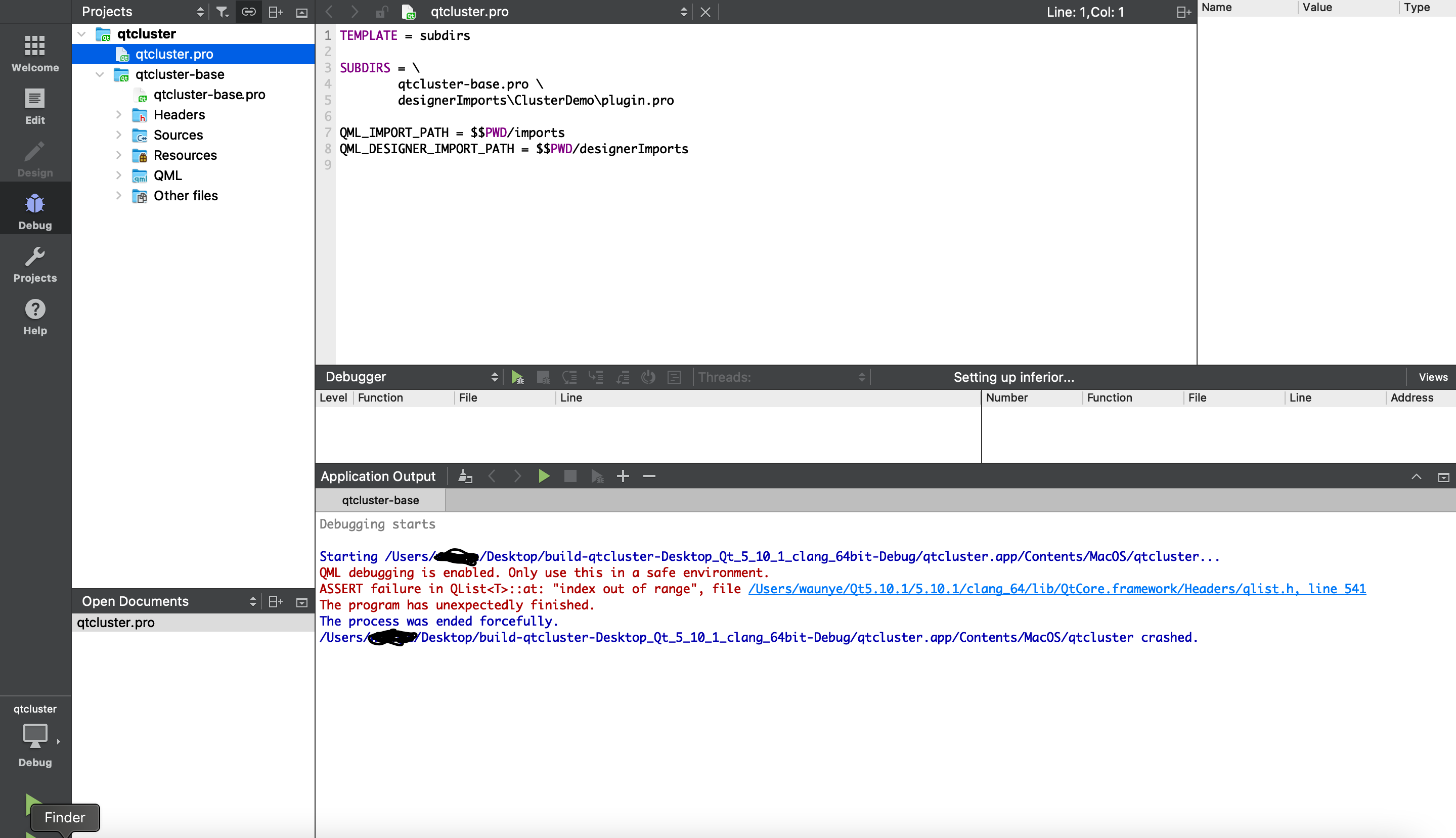
                            Also on QT 5.10.1 I can open the project but can not run. Ive read the following documentation but
                            Screen Shot 2025-09-13 at 3.16.33 AM.png
                            Screen Shot 2025-09-13 at 3.11.14 AM.png
                            Screen Shot 2025-09-13 at 3.10.07 AM.png
                            Screen Shot 2025-09-13 at 3.08.17 AM.png

                            Ive read this documentation but the my SUBDIRS seems to be correct https://doc.qt.io/qt-5/qmake-variable-reference.html#subdirs

                            The project that I am running is a Demo from the QT Company located here:
                            https://code.qt.io/cgit/qt/qtdoc.git/tree/doc/src/snippets/qtcluster?h=5.10

                            1 Reply Last reply
                            0

                            • Login

                            • Login or register to search.
                            • First post
                              Last post
                            0
                            • Categories
                            • Recent
                            • Tags
                            • Popular
                            • Users
                            • Groups
                            • Search
                            • Get Qt Extensions
                            • Unsolved