Skip to content
  • Categories
  • Recent
  • Tags
  • Popular
  • Users
  • Groups
  • Search
  • Get Qt Extensions
  • Unsolved
Collapse
Brand Logo
  1. Home
  2. Qt Development
  3. General and Desktop
  4. sleep or delay in qthread but crash
Qt 6.11 is out! See what's new in the release blog

sleep or delay in qthread but crash

Scheduled Pinned Locked Moved Solved General and Desktop
17 Posts 7 Posters 2.5k Views 3 Watching
  • Oldest to Newest
  • Newest to Oldest
  • Most Votes
Reply
  • Reply as topic
Log in to reply
This topic has been deleted. Only users with topic management privileges can see it.
  • Q QtTester

    @Pl45m4 need to query some io status:

    //call it like this:
    dosomething();
    while(1){
        if(io() ==0)
          break;
        delay(1);
    }
    dootherthing();
    
    Christian EhrlicherC Online
    Christian EhrlicherC Online
    Christian Ehrlicher
    Lifetime Qt Champion
    wrote on last edited by
    #7

    @QtTester said in sleep or delay in qthread but crash:

    need to query some io status:

    Then use a QTimer with the Worker-Object approach shown in the documentation: https://doc.qt.io/qt-6/qthread.html#details

    Qt Online Installer direct download: https://download.qt.io/official_releases/online_installers/
    Visit the Qt Academy at https://academy.qt.io/catalog

    Q 1 Reply Last reply
    1
    • Christian EhrlicherC Christian Ehrlicher

      @QtTester said in sleep or delay in qthread but crash:

      need to query some io status:

      Then use a QTimer with the Worker-Object approach shown in the documentation: https://doc.qt.io/qt-6/qthread.html#details

      Q Offline
      Q Offline
      QtTester
      wrote on last edited by
      #8

      @Christian-Ehrlicher we may not write code like that. it is a long long complicate procedure, and will delay for many condition with many times.

      JonBJ Christian EhrlicherC 2 Replies Last reply
      0
      • Q QtTester

        @Christian-Ehrlicher we may not write code like that. it is a long long complicate procedure, and will delay for many condition with many times.

        JonBJ Offline
        JonBJ Offline
        JonB
        wrote on last edited by
        #9

        @QtTester
        I already wrote above https://forum.qt.io/post/816186 that you should abandon all this event loop and waiting stuff. It's not complicated, it doesn't introduce extra delays and can be used many times.

        Otherwise do your best to debug your code. You have already said you have made a change per @SGaist and that has changed where the crash is, so who knows what is going on.

        1 Reply Last reply
        0
        • Q QtTester

          @Christian-Ehrlicher we may not write code like that. it is a long long complicate procedure, and will delay for many condition with many times.

          Christian EhrlicherC Online
          Christian EhrlicherC Online
          Christian Ehrlicher
          Lifetime Qt Champion
          wrote on last edited by
          #10

          @QtTester so either try to fix this crappy code or rewrite it - I would say the latter costs less, especially in the long run.

          Qt Online Installer direct download: https://download.qt.io/official_releases/online_installers/
          Visit the Qt Academy at https://academy.qt.io/catalog

          1 Reply Last reply
          1
          • Q Offline
            Q Offline
            QtTester
            wrote on last edited by QtTester
            #11

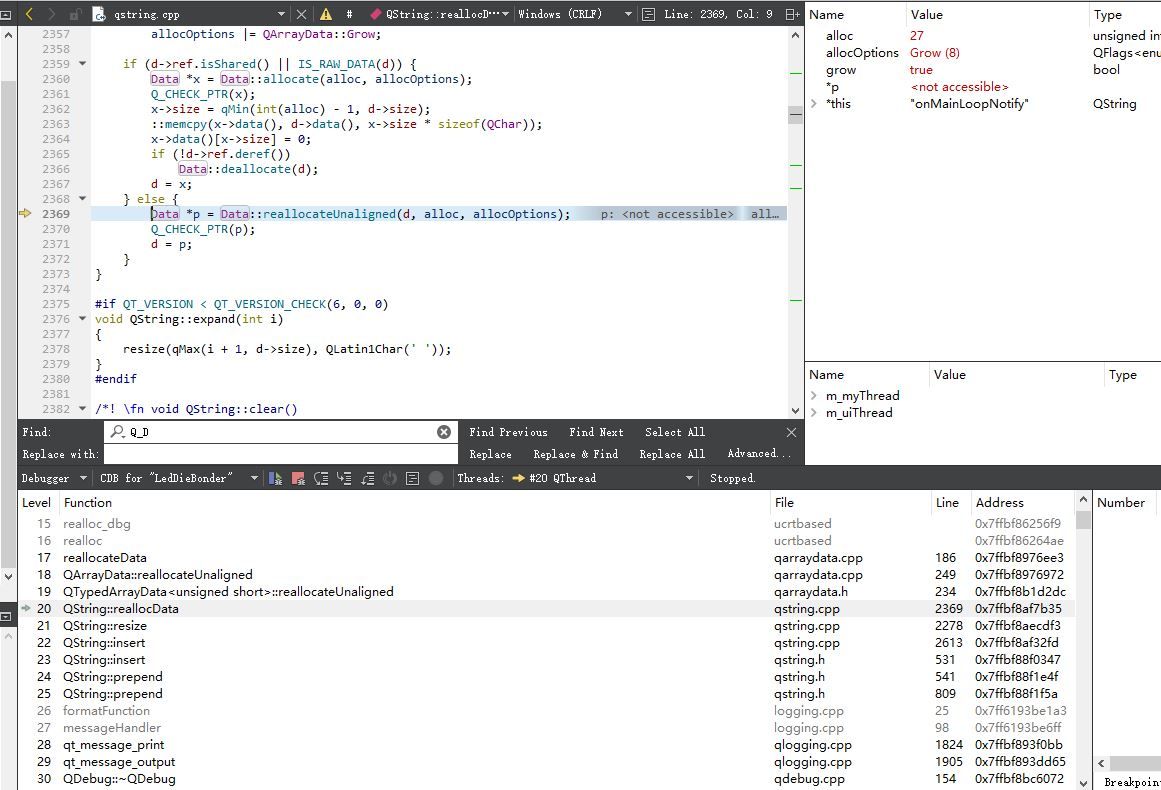
            i trace the qt source file,it stop right here, is qstring .append() possible has a bug???,version is 5.14.1:
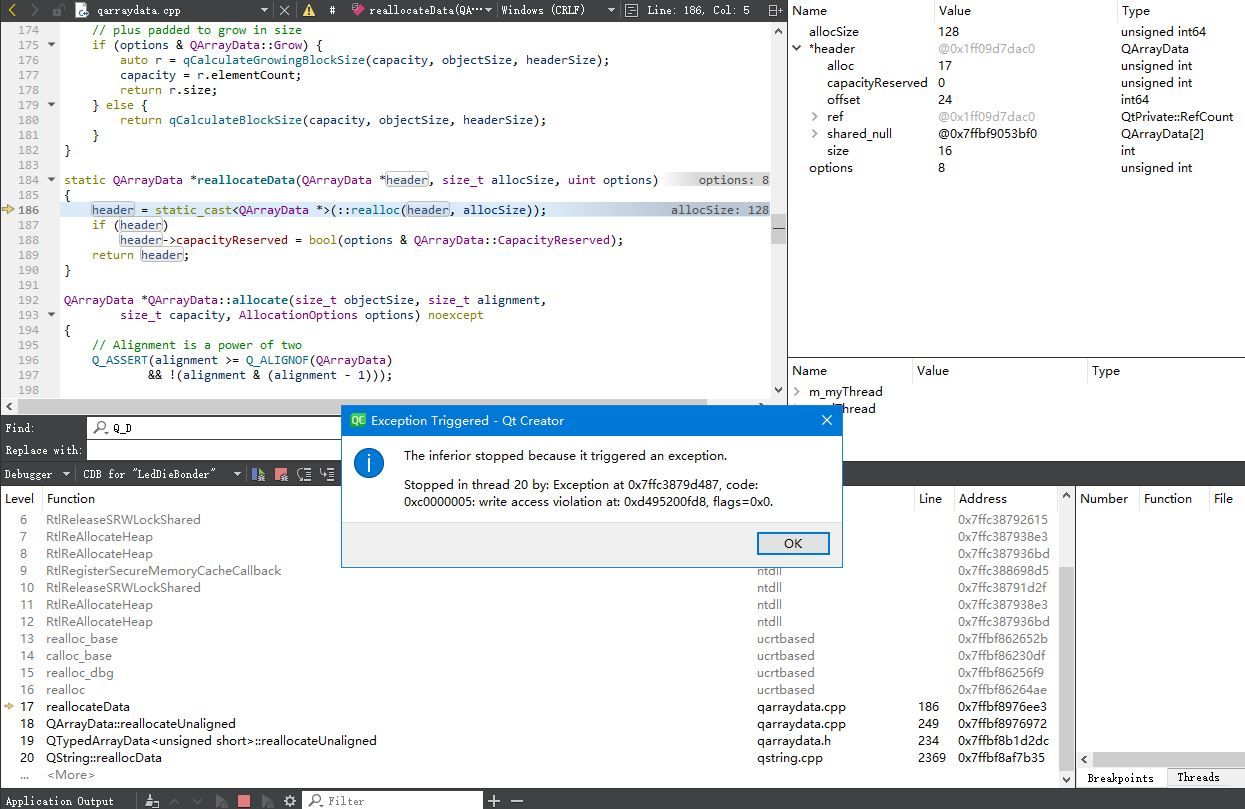
            捕获.JPG

            more:
            捕获.JPG

            jsulmJ 1 Reply Last reply
            0
            • Q QtTester

              i trace the qt source file,it stop right here, is qstring .append() possible has a bug???,version is 5.14.1:

              捕获.JPG

              more:
              捕获.JPG

              jsulmJ Offline
              jsulmJ Offline
              jsulm
              Lifetime Qt Champion
              wrote on last edited by
              #12

              @QtTester Before assuming a bug in Qt you should make sure it is not your code doing something wrong. The fact that the crash is in Qt code does not mean the issue is in Qt. Since you're writing quite convoluted code in this case I'm quite sure the issue is on your side.

              https://forum.qt.io/topic/113070/qt-code-of-conduct

              1 Reply Last reply
              0
              • Christian EhrlicherC Online
                Christian EhrlicherC Online
                Christian Ehrlicher
                Lifetime Qt Champion
                wrote on last edited by
                #13

                This looks like two other threads in the last few days - don't mix debug and release libraries.

                Qt Online Installer direct download: https://download.qt.io/official_releases/online_installers/
                Visit the Qt Academy at https://academy.qt.io/catalog

                JonBJ 1 Reply Last reply
                2
                • S Offline
                  S Offline
                  SimonSchroeder
                  wrote on last edited by
                  #14

                  Usually, it is your own code and not Qt's (I've been using Qt for 20 years and this is still true for me). Go down the stacktrace until you find your own code. See how you call Qt and most likely there is some wrong value there. Also, since you are using more than one thread, look in the stacktraces of all threads that have your own code running.

                  1 Reply Last reply
                  0
                  • Christian EhrlicherC Christian Ehrlicher

                    This looks like two other threads in the last few days - don't mix debug and release libraries.

                    JonBJ Offline
                    JonBJ Offline
                    JonB
                    wrote on last edited by
                    #15

                    @Christian-Ehrlicher For the record, we seem to have a fair number of debug/release library mixing recently.

                    1 Reply Last reply
                    0
                    • Q Offline
                      Q Offline
                      QtTester
                      wrote on last edited by
                      #16

                      I set qdebug level to qwarning, the crash disappeared! strange

                      S 1 Reply Last reply
                      0
                      • Q QtTester has marked this topic as solved on
                      • Q QtTester

                        I set qdebug level to qwarning, the crash disappeared! strange

                        S Offline
                        S Offline
                        SimonSchroeder
                        wrote on last edited by
                        #17

                        @QtTester said in sleep or delay in qthread but crash:

                        I set qdebug level to qwarning, the crash disappeared! strange

                        This is not strange at all. You have just disabled any line with qDebug() in your source. As I have said before your error is most likely in your own code. Now, that the erroneous memory address is not accessed by qDebug() anymore the bug vanishes. You can also just remove the offending qDebug() line in your source (right where it crashed in your stacktrace) and everything works fine as well. Then, you can continue to use qDebug() everywhere else.

                        1 Reply Last reply
                        2

                        • Login

                        • Login or register to search.
                        • First post
                          Last post
                        0
                        • Categories
                        • Recent
                        • Tags
                        • Popular
                        • Users
                        • Groups
                        • Search
                        • Get Qt Extensions
                        • Unsolved