
Error popups about library entry points
-
I get these trying to run a debug build of one of my projects
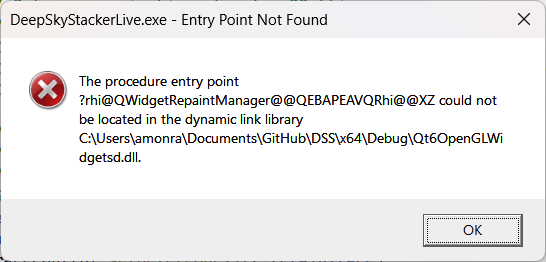
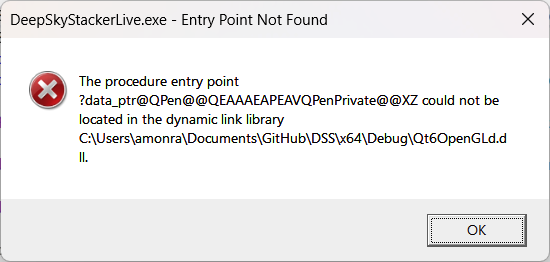
What's the problem here please?
I have no problems when running a release build.
@Perdrix
Did you compile the Qt6OpenGl stuff yourself or did you receive it pre-compiled from somewhere? Are you absolutely certain it has been compiled with the exact same version of Qt6 as you are compiling the rest of your code with?I have no problems when running a release build.
I was about to ask this, but you have just added it. Are you sure when you change to debug build that absolutely nothing is left over from previous release build? And that everything uses debug libraries now? Do an absolutely fresh, clean build, with all intermediate objects/directories deleted to be sure you reproduce these errors.
And for the record you really should state what compiler you use for a question like this, how do people know whether it is MinGW or MSVC?
-
So you should make sure that the correct dlls are picked up which is not the case as you can see.
-
So what did I do wrong, the project settings are:
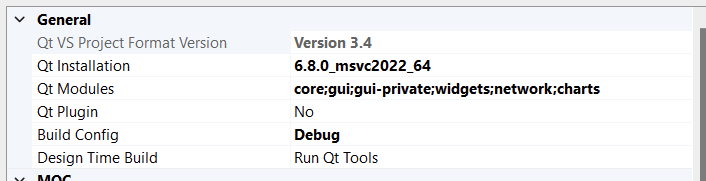
I've no idea why the OpenGL stuff is involved - I don't use it (knowingly).
@Perdrix said in Error popups about library entry points:
what did I do wrong
Your global PATH environment variable contains a path to the wrong dlls.
-
No it doesn't, the DLLs are in the same directory as the .exe so will always be used for preference over any others, and indeed the dll in question is specifically called out in the error popups.
For for the record:
Path=C:\Program Files (x86)\VMware\VMware Workstation\bin;C:\Program Files\ImageMagick-7.1.1-Q16-HDRI;C:\Program Files\Python311\Scripts;C:\Program Files\Python311;C:\Program Files\Microsoft\jdk-17.0.6.10-hotspot\bin;C:\Program Files (x86)\Cuminas\Document Express DjVu Plug-in;C:\WINDOWS\system32;C:\WINDOWS;C:\WINDOWS\System32\Wbem;C:\WINDOWS\System32\WindowsPowerShell\v1.0;C:\WINDOWS\System32\OpenSSH;C:\Program Files\dotnet;C:\Program Files\gs\gs10.00.0\bin;C:\Program Files (x86)\IVI Foundation\VISA\WinNT\Bin;C:\Program Files\IVI Foundation\VISA\Win64\Bin;C:\Program Files (x86)\IVI Foundation\VISA\WinNT\Bin;C:\PROGRAM FILES (X86)\COMMON FILES\ORACLE\JAVA\JAVAPATH;C:\PROGRAMDATA\ORACLE\JAVA\JAVAPATH;C:\PROGRAM FILES\DELL\DW WLAN CARD;C:\WINDOWS\SYSTEM32;C:\WINDOWS;C:\WINDOWS\SYSTEM32\WBEM;C:\WINDOWS\SYSTEM32\WINDOWSPOWERSHELL\V1.0;C:\Windows\System32\OpenSSH;C:\PROGRAM FILES (X86)\NVIDIA CORPORATION\PHYSX\COMMON;C:\PROGRAM FILES (X86)\NTP\BIN;C:\PROGRAM FILES\MICROSOFT DNX\DNVM;C:\PROGRAM FILES (X86)\WINDOWS KITS\8.1\WINDOWS PERFORMANCE TOOLKIT;C:\PROGRAM FILES (X86)\WINMERGE;C:\PROGRAM FILES (X86)\WINDOWS KITS\10\WINDOWS PERFORMANCE TOOLKIT;C:\PROGRAM FILES (X86)\VISUAL LEAK DETECTOR\BIN\WIN32;C:\PROGRAM FILES (X86)\VISUAL LEAK DETECTOR\BIN\WIN64;C:\Program Files\Intel\WiFi\bin;C:\Program Files\Common Files\Intel\WirelessCommon;C:\Program Files (x86)\Kensington\TrackballWorks;C:\Program Files (x86)\Microchip\MPLAB C32 Suite\bin;C:\Program Files\TortoiseGit\bin;C;C:\Program Files (x86)\Visual Leak Detector\bin\Win32;C:\Program Files (x86)\Visual Leak Detector\bin\Win64;C:\Program Files\Calibre2;C:\Program Files\CMake\bin;C:\Program Files\Git\cmd;C:\Users\amonra\AppData\Local\Microsoft\WindowsApps;C:\Users\amonra\AppData\Local\GitHubDesktop\bin;C:\Users\amonra\AppData\Local\gitkraken\bin
-
No it doesn't, the DLLs are in the same directory as the .exe so will always be used for preference over any others, and indeed the dll in question is specifically called out in the error popups.
For for the record:
Path=C:\Program Files (x86)\VMware\VMware Workstation\bin;C:\Program Files\ImageMagick-7.1.1-Q16-HDRI;C:\Program Files\Python311\Scripts;C:\Program Files\Python311;C:\Program Files\Microsoft\jdk-17.0.6.10-hotspot\bin;C:\Program Files (x86)\Cuminas\Document Express DjVu Plug-in;C:\WINDOWS\system32;C:\WINDOWS;C:\WINDOWS\System32\Wbem;C:\WINDOWS\System32\WindowsPowerShell\v1.0;C:\WINDOWS\System32\OpenSSH;C:\Program Files\dotnet;C:\Program Files\gs\gs10.00.0\bin;C:\Program Files (x86)\IVI Foundation\VISA\WinNT\Bin;C:\Program Files\IVI Foundation\VISA\Win64\Bin;C:\Program Files (x86)\IVI Foundation\VISA\WinNT\Bin;C:\PROGRAM FILES (X86)\COMMON FILES\ORACLE\JAVA\JAVAPATH;C:\PROGRAMDATA\ORACLE\JAVA\JAVAPATH;C:\PROGRAM FILES\DELL\DW WLAN CARD;C:\WINDOWS\SYSTEM32;C:\WINDOWS;C:\WINDOWS\SYSTEM32\WBEM;C:\WINDOWS\SYSTEM32\WINDOWSPOWERSHELL\V1.0;C:\Windows\System32\OpenSSH;C:\PROGRAM FILES (X86)\NVIDIA CORPORATION\PHYSX\COMMON;C:\PROGRAM FILES (X86)\NTP\BIN;C:\PROGRAM FILES\MICROSOFT DNX\DNVM;C:\PROGRAM FILES (X86)\WINDOWS KITS\8.1\WINDOWS PERFORMANCE TOOLKIT;C:\PROGRAM FILES (X86)\WINMERGE;C:\PROGRAM FILES (X86)\WINDOWS KITS\10\WINDOWS PERFORMANCE TOOLKIT;C:\PROGRAM FILES (X86)\VISUAL LEAK DETECTOR\BIN\WIN32;C:\PROGRAM FILES (X86)\VISUAL LEAK DETECTOR\BIN\WIN64;C:\Program Files\Intel\WiFi\bin;C:\Program Files\Common Files\Intel\WirelessCommon;C:\Program Files (x86)\Kensington\TrackballWorks;C:\Program Files (x86)\Microchip\MPLAB C32 Suite\bin;C:\Program Files\TortoiseGit\bin;C;C:\Program Files (x86)\Visual Leak Detector\bin\Win32;C:\Program Files (x86)\Visual Leak Detector\bin\Win64;C:\Program Files\Calibre2;C:\Program Files\CMake\bin;C:\Program Files\Git\cmd;C:\Users\amonra\AppData\Local\Microsoft\WindowsApps;C:\Users\amonra\AppData\Local\GitHubDesktop\bin;C:\Users\amonra\AppData\Local\gitkraken\bin
-
Yes, specifically C:\Users\amonra\Documents\GitHub\DSS\x64\Debug is the debug build output folder and that's where all the files in question are - either placed there by building my code, or by windeployqt (for the Qt dlls). I just checked and (at least) the OpenGL dlls in the debug directory were back level compared to the Qt 6.8.0 installation while the release directory had the correct ones.
I manually deleted everything from the build output dirs and re-ran the build, after which of course it worked as I expected. How/why there were some back level dlls in the Debug directory ????


