
how to solve the error when the application is opened on another laptop
-
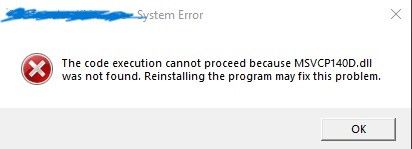
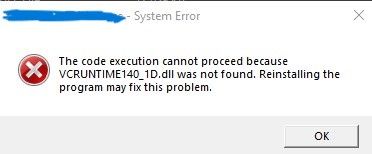
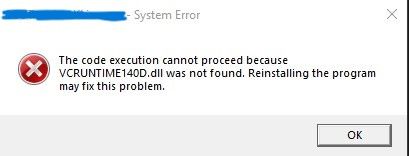
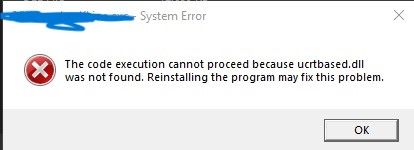
I have a problem with the MSVC2019 compiler after doing windeployqt, the application opens properly on my laptop after deploying, but when other laptops open it errors occur etc. as below, I have used 2 ways to deploy yes it does set VCINSTALLDIR and does not set VCINSTALLDIR, but both as usual it works for my laptop but does not work for other laptops, how to solve this
Method 1
C:\Qt\5.15.2\msvc2019_64\bin>windeployqt.exe --release "C:\Users\User\Documents\Project\MyExe.exe"
C:\Users\User\Documents\Project\MyExe.exe 64 bit, release executable
Adding Qt5Svg for qsvgicon.dll
Skipping plugin qtvirtualkeyboardplugin.dll due to disabled dependencies (Qt5Qml Qt5Quick).
Skipping plugin qtvirtualkeyboard_hangul.dll due to disabled dependencies (Qt5Qml Qt5Quick).
Skipping plugin qtvirtualkeyboard_openwnn.dll due to disabled dependencies (Qt5Qml Qt5Quick).
Skipping plugin qtvirtualkeyboard_pinyin.dll due to disabled dependencies (Qt5Qml Qt5Quick).
Skipping plugin qtvirtualkeyboard_tcime.dll due to disabled dependencies (Qt5Qml Qt5Quick).
Skipping plugin qtvirtualkeyboard_thai.dll due to disabled dependencies (Qt5Qml Qt5Quick).
Direct dependencies: Qt5Core Qt5Gui Qt5Widgets
All dependencies   : Qt5Core Qt5Gui Qt5Widgets
To be deployed     : Qt5Core Qt5Gui Qt5Svg Qt5Widgets
Warning: Cannot find Visual Studio installation directory, VCINSTALLDIR is not set.
Updating Qt5Core.dll.
Updating Qt5Gui.dll.
Updating Qt5Svg.dll.
Updating Qt5Widgets.dll.
Updating libGLESv2.dll.
Updating libEGL.dll.
D3Dcompiler_47.dll is up to date.
opengl32sw.dll is up to date.
Updating qsvgicon.dll.
Updating qgif.dll.
Updating qicns.dll.
Updating qico.dll.
Updating qjpeg.dll.
Updating qsvg.dll.
Updating qtga.dll.
Updating qtiff.dll.
Updating qwbmp.dll.
Updating qwebp.dll.
Updating qwindows.dll.
Updating qwindowsvistastyle.dll.
Creating qt_ar.qm...
Creating qt_bg.qm...
Creating qt_ca.qm...
Creating qt_cs.qm...
Creating qt_da.qm...
Creating qt_de.qm...
Creating qt_en.qm...
Creating qt_es.qm...
Creating qt_fi.qm...
Creating qt_fr.qm...
Creating qt_gd.qm...
Creating qt_he.qm...
Creating qt_hu.qm...
Creating qt_it.qm...
Creating qt_ja.qm...
Creating qt_ko.qm...
Creating qt_lv.qm...
Creating qt_pl.qm...
Creating qt_ru.qm...
Creating qt_sk.qm...
Creating qt_tr.qm...
Creating qt_uk.qm...
Creating qt_zh_TW.qm...
Method 2
C:\Qt\5.15.2\msvc2019_64\bin>set VCINSTALLDIR=C:\Program Files (x86)\Microsoft Visual Studio\2019\Community\VC C:\Qt\5.15.2\msvc2019_64\bin>windeployqt.exe --release "C:\Users\User\Documents\Project\MyExe.exe" C:\Users\User\Documents\Project\MyExe.exe 64 bit, release executable Adding Qt5Svg for qsvgicon.dll Skipping plugin qtvirtualkeyboardplugin.dll due to disabled dependencies (Qt5Qml Qt5Quick). Skipping plugin qtvirtualkeyboard_hangul.dll due to disabled dependencies (Qt5Qml Qt5Quick). Skipping plugin qtvirtualkeyboard_openwnn.dll due to disabled dependencies (Qt5Qml Qt5Quick). Skipping plugin qtvirtualkeyboard_pinyin.dll due to disabled dependencies (Qt5Qml Qt5Quick). Skipping plugin qtvirtualkeyboard_tcime.dll due to disabled dependencies (Qt5Qml Qt5Quick). Skipping plugin qtvirtualkeyboard_thai.dll due to disabled dependencies (Qt5Qml Qt5Quick). Direct dependencies: Qt5Core Qt5Gui Qt5Widgets All dependencies : Qt5Core Qt5Gui Qt5Widgets To be deployed : Qt5Core Qt5Gui Qt5Svg Qt5Widgets Qt5Core.dll is up to date. Qt5Gui.dll is up to date. Qt5Svg.dll is up to date. Qt5Widgets.dll is up to date. libGLESv2.dll is up to date. libEGL.dll is up to date. D3Dcompiler_47.dll is up to date. opengl32sw.dll is up to date. Updating vc_redist.x64.exe. qsvgicon.dll is up to date. qgif.dll is up to date. qicns.dll is up to date. qico.dll is up to date. qjpeg.dll is up to date. qsvg.dll is up to date. qtga.dll is up to date. qtiff.dll is up to date. qwbmp.dll is up to date. qwebp.dll is up to date. qwindows.dll is up to date. qwindowsvistastyle.dll is up to date. Creating qt_ar.qm... Creating qt_bg.qm... Creating qt_ca.qm... Creating qt_cs.qm... Creating qt_da.qm... Creating qt_de.qm... Creating qt_en.qm... Creating qt_es.qm... Creating qt_fi.qm... Creating qt_fr.qm... Creating qt_gd.qm... Creating qt_he.qm... Creating qt_hu.qm... Creating qt_it.qm... Creating qt_ja.qm... Creating qt_ko.qm... Creating qt_lv.qm... Creating qt_pl.qm... Creating qt_ru.qm... Creating qt_sk.qm... Creating qt_tr.qm... Creating qt_uk.qm... Creating qt_zh_TW.qm...@Blackzero You're trying to run a debug build which requires debug versions of libraries it depends on (like the VCRUNTIME). You should deploy release builds of your app not debug. If you really want to deploy debug builds then also provide debug versions of these libraries.
-
@Blackzero You're trying to run a debug build which requires debug versions of libraries it depends on (like the VCRUNTIME). You should deploy release builds of your app not debug. If you really want to deploy debug builds then also provide debug versions of these libraries.
-
@jsulm So I have to build the release in qt creator and then redo the deploy with --release?
@Blackzero said in how to solve the error when the application is opened on another laptop:
So I have to build the release in qt creator
Yes.
Debug build expects*_Dor*ddebug libraries and release the release libs (e.g. without debug symbols). -
Hi,
One detail that comes from the top of my head, the debug version of the MSVC runtime are not redistributable.
One alternative is to do a release with debug information build. -
Hi,
One detail that comes from the top of my head, the debug version of the MSVC runtime are not redistributable.
One alternative is to do a release with debug information build. -
If you are using CMake adding
include(InstallRequiredSystemLibraries)
will installVCRuntime*dependencies in the install step. -
If you are using CMake adding
include(InstallRequiredSystemLibraries)
will installVCRuntime*dependencies in the install step. -
@J-Hilk
I have too much code that makes it impossible to move to cmake, is it possible to change qmake to cmake easily without having to redo the code@Blackzero said in how to solve the error when the application is opened on another laptop:
without having to redo the code
You don't have to change code when you change the build system.
-
@J-Hilk
I have too much code that makes it impossible to move to cmake, is it possible to change qmake to cmake easily without having to redo the code@Blackzero the correct way to ship those particular dependencies that seem to be missing, is actually by having the user install those runtimes themselves:
https://learn.microsoft.com/en-us/cpp/windows/latest-supported-vc-redist?view=msvc-170or by shipping the installer yourself (you're explicitly allowed to do that) and executing it during your app install process.
Be aware of the Qt Code of Conduct, when posting : https://forum.qt.io/topic/113070/qt-code-of-conduct
Q: What's that?
A: It's blue light.
Q: What does it do?
A: It turns blue. -
@Blackzero the correct way to ship those particular dependencies that seem to be missing, is actually by having the user install those runtimes themselves:
https://learn.microsoft.com/en-us/cpp/windows/latest-supported-vc-redist?view=msvc-170or by shipping the installer yourself (you're explicitly allowed to do that) and executing it during your app install process.
@J-Hilk except that the error message talks about the debug version of the runtime which is not redistributable. More information here.
@Blackzero if using qmake:
CONFIG += force_debug_infoIf using cmake:
CMAKE_BUILD_TYPE=RelWithDebInfo


