
Skip to content
  • Categories
  • Recent
  • Tags
  • Popular
  • Users
  • Groups
  • Search
  • Get Qt Extensions
  • Unsolved
Collapse
Brand Logo
  1. Home
  2. Qt Development
  3. General and Desktop
  4. how to solve the problem lnk error

how to solve the problem lnk error

Scheduled Pinned Locked Moved Unsolved General and Desktop
7 Posts 3 Posters 494 Views
  • Oldest to Newest
  • Newest to Oldest
  • Most Votes
Reply
  • Reply as topic
Log in to reply
This topic has been deleted. Only users with topic management privileges can see it.
  • nicker playerN Offline
    nicker playerN Offline
    nicker player
    wrote on last edited by
    #1

    libboost\x86_32_msv\boost_locale-vc141-mt-x32-1_84.dll : fatal error LNK1107: the file is invalid or broken.could not read at 0x2C0

    I used the msv 2017 and qt 5.14.1 for compiling the program.
    and the program based on the boost libs.
    unfortunatly i compiled successfully once time.but after that.the program always occured the errors.

    here s the detail information:
    1.libboost depends on x86 address-model=32 link=shared runtime-link=shared threading=multi.
    in fact,not only the boost libs is the problem.other libs is the same tips.such as the libssl .i dont know why. maybe is it related to the compile args?
    LIBS += lib/libopenssl/libssl-3.dll
    LIBS += lib/libopenssl/libcrypto-3.dll
    LIBS +=lib/libboost/boost_url-vc141-mt-x32-1_84.dll
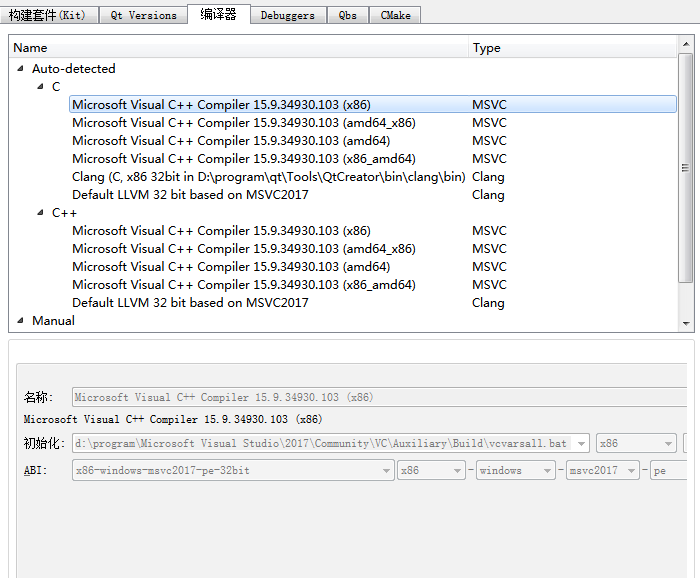
    2.here 's the qt kits settings
    facda4d9-adee-460b-aa05-9f838bbdb08a-image.png
    639be15a-6223-40b5-ac45-227bc5401f99-image.png
    3. here's the pro settings.
    QT += core
    TEMPLATE = lib
    CONFIG += c++17 dll

    jsulmJ 1 Reply Last reply
    0
    • nicker playerN nicker player

      libboost\x86_32_msv\boost_locale-vc141-mt-x32-1_84.dll : fatal error LNK1107: the file is invalid or broken.could not read at 0x2C0

      I used the msv 2017 and qt 5.14.1 for compiling the program.
      and the program based on the boost libs.
      unfortunatly i compiled successfully once time.but after that.the program always occured the errors.

      here s the detail information:
      1.libboost depends on x86 address-model=32 link=shared runtime-link=shared threading=multi.
      in fact,not only the boost libs is the problem.other libs is the same tips.such as the libssl .i dont know why. maybe is it related to the compile args?
      LIBS += lib/libopenssl/libssl-3.dll
      LIBS += lib/libopenssl/libcrypto-3.dll
      LIBS +=lib/libboost/boost_url-vc141-mt-x32-1_84.dll
      2.here 's the qt kits settings
      facda4d9-adee-460b-aa05-9f838bbdb08a-image.png
      639be15a-6223-40b5-ac45-227bc5401f99-image.png
      3. here's the pro settings.
      QT += core
      TEMPLATE = lib
      CONFIG += c++17 dll

      jsulmJ Offline
      jsulmJ Offline
      jsulm
      Lifetime Qt Champion
      wrote on last edited by
      #2

      @nicker-player said in how to solve the problem lnk error:

      libboost\x86_32_msv\boost_locale-vc141-mt-x32-1_84.dll : fatal error LNK1107: the file is invalid or broken.could not read at 0x2C0

      Did you try to reinstall Boost?
      Are you sure you're using x86 and not x86_64 Kit to build?

      https://forum.qt.io/topic/113070/qt-code-of-conduct

      1 Reply Last reply
      0
      • nicker playerN Offline
        nicker playerN Offline
        nicker player
        wrote on last edited by
        #3

        yeah ,i used the x86 platform of the compile tools and libs.I just wondered if is it nessary that the dll file needed the lib module?

        1 Reply Last reply
        0
        • Christian EhrlicherC Online
          Christian EhrlicherC Online
          Christian Ehrlicher
          Lifetime Qt Champion
          wrote on last edited by
          #4

          You can not link directly against a DLL, you need the static import lib. But that's nothing Qt or boost specific.

          Qt Online Installer direct download: https://download.qt.io/official_releases/online_installers/
          Visit the Qt Academy at https://academy.qt.io/catalog

          jsulmJ 1 Reply Last reply
          3
          • Christian EhrlicherC Christian Ehrlicher

            You can not link directly against a DLL, you need the static import lib. But that's nothing Qt or boost specific.

            jsulmJ Offline
            jsulmJ Offline
            jsulm
            Lifetime Qt Champion
            wrote on last edited by
            #5

            @Christian-Ehrlicher @nicker-player Forgot about it.
            @nicker-player yes, you need to add *.lib to LIBS, not *.dll.
            *.lib - needed for linking
            *.dll - needed at runtime

            https://forum.qt.io/topic/113070/qt-code-of-conduct

            1 Reply Last reply
            1
            • nicker playerN Offline
              nicker playerN Offline
              nicker player
              wrote on last edited by
              #6

              someone told me that the c++ class dlls which the mingw compiled could not be used by the vs compiling tools,is it true?
              or is it possible that if I used the vs dumpbin and lib.exe to export the libs from the dlls,so that the vs compiling tools could recognize the dlls?

              1 Reply Last reply
              0
              • Christian EhrlicherC Online
                Christian EhrlicherC Online
                Christian Ehrlicher
                Lifetime Qt Champion
                wrote on last edited by
                #7

                You can not mix c++ libraries compile for MinGW and MSVC.

                Qt Online Installer direct download: https://download.qt.io/official_releases/online_installers/
                Visit the Qt Academy at https://academy.qt.io/catalog

                1 Reply Last reply
                3

                • Login

                • Login or register to search.
                • First post
                  Last post
                0
                • Categories
                • Recent
                • Tags
                • Popular
                • Users
                • Groups
                • Search
                • Get Qt Extensions
                • Unsolved