Skip to content
  • Categories
  • Recent
  • Tags
  • Popular
  • Users
  • Groups
  • Search
  • Get Qt
  • Unsolved
Collapse
Brand Logo
  1. Home
  2. Qt Development
  3. General and Desktop
  4. Qt 6.7 Windows 11 Bug with Arabic languarge
Qt 6.11 is out! See what's new in the release blog

Qt 6.7 Windows 11 Bug with Arabic languarge

Scheduled Pinned Locked Moved Solved General and Desktop
36 Posts 6 Posters 13.9k Views 3 Watching
  • Oldest to Newest
  • Newest to Oldest
  • Most Votes
Reply
  • Reply as topic
Log in to reply
This topic has been deleted. Only users with topic management privileges can see it.
  • Christian EhrlicherC Offline
    Christian EhrlicherC Offline
    Christian Ehrlicher
    Lifetime Qt Champion
    wrote on last edited by
    #25

    Oh, the RTL in textedit bug - I saw this already somewhere else iirc - it's not easy because the underlying stuff don't support it correctly, sorry.

    Qt Online Installer direct download: https://download.qt.io/official_releases/online_installers/
    Visit the Qt Academy at https://academy.qt.io/catalog

    1 Reply Last reply
    0
    • V Offline
      V Offline
      Volker75
      wrote on last edited by Volker75
      #26

      Ok. In worst case the coder can add the webengine to fix the bug. Sadly the webengine is very large, printing is slower and it doesn't work with all compilers.

      But the current bug is bad for Arabic Windows 11 users and the only fix i know so far is forcing the fusion style.

      1 Reply Last reply
      0
      • Christian EhrlicherC Offline
        Christian EhrlicherC Offline
        Christian Ehrlicher
        Lifetime Qt Champion
        wrote on last edited by
        #27

        You can use windows 11 style on a recent windows (maybe with some quirks but for testing purposes) by modifying src\plugins\styles\modernwindows\main.cpp and pass -style windows11 to your app.
        But from my pov it's not an arabic problem - it also does not work with english/german when the app is started with -reverse

        Qt Online Installer direct download: https://download.qt.io/official_releases/online_installers/
        Visit the Qt Academy at https://academy.qt.io/catalog

        1 Reply Last reply
        0
        • V Offline
          V Offline
          Volker75
          wrote on last edited by
          #28

          Yes, of course because of right to left / reverse.

          hmm... About your "quirks". I sadly don't understand them, also because the last time you explained me that it is impossible:
          https://forum.qt.io/topic/153241/qt-6-7-beta1-windows11-style-and-windeployqt
          I will buy a new computer next year. (In fact my idea was to wait until Windows 12 is released for the new computer)

          I will try tomorrow your quirk. I am coding only in my spare time. My profession is not coding. It's just a hobby, so I am slower then "real" coders.

          1 Reply Last reply
          0
          • Christian EhrlicherC Offline
            Christian EhrlicherC Offline
            Christian Ehrlicher
            Lifetime Qt Champion
            wrote on last edited by Christian Ehrlicher
            #29

            It does not work for pre-compiled version. Adding a hack somewhere to make it run for debugging is not something which should be used for daily work but is good for debugging stuff.
            Already have an idea what's going wrong, with the help of 10 lines of code:

            int main(int argc, char *argv[])
            {
                QApplication app(argc, argv);
                QMenu menu;
                menu.addAction(QString::fromUtf8("Action 1"));
                menu.addAction(QString::fromUtf8("Long Action 2"));
                menu.addAction(QString::fromUtf8("Very long Action 3"));
            //    menu.addAction(QString::fromUtf8("أدنى أيام في الأسبوع لكل المدرسين"));
            //    menu.addAction(QString::fromUtf8("الجداول"));
            //    menu.addAction(QString::fromUtf8("تعديل أنشطة فرعية"));
                menu.exec(QPoint(100, 100));
                return 0;
            

            Qt Online Installer direct download: https://download.qt.io/official_releases/online_installers/
            Visit the Qt Academy at https://academy.qt.io/catalog

            1 Reply Last reply
            0
            • V Offline
              V Offline
              Volker75
              wrote on last edited by Volker75
              #30

              I knew that you are genius :-)
              Thank you so much!

              1 Reply Last reply
              0
              • V Offline
                V Offline
                Volker75
                wrote on last edited by
                #31

                Maybe also add a sub-item in the example.
                Because view the first picture that i posted in the first message here.
                You can see that the arrow (>) that shows that there are sub-items is also in the wrong direction. So that should be checked also if someone try to fix this bug.

                1 Reply Last reply
                0
                • Christian EhrlicherC Offline
                  Christian EhrlicherC Offline
                  Christian Ehrlicher
                  Lifetime Qt Champion
                  wrote on last edited by
                  #32

                  When I'm correct there is no need for it - looks like the QPainter is getting the wrong layout direction for unknown reason.

                  Qt Online Installer direct download: https://download.qt.io/official_releases/online_installers/
                  Visit the Qt Academy at https://academy.qt.io/catalog

                  1 Reply Last reply
                  0
                  • V Offline
                    V Offline
                    Volker75
                    wrote on last edited by Volker75
                    #33

                    Thank you so much. Sadly I can't answer it. It's much above my level of knowledge. But I am sure you are skilled enough to fix it.

                    1 Reply Last reply
                    0
                    • Christian EhrlicherC Offline
                      Christian EhrlicherC Offline
                      Christian Ehrlicher
                      Lifetime Qt Champion
                      wrote on last edited by
                      #34

                      Ok, found the problem. It's not really a windows11 style problem but it is getting visible there:

                          QMenu menu;
                          menu.addAction(QString::fromUtf8("Action 1"));
                          menu.addAction(QString::fromUtf8("Long Action 2"));
                          menu.addAction(QString::fromUtf8("Very long Action 3"));
                          QPixmap pm(400, 400);
                          pm.fill(Qt::transparent);
                          menu.render(&pm);
                          pm.save("D:\\rendered.png");
                      

                      Now start the program with the option -reverse and compare the saved png with the expected result :)
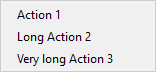
                      What we see:
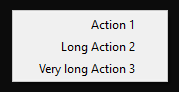
                      real.png
                      What the png looks like:
                      rendered.png

                      Qt Online Installer direct download: https://download.qt.io/official_releases/online_installers/
                      Visit the Qt Academy at https://academy.qt.io/catalog

                      1 Reply Last reply
                      2
                      • V Offline
                        V Offline
                        Volker75
                        wrote on last edited by Volker75
                        #35

                        I must admit that I don't fully understand your answer, but it sounds fine to me.
                        Of course i will pay my debt as soon as I can see a patch in the bug tracker. Just sent me your IBAN or paypal-email (by the chat in this forum).

                        1 Reply Last reply
                        0
                        • L Offline
                          L Offline
                          Liviu Lalescu
                          wrote on last edited by Liviu Lalescu
                          #36

                          Thank you, @Christian-Ehrlicher ! I understood your answer after I looked at your QTBUG page answer: https://bugreports.qt.io/browse/QTBUG-124931

                          1 Reply Last reply
                          0
                          • V Volker75 has marked this topic as solved on

                          • Login

                          • Login or register to search.
                          • First post
                            Last post
                          0
                          • Categories
                          • Recent
                          • Tags
                          • Popular
                          • Users
                          • Groups
                          • Search
                          • Get Qt
                          • Unsolved