Skip to content
  • Categories
  • Recent
  • Tags
  • Popular
  • Users
  • Groups
  • Search
  • Get Qt Extensions
  • Unsolved
Collapse
Brand Logo
  1. Home
  2. Qt Development
  3. Qt Creator and other tools
  4. Qt not reading my project
Qt 6.11 is out! See what's new in the release blog

Qt not reading my project

Scheduled Pinned Locked Moved Unsolved Qt Creator and other tools
14 Posts 7 Posters 3.1k Views 1 Watching
  • Oldest to Newest
  • Newest to Oldest
  • Most Votes
Reply
  • Reply as topic
Log in to reply
This topic has been deleted. Only users with topic management privileges can see it.
  • R Rumeysa_135

    @JonB I restarted. It opens my other projects, only this project does not open.

    SGaistS Offline
    SGaistS Offline
    SGaist
    Lifetime Qt Champion
    wrote on last edited by
    #4

    @Rumeysa_135 hi,

    As @JonB requested, are you using a .pro file ? A CMakeLists.txt ? In either cases, are you sure its content is valid ?

    Interested in AI ? www.idiap.ch
    Please read the Qt Code of Conduct - https://forum.qt.io/topic/113070/qt-code-of-conduct

    R 1 Reply Last reply
    0
    • SGaistS SGaist

      @Rumeysa_135 hi,

      As @JonB requested, are you using a .pro file ? A CMakeLists.txt ? In either cases, are you sure its content is valid ?

      R Offline
      R Offline
      Rumeysa_135
      wrote on last edited by
      #5

      @SGaist I am using .pro file.

      jsulmJ 1 Reply Last reply
      0
      • R Rumeysa_135

        @SGaist I am using .pro file.

        jsulmJ Offline
        jsulmJ Offline
        jsulm
        Lifetime Qt Champion
        wrote on last edited by
        #6

        @Rumeysa_135 And did you check its content as was suggested?

        https://forum.qt.io/topic/113070/qt-code-of-conduct

        R 1 Reply Last reply
        0
        • jsulmJ jsulm

          @Rumeysa_135 And did you check its content as was suggested?

          R Offline
          R Offline
          Rumeysa_135
          wrote on last edited by
          #7

          @jsulm Yes I checked. The day before, the project was opening and there was no problem, but now it tries to read the project and it stays like that. He keeps trying to read and doesn't continue. I tried other projects, there is no problem with them, it only does this for this project.

          SGaistS 1 Reply Last reply
          0
          • R Rumeysa_135

            @jsulm Yes I checked. The day before, the project was opening and there was no problem, but now it tries to read the project and it stays like that. He keeps trying to read and doesn't continue. I tried other projects, there is no problem with them, it only does this for this project.

            SGaistS Offline
            SGaistS Offline
            SGaist
            Lifetime Qt Champion
            wrote on last edited by
            #8

            @Rumeysa_135 You might want to share the project file content just in case there's something you've missed.

            Did you also check it for any strange characters ?
            Can you build the project from the command line ?

            Interested in AI ? www.idiap.ch
            Please read the Qt Code of Conduct - https://forum.qt.io/topic/113070/qt-code-of-conduct

            1 Reply Last reply
            0
            • R Rumeysa_135

              QT.PNG

              Hello! Why is my code not opening? I've never encountered such a problem before. It tries to read the project but it doesn't.

              A Offline
              A Offline
              Anonymous_Banned275
              wrote on last edited by Anonymous_Banned275
              #9

              @Rumeysa_135 What OS? If Linux - Can you start .pro from "file manager"? Or use windoze equivalent of " file manager ".

              1 Reply Last reply
              0
              • S Offline
                S Offline
                sdahd
                wrote on last edited by
                #10

                请问你解决这个问题了吗?我也出现了这种情况

                Christian EhrlicherC 1 Reply Last reply
                0
                • S sdahd

                  请问你解决这个问题了吗?我也出现了这种情况

                  Christian EhrlicherC Offline
                  Christian EhrlicherC Offline
                  Christian Ehrlicher
                  Lifetime Qt Champion
                  wrote on last edited by
                  #11

                  @sdahd Please post in english or use the chineese subforum.

                  Qt Online Installer direct download: https://download.qt.io/official_releases/online_installers/
                  Visit the Qt Academy at https://academy.qt.io/catalog

                  S 1 Reply Last reply
                  0
                  • Christian EhrlicherC Christian Ehrlicher

                    @sdahd Please post in english or use the chineese subforum.

                    S Offline
                    S Offline
                    sdahd
                    wrote on last edited by
                    #12

                    @Christian-Ehrlicher Do you know how to solve this problem?

                    Christian EhrlicherC 1 Reply Last reply
                    0
                    • S sdahd

                      @Christian-Ehrlicher Do you know how to solve this problem?

                      Christian EhrlicherC Offline
                      Christian EhrlicherC Offline
                      Christian Ehrlicher
                      Lifetime Qt Champion
                      wrote on last edited by
                      #13

                      @sdahd What problem? You did not tell us anything about your environment - do you use qmake or cmake, is the compiler properly configured in the kits etc.

                      Qt Online Installer direct download: https://download.qt.io/official_releases/online_installers/
                      Visit the Qt Academy at https://academy.qt.io/catalog

                      S 1 Reply Last reply
                      0
                      • Christian EhrlicherC Christian Ehrlicher

                        @sdahd What problem? You did not tell us anything about your environment - do you use qmake or cmake, is the compiler properly configured in the kits etc.

                        S Offline
                        S Offline
                        sdahd
                        wrote on last edited by
                        #14

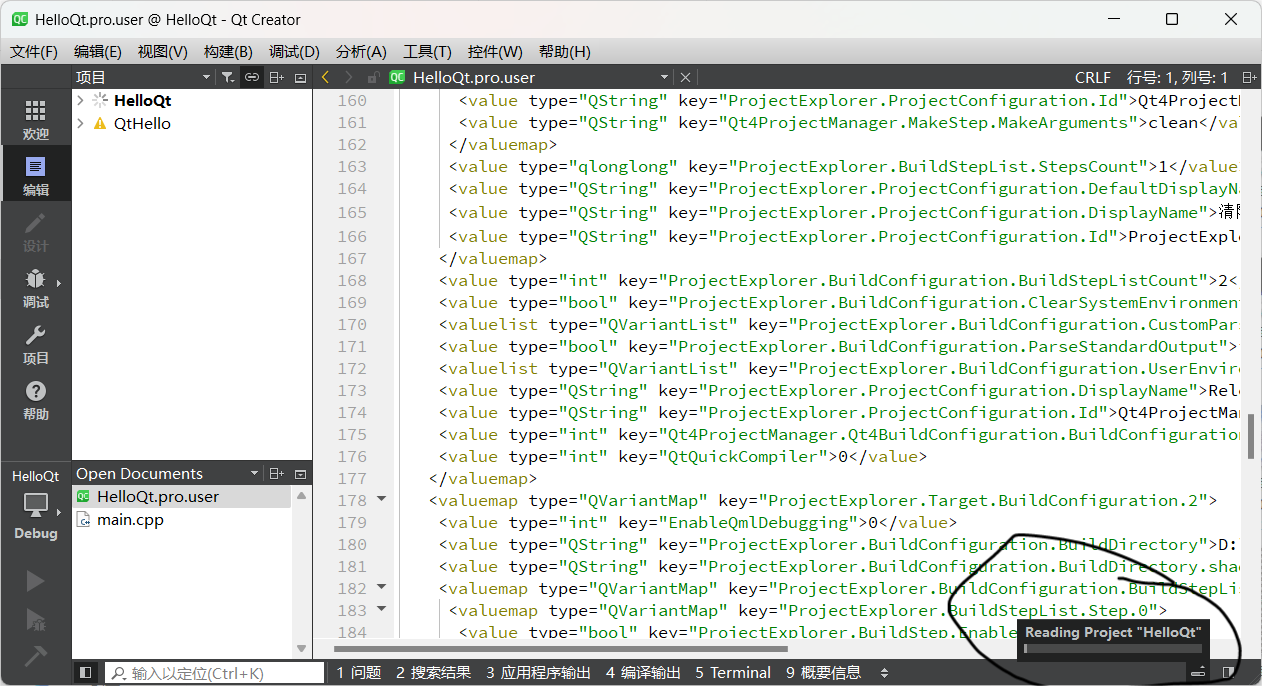
                        @Christian-Ehrlicher 微信图片_20240308153127.png
                        The version I am using is Qt 5.15.2. When using qmake, my project cannot run and the bottom right corner keeps displaying "reading project". However, when using cmake or qbs, my project can run. How can I solve this problem?

                        1 Reply Last reply
                        0

                        • Login

                        • Login or register to search.
                        • First post
                          Last post
                        0
                        • Categories
                        • Recent
                        • Tags
                        • Popular
                        • Users
                        • Groups
                        • Search
                        • Get Qt Extensions
                        • Unsolved