
Settings class causes an application to fail to start after it is published
-
Hi, all:
In order to prove this problem, i spent a lot of time, the situation is this:
If I use the following in any.qml file of my project:import QtCoreor
import Qt.labs.settingsstatement, after publishing my application using windeployqt.exe or windeployqt6.exe, I can't start the application, there will be no display content and console information after starting, but if I use QtCreator to start the program, it still works.
If I run my application using QtCreator, the Settings class works fine, and it correctly saves what I need to save.
Windeployqt6.exe does not add QtCore or Qt.labs.settings to the distribution folder after it is published, but I did manually and it still doesn't work.
If I don't import the QtCore or Qt.labs.settings package into my project's qml file, it will work fine again, running the released application or using QtCreator.
What both packages have in common is that they contain a class called Settings. I checked the Qt documentation, and I needed it to save my user settings.
Now, because of this problem, I have to rely on the QSettings class to complete this function.
However, if I can use the Settings class in Qml, then I think it is very convenient, because I do not need to do extra work to complete this functionality.
Qt information I use:
Qt 6.5.0
QtCreator 10.0.0
Compiler: MSVC2019 64bitOperating system
Operating System Name: Microsoft Windows 11 Pro
Operating system kernel type: Multiprocessor Free (64-bit)
Operating system version: 10.0.22631.1972
Operating System Version Upgrade (SP): -
Operating system root directory: C:\WINDOWSComponent Version
Common Controls: 6.16
.NET Framework: 4.8.9166.0 built by: NET481REL1LAST_B
DirectX: DirectX 12.0
OpenGL: 10.0.22621.1465 (WinBuild.160101.0800)Thank you for reading my question, if you need more information, I can continue to provide!
-
Hi, all:
In order to prove this problem, i spent a lot of time, the situation is this:
If I use the following in any.qml file of my project:import QtCoreor
import Qt.labs.settingsstatement, after publishing my application using windeployqt.exe or windeployqt6.exe, I can't start the application, there will be no display content and console information after starting, but if I use QtCreator to start the program, it still works.
If I run my application using QtCreator, the Settings class works fine, and it correctly saves what I need to save.
Windeployqt6.exe does not add QtCore or Qt.labs.settings to the distribution folder after it is published, but I did manually and it still doesn't work.
If I don't import the QtCore or Qt.labs.settings package into my project's qml file, it will work fine again, running the released application or using QtCreator.
What both packages have in common is that they contain a class called Settings. I checked the Qt documentation, and I needed it to save my user settings.
Now, because of this problem, I have to rely on the QSettings class to complete this function.
However, if I can use the Settings class in Qml, then I think it is very convenient, because I do not need to do extra work to complete this functionality.
Qt information I use:
Qt 6.5.0
QtCreator 10.0.0
Compiler: MSVC2019 64bitOperating system
Operating System Name: Microsoft Windows 11 Pro
Operating system kernel type: Multiprocessor Free (64-bit)
Operating system version: 10.0.22631.1972
Operating System Version Upgrade (SP): -
Operating system root directory: C:\WINDOWSComponent Version
Common Controls: 6.16
.NET Framework: 4.8.9166.0 built by: NET481REL1LAST_B
DirectX: DirectX 12.0
OpenGL: 10.0.22621.1465 (WinBuild.160101.0800)Thank you for reading my question, if you need more information, I can continue to provide!
-
@sierdzio Well, here, I use it like this, without any other options:
C:\Qt\6.5.0\msvc2019_64\bin\windeployqt6.exe appTTZDLuncher.exe
@HyEISN said in Settings class causes an application to fail to start after it is published:
without any other options:
and thats the problem, you're clearly using QML so you need to provide the path to your qml files via
--qmldir <directory>
Be aware of the Qt Code of Conduct, when posting : https://forum.qt.io/topic/113070/qt-code-of-conduct
Q: What's that?
A: It's blue light.
Q: What does it do?
A: It turns blue. -
@HyEISN said in Settings class causes an application to fail to start after it is published:
without any other options:
and thats the problem, you're clearly using QML so you need to provide the path to your qml files via
--qmldir <directory>@J-Hilk Thank you, it works! Before that, i tried to manually copy the library files that the qml package depends on, like this:
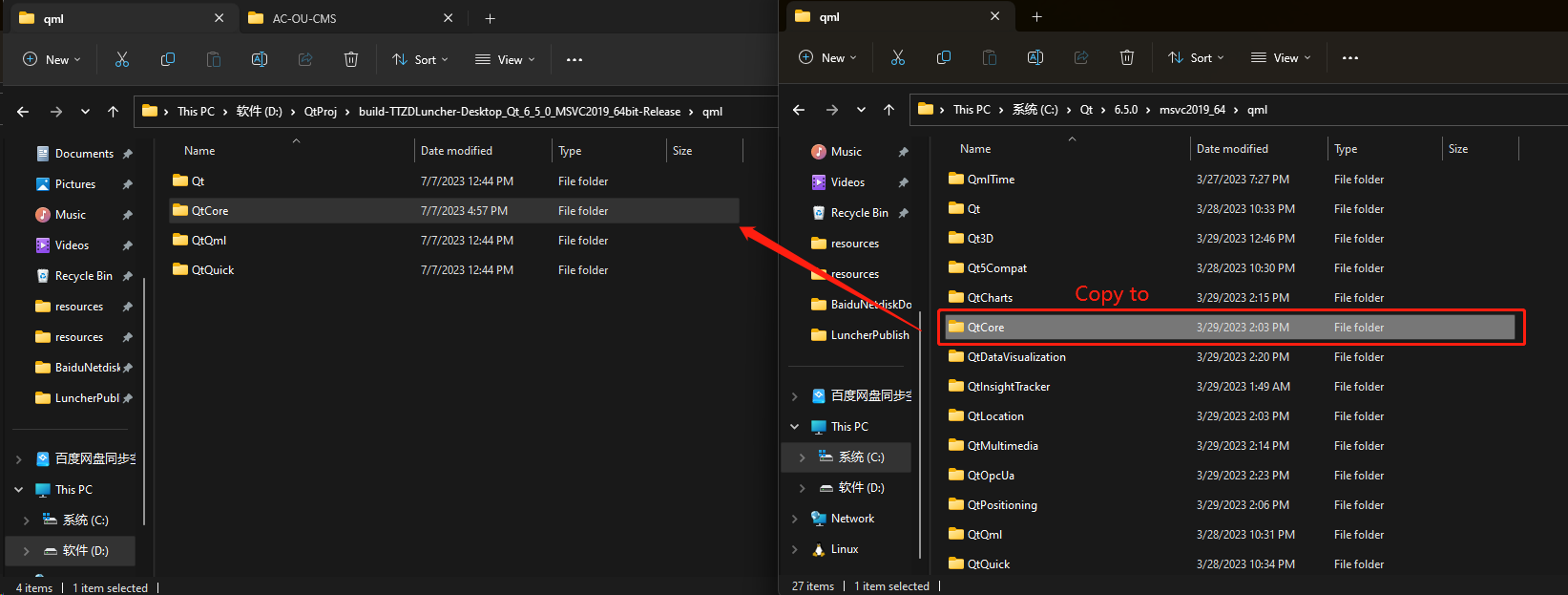
This didn't work, and I found that--qmldir and the file I copied manually seemed to be the same. So can I ask you a question? What does the--qmldir option do when used? It's not just a simple file copy, is it? -
@J-Hilk Thank you, it works! Before that, i tried to manually copy the library files that the qml package depends on, like this:
This didn't work, and I found that--qmldir and the file I copied manually seemed to be the same. So can I ask you a question? What does the--qmldir option do when used? It's not just a simple file copy, is it?@HyEISN it is in essence a simple copy, but its more thorough and catches stuff that don't generate a missing dll warning.
In fact it is usually too thorough and you can potentially reduce the folder size by removing unneeded parts, but thats there very very last step in a release process :D
Be aware of the Qt Code of Conduct, when posting : https://forum.qt.io/topic/113070/qt-code-of-conduct
Q: What's that?
A: It's blue light.
Q: What does it do?
A: It turns blue. -
@HyEISN it is in essence a simple copy, but its more thorough and catches stuff that don't generate a missing dll warning.
In fact it is usually too thorough and you can potentially reduce the folder size by removing unneeded parts, but thats there very very last step in a release process :D
-
H HyEISN has marked this topic as solved on

