
Registering an Instantiable Object Type (Official Example)
-
I'm following the official example from here, but either I'm getting something wrong, or there is something missing in the guide.
I'm trying to register a C++ type into QML, to be able to instantiate it in a QML document. I'm following the guide as well as the worked example, but I'm always getting the
QQmlApplicationEngine failed to load component
qrc:/exampleDir/Main.qml:3:1: module "myclass" is not installederror.
I've created a new, empty Qt Quick project, and added a minimalist C++ class, almost identical to the example, just replacing the identifier
MessagewithMyClass:#ifndef MYCLASS_H #define MYCLASS_H #include <QObject> #include <qqmlregistration.h> class MyClass : public QObject { Q_OBJECT Q_PROPERTY(QString author READ getAuthor WRITE setAuthor NOTIFY authorChanged) QML_ELEMENT public: explicit MyClass(QObject *parent = nullptr); public slots: QString getAuthor(void); void setAuthor(const QString&); signals: void authorChanged(void); private: QString m_author = "Author's Name"; }; #endif // MYCLASS_HThen, by following the guide, I added this snippet of code in
CMakeLists.txt, just after the already existingqt_add_qml_moduleinvokation for the main project:qt_add_qml_module(myClass URI myclass VERSION 1.0 SOURCES myclass.cpp myclass.h )This is
Main.qml:import QtQuick import QtQuick.Window import myclass Window { width: 640 height: 480 visible: true title: qsTr("Hello World") MyClass {} }When I try to compile, I'm always getting the module "myClass" is not installed error.
NOTE: if I add these lines to
main.cpp:const char *packageName = "myclass"; const char *QMLTypeName = "MyClass"; const int majorVerNum = 1; const int minorVerNum = 0; qmlRegisterType<MyClass>(packageName, majorVerNum, minorVerNum, QMLTypeName);The project compiles and works correctly. However, the usage of
qmlRegisterTypeisn't mentioned anywhere in the documentation, which makes me think that it should not be necessary to add the call toqmlRegisterTypeinmain.cpp, because the call toqt_add_qml_moduleinCMakeLists.txtshould take care of everything, together with theQML_ELEMENTmacro in the class header file. In fact, after having added the the call toqmlRegisterTypeinmain.cpp, theqt_add_qml_modulesnippet can be safely removed fromCMakeLists.txt.What am I missing here?
- Qt version: 6.5.1
- Qt Creator version: 10.0.2
- OS: Windows 10
- Filesystem:
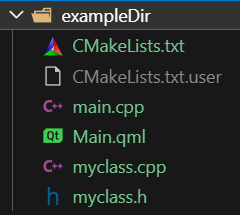
-
Hi and welcome to devnet,
I haven't done that yet but one thing that is important with QML is the casing. You QML classes should always start with an uppercased letter and I see that you have myClass in your declaration rather than MyClass.
-
Hi and welcome to devnet,
I haven't done that yet but one thing that is important with QML is the casing. You QML classes should always start with an uppercased letter and I see that you have myClass in your declaration rather than MyClass.
@SGaist Hello, thank you for your reply.
Later I will start this example from scratch, and I will try to use unique identifiers instead of repeating variations of "MyClass", so that it will be easier to track them, and identify where the case usage might go wrong. If the problem does not disappear, I will post the whole source files, together with the
CMakeLists.txtfile. -
@SGaist Hello, thank you for your reply.
Later I will start this example from scratch, and I will try to use unique identifiers instead of repeating variations of "MyClass", so that it will be easier to track them, and identify where the case usage might go wrong. If the problem does not disappear, I will post the whole source files, together with the
CMakeLists.txtfile.I gave another unsuccessful try. This time I tried to be even more minimalist than before, to no avail.
This is what I did:
- Create a new "Qt Quick Application" project named
testIntegration - Select CMake as build system
- Select "Desktop Qt 6.5.1 MinGW 64-bit" as kit
- Add new C++ class named
Message(source filesmessage.cppandmessage.h), derived fromQObjectand adding theQ_OBJECTmacro - Adding source files
message.handmessage.cpptoqt_add_executableinCMakeLists.txt - Add
#include <QtQml/qqmlregistration.h>tomessage.hto be able to use theQML_ELEMENTmacro in classMessage - Add
qt_add_qml_modulestatement toCMakeLists.txt - Add
importstatement and instantiateMessageclass inMain.qmlinsideWindow
Now, two error messages are possible, depending on the case of the URI (lowercase
messagingUrior uppercaseMessagingUri):- If i add
URI messagingUriinqt_add_qml_module(inCMakeLists.txt) andimport messagingUri(inMain.qml), i get this error message: "QQmlApplicationEngine failed to load component qrc:/testIntegration/Main.qml:3:1: module "messagingUri" is not installed" - If i add
URI MessagingUriinqt_add_qml_module(inCMakeLists.txt) andimport MessagingUri(inMain.qml), i get this error message: ":-1: error: ninja: build stopped: subcommand failed."
In both cases, i get the warning message "D:\Qt\6.5.1\mingw_64\lib\cmake\Qt6Qml\Qt6QmlMacros.cmake:794: warning: The messagingModule target is a QML module with target path MessagingUri. It uses an OUTPUT_DIRECTORY of D:/Qt_6/build-testIntegration-Desktop_Qt_6_5_1_MinGW_64_bit-Debug, which should end in the same target path, but doesn't. Tooling such as qmllint may not work correctly. D:/Qt/6.5.1/mingw_64/lib/cmake/Qt6Qml/Qt6QmlMacros.cmake:1840 (_qt_internal_target_enable_qmllint) D:/Qt/6.5.1/mingw_64/lib/cmake/Qt6Qml/Qt6QmlMacros.cmake:625 (qt6_target_qml_sources) D:/Qt/6.5.1/mingw_64/lib/cmake/Qt6Qml/Qt6QmlMacros.cmake:684 (qt6_add_qml_module) CMakeLists.txt:24 (qt_add_qml_module)"
Again, if i add these lines to
main.cpp(as well as#include "message.h"):const char *packageName = "messagingUri"; const char *QMLTypeName = "Message"; const int majorVerNum = 1; const int minorVerNum = 0; qmlRegisterType<Message>(packageName, majorVerNum, minorVerNum, QMLTypeName);Everything works perfectly: no error messages, no warnings, no nothing.
At this point, I'm really stumped. The example from Qt documentation never mentions the usage of
qmlRegisterType, but it looks like it is inevitable.Here are the full source files:
*****
CMakeLists.txt*****
(mostly auto-generated. I only added theqt_policycommand to suppress a warning, the source files forMessageclass toqt_add_executable, and the fullqt_add_qml_modulecommand, copied from the example, only changing the package's name and the URI)cmake_minimum_required(VERSION 3.16) project(testIntegration VERSION 0.1 LANGUAGES CXX) set(CMAKE_CXX_STANDARD_REQUIRED ON) find_package(Qt6 6.4 REQUIRED COMPONENTS Quick) qt_standard_project_setup() qt_policy(SET QTP0001 OLD) # Suppress warning https://doc.qt.io/qt-6/qt-cmake-policy-qtp0001.html qt_add_executable(apptestIntegration main.cpp message.h message.cpp ) qt_add_qml_module(apptestIntegration URI testIntegration VERSION 1.0 QML_FILES Main.qml ) qt_add_qml_module(messagingModule URI MessagingUri VERSION 1.0 SOURCES message.cpp message.h ) set_target_properties(apptestIntegration PROPERTIES MACOSX_BUNDLE_GUI_IDENTIFIER my.example.com MACOSX_BUNDLE_BUNDLE_VERSION ${PROJECT_VERSION} MACOSX_BUNDLE_SHORT_VERSION_STRING ${PROJECT_VERSION_MAJOR}.${PROJECT_VERSION_MINOR} MACOSX_BUNDLE TRUE WIN32_EXECUTABLE TRUE ) target_link_libraries(apptestIntegration PRIVATE Qt6::Quick ) install(TARGETS apptestIntegration BUNDLE DESTINATION . LIBRARY DESTINATION ${CMAKE_INSTALL_LIBDIR} RUNTIME DESTINATION ${CMAKE_INSTALL_BINDIR} )*****
main.cpp*****
(fully auto-generated. Nothing was added or modified by me here)#include <QGuiApplication> #include <QQmlApplicationEngine> int main(int argc, char *argv[]) { QGuiApplication app(argc, argv); QQmlApplicationEngine engine; const QUrl url(u"qrc:/testIntegration/Main.qml"_qs); QObject::connect(&engine, &QQmlApplicationEngine::objectCreationFailed, &app, []() { QCoreApplication::exit(-1); }, Qt::QueuedConnection); engine.load(url); return app.exec(); }*****
message.h*****#ifndef MESSAGE_H #define MESSAGE_H #include <QObject> #include <QtQml/qqmlregistration.h> class Message : public QObject { Q_OBJECT QML_ELEMENT public: explicit Message(QObject *parent = nullptr); signals: }; #endif // MESSAGE_H*****
message.cpp*****#include "message.h" Message::Message(QObject *parent) : QObject{parent} {;}*****
Main.qml*****import QtQuick import QtQuick.Window import messagingUri Window { width: 640 height: 480 visible: true title: qsTr("Hello World") Message {} } - Create a new "Qt Quick Application" project named
-
I gave another unsuccessful try. This time I tried to be even more minimalist than before, to no avail.
This is what I did:
- Create a new "Qt Quick Application" project named
testIntegration - Select CMake as build system
- Select "Desktop Qt 6.5.1 MinGW 64-bit" as kit
- Add new C++ class named
Message(source filesmessage.cppandmessage.h), derived fromQObjectand adding theQ_OBJECTmacro - Adding source files
message.handmessage.cpptoqt_add_executableinCMakeLists.txt - Add
#include <QtQml/qqmlregistration.h>tomessage.hto be able to use theQML_ELEMENTmacro in classMessage - Add
qt_add_qml_modulestatement toCMakeLists.txt - Add
importstatement and instantiateMessageclass inMain.qmlinsideWindow
Now, two error messages are possible, depending on the case of the URI (lowercase
messagingUrior uppercaseMessagingUri):- If i add
URI messagingUriinqt_add_qml_module(inCMakeLists.txt) andimport messagingUri(inMain.qml), i get this error message: "QQmlApplicationEngine failed to load component qrc:/testIntegration/Main.qml:3:1: module "messagingUri" is not installed" - If i add
URI MessagingUriinqt_add_qml_module(inCMakeLists.txt) andimport MessagingUri(inMain.qml), i get this error message: ":-1: error: ninja: build stopped: subcommand failed."
In both cases, i get the warning message "D:\Qt\6.5.1\mingw_64\lib\cmake\Qt6Qml\Qt6QmlMacros.cmake:794: warning: The messagingModule target is a QML module with target path MessagingUri. It uses an OUTPUT_DIRECTORY of D:/Qt_6/build-testIntegration-Desktop_Qt_6_5_1_MinGW_64_bit-Debug, which should end in the same target path, but doesn't. Tooling such as qmllint may not work correctly. D:/Qt/6.5.1/mingw_64/lib/cmake/Qt6Qml/Qt6QmlMacros.cmake:1840 (_qt_internal_target_enable_qmllint) D:/Qt/6.5.1/mingw_64/lib/cmake/Qt6Qml/Qt6QmlMacros.cmake:625 (qt6_target_qml_sources) D:/Qt/6.5.1/mingw_64/lib/cmake/Qt6Qml/Qt6QmlMacros.cmake:684 (qt6_add_qml_module) CMakeLists.txt:24 (qt_add_qml_module)"
Again, if i add these lines to
main.cpp(as well as#include "message.h"):const char *packageName = "messagingUri"; const char *QMLTypeName = "Message"; const int majorVerNum = 1; const int minorVerNum = 0; qmlRegisterType<Message>(packageName, majorVerNum, minorVerNum, QMLTypeName);Everything works perfectly: no error messages, no warnings, no nothing.
At this point, I'm really stumped. The example from Qt documentation never mentions the usage of
qmlRegisterType, but it looks like it is inevitable.Here are the full source files:
*****
CMakeLists.txt*****
(mostly auto-generated. I only added theqt_policycommand to suppress a warning, the source files forMessageclass toqt_add_executable, and the fullqt_add_qml_modulecommand, copied from the example, only changing the package's name and the URI)cmake_minimum_required(VERSION 3.16) project(testIntegration VERSION 0.1 LANGUAGES CXX) set(CMAKE_CXX_STANDARD_REQUIRED ON) find_package(Qt6 6.4 REQUIRED COMPONENTS Quick) qt_standard_project_setup() qt_policy(SET QTP0001 OLD) # Suppress warning https://doc.qt.io/qt-6/qt-cmake-policy-qtp0001.html qt_add_executable(apptestIntegration main.cpp message.h message.cpp ) qt_add_qml_module(apptestIntegration URI testIntegration VERSION 1.0 QML_FILES Main.qml ) qt_add_qml_module(messagingModule URI MessagingUri VERSION 1.0 SOURCES message.cpp message.h ) set_target_properties(apptestIntegration PROPERTIES MACOSX_BUNDLE_GUI_IDENTIFIER my.example.com MACOSX_BUNDLE_BUNDLE_VERSION ${PROJECT_VERSION} MACOSX_BUNDLE_SHORT_VERSION_STRING ${PROJECT_VERSION_MAJOR}.${PROJECT_VERSION_MINOR} MACOSX_BUNDLE TRUE WIN32_EXECUTABLE TRUE ) target_link_libraries(apptestIntegration PRIVATE Qt6::Quick ) install(TARGETS apptestIntegration BUNDLE DESTINATION . LIBRARY DESTINATION ${CMAKE_INSTALL_LIBDIR} RUNTIME DESTINATION ${CMAKE_INSTALL_BINDIR} )*****
main.cpp*****
(fully auto-generated. Nothing was added or modified by me here)#include <QGuiApplication> #include <QQmlApplicationEngine> int main(int argc, char *argv[]) { QGuiApplication app(argc, argv); QQmlApplicationEngine engine; const QUrl url(u"qrc:/testIntegration/Main.qml"_qs); QObject::connect(&engine, &QQmlApplicationEngine::objectCreationFailed, &app, []() { QCoreApplication::exit(-1); }, Qt::QueuedConnection); engine.load(url); return app.exec(); }*****
message.h*****#ifndef MESSAGE_H #define MESSAGE_H #include <QObject> #include <QtQml/qqmlregistration.h> class Message : public QObject { Q_OBJECT QML_ELEMENT public: explicit Message(QObject *parent = nullptr); signals: }; #endif // MESSAGE_H*****
message.cpp*****#include "message.h" Message::Message(QObject *parent) : QObject{parent} {;}*****
Main.qml*****import QtQuick import QtQuick.Window import messagingUri Window { width: 640 height: 480 visible: true title: qsTr("Hello World") Message {} }I think I have found a workaround to the problem. Unfortunately, I cannot explain much of what I've done, because I am quite confused myself about how Qt manages resources through the Resource System, and the recent policy modification makes things even worse.
Start by creating a new Qt Quick project with Qt Creator's wizard, selecting CMake as the build system; I called mine
testIntegration. Qt Creator's wizard will auto-generateCMakeLists.txt,main.cpp, andMain.qmlfor you.The first problem that needs tackling is the Qt policy QTP0001 is not set warning message. To fix this, either add the
qt_policy(SET QTP0001 NEW)command inCMakeLists.txt(beforeqt_add_executable), or add aRESOURCE_PREFIXargument to theqt_add_qml_modulecommand inCMakeLists.txt. I did both, just to be safe (I usedRESOURCE_PREFIX /).Then add a new C++ class, selecting
QObjectas base class (use Qt Creator's wizard to save yourself some effort). Call it whatever you like: I called mineMyClass.Now
CMakeLists.txtneeds to be edited again. Find theqt_add_qml_modulecommand, and add the source files for your class, by passing theSOURCES myclass.h myclass.cppargument.Edit your
myclass.hheader file, and add#include <qqmlregistration.h>. This inclusion will allow you to use theQML_ELEMENTmacro. I putQML_ELEMENTimmediately after theQ_OBJECTmacro.I also added a
qDebugstatement in the constructor ofMyClass(qDebug() << "Class instantiated";), to ascertain that the class has actually been instantiated. You will need to#include <QDebug>to useqDebug().Now edit
Main.qmland add this import statement:import testIntegration. You will notice that it is the same identifier as theURI testIntegrationargument used in theqt_add_qml_modulecommand inCMakeLists.txt. You can now declare aMyClassobject in your QML code. In my case, I simply created an emptyMyClass{}inside the mainWindow.This way I managed to compile and run the project without issues, getting a nice "Class instantiated" debug message in Application Output.
NOTE: As you can see, no
qmlRegisterTypewas used inmain.cpp. However, it looks like Qt / QML / CMake / whatever is (are?) extremely finicky for what concerns the identifiers you use. You can choose whatever URI you like inqt_add_qml_module, but you have to make sure that it is the same both in the QML document and inmain.cpp. For example, if inCMakeLists.txtyou use theURI MyBeautifulURIargument forqt_add_qml_module, then you'll have to updateMain.qmlandmain.cppaccordingly:import MyBeautifulURIinMain.qmlconst QUrl url(u"qrc:/MyBeautifulURI/Main.qml"_qs);inmain.cpp
If you are interested, here are the full source files:
*****
CMakeLists.txt*****cmake_minimum_required(VERSION 3.16) project(testIntegration VERSION 0.1 LANGUAGES CXX) set(CMAKE_CXX_STANDARD_REQUIRED ON) find_package(Qt6 6.4 REQUIRED COMPONENTS Quick) qt_policy(SET QTP0001 NEW) # Suppress warning https://doc.qt.io/qt-6/qt-cmake-policy-qtp0001.html qt_standard_project_setup() qt_add_executable(apptestIntegration main.cpp ) qt_add_qml_module(apptestIntegration URI testIntegration RESOURCE_PREFIX / VERSION 1.0 QML_FILES Main.qml SOURCES myclass.h myclass.cpp ) set_target_properties(apptestIntegration PROPERTIES MACOSX_BUNDLE_GUI_IDENTIFIER my.example.com MACOSX_BUNDLE_BUNDLE_VERSION ${PROJECT_VERSION} MACOSX_BUNDLE_SHORT_VERSION_STRING ${PROJECT_VERSION_MAJOR}.${PROJECT_VERSION_MINOR} MACOSX_BUNDLE TRUE WIN32_EXECUTABLE TRUE ) target_link_libraries(apptestIntegration PRIVATE Qt6::Quick ) install(TARGETS apptestIntegration BUNDLE DESTINATION . LIBRARY DESTINATION ${CMAKE_INSTALL_LIBDIR} RUNTIME DESTINATION ${CMAKE_INSTALL_BINDIR} )*****
main.cpp*****#include <QGuiApplication> #include <QQmlApplicationEngine> int main(int argc, char *argv[]) { QGuiApplication app(argc, argv); QQmlApplicationEngine engine; const QUrl url(u"qrc:/testIntegration/Main.qml"_qs); QObject::connect(&engine, &QQmlApplicationEngine::objectCreationFailed, &app, []() { QCoreApplication::exit(-1); }, Qt::QueuedConnection); engine.load(url); return app.exec(); }*****
Main.qml*****import QtQuick import QtQuick.Window import testIntegration Window { width: 640 height: 480 visible: true title: qsTr("Hello World") MyClass{} }*****
myclass.h*****#ifndef MYCLASS_H #define MYCLASS_H #include <QObject> #include <qqmlregistration.h> class MyClass : public QObject { Q_OBJECT QML_ELEMENT public: explicit MyClass(QObject *parent = nullptr); signals: }; #endif // MYCLASS_H*****
myclass.cpp*****#include <QDebug> #include "myclass.h" MyClass::MyClass(QObject *parent) : QObject{parent} { qDebug() << "Class instantiated"; } - Create a new "Qt Quick Application" project named
-
I know this is an old topic but thank you very much, Gamma Sigma, for summarizing this. I want to use the current practices for adding modules without registration but nothing worked despite following Qt's blogs and documentation. I got a test case to work. Now
I need to figure out how to get C++ Classes that are in subdirectories working. -
R RangerQT referenced this topic on
-
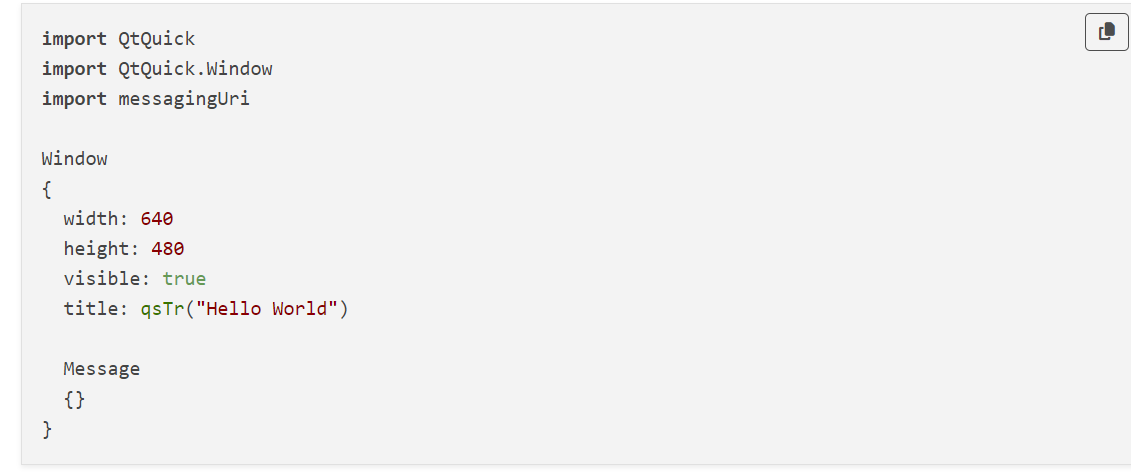
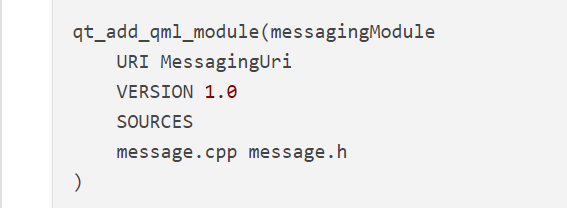
I found this mismatch. Maybe you should try to capitalize the first character exactly the URI in your CMakeLists
