Speedup CMake with Qt. How?
-
Hello all!
For now trying to move one of my projects from QMake into CMake. But got confused with speed of building project. QMake is about 2 times faster, especially if there are defined precompiled headers. In CMake and in QMake defined precompiled headers, both projects organized on includes. Not subdirectories in CMake and in QMake using *pri files. The same Qt version and application code base. Only one difference is using CMake instead of QMake. Tried to use default CMake from Qt and fresh one installed manually.
CMake relatively fast only with Ninja. When defined XCode for iOS or MacOS it's very slow. But in many cases when developing for MacOS must be used XCode instead of Ninja.
Because all of described got few questions:
- Is there any manuals about CMake projects improvements?
- Is there any CMake best practices for the case of built time improvements?
- How to speedup the connections between XCode and CMake?
- Is there something special for CMake when building Qt Application?
This questions was about pure using Qt Creator and CMake or QMake. WITHOUT ANY 3D PART SOLUTIONS like CCache. The question is about how to improve pure CMake project.
When building CMake project even been trying to benchmark it by this:
set_property(GLOBAL PROPERTY RULE_LAUNCH_COMPILE "${CMAKE_COMMAND} -E time")
set_property(GLOBAL PROPERTY RULE_LAUNCH_LINK "${CMAKE_COMMAND} -E time")
It's showing the timestamp of each procedure performed by compiler. And all of it never been faster than QMake. How to make it at least equal? For big projects it's very critical. Beside all of it there are logs from Jenkins-defined build system and there are the same QMake faster at least 40% in some cases. In some this time way bigger.
For now, only way for myself is transforming all of projects into combinations of small ones. Where result of building process is static libraries that is included into main project and when you developing something you are not rebuilding whole project. You are rebuilding just part of it. But never the less, it's huge complexity in project definitions and maintenance.
-
This manual might be the solution for speeding up build process with Xcode. For me it's enough. It's building much faster with this defined parameters in MacOS defaults.
Through QT Creator haven't found any solution, using this commands in terminal:
$ sysctl -n hw.ncpu
8
$ defaults write com.apple.Xcode PBXNumberOfParallelBuildSubtasks 8
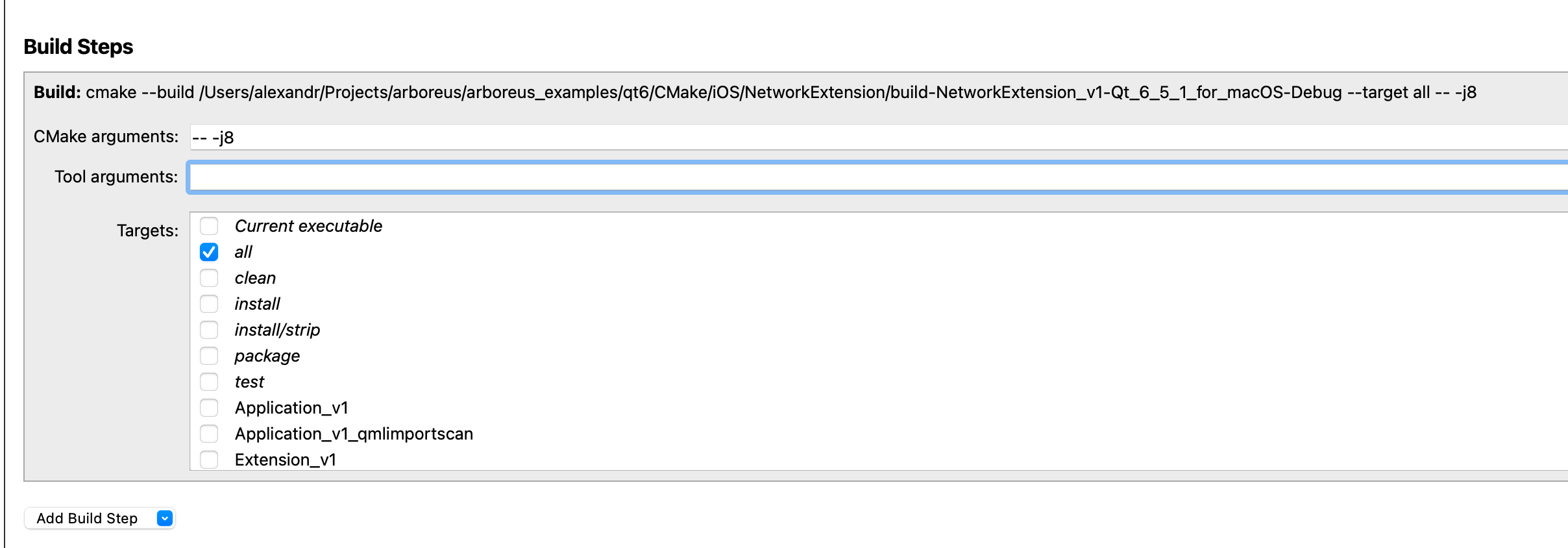
The "-- -j8" with Xcode cause the fail:
xcodebuild: error: invalid option '-j8'For me all is done. Issue closed. It's became slightly faster. But never the less QMake working faster.
-
Hello all!
For now trying to move one of my projects from QMake into CMake. But got confused with speed of building project. QMake is about 2 times faster, especially if there are defined precompiled headers. In CMake and in QMake defined precompiled headers, both projects organized on includes. Not subdirectories in CMake and in QMake using *pri files. The same Qt version and application code base. Only one difference is using CMake instead of QMake. Tried to use default CMake from Qt and fresh one installed manually.
CMake relatively fast only with Ninja. When defined XCode for iOS or MacOS it's very slow. But in many cases when developing for MacOS must be used XCode instead of Ninja.
Because all of described got few questions:
- Is there any manuals about CMake projects improvements?
- Is there any CMake best practices for the case of built time improvements?
- How to speedup the connections between XCode and CMake?
- Is there something special for CMake when building Qt Application?
This questions was about pure using Qt Creator and CMake or QMake. WITHOUT ANY 3D PART SOLUTIONS like CCache. The question is about how to improve pure CMake project.
When building CMake project even been trying to benchmark it by this:
set_property(GLOBAL PROPERTY RULE_LAUNCH_COMPILE "${CMAKE_COMMAND} -E time")
set_property(GLOBAL PROPERTY RULE_LAUNCH_LINK "${CMAKE_COMMAND} -E time")
It's showing the timestamp of each procedure performed by compiler. And all of it never been faster than QMake. How to make it at least equal? For big projects it's very critical. Beside all of it there are logs from Jenkins-defined build system and there are the same QMake faster at least 40% in some cases. In some this time way bigger.
For now, only way for myself is transforming all of projects into combinations of small ones. Where result of building process is static libraries that is included into main project and when you developing something you are not rebuilding whole project. You are rebuilding just part of it. But never the less, it's huge complexity in project definitions and maintenance.
-
@bogong How do you do the actual build? If you use make you can pass "-j NUMBER_OF_CPU_CORES" to use all available cores of your CPU. If you call "cmake --build" you can also add "-- -jNUMBER_OF_CPU_CORES" to the command.
-
That's a bummer. We are also still on our QMake-based projects and haven't switched to CMake yet. I don't see a way around this for the future. QMake won't be around always. Qt seems to be switching over to CMake.
Starting from CMake 3.16 there are unity builds to speed up compilation. The problem is that most of the source code that needs to be compiled comes from standard headers. Unity builds will combine several C++ source files into one so that headers are parsed less often. This makes full recompiles faster and compiles after small changes slightly slower. (I don't use CMake right now, but I know this feature from FASTBuild. Visual Studio calls this jumbo build.)
-
That's a bummer. We are also still on our QMake-based projects and haven't switched to CMake yet. I don't see a way around this for the future. QMake won't be around always. Qt seems to be switching over to CMake.
Starting from CMake 3.16 there are unity builds to speed up compilation. The problem is that most of the source code that needs to be compiled comes from standard headers. Unity builds will combine several C++ source files into one so that headers are parsed less often. This makes full recompiles faster and compiles after small changes slightly slower. (I don't use CMake right now, but I know this feature from FASTBuild. Visual Studio calls this jumbo build.)
@SimonSchroeder I'm using cmake since nearly from the beginning and did not measured any speed differences between qmake and cmake. It all depends on the used generator (e.g. NMake Makefiles are painful slow, use Ninja instead) and the compilation speed also depends on the flags passed to the compiler. So maybe CMake adds some more headers due to a wrong configuration of the used libs so the compiler is slower.
-
This manual might be the solution for speeding up build process with Xcode. For me it's enough. It's building much faster with this defined parameters in MacOS defaults.
Through QT Creator haven't found any solution, using this commands in terminal:
$ sysctl -n hw.ncpu
8
$ defaults write com.apple.Xcode PBXNumberOfParallelBuildSubtasks 8
The "-- -j8" with Xcode cause the fail:
xcodebuild: error: invalid option '-j8'For me all is done. Issue closed. It's became slightly faster. But never the less QMake working faster.
-
B bogong has marked this topic as solved on