Skip to content
  • Categories
  • Recent
  • Tags
  • Popular
  • Users
  • Groups
  • Search
  • Get Qt Extensions
  • Unsolved
Collapse
Brand Logo
  1. Home
  2. Qt Development
  3. QML and Qt Quick
  4. qml quick
Qt 6.11 is out! See what's new in the release blog

qml quick

Scheduled Pinned Locked Moved Unsolved QML and Qt Quick
15 Posts 4 Posters 1.7k Views 2 Watching
  • Oldest to Newest
  • Newest to Oldest
  • Most Votes
Reply
  • Reply as topic
Log in to reply
This topic has been deleted. Only users with topic management privileges can see it.
  • S Offline
    S Offline
    sneha ashok
    wrote on last edited by
    #1

    Hii

    i have installed ubuntu 18.04 and have installed qt in it
    Qt Creator 4.5.2
    Based on Qt 5.9.5 (GCC 7.3.0, 64 bit)

    but i am getting qml qick error

    sierdzioS S 2 Replies Last reply
    0
    • S sneha ashok

      Hii

      i have installed ubuntu 18.04 and have installed qt in it
      Qt Creator 4.5.2
      Based on Qt 5.9.5 (GCC 7.3.0, 64 bit)

      but i am getting qml qick error

      sierdzioS Offline
      sierdzioS Offline
      sierdzio
      Moderators
      wrote on last edited by
      #2

      @sneha-ashok what "qml qick" error are you getting? What are you trying to do? Please describe the steps.

      From that description all I can say is: you've installed Qt Creator (IDE) but not Qt libraries. Try with sudo apt install qt5-qmake or sudo apt qt5-default. You may need to install additional Qt libs if QML is not included in the default package.

      (Z(:^

      S 1 Reply Last reply
      0
      • sierdzioS sierdzio

        @sneha-ashok what "qml qick" error are you getting? What are you trying to do? Please describe the steps.

        From that description all I can say is: you've installed Qt Creator (IDE) but not Qt libraries. Try with sudo apt install qt5-qmake or sudo apt qt5-default. You may need to install additional Qt libs if QML is not included in the default package.

        S Offline
        S Offline
        sneha ashok
        wrote on last edited by
        #3

        @sierdzio
        after installing those command still the qml quick error is there.

        1 Reply Last reply
        0
        • S sneha ashok

          Hii

          i have installed ubuntu 18.04 and have installed qt in it
          Qt Creator 4.5.2
          Based on Qt 5.9.5 (GCC 7.3.0, 64 bit)

          but i am getting qml qick error

          S Offline
          S Offline
          sneha ashok
          wrote on last edited by
          #4

          @sneha-ashok

          i just build an application in qt while building i am getting qml quick error

          JonBJ S 2 Replies Last reply
          0
          • S sneha ashok

            @sneha-ashok

            i just build an application in qt while building i am getting qml quick error

            JonBJ Offline
            JonBJ Offline
            JonB
            wrote on last edited by JonB
            #5

            @sneha-ashok
            You have now posted 3 times without showing what the error actually is. Do you not think that it would be a good idea if you want help on it?

            S 1 Reply Last reply
            1
            • JonBJ JonB

              @sneha-ashok
              You have now posted 3 times without showing what the error actually is. Do you not think that it would be a good idea if you want help on it?

              S Offline
              S Offline
              sneha ashok
              wrote on last edited by
              #6

              @JonB

              :-1: error: Unknown module(s) in QT: qml quick

              this is was the error messsage I got

              SGaistS sierdzioS 2 Replies Last reply
              0
              • S sneha ashok

                @JonB

                :-1: error: Unknown module(s) in QT: qml quick

                this is was the error messsage I got

                SGaistS Offline
                SGaistS Offline
                SGaist
                Lifetime Qt Champion
                wrote on last edited by
                #7

                @sneha-ashok hi, based on the light information you are giving, I would say that you installed Qt using your distribution package manager. Based on that error message, you did not install all the required development packages.

                Interested in AI ? www.idiap.ch
                Please read the Qt Code of Conduct - https://forum.qt.io/topic/113070/qt-code-of-conduct

                1 Reply Last reply
                0
                • S sneha ashok

                  @JonB

                  :-1: error: Unknown module(s) in QT: qml quick

                  this is was the error messsage I got

                  sierdzioS Offline
                  sierdzioS Offline
                  sierdzio
                  Moderators
                  wrote on last edited by
                  #8

                  @sneha-ashok

                  sudo apt install libqt5qml5 libqt5quick5
                  

                  (Z(:^

                  SGaistS S 2 Replies Last reply
                  0
                  • sierdzioS sierdzio

                    @sneha-ashok

                    sudo apt install libqt5qml5 libqt5quick5
                    
                    SGaistS Offline
                    SGaistS Offline
                    SGaist
                    Lifetime Qt Champion
                    wrote on last edited by
                    #9

                    @sierdzio said in qml quick:

                    @sneha-ashok

                    sudo apt install libqt5qml5 libqt5quick5
                    

                    The -dev suffix are missing :-)

                    Interested in AI ? www.idiap.ch
                    Please read the Qt Code of Conduct - https://forum.qt.io/topic/113070/qt-code-of-conduct

                    1 Reply Last reply
                    1
                    • sierdzioS sierdzio

                      @sneha-ashok

                      sudo apt install libqt5qml5 libqt5quick5
                      
                      S Offline
                      S Offline
                      sneha ashok
                      wrote on last edited by
                      #10

                      @sierdzio
                      after installing those commands also the error is occuring

                      S 1 Reply Last reply
                      0
                      • S sneha ashok

                        @sneha-ashok

                        i just build an application in qt while building i am getting qml quick error

                        S Offline
                        S Offline
                        sneha ashok
                        wrote on last edited by
                        #11

                        @sneha-ashok Project ERROR: Unknown module(s) in QT: qml quick
                        15:16:56: The process "/usr/lib/qt5/bin/qmake" exited with code 3.

                        The kit Desktop has configuration issues which might be the root cause for this problem.
                        When executing step "qmake"
                        this the error

                        1 Reply Last reply
                        0
                        • S sneha ashok

                          @sierdzio
                          after installing those commands also the error is occuring

                          S Offline
                          S Offline
                          sneha ashok
                          wrote on last edited by
                          #12

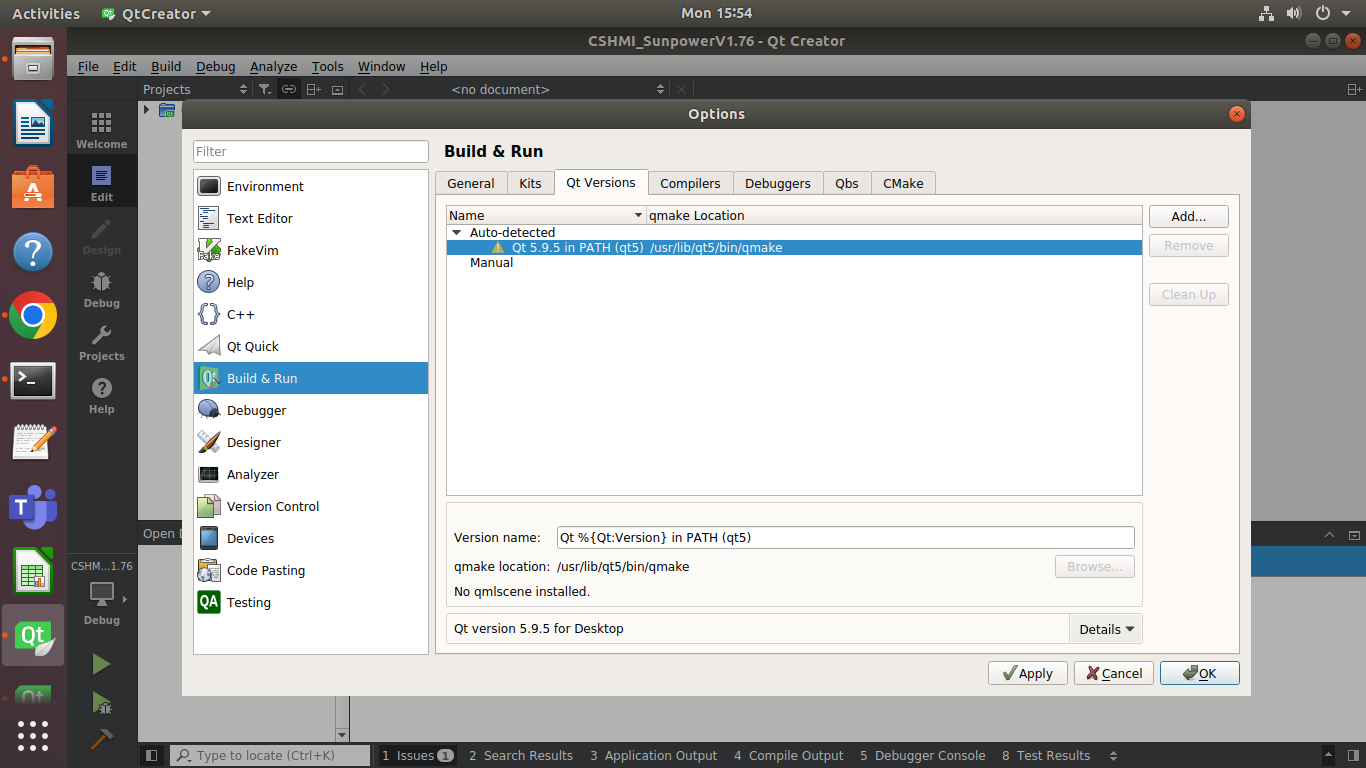
                          @sneha-ashok !Screenshot from 2023-04-17 15-54-20.png

                          No qml scenes it says

                          SGaistS 1 Reply Last reply
                          0
                          • S sneha ashok

                            @sneha-ashok !Screenshot from 2023-04-17 15-54-20.png

                            No qml scenes it says

                            SGaistS Offline
                            SGaistS Offline
                            SGaist
                            Lifetime Qt Champion
                            wrote on last edited by
                            #13

                            It's provided by the qmlscene package.

                            As for the unknown module error, as already suggested: install the missing development packages.

                            Interested in AI ? www.idiap.ch
                            Please read the Qt Code of Conduct - https://forum.qt.io/topic/113070/qt-code-of-conduct

                            S 1 Reply Last reply
                            0
                            • SGaistS SGaist

                              It's provided by the qmlscene package.

                              As for the unknown module error, as already suggested: install the missing development packages.

                              S Offline
                              S Offline
                              sneha ashok
                              wrote on last edited by
                              #14

                              @SGaist i fixed the qml quick error

                              when i run my application i get an error saying
                              error while loading shared libraries: libQt5Core.so.5: cannot open shared object file: No such file or directory

                              Is there any solutions for this ?

                              SGaistS 1 Reply Last reply
                              0
                              • S sneha ashok

                                @SGaist i fixed the qml quick error

                                when i run my application i get an error saying
                                error while loading shared libraries: libQt5Core.so.5: cannot open shared object file: No such file or directory

                                Is there any solutions for this ?

                                SGaistS Offline
                                SGaistS Offline
                                SGaist
                                Lifetime Qt Champion
                                wrote on last edited by
                                #15

                                @sneha-ashok run ldd on your application to see what exactly is being found and not.

                                Interested in AI ? www.idiap.ch
                                Please read the Qt Code of Conduct - https://forum.qt.io/topic/113070/qt-code-of-conduct

                                1 Reply Last reply
                                0

                                • Login

                                • Login or register to search.
                                • First post
                                  Last post
                                0
                                • Categories
                                • Recent
                                • Tags
                                • Popular
                                • Users
                                • Groups
                                • Search
                                • Get Qt Extensions
                                • Unsolved