
QMessageBox close button disabled when none of the added buttons are mapped to close
-
Hi. I have a QMessageBox with two buttons mapped to ActionRole.
QMessageBox scopeMsgBox(this);
scopeMsgBox.setText(tr("<font size = 1>Download latest or all results from the device onto the database?</font>"));
QAbstractButton *latestButton = scopeMsgBox.addButton(tr("Latest"),
QMessageBox::ActionRole);
QAbstractButton *allButton = scopeMsgBox.addButton(tr("All"), QMessageBox::ActionRole);
scopeMsgBox.setIcon(QMessageBox::Question);
scopeMsgBox.setDefaultButton(scopeMsgBox.QMessageBox::standardButton(latestButton));
scopeMsgBox.setEscapeButton(QMessageBox::Close);
scopeMsgBox.exec();
In this, the close button on the upper right corner is disabled.
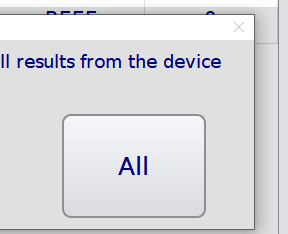
According to this post, apparently QMessageBox was reluctant to accept a close when none of the buttons had roles that mapped to close.
My workaround:
QMessageBox scopeMsgBox(this);
scopeMsgBox.setText(tr("<font size = 1>Download latest or all results from the device onto the database?</font>"));
QAbstractButton *latestButton = scopeMsgBox.addButton(tr("Latest"), QMessageBox::RejectRole);   //This is not a RejectRole but QMessageBox was reluctant to accept a close when none of the buttons had roles that mapped to close.
QAbstractButton *allButton = scopeMsgBox.addButton(tr("All"), QMessageBox::ActionRole);
scopeMsgBox.setIcon(QMessageBox::Question);
scopeMsgBox.setDefaultButton(scopeMsgBox.QMessageBox::standardButton(latestButton));
scopeMsgBox.setEscapeButton(QMessageBox::Close);
scopeMsgBox.exec();
My question is, why is QMessageBox reluctant to accept a close when none of the added buttons had roles that mapped to close? Surely these are only added buttons and shouldn't affect the "inherent buttons" available to QMessageBox. I haven't been able to find anything in the QMessageBox documentation which discusses this, hence this post.
-
Hi. I have a QMessageBox with two buttons mapped to ActionRole.
QMessageBox scopeMsgBox(this);
scopeMsgBox.setText(tr("<font size = 1>Download latest or all results from the device onto the database?</font>"));
QAbstractButton *latestButton = scopeMsgBox.addButton(tr("Latest"),
QMessageBox::ActionRole);
QAbstractButton *allButton = scopeMsgBox.addButton(tr("All"), QMessageBox::ActionRole);
scopeMsgBox.setIcon(QMessageBox::Question);
scopeMsgBox.setDefaultButton(scopeMsgBox.QMessageBox::standardButton(latestButton));
scopeMsgBox.setEscapeButton(QMessageBox::Close);
scopeMsgBox.exec();
In this, the close button on the upper right corner is disabled.
According to this post, apparently QMessageBox was reluctant to accept a close when none of the buttons had roles that mapped to close.
My workaround:
QMessageBox scopeMsgBox(this);
scopeMsgBox.setText(tr("<font size = 1>Download latest or all results from the device onto the database?</font>"));
QAbstractButton *latestButton = scopeMsgBox.addButton(tr("Latest"), QMessageBox::RejectRole);   //This is not a RejectRole but QMessageBox was reluctant to accept a close when none of the buttons had roles that mapped to close.
QAbstractButton *allButton = scopeMsgBox.addButton(tr("All"), QMessageBox::ActionRole);
scopeMsgBox.setIcon(QMessageBox::Question);
scopeMsgBox.setDefaultButton(scopeMsgBox.QMessageBox::standardButton(latestButton));
scopeMsgBox.setEscapeButton(QMessageBox::Close);
scopeMsgBox.exec();
My question is, why is QMessageBox reluctant to accept a close when none of the added buttons had roles that mapped to close? Surely these are only added buttons and shouldn't affect the "inherent buttons" available to QMessageBox. I haven't been able to find anything in the QMessageBox documentation which discusses this, hence this post.
Hi,
Which version of Qt are you using ?
On which platform ?Interested in AI ? www.idiap.ch
Please read the Qt Code of Conduct - https://forum.qt.io/topic/113070/qt-code-of-conduct -
@SGaist I am using Qt 5.15.2 (MinGW 32-bit if it helps), on Windows 10.
I might be wrong but I think that your use of ActionRole is wrong in this context. Both actions should be AcceptAction as they do not denote a change but a choice.

